

We’ve got a couple of related suggestions on UserVoice that I’d like to address in Octopus 2.0:
- Being able to protect the values of individual variables
- Storing variables securely
I want to use this blog post to share how we’re going to address these needs. Octopus 2.0 is going to support a number of different scenarios relating to encryption.
- Encrypting the database
The RavenDB database in Octopus needs to be encrypted to allow customers to ‘tick off’ Octopus for use in environments which require any configuration information to be encrypted on disk. For example, customers in PCI-DSS environments. - Secure/sensitive variables
Some variables created in the Octopus UI may also need to be encrypted. For example, a customer might create a variable to represent an administrator’s password for use when connecting to a database. This extends beyond on-disk encryption - these values shouldn’t be returned by the REST API, nor should they ever appear in activity logs. They should be “write-only”. - Storage of sensitive internal Octopus settings
For example, the private key for the Tentacle X.509 certificates are currently stored in the registry, encoded using Base64. These values should be encrypted too.
To make this work, we’re going to rely on two levels of encryption. A “master key” will be used with AES128 to symmetrically encrypt values. The master key itself will be encrypted asymmetrically using DPAPI.
Master key
When Octopus first starts, it will generate a random string to use as a master key. This master key will then be encrypted using DPAPI and stored in the Octopus configuration file.
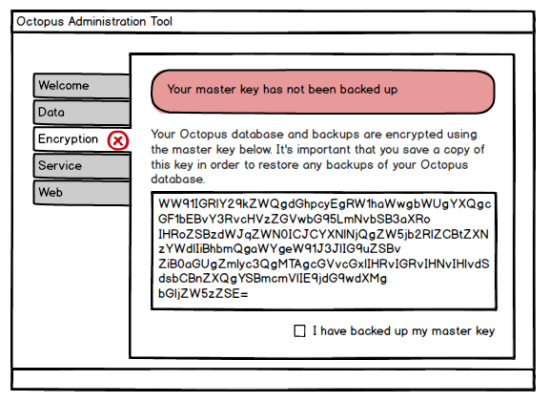
Octopus will prompt you to back up your master key whenever you open the Octopus admin tool. Until you click something to the effect of ‘I have backed up my master key’, you’ll continue to be prompted every time you open the admin tool. To back up your key, we’ll simply expose the master key as a Base64 encoded representation of the unencrypted key. You can print it or paste it into Notepad and save it wherever you like.
Encrypting the database
RavenDB comes with a bundle that enables encryption for the database. When we run Raven in embedded mode, we’ll automatically enable this bundle, and use our master key as the key for Raven’s encryption bundle. This ensures that all documents and indexes are encrypted. Since the bundle needs to be enabled when the Octopus database is created (it can’t be turned on later), this isn’t going to be an opt-in/opt-out feature. It will be out of the box.
In the scenario where customers use an external RavenDB database, it will be up to them to enable this bundle and to manage their own key for it.
The following, however, will not be covered with Raven’s encryption bundle:
- Raven attachments
- Log files
For attachments, we’ll encrypt and decrypt these ourselves using AES128 and our master key. We won’t be encrypting log files however. Storing the logs in plain text has a lot of value when it comes to debugging, and since we’ll prevent sensitive variables from appearing in them (see below) there should be no reason to encrypt them.
Secure/sensitive variables
When you create a variable, you’ll be able to tick a box that makes it ‘secure’. A secure variable cannot be read once it has been written; it will always appear as ’**’ in the UI, and the value won’t be available from the REST API. It will, however, be made available as a variable when sent to Tentacles.
The value of these secure variables will be stored encrypted using the master key and AES128. Variables that aren’t marked as secure will simply have their values stored as plain text.
When processing any activity logs, we’re going to take inspiration from the way TeamCity deals with password parameters: the values of any secure variables will automatically be masked. For example, if a user accidentally wrote a Deploy.ps1 script like this:
Write-Host "Password is $MyPassword"Octopus would see the secure value appear in the log, and would automatically replace it with * before the log entry is sent over the wire or persisted. In the UI, you’ll see:
Password is ***************This will simply be done using string.Replace(). Of course, this does mean that a user could write a script that generates a random values and then look for the * to figure out which one was a password, and if passwords are a simple as ‘hello’ the masks might show up in the wrong place and thus give themselves away, but on the whole this feature is meant to be an extra layer of protection and not 100% fool proof.
Backup and restore
Backups are currently performed using an ‘import’ and ‘export’ of documents via RavenDB’s Smuggler API. The file it produces is just a list of JSON documents with GZIP compression.
Our backup file will need to be encrypted too, so we’ll take the backup file from smuggler, add the activity logs and any other files we need to back up, and compress them all into a System.IO.Packaging package. Then we’ll apply encryption to that, using the master key.
When you restore from a backup, you’ll need to enter the master key, which should have been backed up/printed/saved when Octopus was set up. We’ll then set the master key in your configuration file and perform the restore.
Summary
Our solution to these problems is going to involve a few dimensions. We’re going to automatically encrypt all documents in Raven via the Raven bundle. We’re also going to allow for variables to be marked as “secure”, which impacts how they are presented in the UI.
All of our encryption is going to rely on AES128 using a randomly generated master key, and the master key itself will be stored using DPAPI, so if attackers manage to see your configuration file they still won’t be able to read the key unless they have code running on your Octopus server. The only downside to this change is the need to back up your master key, which we’ll try our best to make a nice user experience.
This feature is currently in the planning stages, so if you’re in an environment where these features are important, I’d love to get your feedback in the comments below.
Tags: