Purpose-built CD tool for teams who need to standardize deployments
Build your deployment process once and deploy to every environment the same way, every time. See exactly what's running where, and who deployed it.
:format(webp))
From commit to production, fully automated.
What's included in the Free tier
Everything you need to standardize deployments for your team.
Other tools might handle some of your deployment needs. Octopus handles them all, so your team can deploy faster and safer.
What you get | Why it matters |
|---|---|
Deployment processes and built-in steps | Build your deployment process once using built-in step templates and reuse it across environments without custom scripting. |
Variables | Define values once, and Octopus automatically applies the right config for each environment. |
Environment promotion | Promote releases across environments without rebuilding. |
Single dashboard | See what is running in every environment, when it last deployed, and its status. |
Role-based access control (RBAC) | Control who can deploy what. |
Audit log | See who did what and when. |
Runbooks | Automate routine and emergency operations tasks. |
Tenanted deployments (10 tenants) | Deploy to multiple customers or edge locations using the same process. |
10 users | Enough for a team to get started. |
10 projects | Deploy applications, microservices, APIs, or databases. |
10 machines | The servers, clusters, or cloud targets your deployment process runs against. |
How Octopus helps
:format(webp))
Automate deployments with reusable processes
Define your deployment process once with built-in steps, then reuse it consistently across all environments. Octopus automatically manages variable substitution for each environment and triggers deployments. Your team safely deploys without custom scripts or manual coordination.
The great thing about Octopus is that you can do it once and then it’s repeatable. Manual deployments used to take us hours, but now we’re deploying in minutes and more frequently too.
:format(webp))
See the status of every deployment across environments
Know exactly what's running in every environment without checking multiple tools. Get a single view of all your deployments, versions, and environments in one dashboard.
Being able to see 1,200 deployments in a single pane of glass has been extremely beneficial. Centralization has made it quick and easy to manage.
:format(webp))
Complete control and compliance with RBAC, audit logs, and approval gates
Set role-based permissions and require sign-offs before production releases. The audit log automatically tracks every deployment activity and system change to show you who did what and when.
When I show Octopus Deploy to auditors, their eyes light up. It makes it easy to explain our processes to them and to get the information they need quickly.
:format(webp))
Deploy to multiple tenants without duplication
Deploy to different customers using one process with tenant-specific variables. Update one tenant or deploy to all of them. No copy-pasting configs for each customer or location.
We’ve used tenants any way you can think of using them. With so many laboratories, locations, industry sectors, and regions, tenants have been incredibly useful. The ability to group them by tags makes it easy and convenient to do very granular to very broad deployments.
Octopus fits right into your team’s existing stack
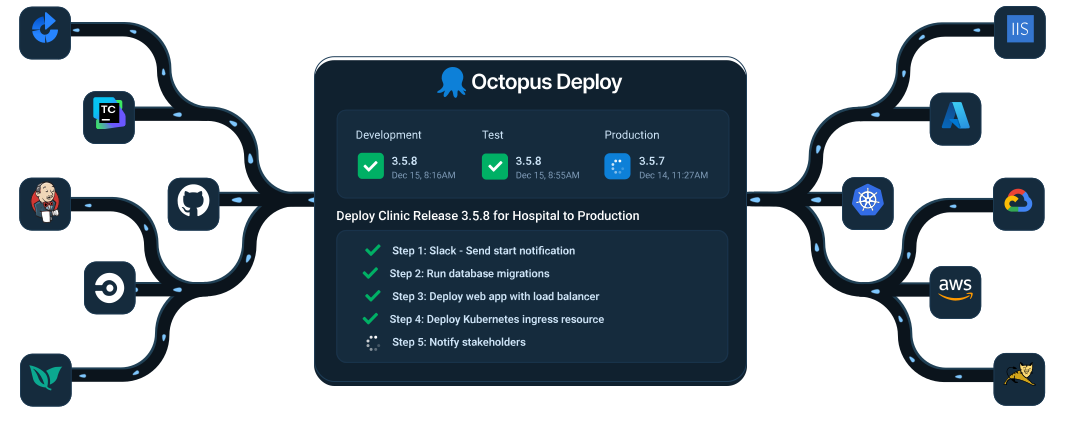
Orchestrate deployments between your build servers and infrastructure with Octopus.
Connect Octopus with GitHub, Jenkins, TeamCity, Azure DevOps, Bamboo, and more to automate, manage, and track deployments. Octopus works with Kubernetes, AWS, Azure, GCP, and more.
Trusted by over 4,000 organizations


Get started for free and scale whenever you're ready
All tiers are available on Cloud or Server.
Free
$0
- All core features
- 10 projects
- 10 tenants and 10 machines
- 10 users
- Community support
Professional
From $4,170 USD/year
- All core features
- Best for 20 - 100 projects
- Tenants and machines as add-ons
- Unlimited users
- 8/5 support (9-5pm weekdays)
Enterprise
From $23,400 USD/year
- All core features
- Best for over 100 projects
- Tenants and machines as add-ons
- Unlimited users
- 24/7 support
- Platform Hub
- And more
Ready to simplify your complex deployments?
Start with the Octopus Free tier and give your team the CD platform they need.
Frequently asked questions
What is a project?
A project is a container for a single deployable component like an application, microservice, API, or database that holds your deployment process, variables, releases, and configurations.
What is a tenant?
A tenant is an entity that represents a customer, a physical location, a customer’s physical location, or something else that has its own variables and deployment settings, allowing the same project to be deployed multiple times without duplicating configuration.
What security certifications does Octopus have?
We undergo regular third-party audits and technical assessments of our data security to ensure privacy and safety. Our security credentials include:
- ISO 27001:2022
- SOC 2 Type II
- SOC 3 report
Check out our Trust Center for more information.
What hosting options are available for Octopus?
Octopus is available as both Octopus Cloud (we host, no technical setup required) and Octopus Server (you host and install on your own infrastructure). Both options offer the same core features.
What kind of support is available?
Free tier: Community support through our Community Slack, where you can connect with thousands of DevOps professionals and get help from experienced users.
Professional tier: 8/5 support (9-5pm weekdays)
Enterprise tier: 24/7 support