
It has become clear after many discussions with large enterprises that the interest and excitement around AI agents will only grow. Many enterprises now have C-level executives responsible for implementing AI, which brings associated budgets and measurable outcomes. Meanwhile, individual contributors are well along in their AI journey, using AI-assisted coding agents and general-purpose AI assistants.
Securing these agents is a top concern for enterprises. One common solution to improve the security of AI agents is to run them in a sandboxed environment. In this post, I’ll take a look at what it means to “sandbox” an AI agent in a production environment.
Easy Mode - Claude Agent provides a practical example incorporating Claude in deployments you can apply to your own Octopus instance.
In brief
- Local AI agents are general-purpose assistants that can perform almost any action on behalf of a user.
- Local AI agents benefit from sandboxes as a countermeasure to their broad access to CLI tools, local files, and networks.
- Shared AI agents are designed for specific tasks.
- Shared AI agents should be decomposed into the agent harness and the tools called by the agent.
- The tools called by shared AI agents are typical web services.
- The term “sandbox” has little meaning for shared AI agents, as the tools can be secured with existing security policies and practices.
Distinguishing between local and shared agents
Before discussing what it means to sandbox an agent, it is important to distinguish between local and shared agents.
Local agents are the result of bespoke configuration in an individual’s own workspace. It is the coding agent with a mishmash of MCP servers and personal credentials that a developer has set up to help them with their work. Or the OpenClaw style agent that runs in the background automating tasks like monitoring emails, browsing the web, or organizing files.
To use the pets/cattle analogy (where pets have names and are lovingly cared for while cattle are interchangeable), local agents are pets. Local agents must support a wide range of tasks, including code generation, running scripts, manipulating files, and answering questions. They were never intended to be distributed, and little thought is put into how they might be recreated. Each developer is responsible for their own local agent. In fact, much of the functionality provided by a local agent likely relies on MCP servers exposed by an IDE, which are not available outside a local development environment.
Shared (or managed) agents are designed to perform specialized tasks. They must be secure, testable, deployable, and supported. Shared agents will often be hosted as web applications, perhaps using protocols like the Model Context Protocol (MCP).
Local agents have unique security concerns. It is mesmerizing, and slightly horrifying, watching a local agent query the contents of your /etc/environment file to get the credentials required to execute a curl command as it doggedly attempts to upload a file to a remote server. Local agents are like sharing your keyboard with the most brilliant and amoral entity in the known universe.
Because local agents are general-purpose AI tools, they tend to have broad access to the CLI, local files, and networks. So it makes sense to run local agents in an isolated environment to distinguish between the trust granted to a user and the trust granted to the local AI agent.
Shared agents have a far narrower scope than local agents. Shared agents are designed to solve specific tasks and interact with the world through a small window. The limited scope of shared agents has implications for their security.
The focus of this post is on shared agents. This is not to diminish the security implications of local AI agents, but rather to note that shared agents, iteratively developed and deployed to a production environment, align very closely with the core functionality provided by Octopus.
But before we can understand what it means to sandbox a shared agent, we first need to understand the architecture of shared agents.
Shared agent architecture
At the heart of every AI agent is an LLM making decisions about how best to achieve its task.
For all their wonder and complexity, it is best to think of LLMs used by shared agents as string functions: the prompt string goes in, the response string comes out. (I’m going to ignore the social engineering security aspect of LLMs here, as the generated output of an LLM used by a shared agent is not typically consumed by a person.)
That is it. LLMs cannot, on their own, interact with the world. They cannot browse a web page, read a file, or save a record in a database.
Because LLMs can’t interact with the world, there is very little to contain in a sandbox.
However, this inability to interact with the world severely restricts the problems that LLMs can solve. A chatbot is about as complex a solution as you can build with an isolated LLM. To build useful AI agents, LLMs must be able to act.
This is where the concept of tool calling comes in. Tools are just a fancy way of describing code exposed to an LLM that can interact with the world. MCP is the most common interface through which LLMs learn about and execute tools.
When a tool like switch_lightbulb_on is exposed by an MCP server to an LLM, a prompt like Switch on the lights will cause a physical light bulb to turn on.
Treating the LLM and the tools it calls as separate concerns is crucial to understanding how sandboxes apply to shared AI agents.
Sandboxing the tools
There are many industry examples demonstrating the pattern where the LLM is run as a regular service while the tools called by the LLM are isolated within a sandbox environment.
Some of these quotes have been edited for clarity.
Claude describes the LLM as the brain and the tools as the hands of an AI agent:
The solution we arrived at was to decouple what we thought of as the “brain” (Claude and its harness) from both the “hands” (sandboxes and tools that perform actions) and the “session” (the log of session events).
Notably, in this description, the hands include sandboxes.
The agent’s “brain” (reasoning and orchestration) is decoupled from its “hands” (tool execution and code). The platform orchestrates the agent loop and delegates execution to disposable, stateless sandboxes that you control. Credentials are physically separated from the execution environment, injected at the network boundary rather than stored where agent-generated code can reach them. Both the Responses API and Anthropic’s Managed Agents follow this pattern, whether the sandbox runs in the provider’s cloud or on your own infrastructure through self-hosted environments. This is the right choice for multi-tenant agent platforms and production workloads.
How 11x Rebuilt Their Alice Agent: From ReAct to Multi-Agent with LangGraph notes that agents work best when tools do the heavy lifting:
Tools are preferable over skills. Don’t try to make your agent too smart. Just give it the right tools and tell it how to use them.
In the video Securing MCP in an Agentic World with Arjun Sambamoorthy from Cisco, Arjun describes the importance of run-time MCP security with sandboxes isolating MCP servers:
We should also sandbox and isolate MCP servers to make sure there’s no crosspollination that’s actually happening.
Agentic AI Safety & Security by Dawn Song describes the importance of decomposing systems to enforce the principle of least privilege:
The idea is that instead of building one monolithic agent with different components in one system, one can actually separate the overall agent system into separate components where each component can run its own, for example, container or context such that each separate component can have its own set of privileges depending on its needed capabilities and so on and hence enable and help enforce principle of least privilege.
OpenAI describes when to use a sandbox, and notes that “the sandbox stays focused on provider-specific execution”:
Use sandboxes when the agent needs to manipulate files, run commands, mount a data room, produce artifacts, expose a service, or continue stateful work later.
The key split is the boundary between the harness and compute. The harness is the control plane around the model: it owns the agent loop, model calls, tool routing, handoffs, approvals, tracing, recovery, and run state. Compute is the sandbox execution plane where model-directed work reads and writes files, runs commands, installs dependencies, uses mounted storage, exposes ports, and snapshots state.
Keeping those boundaries separate lets your application keep sensitive control plane work in trusted infrastructure while the sandbox stays focused on provider-specific execution.
Azure Container Apps Sandboxes provide a managed service where:
Agents can run anything safely - an agent spawns a sandbox, executes work inside it, and returns the output with no agent host privileges required.
AWS provides the Amazon Bedrock AgentCore Code Interpreter, which similarly provides a sandbox where untrusted code is run:
With the AgentCore Core Interpreter, AI agents can write and execute code securely in sandbox environments, enhancing their accuracy and expanding their ability to solve complex end-to-end tasks.
The provided diagram clearly shows the Agent and LLM sitting outside the sandbox, and the code being executed inside it:
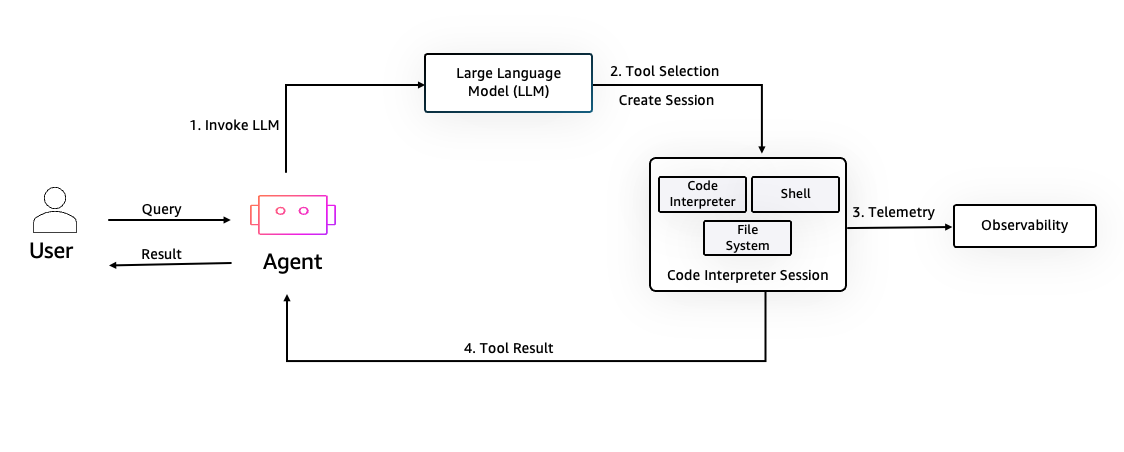
What is clear from these examples is that the LLM is hosted separately from the tools it calls, and it is the tools that are sandboxed, as this is where the real work is done.
What even is a sandbox?
When taking the approach of sandboxing tools, the next decision is which guardrails the sandbox must provide.
At the extreme end, a sandbox provides an environment in which untrusted scripts can run. An example of this is Intel DeepMath, which is a lightweight agent that specializes in solving mathematical problems by running small, sandboxed Python scripts that support and enhance its problem-solving process:
Instead of verbose text, the model emits tiny Python snippets for intermediate steps, runs them in a secure sandbox, and folds the results back into its reasoning, reducing errors and output length.
Your local coding assistant AI agent may even have produced Python scripts to modify files in bulk or search for text.
Because you can do almost anything with a Python script, you need a robust sandbox to prevent any malicious or undesirable actions from being executed.
Running untrusted code is an extreme example, though. Most tools will be far more routine, performing deterministic actions like returning data, sending messages, triggering a workflow, approving a request, etc. Indeed, most of the tools called by a shared AI agent are just wrappers around existing APIs.
The sandbox around these tools must address the same cross-cutting concerns as any web service container, like authentication, authorization, rate limiting, PII redaction, observability, CPU and memory limits, firewalls, etc.
At this point, it may not even make sense to talk about sandboxes at all. Any modern Platform as a Service (PaaS) or orchestration platform has almost certainly addressed these common security concerns, usually without using the term “sandbox.”
Do sandboxes make sense?
General-purpose local AI agents running in an individual’s workspace absolutely benefit from a sandbox. The fact that a local AI agent can and will do anything you ask (and sometimes things you don’t) means a specialized sandbox is a valid countermeasure.
In OpenClaw + Windows, Microsoft demonstrates how OpenClaw is prevented from making unwanted changes to the system by running it in a sandbox:
And you’ll notice down here in the corner we’ve got lots of permissions options along with our sandbox configuration. Now, this sandbox is really interesting because this is using MXC, the Microsoft Execution Containers.
You’ve got full support about what files and folders you want OpenClaw to have access to, and really granular security features like clipboard access or talking to the internet itself.
OpenClaw already has a rich safety layer, and that layer is only augmented more by appropriate containment that can be managed by me or policies applied by IT.
The concept of a sandbox is also applicable for the execution of generated scripts, which administrators must assume can perform any action.
However, the concept of a sandbox is less meaningful when used to isolate specific, deterministic tools required by shared agents. The security layer built into any modern PaaS offering already supports the cross-cutting security concerns required to host web-based services, authentication and authorization policies are available on APIs exposed by tools, and individual tools can be turned on and off as needed in an MCP server.
You could make a good argument that this collection of controls effectively serves as a sandbox. For example, agent-sandbox combines existing Kubernetes features to provide an AI agent sandbox.
But using the term “sandbox” feels more like a distraction from the implementation of existing, standard security controls applied to any web service because it implies that there is some unique security layer that is specifically required to support AI agents.
Conclusion
The term sandbox is thrown around a lot these days. You don’t have to look hard to find examples of AI agents going rogue and deleting files or trashing databases, and it is natural to assume that some kind of sandbox is required to rein in freewheeling AI agents.
But it is important to distinguish between general-purpose local AI agents that are incentivized to support any kind of action and specialized shared AI agents that are designed for a very specific purpose. Further decomposing shared AI agents into the agent harness and the tools highlights that it is the tools that need to be constrained. And centrally managed tools exposed as web services (with an MCP server being a specialized web server) already have a wealth of existing, comprehensive security controls available to secure them.
Enterprises should focus on constraining the tools used by shared AI agents, rather than being distracted by hype around sandboxes. Your existing best practices can be applied to centrally managed tools; there is no need to shoehorn in an additional security layer under the guise of a sandbox.
Happy Deployments!