
AI is driving a surge in code commits. Kyle Daigle, COO at GitHub, noted that:
There were 1 billion commits in 2025. Now, it’s 275 million per week, on pace for 14 billion this year if growth remains linear (spoiler: it won’t.)
Of course, commits are only useful if they contribute to running software. The challenge for many teams is increasing deployment frequency to match commit frequency. Ideally, changes with limited risk should be deployed with as little friction as possible. But how do you determine something as abstract as a low-risk commit?
Code is just text, and LLMs are incredible at comprehending text. With the new Run Claude Agent step in Octopus, combined with Build Information, Octopus can automatically inspect commits that contribute to a deployment and make intelligent decisions at deploy time based on the commit content.
In the previous post, you created a project simulating updating an Argo CD Manifest file.
In this post, you will create a sample project that uses the Run Claude Agent step to determine if a commit is low risk and can be deployed automatically.
Prerequisites
- An Octopus Cloud account. If you don’t have one, you can sign up for a free trial.
- The Octopus AI Assistant Chrome extension. You can install it from the Chrome Web Store.
The Octopus AI Assistant will work with an on-premises Octopus instance, but it requires more configuration. The cloud-hosted version of Octopus doesn’t need extra configuration. This means the cloud-hosted version is the easiest way to get started.
Creating the project
Paste the following prompt into the Octopus AI Assistant and run it to create a sample project using the Run Claude Agent step to categorize commits:
Create a Claude project called "17. Categorize Changes"The resulting project uses Build Information to associate commits with a package included in the deployment.
You must provide two API keys for this project to work:
- A GitHub Personal Access Token (PAT) with
reposcope saved in theProject.GitHub.PATproject variable - A Claude API Key saved in the
Project.Claude.ApiKeyproject variable
The Claude step also requires the claude CLI to be installed on the worker. This can be provided by an Execution Container Image with the following inline Dockerfile:
FROM python:3.11-slim

# 1. Install prerequisites (including libicu for .NET Calamari compatibility)
RUN apt-get update && apt-get install -y --no-install-recommends \
    curl \
    git \
    libicu-dev \
    ca-certificates \
    && rm -rf /var/lib/apt/lists/*

# 2. Install the native Claude Code CLI tool
RUN curl -fsSL https://claude.ai/install.sh | bash

# 3. Create a global symlink using the exact path from your install log
# This bypasses the $PATH profile restriction for non-interactive runners
RUN ln -sf /root/.local/bin/claude /usr/local/bin/claude

WORKDIR /app
CMD ["/bin/bash"]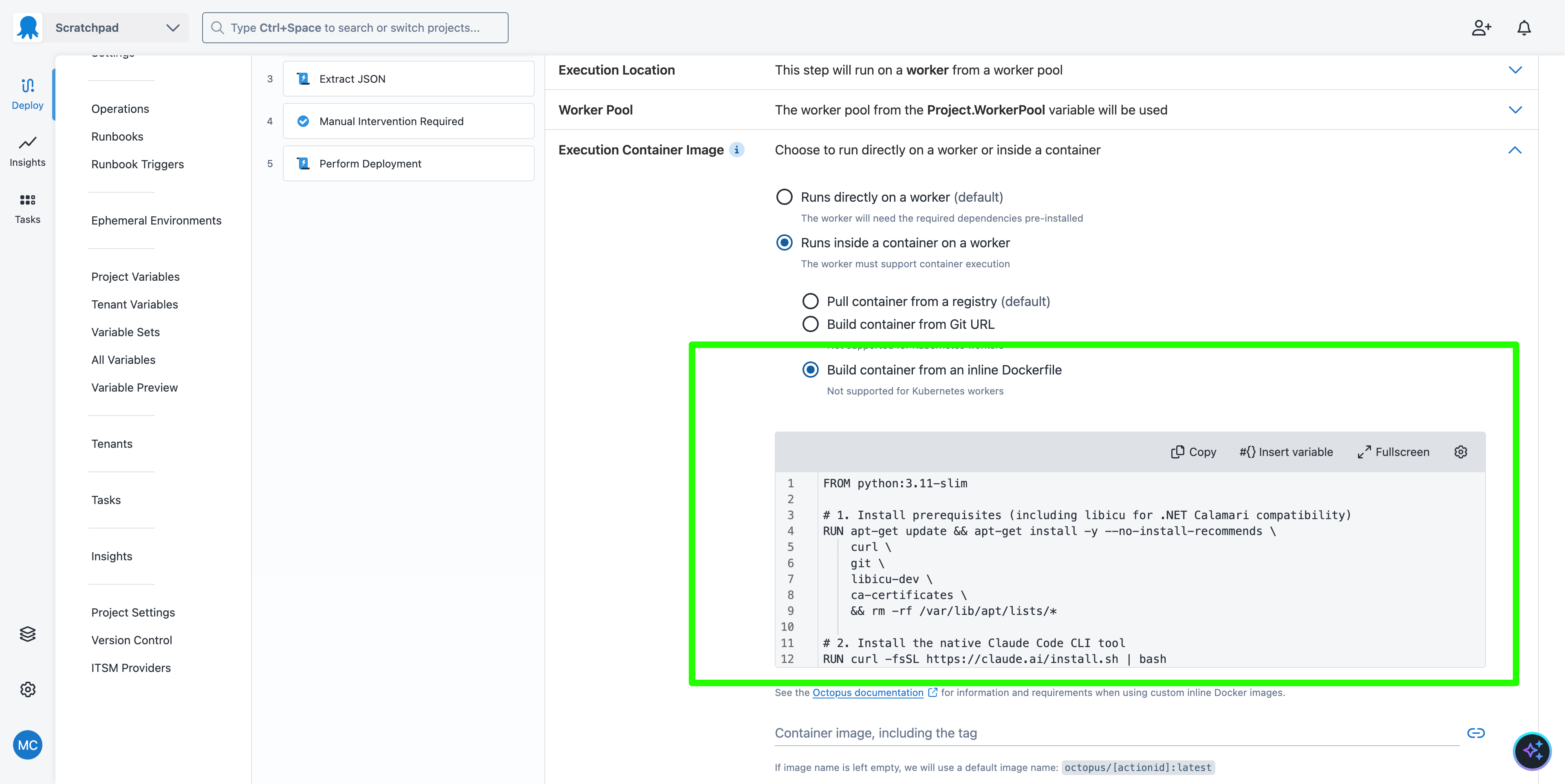
Categorizing commits
The prompt defined in the Run Claude Agent step is designed to categorize commits:
Your task is to rate the impact of the Git commits that contribute to the new version of the application being deployed.

The following is the list of Git commits:

#{each change in Octopus.Deployment.Changes}
#{each commit in change.Commits}
#{commit.LinkUrl}
#{/each}
#{/each}

Output a value between 1 and 10 based on the impact of the changes in the following categories:

* Security
* User Interface
* Documentation
* Business Logic
* Performance
* Code dependencies
* Code refactoring

The result must be a plain JSON blob like this:

```
{
"security": 1,
"userInterface": 4,
"documentation": 7,
"businessLogic": 3,
"performance": 1,
"dependencies": 9,
"refactoring": 5
}
```
The key to linking Build Information with the Run Claude Agent step is the Octopus.Deployment.Changes variable. You loop over every change, then over every commit in that change. The LinkUrl property is used to embed a link to the commit in the prompt.
You then use the GitHub MCP server to access the commit content:
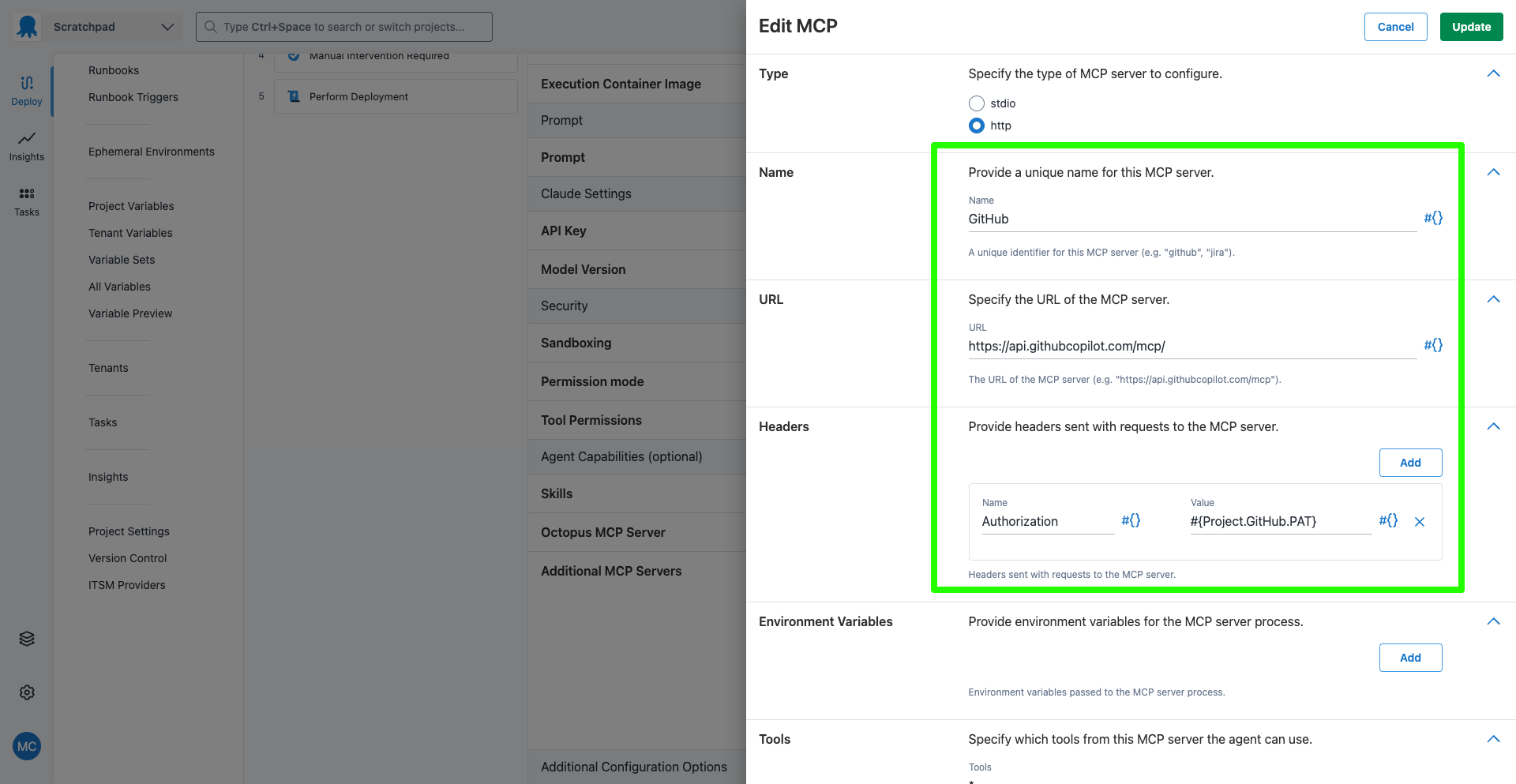
It is best practice to use MCP servers to interact with external services over general CLI tools like curl. The tools exposed by MCP servers have limited scope, are tested, and are constrained by the provided credentials. General tools like curl can initiate literally any web request, and LLMs will often go to great lengths constructing web requests to achieve their goals.
The step also includes a range of security and compliance features to restrict the agent.
Demonstrating a low-risk change
Start by pushing a Build Information package to Octopus that links to a number of low-risk commits. Save the JSON blob below to a file called buildinfo.json:
{
  "BuildEnvironment": "GitHub Actions",
  "Branch": "main",
  "BuildNumber": "658",
  "BuildUrl": "https://github.com/OctopusSolutionsEngineering/Octopub/actions/runs/29776705931",
  "VcsType": "Git",
  "VcsRoot": "https://github.com/OctopusSolutionsEngineering/Octopub",
  "VcsCommitNumber": "a84a77fd046e329bb10405480486ce9c11db6074",
  "Commits": [
    {
      "Id": "a84a77fd046e329bb10405480486ce9c11db6074",
      "LinkUrl": "https://github.com/OctopusSolutionsEngineering/Octopub/commit/a84a77fd046e329bb10405480486ce9c11db6074",
      "Comment": "Accidentally improved the intern with zero tests"
    },
    {
      "Id": "bb8754a163ec1b278c4e2a3e31bcb868d5d0eb70",
      "LinkUrl": "https://github.com/OctopusSolutionsEngineering/Octopub/commit/bb8754a163ec1b278c4e2a3e31bcb868d5d0eb70",
      "Comment": "Accidentally improved Schrödinger's bug against my better judgment"
    },
    {
      "Id": "1e9e34564e7e5352e4fc168377f5dd2585a6069f",
      "LinkUrl": "https://github.com/OctopusSolutionsEngineering/Octopub/commit/1e9e34564e7e5352e4fc168377f5dd2585a6069f",
      "Comment": "Stared menacingly at the dark arts with zero tests"
    }
  ]
}
If you open the links in the LinkUrl fields, you will see that these commits are gibberish changes to a text file. They are low risk because they don’t change any code that is executed in the application.
Push the Build Information package to Octopus using the octopus CLI, replacing the space name with your actual space name.
This is the Bash command:
octopus build-information upload \
  --space "Your Space Name" \
  --package-id "com.octopus:octopub-frontend" \
  --version "20260721.659.1" \
  --file "buildinfo.json" \
  --overwrite-mode "overwrite"
This is the PowerShell command:
octopus build-information upload `
  --space "Your Space Name" `
  --package-id "com.octopus:octopub-frontend" `
  --version "20260721.659.1" `
  --file "buildinfo.json" `
  --overwrite-mode "overwrite"
In a production scenario, you would typically automate the generation of Build Information as part of your CI/CD pipeline. This ensures that the information is always up to date and accurately reflects the state of your codebase.
For the purposes of this demonstration, we are manually constructing and pushing mock Build Information to Octopus to simulate different commit scenarios.
When you deploy a release of the project, the steps will:
- Print a list of the commit links
- Run the
Run Claude Agentstep to categorize the commits - Extract the JSON blob generated by the Claude agent, and determine if any high-risk categories have a value greater than 5
- If any high-risk categories are detected, a manual intervention step will be triggered, requiring a human to approve the deployment
- If all categories are low risk, the manual intervention step will be skipped
- Proceed to a mock deployment step that simulates deploying the application
Since the commits in this example are low risk, each category gets a low score:
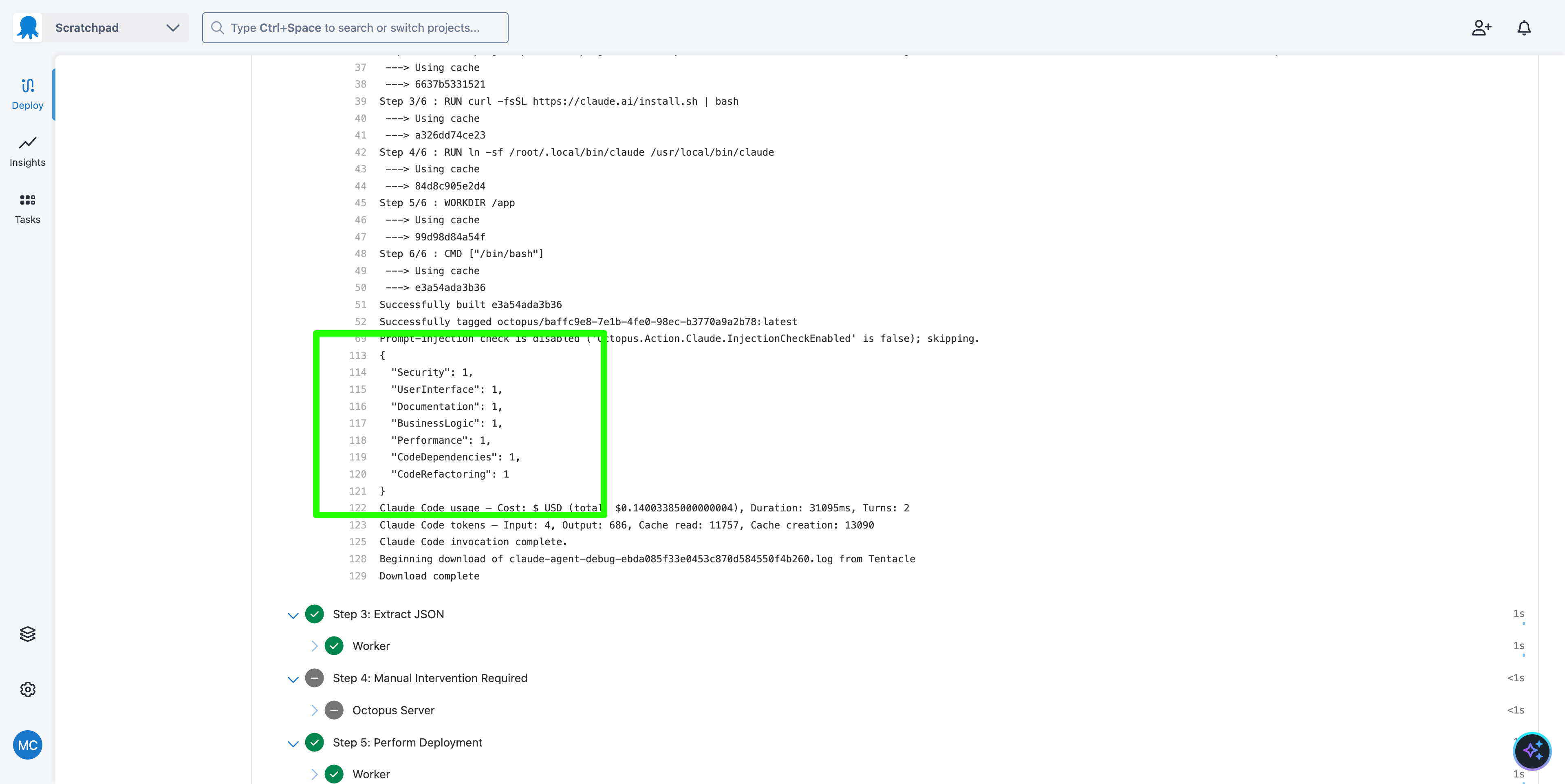
Based on these scores, the manual intervention step is skipped, and the deployment proceeds automatically.
Demonstrating a high-risk change
Save the following code to a file called buildinfo.json:
{
  "BuildEnvironment": "GitHub Actions",
  "Branch": "main",
  "BuildNumber": "658",
  "BuildUrl": "https://github.com/OctopusSolutionsEngineering/Octopub/actions/runs/29776705931",
  "VcsType": "Git",
  "VcsRoot": "https://github.com/OctopusSolutionsEngineering/Octopub",
  "VcsCommitNumber": "982860ff9295c75ea3f3f0f963b09f0db3138e4e",
  "Commits": [
    {
      "Id": "7ec4ef85a5aac729b2d3e823307cb4c4caa63d58",
      "LinkUrl": "https://github.com/OctopusSolutionsEngineering/Octopub/commit/7ec4ef85a5aac729b2d3e823307cb4c4caa63d58",
      "Comment": "Enhance URL safety and update footer links for improved security"
    },
    {
      "Id": "982860ff9295c75ea3f3f0f963b09f0db3138e4e",
      "LinkUrl": "https://github.com/OctopusSolutionsEngineering/Octopub/commit/982860ff9295c75ea3f3f0f963b09f0db3138e4e",
      "Comment": "Update dependencies and enhance project configuration for improved compatibility"
    }
  ]
}
Push the new Build Information package to Octopus using the octopus CLI commands provided earlier, replacing the space name with your actual space name.
These commits represent realistic changes that update dependencies and improve security. When you deploy a release of the project with this Build Information, the Run Claude Agent step will categorize the commits and produce a JSON blob with higher scores in the security and dependencies categories:
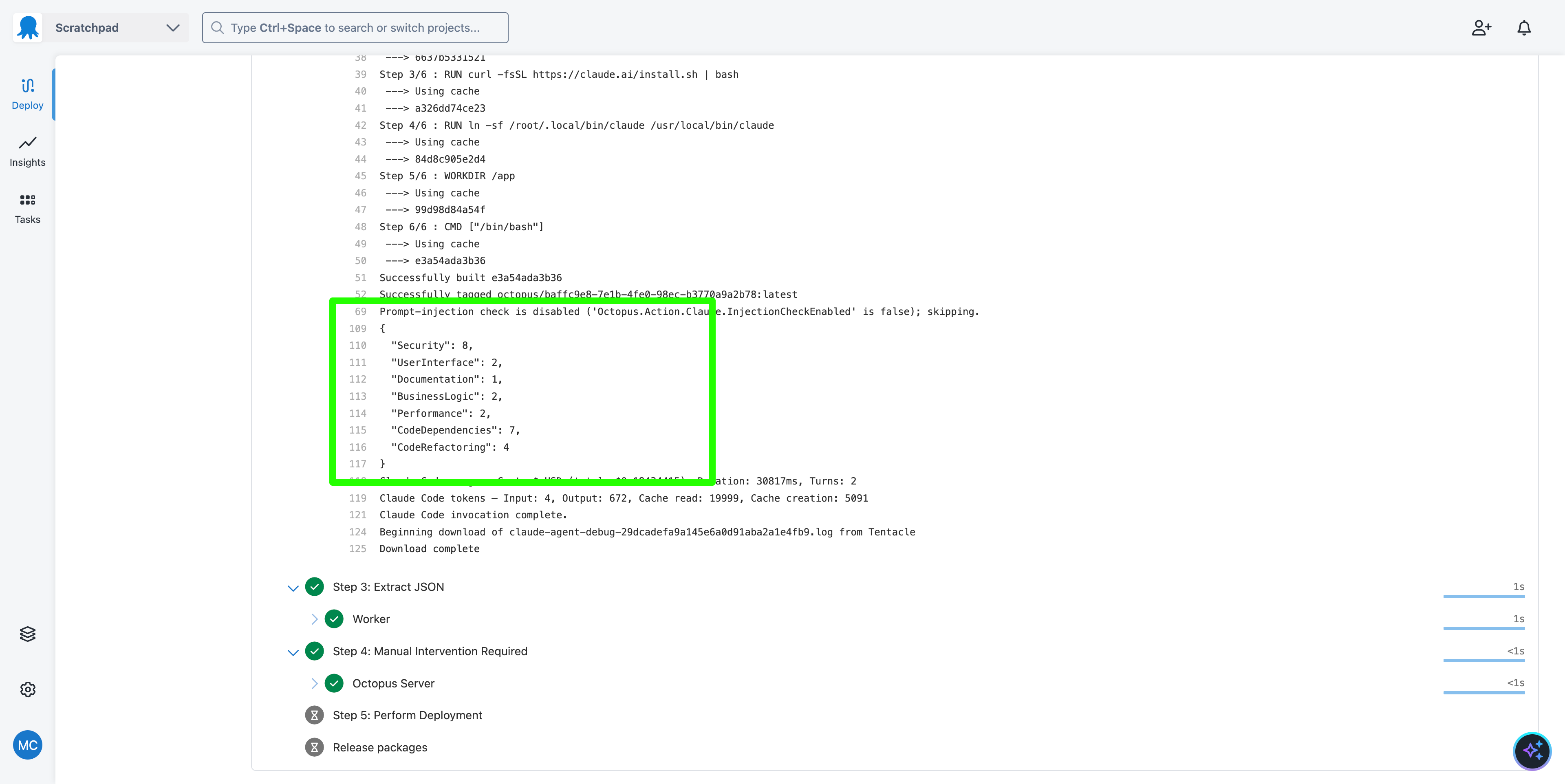
These score values indicate that the changes are high risk, and the manual intervention step will be triggered, requiring a human to approve the deployment before it can proceed.
What just happened?
You created a sample project with:
- Associated Build Information that links to commits in a GitHub repository
- A
Run Claude Agentstep that categorizes commits based on their impact - A step that parses the JSON output from the Claude agent and determines if any high-risk categories are present
- A manual intervention step that is conditionally triggered based on the risk assessment
What’s next?
The next step is an example of progressive rollouts through multiple production environments.