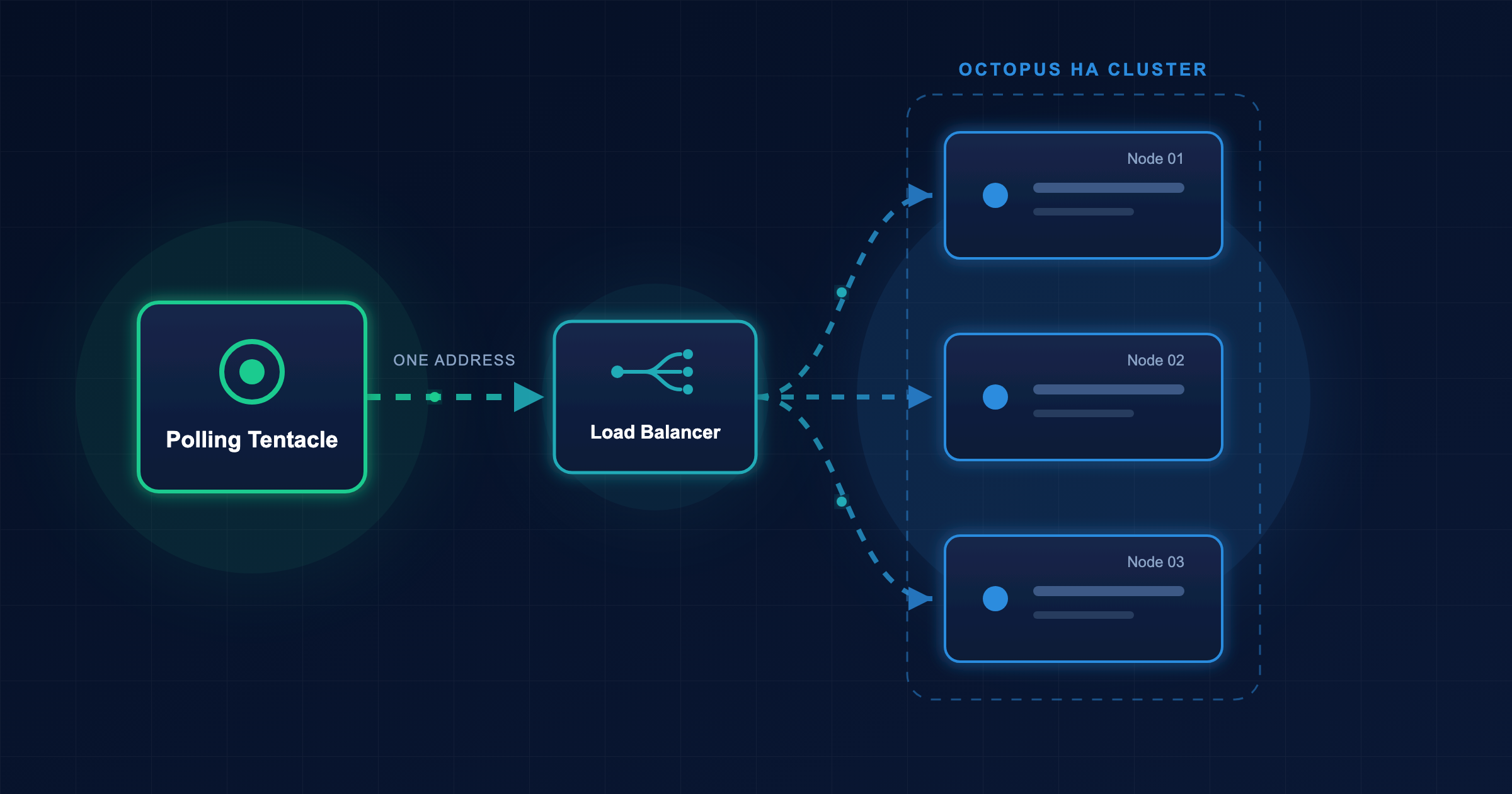

Securing communication between internal components is a long-awaited feature by the ArgoCD community.
Historically, to ensure encrypted communication between the repo-server and its internal clients, such as argocd-server and argocd-application-controller,
required operators to find solutions outside ArgoCD.
Argo CD 3.5 introduces native, first-class mutual TLS (mTLS) support. By embedding encryption and identity verification directly into its components, it eliminates the need for running service mesh sidecars, writing custom certificate-rotation scripts, or managing complex volume projections just to make sure traffic is secure between the ArgoCD components.
Why mTLS is one step ahead of one-way TLS
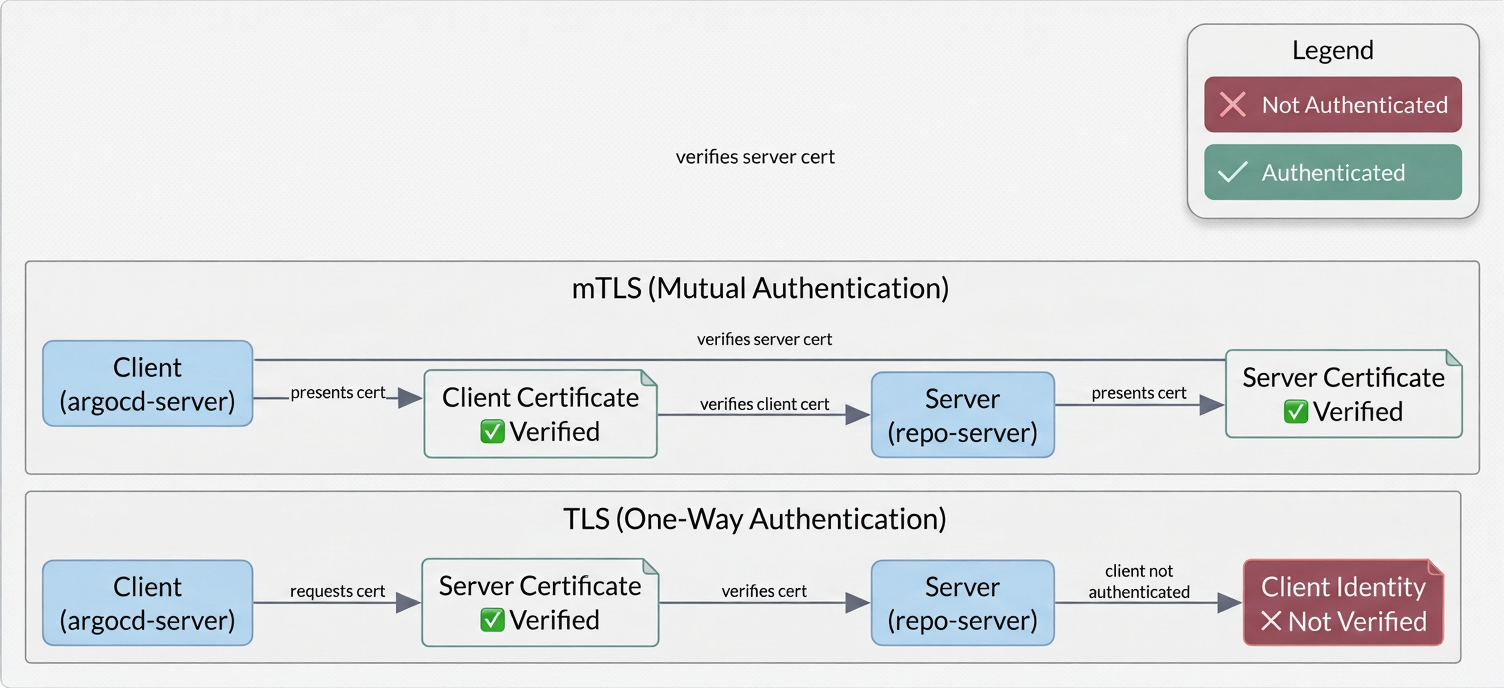
Standard TLS provides one-way authentication: the client verifies the identity of the server via a certificate, but the server accepts connections from any client inside the network boundary. So far so good!
Let’s take, however, the case of zero-trust architecture, where relying entirely on the network is an antipattern.
If an attacker compromises a single pod within the cluster, they can potentially communicate with the repo-server without any authentication.
Mutual TLS (mTLS) addresses this by requiring both sides to authenticate before exchanging any data:
- The client verifies the
repo-servercertificate to ensure it is communicating with the legitimate repository management layer. - The
repo-servervalidates the client’s certificate against a trusted Certificate Authority (CA) to confirm that the incoming connection originates from an authorized Argo CD component.
What do you gain by using mTLS:
- First and most important, you stop assuming internal cluster traffic is safe. Every internal component that needs to “talk” to the
repo-servermust explicitly prove its identity. - If your environment is regulated by compliance frameworks such as SOC 2, HIPAA, and PCI-DSS, then you are already covered. Native mTLS satisfies the security requirements without adding third-party dependencies.
- By issuing different certificates to different components, you can precisely log which service initiated a connection and establish a foundation for fine-grained access controls.
- Even if an attacker gains access to a pod, they can’t actually talk to the
repo-serverbecause they lack the required signed client certificate.
The pre-3.5 reality: how operators managed internal encryption
Before native support was introduced in version 3.5, achieving mTLS within an Argo CD deployment forced teams to choose between several complex architectural workarounds.
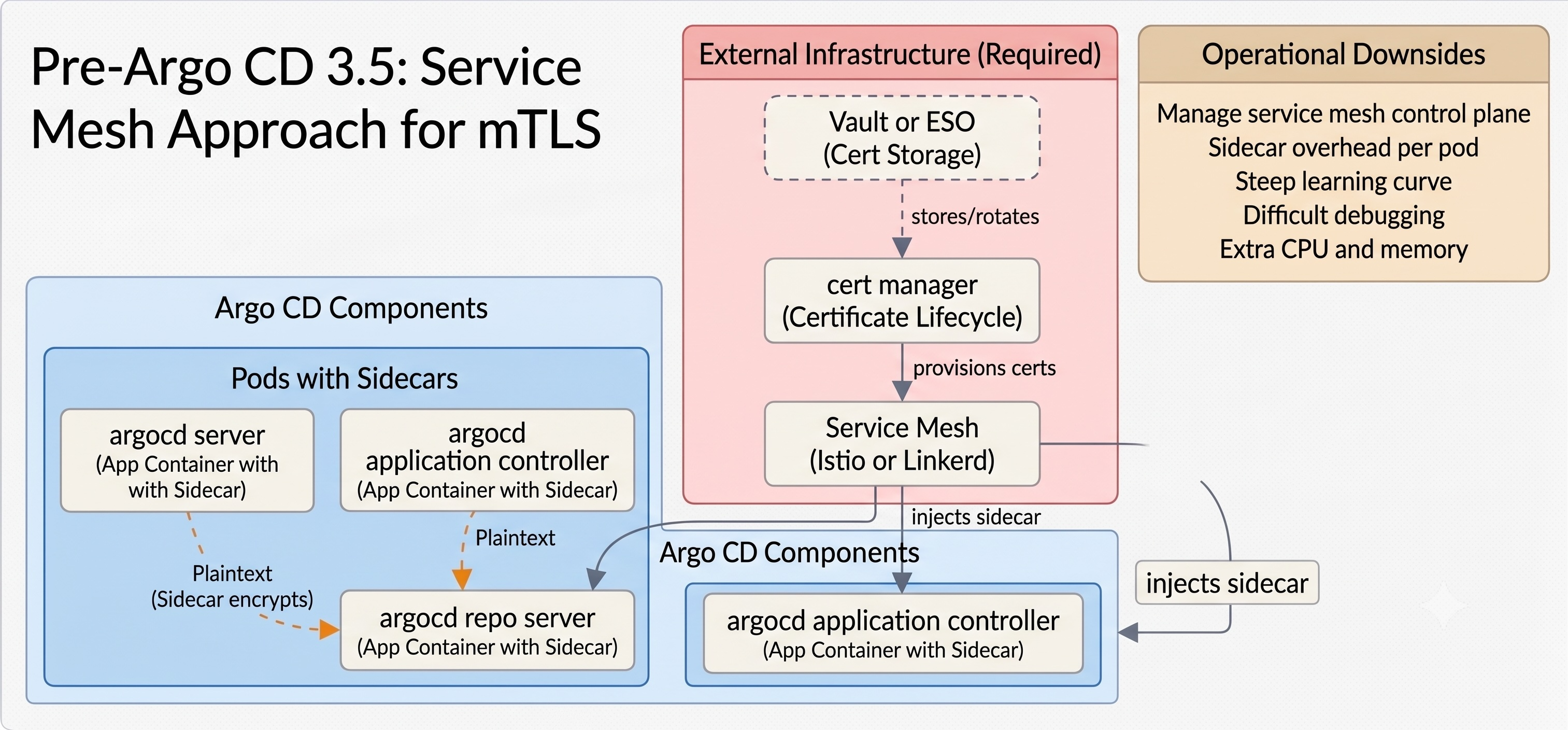
The service mesh approach
The most common pattern was transferring the encryption responsibility to an external service mesh like Istio or Linkerd. Teams would inject sidecar proxies into their Argo CD pods to intercept traffic and handle the TLS handshake transparently. This architecture was ok-ish. It worked, but if you ask operators, they would probably complain because they had to manage, upgrade, and debug an entirely separate control plane. On the other side, if secure communications is a hard-requirement, then this approach was a great implementation.
Manual cert-manager integration
Other teams used cert-manager to automatically provision certificates into Kubernetes Secrets,
paired with custom Kustomize or Helm patches to manually map those secrets to specific paths inside the Argo deployments.
The main point of failure here was certificate rotation. Coordinating pod restarts to ensure components picked up renewed certificates often required writing custom wrapper scripts or relying on auxiliary operators like Reloader, which added more moving pieces to the platform.
Static secret vaulting
In highly locked-down environments, teams synchronized certificates from external stores like HashiCorp Vault using tools like the External Secrets Operator (ESO). While this approach is very auditable-friendly, it creates a tight coupling between the secret store, the sync operator, and the GitOps controller.
In smaller companies, the fallback was often base64-encoding static, long-lived certificates directly into Kubernetes ConfigMaps or Secrets. This bypassed infrastructure overhead but required manual secret rotation which was often a manual process.
Overall, you can see the same pattern in all three approaches described above (there might be more, but they all follow the same basic principles) Internal communication security was handled as an external network problem rather than a native application capability, resulting in fragile configurations challenging to maintain.
What’s new in 3.5: built-in mTLS
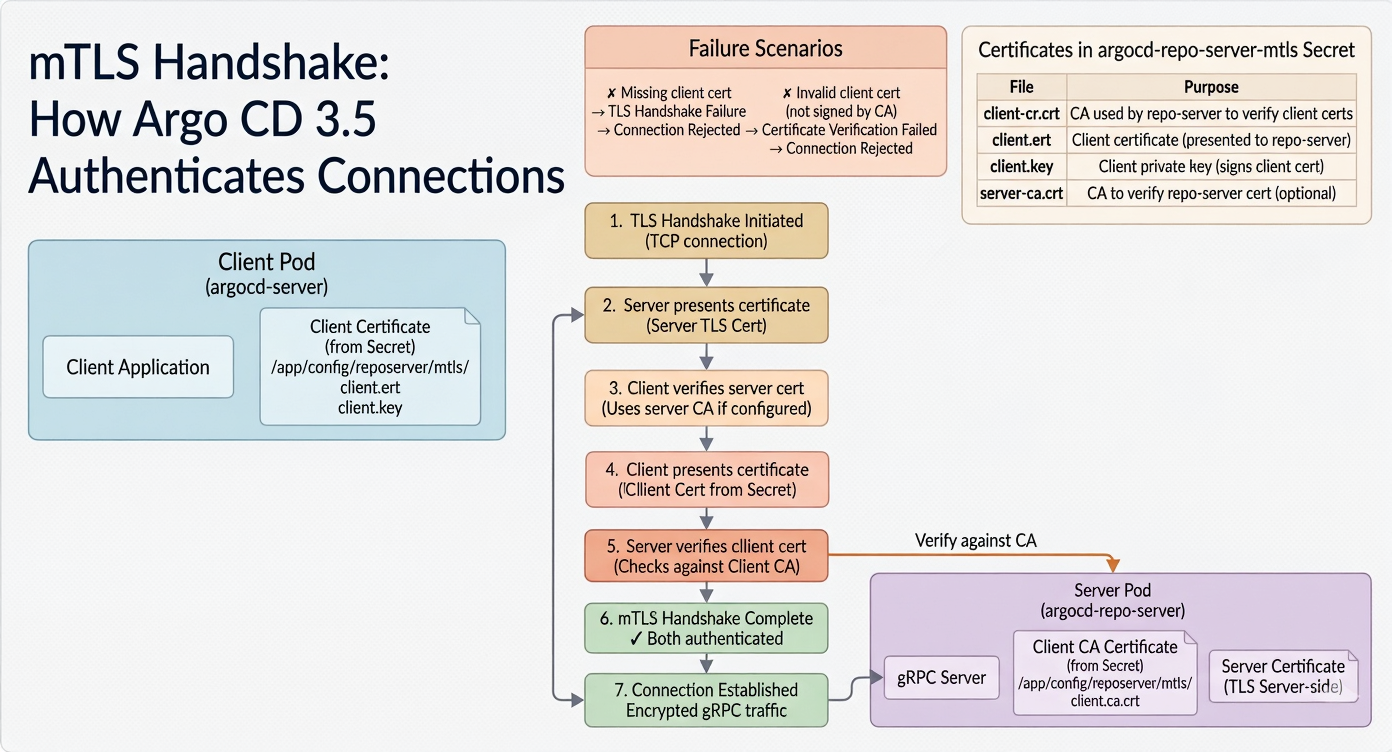
Argo CD 3.5 simplifies this landscape by moving the handshake, verification, and configuration logic entirely into the application. You no longer need to write complex volume mounts or alter network layers; It’s as simple as provisioning a single, specifically named Kubernetes Secret to activate mTLS.
Below you can find a high-level overview of the new features:
- Super-easy setup (auto-discovery). Argo CD automatically looks for a Secret named
argocd-repo-server-mtls. When discovered, the manifests handle the internal mounting and environment configurations out of the box, eliminating manual template patching. - The
repo-serverrequires self-directed communication to execute liveness and readiness probes. In a strict mTLS environment, a service can easily block its own health checks. Argo CD 3.5 addresses this by automatically generating memory-lived, ephemeral certificates dedicated exclusively to internal loopback probes, ensuring monitoring remains functional without manual intervention. - The feature accommodates both simple and highly complex environments. You can start with a single shared client certificate across all components and transition to unique per-component identities later without re-architecting your underlying deployment strategy.
Now let’s take a more detailed look at the setup process for the shared-certificate configuration.
Getting started: the shared-certificate setup
For the majority of production deployments, a single shared client certificate used by all client components is enough and requires minimum configuration
Step 1: Generate the certificates
If you are not using an automated PKI pipeline, you can generate the required CA, server, and client certificates using standard OpenSSL commands:
openssl genrsa -out ca.key 2048
openssl req -new -x509 -days 365 -key ca.key -out ca.crt \
  -subj "/CN=argocd-internal-repo-ca"

openssl genrsa -out server.key 2048
openssl req -new -key server.key -out server.csr \
  -subj "/CN=argocd-repo-server"
openssl x509 -req -days 365 -in server.csr \
  -CA ca.crt -CAkey ca.key -CAcreateserial \
  -out server.crt

openssl genrsa -out client.key 2048
openssl req -new -key client.key -out client.csr \
  -subj "/CN=argocd-core-clients"
openssl x509 -req -days 365 -in client.csr \
  -CA ca.crt -CAkey ca.key -CAcreateserial \
  -out client.crt
Step 2: Construct the mTLS kubernetes secret
Create a secret named argocd-repo-server-mtls in your Argo CD namespace. The keys within the data block must strictly conform to the expected naming convention:
apiVersion: v1
kind: Secret
metadata:
  name: argocd-repo-server-mtls
  namespace: argocd
type: Opaque
data:
  client-ca.crt: <BASE64_ENCODED_CA_CRT>
  client.crt: <BASE64_ENCODED_CLIENT_CRT>
  client.key: <BASE64_ENCODED_CLIENT_KEY>
  server-ca.crt: <BASE64_ENCODED_CA_CRT>
If you are a CLI fan, you can generate and inject this secret directly using kubectl:
kubectl create secret generic argocd-repo-server-mtls \
  --from-file=client-ca.crt=ca.crt \
  --from-file=client.crt=client.crt \
  --from-file=client.key=client.key \
  --from-file=server-ca.crt=ca.crt \
  -n argocd
Step 3: Trigger a rolling restart
As usual, to let the services pick up the new configuration, secrets, and certificates and initialize mTLS, you need to run a rolling restart across your deployments:
kubectl rollout restart -n argocd \
  deployment/argocd-server \
  deployment/argocd-repo-server \
  deployment/argocd-application-controller \
  deployment/argocd-applicationset-controller
If you are running the application controller in a High Availability (HA) configuration, remember to target the statefulset instead:
kubectl rollout restart -n argocd statefulset/argocd-application-controllerValidating the connection handshake
Once the pods are restarted, check the argocd-repo-server logs to confirm successful initialization.
You should observe log messages related to the self-generation of certificates for the internal health check as below:
Generated ephemeral health-check client certificate (CN=argocd-repo-server-health)To verify that mTLS is now enabled, try to execute a direct gRPC or HTTP request to the repo-server from an unauthenticated pod inside the cluster. The connection should terminate immediately during the TLS handshake phase, log an untrusted client error on the server side, and prevent any data exposure.
To the contrary all internal communications to repo-server are now encrypted.
So far we have seen how easy to enable mTLS using a default approach, same client certificate across all components. This probably works for most of the production environments, but there are cases where you might want to use different certificates for different components. The following sections will show you how to do that.
Advanced configurations: per-component certificates
In enterprise environments with strict auditing requirements or multi-tenant architectures, sharing a single client certificate across all services may violate compliance rules. Argo CD 3.5 supports unique and different, per-component certificates through the following two approaches.
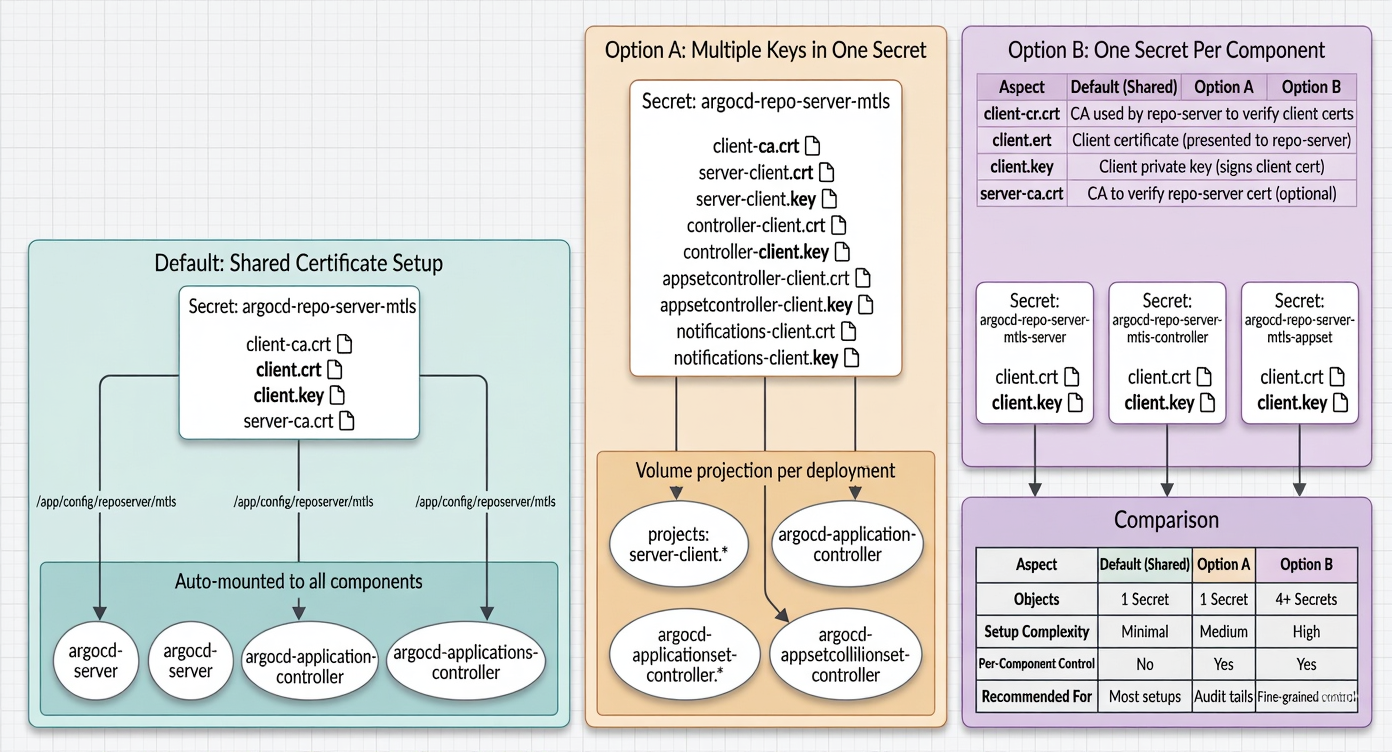
Option A: multiple keys within a single secret
You can store all individual component certificates inside the primary argocd-repo-server-mtls secret using distinct key identifiers.
This centralizes your secret management while allowing smooth delivery to each client component via volume projection patches.
Check the sample yaml below. You can see that for each component we have a separate key for the client certificate (server-*, controller-*, etc.)
apiVersion: v1
kind: Secret
metadata:
  name: argocd-repo-server-mtls
  namespace: argocd
type: Opaque
data:
  client-ca.crt: <BASE64_CA_PEM>
  server-client.crt: <BASE64_SERVER_CERT_PEM>
  server-client.key: <BASE64_SERVER_KEY_PEM>
  controller-client.crt: <BASE64_CONTROLLER_CERT_PEM>
  controller-client.key: <BASE64_CONTROLLER_KEY_PEM>
Once you have added the above secret to K8s, patch the volume mount configuration of each component deployment, ensuring it maps its custom key to the filename the client expects (client.crt):
spec:
  template:
    spec:
      volumes:
      - name: argocd-repo-server-mtls
        secret:
          secretName: argocd-repo-server-mtls
          items:
          - key: server-client.crt
            path: client.crt
          - key: server-client.key
            path: client.key
          - key: client-ca.crt
            path: client-ca.crt
The main advantage of this approach is that you are still keeping all certificates in a single secret.
Obviously the disadvantage is that you need to maintain explicit volume mount overrides across all components that need to talk to repo-server.
Option B: isolated secret objects per component
The second approach suggests breaking the secret configuration to individual, component-specific secrets (e.g., argocd-repo-server-mtls-server, argocd-repo-server-mtls-controller):
So for each component that communicates with repo-server, you create a separate secret with the appropriate client certificate and key. For example:
apiVersion: v1
kind: Secret
metadata:
  name: argocd-repo-server-mtls-server
  namespace: argocd
type: Opaque
data:
  client.crt: <BASE64_SERVER_CERT_PEM>
  client.key: <BASE64_SERVER_KEY_PEM>
Then you need to patch again each deployment’s volume specification to point to its corresponding secret:
spec:
  template:
    spec:
      volumes:
      - name: argocd-repo-server-mtls
        secret:
          secretName: argocd-repo-server-mtls-server
This is the most clear approach because you keep the secrets for each component isolated from the others. This allows you to rotate keys independently of the primary secret, which is a common practice in multi-tenant environments.
But as you know, there’s no free beer. The downside (if you think of it as a downside) of this approach is that you need to maintain separate Kubernetes Secret objects for each component.
Real-world use cases
Comprehensive zero-trust layering
Native mTLS provides a critical mid-tier authentication layer that complements existing security layers. A strong and complete defense-in-depth model for Argo CD typically relies on the following layers:
- Network policies that restrict pod-to-pod communication paths so that only valid Argo CD components can route packets to the
repo-serverport. - K8s service accounts that define exactly what an authenticated client process is allowed to execute once the connection is opened.
- Native mTLS which is used to authenticate data exchange between services at the application layer.
- Application RBAC which allows fine-grained access control to Argo CD resources.
Audit-ready compliance (SOC 2 / HIPAA / PCI-DSS)
When preparing for an audit, proving internal data security can be challenging when relying on third-party service meshes or complex bespoke scripts. Auditors look for easily verifiable, reproducible security controls. Pointing to a native, platform-supported configuration driven by a declarative Kubernetes Secret simplifies the compliance narrative considerably compared to explaining a custom infrastructure mesh setup.
Multi-tenant control planes
For large organizations running multi-tenant internal developer platforms (IDPs), combining per-component certificates with upstream gRPC interceptors allows cluster administrators to log, trace, and isolate internal requests precisely by team or business unit. This level of traceability is highly beneficial for forensics and chargeback metrics.
Migration patterns
Transitioning an active production cluster from a service mesh or custom cert-manager architecture to native mTLS might sound like a complex task but it can be executed with minimal risk using the following, incremental, approach:
- You can keep your existing Root CA. Use your current certificate authority to generate the initial client certificates and keys.
- Deploy the
argocd-repo-server-mtlssecret into the cluster while your existing sidecars or custom mounts are active. The presence of the secret will not change anything until a reload occurs. - Execute a rolling restart of all Argo CD components to pick up the new configuration.
- Verify that the connection handshake (via the native mTLS configuration) is successful and that all internal traffic is now encrypted.
- Once the connection is established, remove the old configuration, disable sidecar injection, etc.
Well done! – you are now using native mTLS for all internal traffic.
Architectural recommendation
This article cannot cover all the production cases out there but we can summarize the recommendations for two groups of implementations. If you are operating a small-to-medium-sized Argo CD installation looking for an immediate security upgrade with low operational friction and no specific requirement to audit individual internal component traffic streams. On the other side, if you are looking for a more robust and comprehensive security model, because, for instance, you are in a highly regulated enterprise environment, then you should consider the per-component approach that gives you the most flexibility and control.
For most teams, starting with a shared certificate configuration is the most pragmatic approach. The good (excellent) news is that if your compliance needs scale over time, migrating to separate component identities involves adjusting your manifest overlays without replacing your underlying secrets architecture.
Tags: