
In the first article of this series, I shared how we approached modernizing the build and deployment of our microsites at Octopus. One of the biggest sources of friction was how our GitHub Actions workflows were managed. Each of our microsites had its own repository, and each repository had its own copy of four workflows. That’s twenty workflow files, all meant to be identical, all maintained separately, and a problem that only got worse with every new microsite we provisioned.
From a technical perspective, it worked, but it didn’t age well, and the workflows were originally built before reusable workflows were available to us. Making a change like bumping the node version meant opening five pull requests across five repositories, getting each one reviewed, and merging them one by one. Small tweaks made in one repository didn’t always reach the others, and over time, it became trivial for the workflows to drift apart. It’s one of those classic things where each time someone made a change, they knew there was a better way, but the pain experienced for that one-off change wasn’t big enough to take action. However, nobody could say with confidence that every microsite was being built the same way.
Most developers learn “don’t repeat yourself” (DRY) early on as a principle for writing application code. Yet it’s surprisingly common to see the same pipeline copied across repository after repository, as if the rule stops at the edge of the source code. Our microsites were a textbook example.
The fix was to move the build logic into a single central repository and have each microsite call it, so a change made once applies everywhere. GitHub calls these reusable workflows, and getting them in place was one of the project’s quicker wins.
It wasn’t all smooth sailing, though. Reusable workflows solved the copy-paste problem, but they raised new questions about versioning, testing changes safely and without friction, and how much a platform team can see and control once other teams depend on what they’ve built.
A central home for shared workflows
The first step was deciding where the shared workflows would live. I knew there would likely be other shared elements for the project, so we created a central repository called microsite-deployment. Alongside the reusable workflows, it also holds the Terraform for the hosting infrastructure and the scripts used during deployment.
What makes a workflow reusable is a single trigger. Instead of running on a push or a pull request, it uses on: workflow_call, which tells GitHub it’s designed to be invoked by other workflows. It can then declare inputs, just like a function declares parameters, and the calling workflow supplies the values.
For each microsite, the result is refreshingly small. Here’s the entire calling workflow that runs when a pull request is opened against our blog:
name: Pull Request build and deploy

on:
  pull_request:
    branches:
      - main

jobs:
  branch_validation:
    uses: OctopusDeploy/microsite-deployment/.github/workflows/microsite-deployment-branch.yml@main
    with:
      octopus_project_name: "Blog Microsite"
      package_id: "BlogMicrosite"
    secrets: inherit
That’s it. The calling workflow decides when the build runs, and the called workflow decides how it runs. Each microsite provides two inputs: the name of its Octopus project and the package ID for the built site, so it knows which package to reference when GitHub triggers a release in Octopus. Installing dependencies, building and testing the site, packaging it, pushing it to Octopus, and creating a release all live in one place now.
Centralizing the workflows also means the trickier logic only needs to be solved once. Some of our microsite repositories are public and accept contributions from people outside of Octopus. Pull requests from forks don’t have access to the repository’s secrets, so a build from a fork can’t push anything to the Octopus instance that performs deployments. The reusable workflow handles this with a SHOULD_DEPLOY flag, which is set based on whether the Octopus server secret is available in the repo. If it isn’t, the site is still built, tested, and packaged, and the package is uploaded as a workflow artifact instead. Outside contributors still get a validated build, but it doesn’t try to deploy without the credentials to do it. That logic existed before this project, but now it lives in one place, and every public microsite gets it for free.
Adding a new microsite is now a very different experience. Instead of copying four complex workflow files from an existing repo and hoping you picked the latest version, a new repository needs a handful of stable short calling workflows like the one above, and it gets the same build process every other microsite uses from day one.
Bring improvements in small batches
When I started converting the workflows, there was a temptation to go all the way in one hit. Take everything, use Claude to consolidate it into as few files as possible, with whatever logic was needed to handle every incarnation, and be done with it. But moving five microsites onto shared workflows was already a meaningful change, and I didn’t want to stack a redesign of the build logic on top of it. We already know small batches are easier to author and review, easier to test, and much easier to roll back if something goes wrong.
The first step was a fairly direct translation. Each of the four workflows in the microsite repositories became a reusable workflow in the central repository, and each microsite swapped its copies for the short and stable calling workflows. The logic of the workflow stayed the same, but the benefit I was looking for with this change was to consolidate to one version of each workflow, giving us one place to make changes moving forward that would roll out to all callers.
The two build workflows are a good example of where I deliberately held back. One runs when a pull request is opened, and the other runs when changes are merged to main. Both build, test, and package the site, but what happens next is quite different. The main branch workflow is a single job that pushes the package to Octopus and creates a release. The pull request workflow is split into three jobs, deploys to an ephemeral environment, can be skipped with a label, and has a gate job that acts as the required status check for merging.
Could they be a single workflow? Yes. They might even become a single workflow in the future. You could check which event triggered the run, or pass in an input, and use conditions to determine which jobs run. But the two workflows differ in their structure, not just a step or two, and a single file full of conditionals can be harder to read and reason about. Keeping them separate means each one clearly does one job.
I can see what you’re thinking:
But Matt, we are trying to stop the duplication and the multiple changes!
Yes, true, but it doesn’t mean the duplication between them was entirely ignored. For example, workflows need to install the same versions of Node and pnpm, and specifying those versions in two places would have reintroduced the exact problem we were trying to escape, just inside the central repository instead of across the microsites.
So the versions for pnpm and Node are specified in a small composite action, which both workflows call:
- name: Retrieve versions
  uses: OctopusDeploy/microsite-deployment/.github/composite/versions@main
  id: versions
The composite action exposes the Node and pnpm versions as outputs, giving us one place to bump the toolchain for every workflow at once.
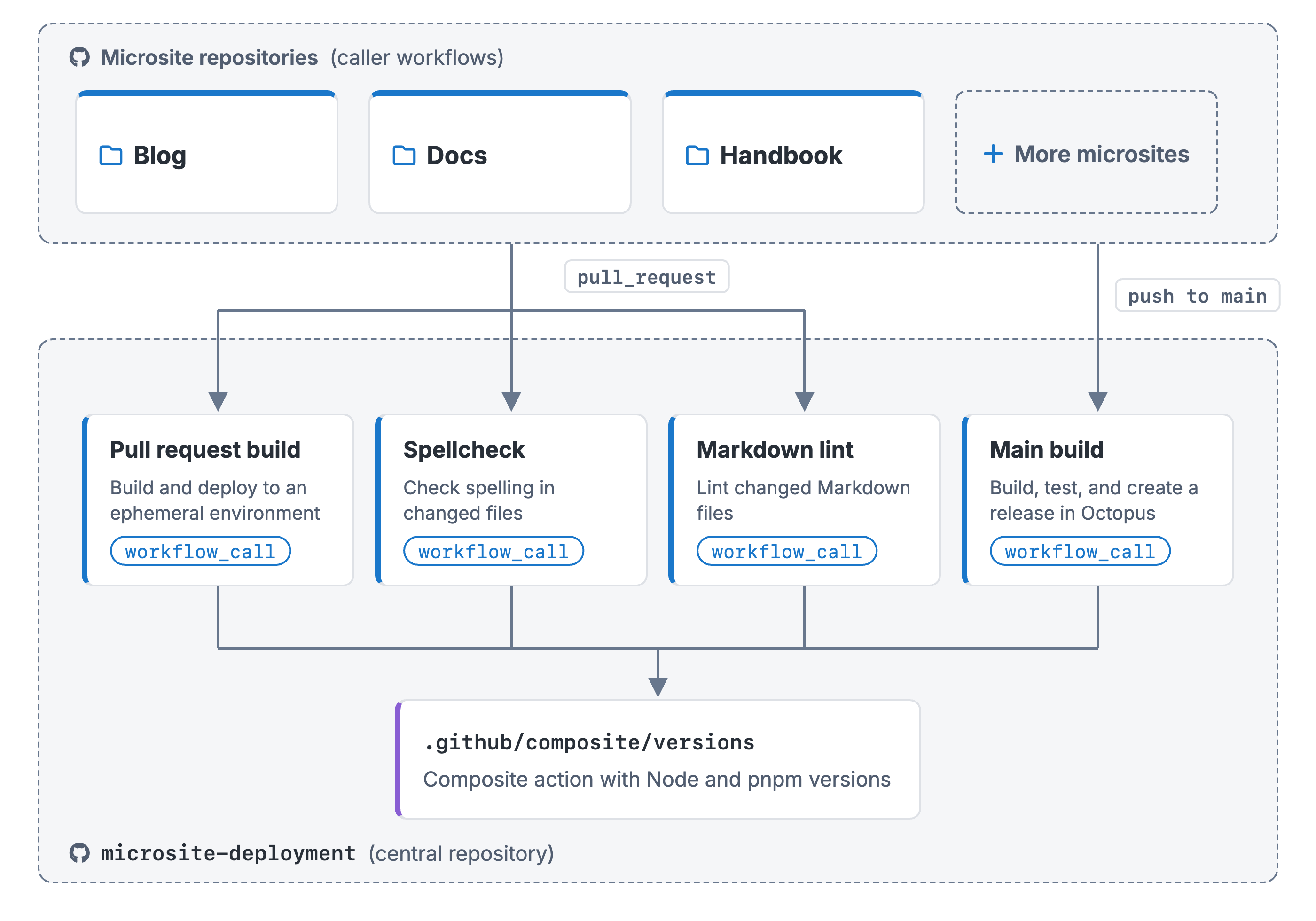
I’ll be honest, though: there’s still duplication. The steps to install dependencies, build, test, and package the site are nearly identical in both workflows, and that’s a natural next candidate for a composite action of its own. It’s a good reminder that copy-paste can creep back in even inside the platform that’s meant to eliminate it. But getting the microsites onto shared workflows first, and then improving those workflows from a single place, was a much safer path than trying to do everything at once. Any further consolidation is now a change to one repository, not five.
Versioning and testing changes
Once the microsites were calling shared workflows, a new question quickly arose. When I change a reusable workflow, which version should each microsite be running?
Choosing a reference
The calling workflow determines which version of a reusable workflow to uses via the reference after the @. There are three common options, each with a trade-off.
A branch, like @main. This is a floating reference. Whatever is on the main branch of the central repository is what every caller runs on its next build. For a platform team, that’s appealing, because a fix or improvement reaches every consumer immediately. For the consumer, it means a change can land in their build without them doing anything, and if that change breaks something, they find out when their pipeline fails. It’s a similar pattern to using latest with container images, which most of the industry has moved away from for good reason.
A tag, like @v1.2.0. Callers stay on a known version until they choose to update. That’s much more predictable, but git tags are mutable by default. Someone can move a tag to a different commit, accidentally or otherwise, and every caller pinned to it quietly starts running different code. GitHub’s immutable releases help here, as the tag attached to an immutable release can’t be changed after it’s published. The catch is that this doesn’t work for floating tags like @v1, which many teams use so consumers automatically get minor updates, because a floating tag has to move to be useful.
A commit SHA. This is the most stable option. A SHA always points to the exact same code, and GitHub’s own documentation recommends it as the safest choice for stability and security. The catch is that a 40-character hash tells you nothing at a glance, so the common convention is to add a comment with the version it represents.
We opted to use @main, effectively forcing every consumer onto the latest version at all times, and accepting that we’re on the hook if we break all the microsites at once. How a workflow is referenced is ultimately set in the calling repository, but the platform team decides which options exist and which one to recommend, so it’s a decision worth making together with your consumers. Think through the implications, and decide whether you’d rather keep everyone on the latest version, or end up with consumers using many versions and choosing when to update, with all the complications that may arise. As we’ll see, GitHub doesn’t have a neat way to notify people there’s a new version, or report on version use so you can track and encourage updates.
Keeping consumers up to date
If you do pin to tags or SHAs, the next problem is ensuring consumers move to newer versions when you publish. Pinned callers don’t automatically pick up changes, so the fix you’ve published might not be running anywhere.
Dependabot can help here. It can track reusable workflow references and raise pull requests when a new version is available, just as it does for marketplace actions. For workflows in private or internal repositories, which is the common case within an organization, they require a little extra setup, either by granting Dependabot access to the central repository in your organization settings or by configuring a Dependabot secret with a token that can read it. It’s also opt-in per calling repository. It makes updates easier to notice and act on, but the decision to update still sits with each consumer for any type of update, whether it be a patch, minor, or major change.
One tag for every workflow
Another paper cut I hit when exploring tagging for the reference approach, is that tags apply to the whole repository. A Git tag points to a commit, and that commit contains every workflow in the repository. If I change the pull request workflow and tag it v1.3.0, a consumer of the main branch workflow who moves to v1.3.0 picks up whatever state that workflow is in at the same commit, even if nothing changed for them. There’s no built-in way to version reusable workflows independently within one repository. You can work around it with prefixed tags, a repository per workflow, or community tools like the Workflow Independent Release Engine, but each adds its own overhead.
Testing changes
This is the part I found most awkward day-to-day. When I want to change a reusable workflow, I make the change on a branch in the central repository. I want to test it works as intended before I merge to main, but I don’t have anything that’s calling the version in my new branch. Currently to test, I create a branch in one of the microsite repositories, change its calling workflow to point at my branch instead of @main, and trigger it. Depending on the trigger, that can mean opening a throwaway pull request just to get the workflow to run.
This rarely happens, but it gets more awkward when the change also touches the composite action. The reusable workflow references the composite at @main, and that nested reference resolves on its own, regardless of which version of the reusable workflow the caller asked for. You might think a local path would solve this, but a local path inside a reusable workflow is resolved against the caller’s workspace, not the central repository. Before the composite action existed, I tried storing the versions in a JSON file in the central repository and reading it from the reusable workflow, but the workflow went looking for the file in the calling microsite repository instead. So testing a change that spans both files means re-pointing two references on my branch, and then remembering to point them back before merging, because I don’t want branch references promoted to main. Pinning to tags or SHAs doesn’t remove that awkwardness. It just moves it somewhere else.
This is an area of the project I haven’t put much thought into solving, as the pain is bearable, but it’s one I’d like to improve. I’ve seen other projects have similar concerns, and one way they’ve resolved this is to have a “test” calling repo - which, in our case, would be a basic microsite - which is primarily used to test changes to called workflows.
Visibility and governance for platform teams
Everything so far has mostly been from the perspective of the person writing and maintaining the shared workflows. But once other teams depend on what you’ve built, a different set of questions comes up. Who’s actually using this workflow? Which version are they on? And if I need everyone to move to a newer version, how do I make that happen?
Who’s consuming your workflows?
This is where GitHub gives a platform team surprisingly little. There’s no view from a reusable workflow that shows which repositories call it, or which reference each of the callers is using. On GitHub Enterprise Cloud, which Octopus uses, you can query the audit log through the REST API to see workflow use, but it’s not the best user experience. Outside of that, the options are to search for code across your organization or to write your own script to crawl repositories and parse their workflow files.
When you put this in the context of a platform team with hundreds of repositories calling many workflows, the questions get harder to answer. Is anyone still on an old version? Has a security fix been picked up everywhere? You’d reasonably expect a platform to tell you, and today on GitHub you mostly have to go and find out yourself.
Steering consumers to a new version
Imagine you’ve published a change that every team needs to pick up, maybe a security fix or a new organizational requirement baked into the build. If consumers reference @main, they get it on their next run. If they’ve pinned to a tag or SHA, as GitHub recommends, it’s up to each of them to update.
GitHub does give administrators some control here, through the allowed actions and reusable workflows policy. Administrators can block a specific action or reusable workflow version by adding it to the policy with a ! prefix, and blocks take priority over anything the policy would otherwise allow. So an administrator can block an old version of a reusable workflow across the organization.
The catch is that it’s a hard stop. There’s no warning phase, no grace period with a “please update by the end of the month” message that teams can see but keep working. The next time a caller on the blocked version runs, it simply fails. That makes sense when you look at why the controls exist. GitHub introduced them to reduce the risk of compromised action repositories, secrets, and malicious tag updates. They’re supply chain security tools, and they do that job well. What they weren’t designed for is managing the lifecycle of your own internal workflows, like guiding teams from one version to the next over a few weeks.
Dependabot, as I covered earlier, helps from the other direction. It can raise pull requests in calling repositories when a new version is available, but it’s configured per repository, and the consumer still decides when to merge. Between the two, a platform team can nudge from the consumer’s side or block from the organization’s side, with not much in between.
Wrapping up
Moving to reusable workflows was one of the quicker wins of this project. Twenty workflow files became a handful of short calling workflows; implementing a change is now one pull request instead of five, and I can say with confidence that every microsite is built the same way. They do come with tradeoffs, though, and if you’re a platform team sharing workflows across many repositories, it’s worth deciding early how consumers should reference your workflows, how you’ll test changes before they land, and how you’ll know who’s using which version, because those answers are much easier to design in than to retrofit.
Happy deployments!