

Today, we’re excited to release OctoDoctor, a standalone utility that scans your Argo CD cluster (or Git manifests) and generates a comprehensive HTML report on potential misconfigurations or questionable practices. OctoDoctor takes all the hard-earned advice that you might have seen already in our Argo CD guides and makes it easy to apply that advice to your actual Argo CD clusters.
OctoDoctor is open source and completely free. You can run it yourself on any type of cluster (even air-gapped or behind a firewall) and get an actionable report on how your Argo CD instance is configured.
How OctoDoctor rates your Argo CD setup
OctoDoctor is a self-contained executable. You can download it for your operating system from the releases page. You can run it in 2 ways:
- Point it at a folder that contains your Argo CD manifests (Applications and ApplicationSets)
- Point it at a live Argo CD cluster (the central one if you follow the hub-and-spoke model)
The tool then analyzes your Argo CD setup and provides an HTML report of its findings within minutes.
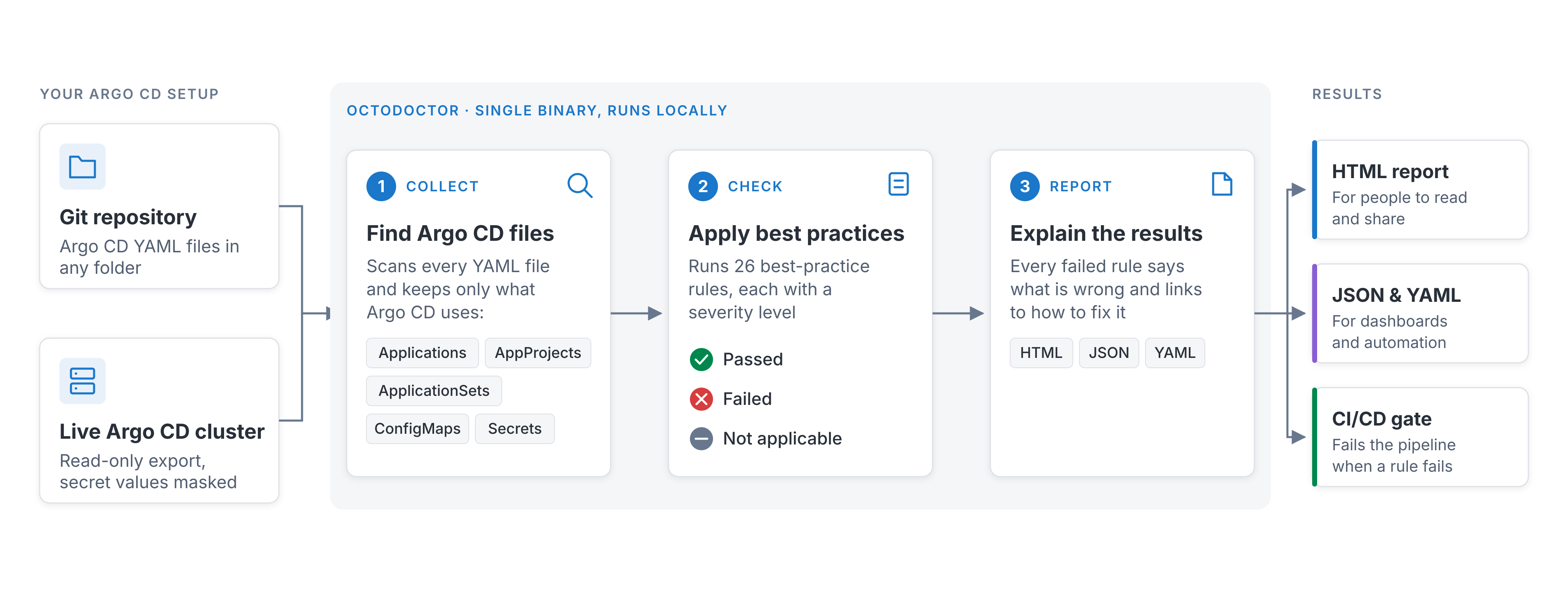
OctoDoctor is read-only. In both cases, it only reads information and doesn’t change anything in your cluster or files. You can run it the same way against production and staging clusters.
Here’s an example of the HTML report.
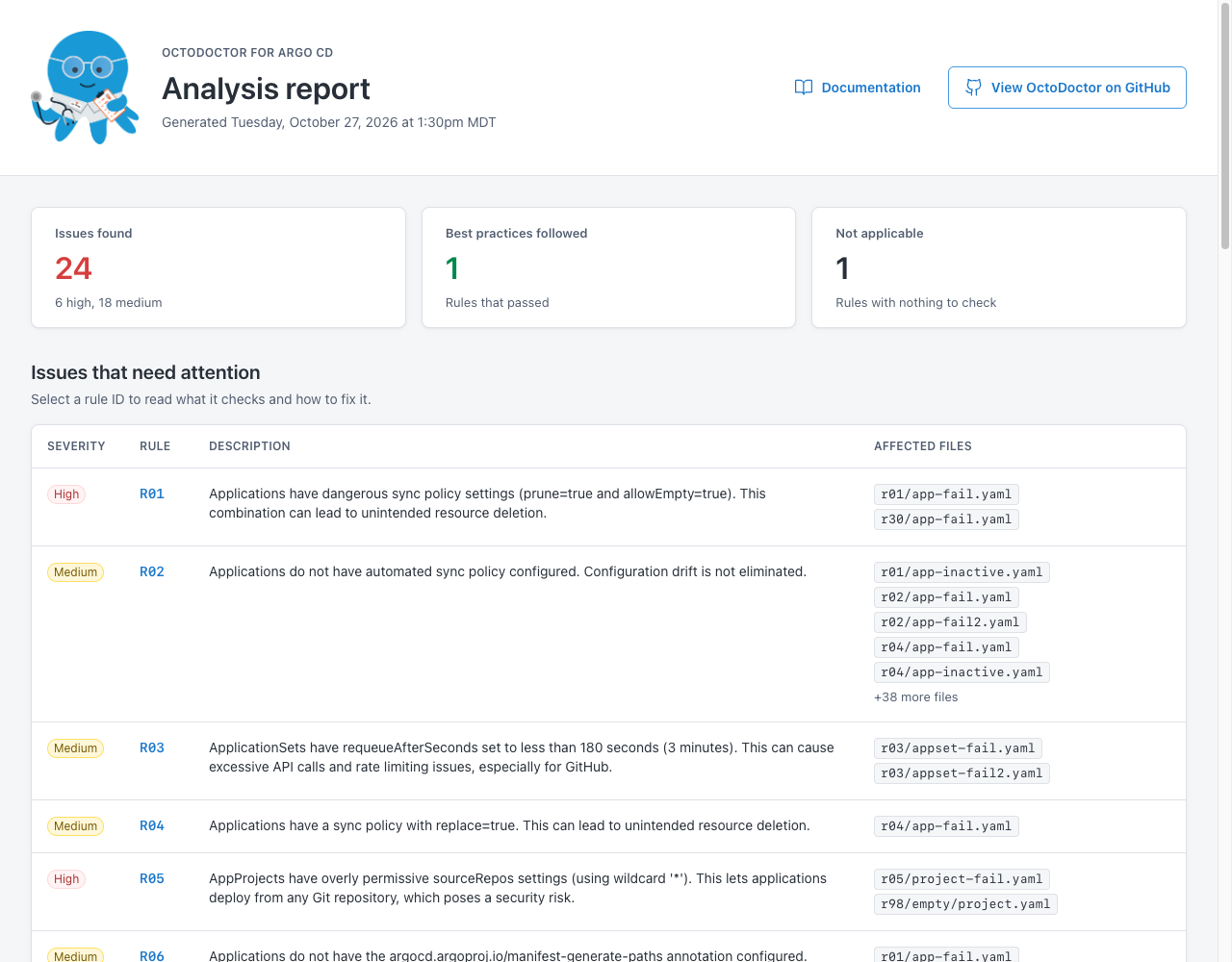
OctoDoctor judges your Argo CD instance against a comprehensive set of rules. For each failed rule, you get a list of the files that trigger it. You can also click the rule name to see documentation that explains:
- Why the rule exists
- What Argo CD configuration it checks
- How to fix it (if it fails)
The goal of the report is to give you an understanding of what can be improved in your Argo CD instance and to help you avoid common pitfalls in new Argo CD installations.
OctoDoctor also saves the report as JSON and YAML, so you can process it with your own tools or integrate it into a CI/CD pipeline.
Bonus: OctoDoctor skill for AI agents
Downloading a single executable is straightforward. However, if you or your team prefer to do everything with an AI agent, we’ve got you covered. We also ship an agent skill for OctoDoctor.
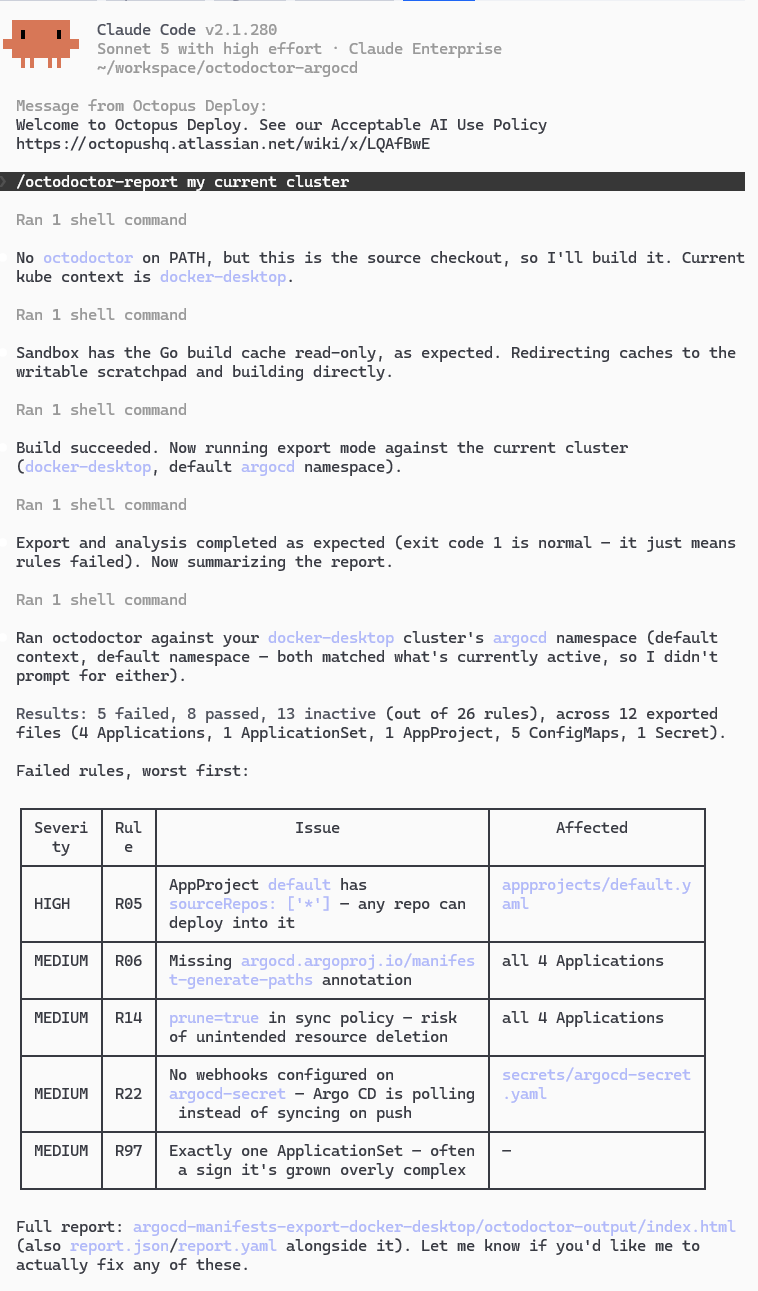
You can run the skill directly with /octodoctor-report, or describe what you want in plain English, for example, “check my Argo CD cluster for best practices with OctoDoctor”. The agent then installs and runs OctoDoctor for you automatically.
From Argo CD best practice guides to an actionable cluster scanning tool
If you’ve been following the Octopus Blog for a while, you’ll know that we regularly publish best practice guides for Argo CD and Argo Rollouts. Some of the most popular ones are:
- Top 30 Argo CD anti-patterns
- How to use multiple clusters with Argo CD
- How to use ApplicationSets
- How to organize Helm charts with Argo CD
- How to promote applications with Argo CD
The community constantly references these guides when adopting Argo CD, and they appear as top results when somebody searches for Argo CD best practices. This is great, but we want to take them a step further.
Reading about best practices is completely different from seeing them checked against your own Argo CD cluster. OctoDoctor takes all the best practices we’ve documented so far across several guides and packages them into a single executable you can run on your Argo CD manifests or clusters.
This helps you in 2 ways:
- If you’re just adopting Argo CD, you can use OctoDoctor as a safety net or validation layer at every step. Install Argo CD, run OctoDoctor, adopt ApplicationSets, run OctoDoctor, create temporary preview environments, run OctoDoctor, and so on. This way, you know the whole onboarding process follows best practices and our recommendations.
- On the other hand, if you already have an established Argo CD setup with many applications and clusters, OctoDoctor offers a fully automated, simple, and predictable way to audit everything. Run OctoDoctor, get the report, and discuss the results with your team.
It’s worth noting that we can’t possibly predict every Argo CD setup out there. If your setup fails a rule but you know exactly why and how this happens, that’s understandable and expected.
Helping the Argo CD community with GitOps onboarding
The AI era is upon us. Several teams are creating specialized internal tools that add value to a specific part of the software development process, but depend heavily on that company’s own processes. OctoDoctor is not one of those tools.
We built OctoDoctor with large Argo CD installations in mind. Anyone can run it, but many of the problems it detects only start to hurt when you have many clusters, many teams, and thousands of applications. Our support team has used it extensively as a discovery and debugging tool with very large Argo CD installations. Instead of asking customers to describe how their Argo CD instance works, we ask them to send us the report.
OctoDoctor isn’t something we created in a couple of hours with a few prompts. It’s a real tool, tested in large Argo CD installations (100+ clusters, 20,000+ apps), and it’s now available to you for free.
If you run into any problems, please open an issue in the GitHub issue tracker. We’d love to know how you used OctoDoctor to audit your Argo CD installations and what value you gained from it. Since the project is open source you can also contribute your own Argo CD best practices as rules.
Happy deployments!
Tags: