
Argo CD has become the de facto standard for GitOps deployments. It is currently the leading GitOps solution with 60% penetration in the Kubernetes ecosystem. Teams that choose Argo CD also love it, giving it an NPS score of 79 (for comparison, the industry average is 36).
Octopus Deploy has built-in integration with Argo CD. If you want to understand the technical details and setup instructions, feel free to take a look at the announcement and the documentation.
In this post, we want to focus on the “why” of the integration rather than the “how”. We have talked with several customers about the Octopus/Argo CD collaboration, and most discussions always start with similar questions:
- Why do I need Octopus if I already deploy with Argo CD?
- How does Octopus change the Argo CD experience?
- Does Octopus improve how GitOps deployments work with Argo CD?
- Is GitOps with Octopus better than GitOps with Argo CD?
If you have already adopted Argo CD and are wondering about the value of Octopus and how it supercharges your GitOps deployments, read on!
Octopus and Argo CD work together
Octopus does not change the excellent GitOps engine that Argo CD already offers. Instead, it allows you to scale Argo CD to Enterprise organizations that have special requirements regarding security, standardization, observability, etc.
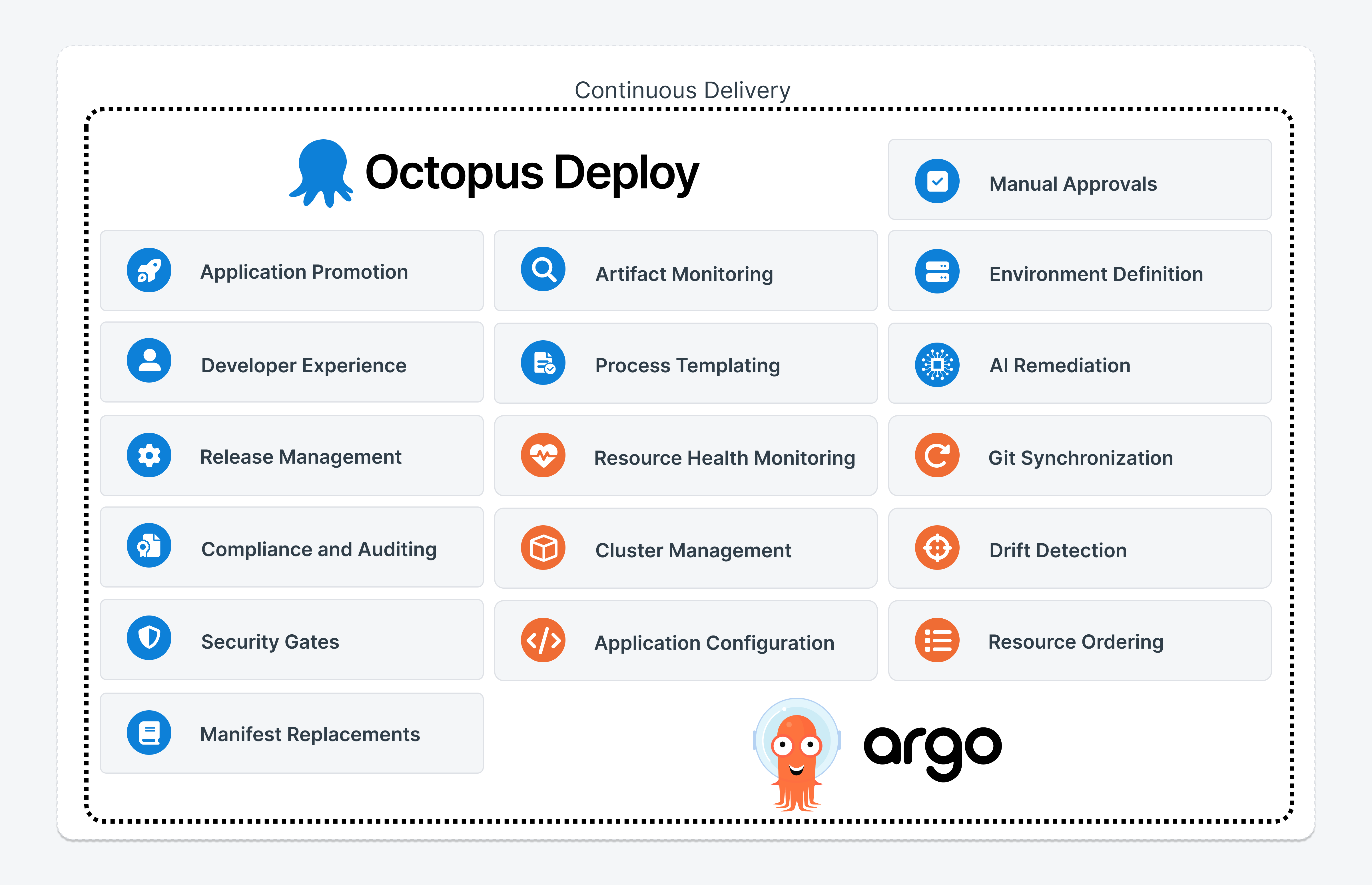
The two tools work together to offer you a complete solution that is appropriate for Enterprise adoption of GitOps best practices.
GitOps standardization across your teams
Adopting Argo CD on the first team is an easy task. The problems start when Argo CD adoption grows beyond the initial phase within an organization. Can you guarantee that the second, third, fourth, and Nth teams are adopting Argo CD the same way?
Argo CD is a very flexible tool that can be used in multiple ways. This is a double-edged sword. On one hand, it means that Argo CD can cover many use cases. On the other hand, it also means that every team can deviate from the “approved” or “blessed” way if there are no guardrails in place.
The most common pattern we see is with Git commits. Argo CD is great for taking your Git changes and deploying them to a Kubernetes cluster.
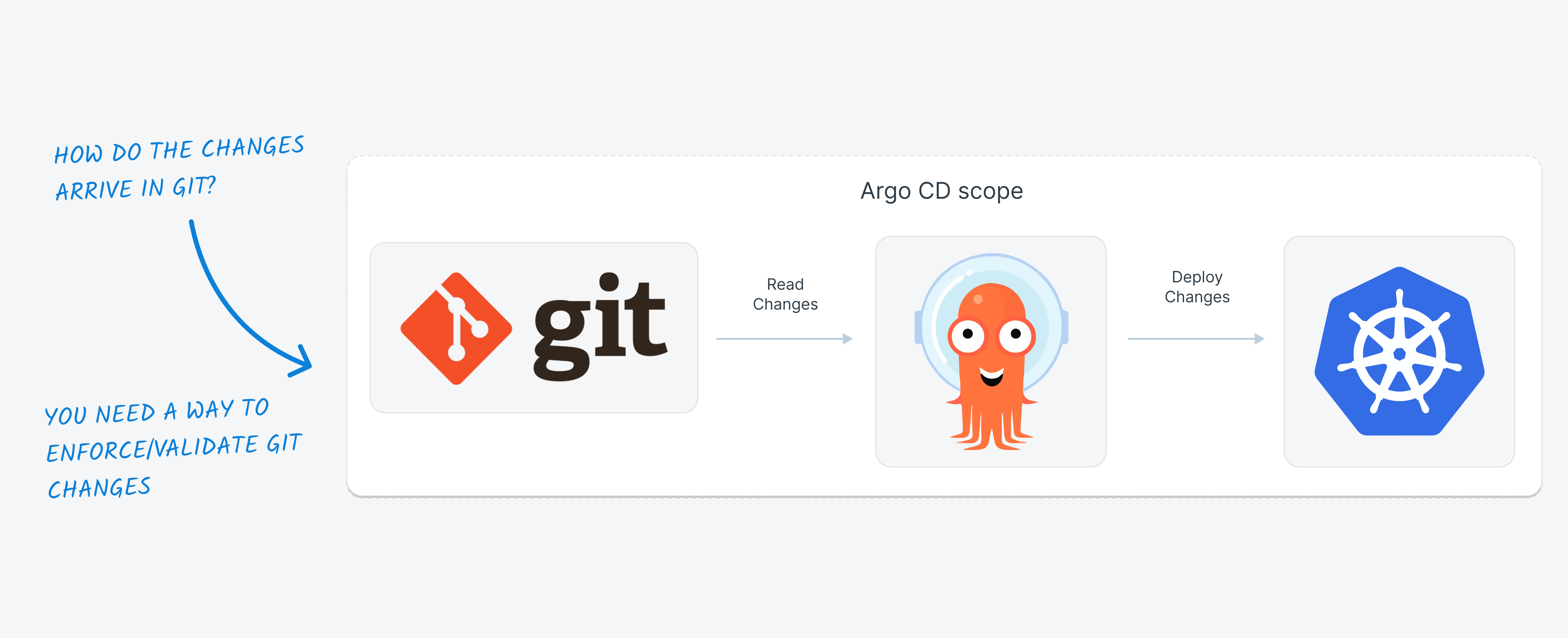
This is a well-understood process and the foundation for GitOps deployments. The hidden question here is who updates the Git files? How are they updated? And when? Argo CD doesn’t really care about how a change found its way into Git. But if you are working in an organization that cares about standardization and auditing, you must know that all your teams deploy the same way.
Several times we talk with customers who say they have “standard” GitOps deployments and in reality, they do something like this:
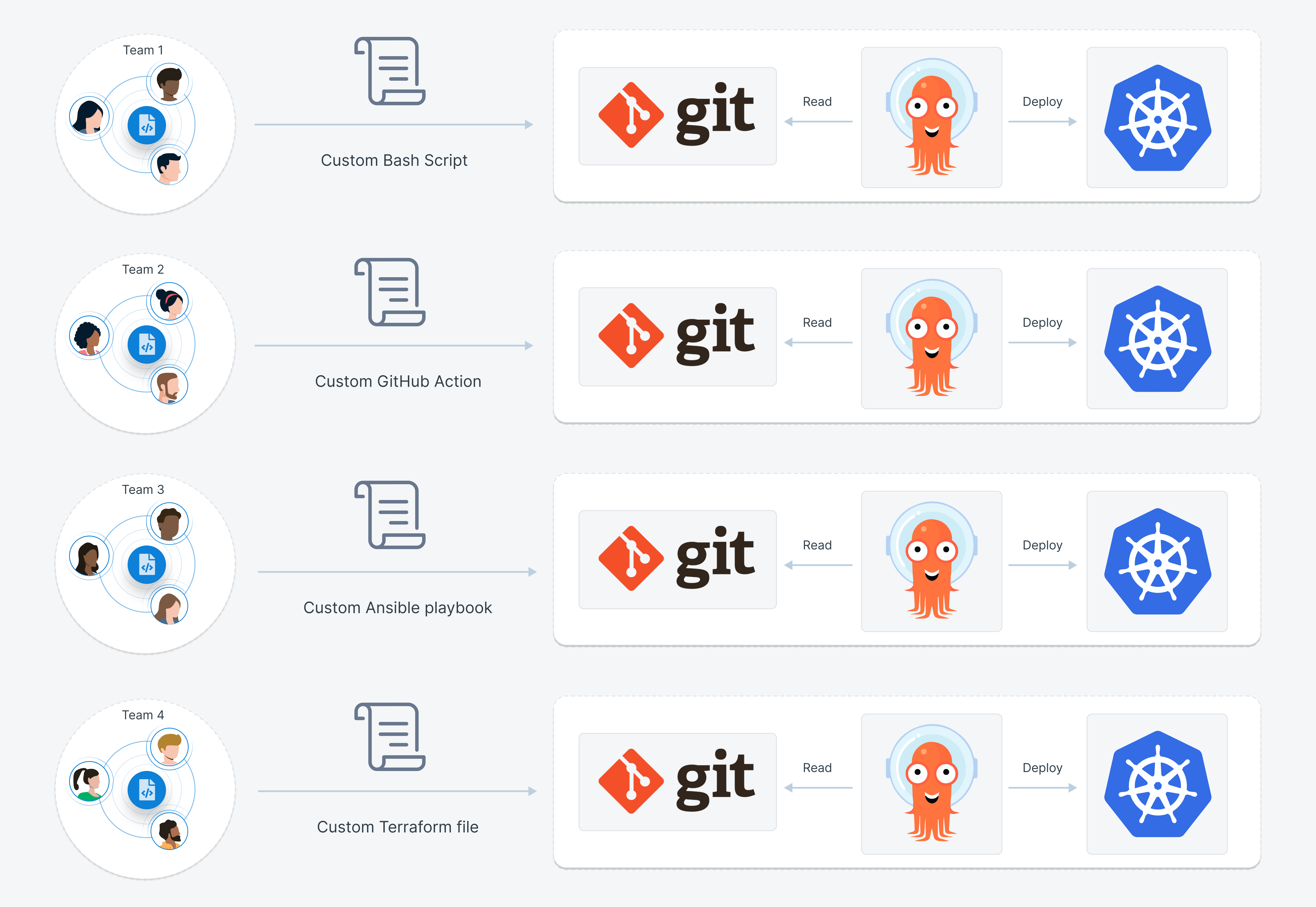
This setup is a big problem for organizations that want to scale their Argo CD usage. If every team is doing something else you don’t really have a way to enforce best practices and security processes across your company.
Even if some teams are using the same tool such as GitHub actions or Jenkins, these tools are originally built for Continuous Integration. Abusing them for GitOps deployments presents several challenges that need workarounds and custom solutions in areas like:
- Manual approvals (especially when coupled with external systems)
- Security and access control (who can actually deploy/approve/commit)
- Correlation with artifacts and everything else that goes inside a release (auditing and security)
- Maintenance overhead and developer onboarding (solved with Octopus Platform Hub)
We talk with several organizations that tell us that they have tried to standardize on using a single solution such as GitHub actions. But even though on paper it seems like they have solved standardization with a custom script in reality:
- The “solution” is a homegrown script that nobody wants to maintain
- Because it is completely custom, it must be constantly updated and adapted to new requirements
- It can never scale to the needs of an Enterprise
- Day 2 operations are always lengthy and risky as they affect services that are already in production
This is where Octopus steps in. Octopus Deploy comes bundled with standard, preconfigured and auditable steps for changing the Git manifests that Argo CD monitors.
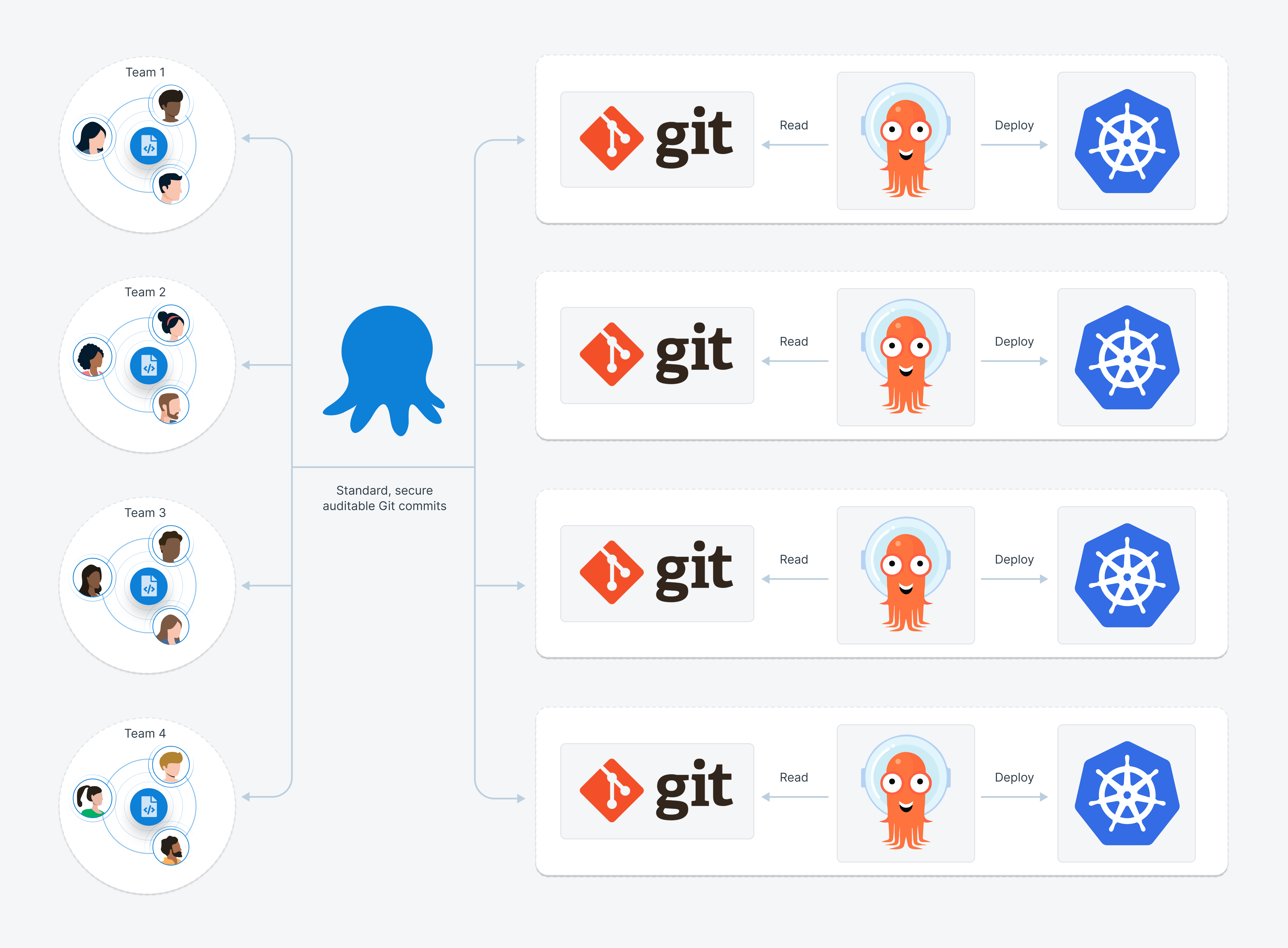
By adding Octopus, you enhance your GitOps deployments by enforcing a consistent approach to Git manifest management across all your teams. If you use Octopus and Argo CD you don’t need to guess what each team is doing to change their Git files. You know exactly what goes into Git, and you also have full visibility into how, when, and by whom all those changes are approved.
A big advantage of Octopus Deploy that is missing in Continuous Integration tools is the concept of the Release. Octopus knows what a release is and has a first class construct for everything that goes inside one. This allows for three significant advantages:
- Octopus Deploy keeps a detailed record of all the files and artifacts that took part in the deployment for any release, even for past ones. This is important for auditing and security purposes. Standard Continuous Integration tools only know what is happening during the actual run
- Octopus Deploy can easily perform rollbacks to previous releases as it has full knowledge on what needs to be done to bring things back to an earlier state. This is critical during incidents when downtime is affected and developers need to go back to the previous version as fast as possible.
- With Octopus Deploy you can fully automate all Git commits, essentially preventing developers from making manual commits. If you know that only Octopus Deploy can commit, security controls are audits are now much easier in your organization.
This is the common theme for doing GitOps with Octopus. Octopus doesn’t replace the powerful GitOps engine that Argo CD implements. But using both tools together allows you to expand your GitOps practices in an enterprise setting that has different requirements about scale, security, compatibility, and auditing.
Application promotion between environments
At its core, an Argo CD application is a bidirectional link between a Git repository and a Kubernetes cluster. Argo CD continuously monitors the Git repository and deploys the application to the cluster. In a large enterprise, clusters are usually grouped by software release lifecycle (QA/Production/Staging).
Developer teams always want to gradually deploy their applications to a sequence of environments that starts with low-risk clusters and ends with the “production” clusters. For companies under strict regulations (e.g. financial institutions, HLS, Manufacturing controls etc.) this is an even more critical process as developers will be blocked from deploying anything to production unless it has been approved first in lower-risk environments.
Argo CD is excellent for deploying to a single Kubernetes cluster, but it doesn’t have any visibility into what this cluster represents and which “environment” it belongs to. By default, Argo CD will deploy a brand new application to a cluster, and it has no capacity to “promote” an application from a previous environment.
A very popular workaround for this problem is when teams choose a special naming convention for their Argo CD applications:
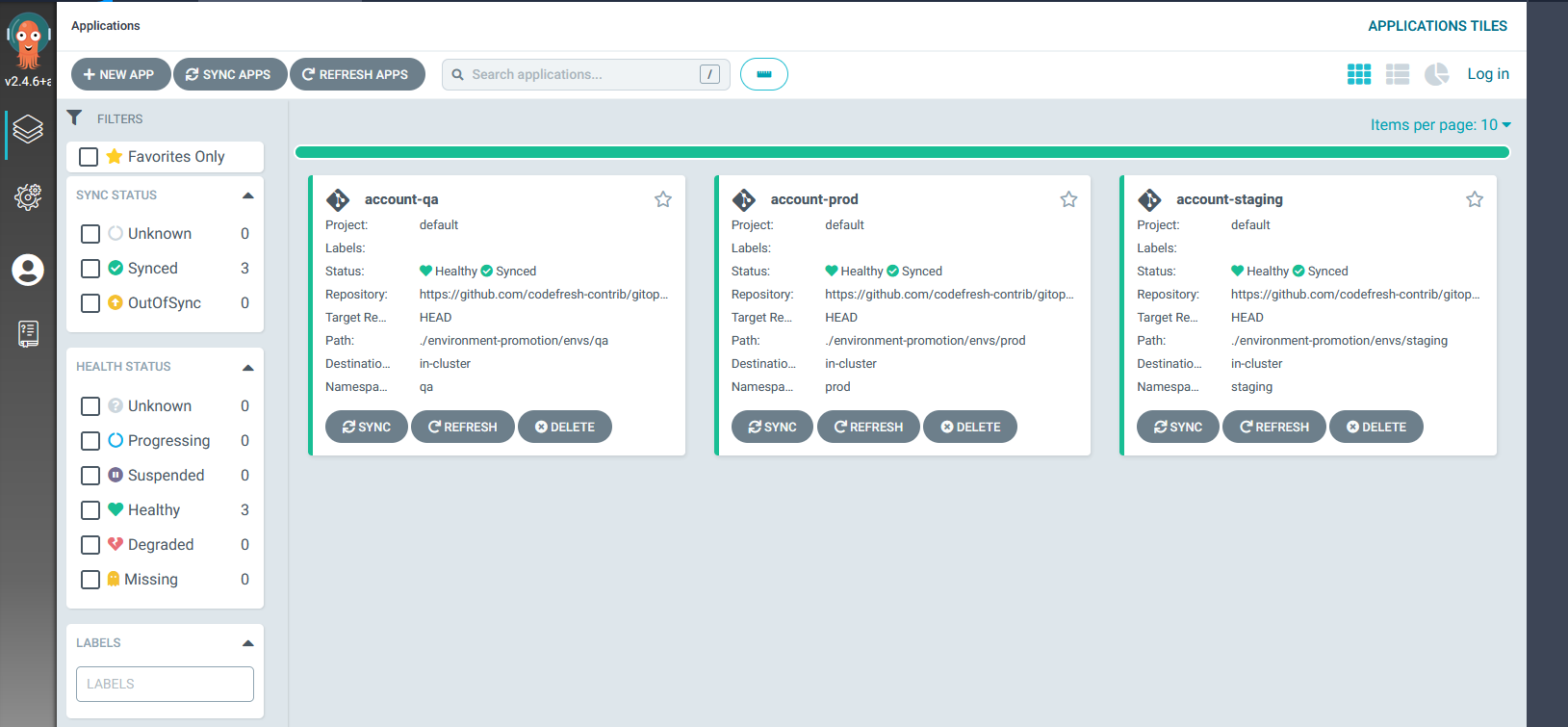
A human administrator who looks at the picture above will understand that they see a single application called “accounts” which is currently deployed to 3 different environments (qa/prod/staging). This information is only available to human users. As far as Argo CD is concerned, these are 3 different and unrelated applications.
This forces a lot of teams to create custom scripts or tools that handle the promotion of developer applications. This is problematic in so many ways:
- Different teams might create different scripts, resulting in effort duplication
- Promotion scripts are always hard to maintain and hard to adapt to new requirements
- Developers are constantly in firefight mode when deployments fail, as they do not understand the differences between environments
- Administrators cannot enforce common security policies and company guidelines across their teams
Octopus Deploy solves this problem entirely by modeling environments on top of Argo CD applications. In addition, you can model promotion processes directly into Octopus and get full visibility on which state each application is in right now. Understanding what is deployed and where the latest changes are is crucial not only during daily operations but also during incidents. Not knowing what your environments have will result in downtime when incidents happen.
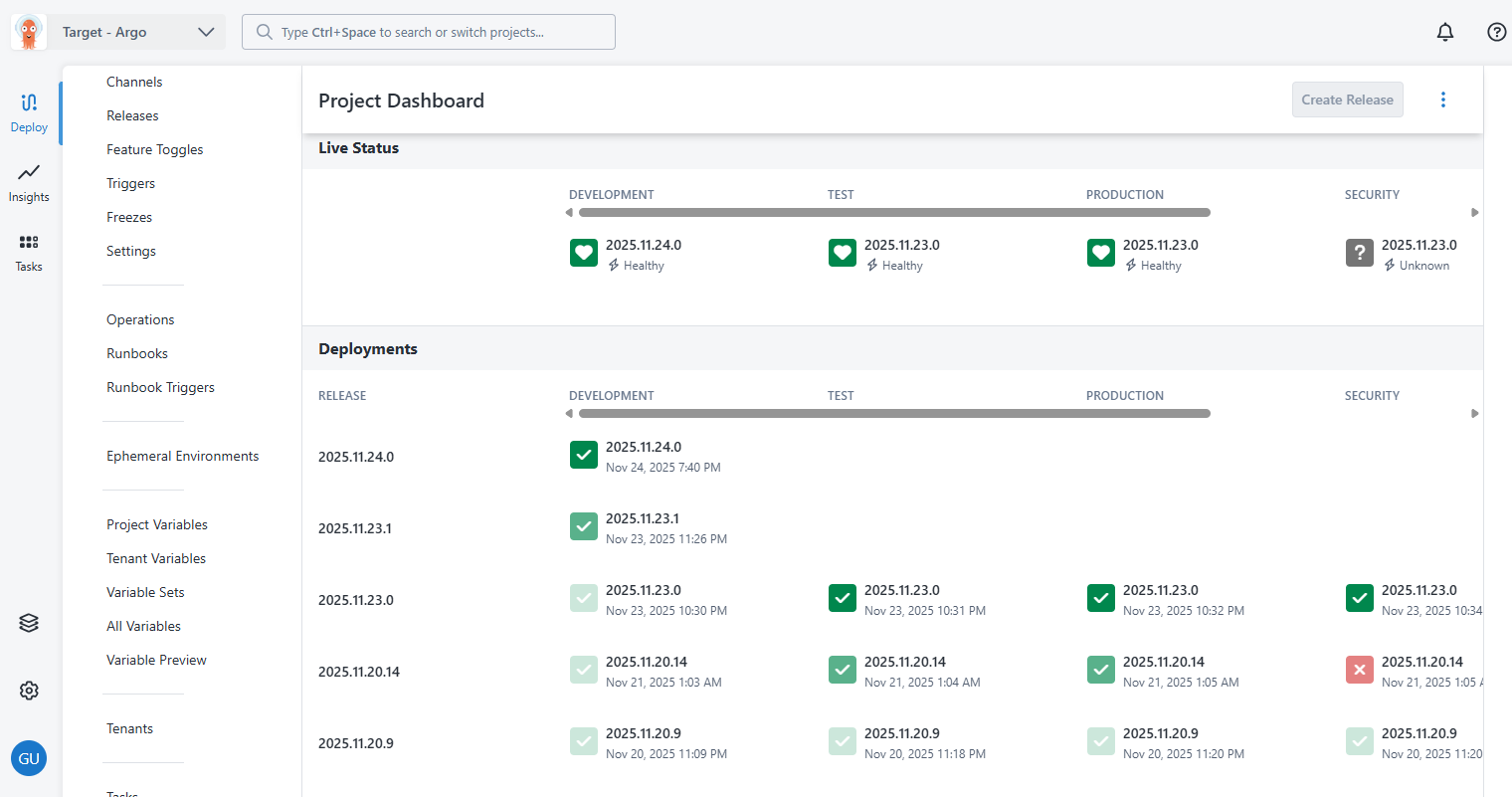
Octopus environments essentially allow developers to promote their applications with less risk, higher confidence, and full visibility.
When an incident happens, all teams always ask the same 2 questions:
- What was the last change/version that was deployed in the problematic environment?
- What is the safe version that we can rollback to, and which environment has guarantees that it is safe to rollback to?
These two questions can be answered in seconds with Octopus Deploy using the environments dashboard.
Security and compliance
Deploying an application to production is always the last step in a lengthy process, which, depending on the nature of the company that uses Argo CD might take from a couple of hours to several days. Sending a new feature to production is important, but it is also critical to be able to reason about:
- How this feature was created
- Who implemented it
- Who approved it
- The security requirements it satisfies
Argo CD knows only the last part of the deployment process. It deploys an application into a Kubernetes cluster without any real knowledge of what features are contained in this release or who created it. Again, this forces a lot of teams to create ad-hoc solutions with custom scripts that function as workarounds, implementing essential enterprise requirements such as manual approvals or correlations with the Continuous Integration phase of a software release.
Octopus Deploy already has built-in support for understanding the whole picture of a software release. Octopus Deploy can also interface with external systems and artifact registries in order to create a full snapshot of the release process in a secure and auditable manner.
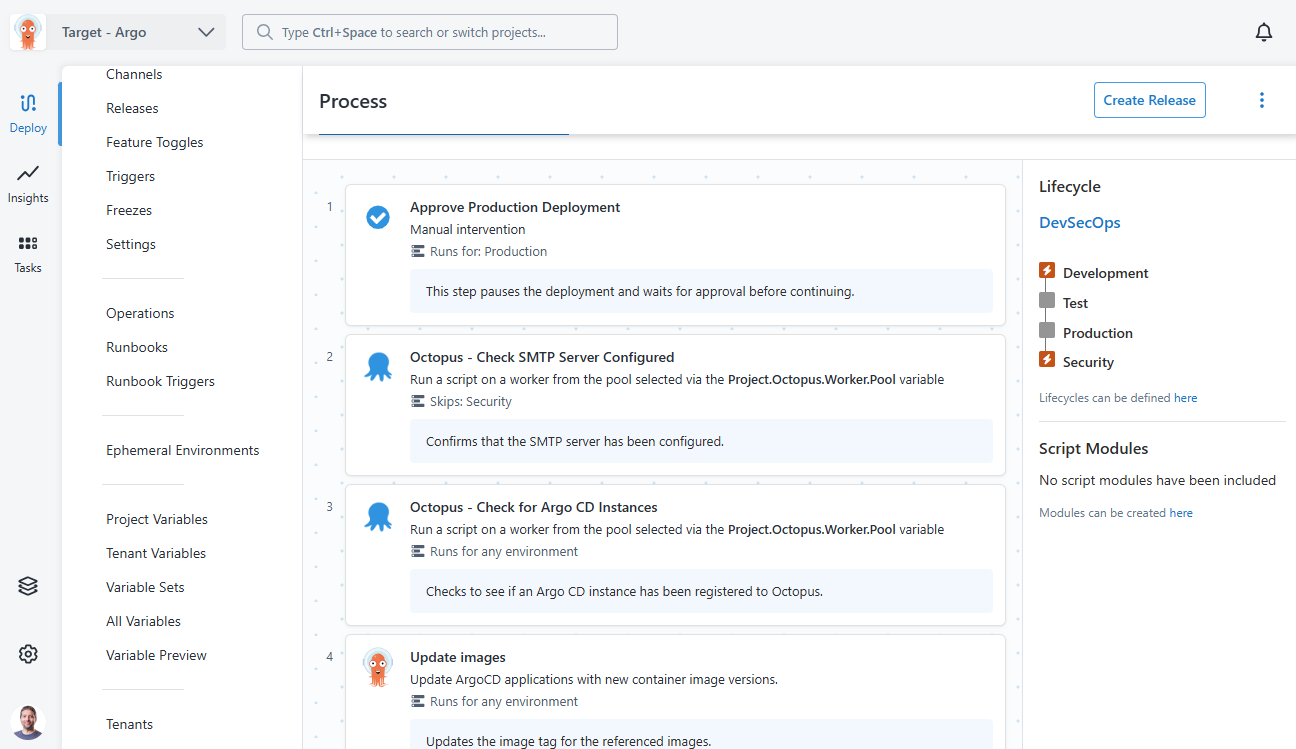
Deployment approvals are a critical part of the software lifecycle, especially for companies that operate under strict legislation (e.g. companies with financial or health data). Argo CD does NOT offer an approval mechanism. While it is possible to perform basic approvals with Git, enterprise organizations often want to integrate existing approval mechanisms in their GitOps workflows.
With Argo CD and Octopus Deploy, you get the best of both worlds. Argo CD implements a powerful GitOps engine, while Octopus handles all the requirements for Enterprise deployments.
Further enforcing the standardization aspect, all Octopus workflows can use Platform Hub templates that result in a secure and controlled workflow process. With Platform Hub your administrators can create and define the approved workflows for how deployment works within an organization. Developers across all teams must then use the approved workflow templates in their own projects. This avoids duplicated effort and custom/ad-hoc deployment processes that might result in downtime or failed security audits.
Developer experience and observability
Helping developers quickly and safely bring their changes to production is vital as this is the only way that new features can reach customers. The time a change needs to reach production is actually one of the DORA metrics and has a direct correlation to the performance of an organization.
While Argo CD has a comprehensive User Interface that system administrators love, developers have entirely different needs when it comes to application promotion.
Some examples of the questions that developers need to answer daily are:
- Which is the last environment that application X was deployed to?
- How many versions is “production” behind “staging” for application Y?
- What was the last software release that was deployed to environment Z?
As we explained already, Argo CD doesn’t model deployment environments. Only Octopus can map business environments (Staging/production, etc) to Argo CD applications. This way, Octopus can quickly answer all these questions in seconds instead of hours.
Octopus is also the best way to show multiple applications from different Argo CD instances in a single dashboard. This way, developers can see aggregated information across the whole organization about what their applications are doing.
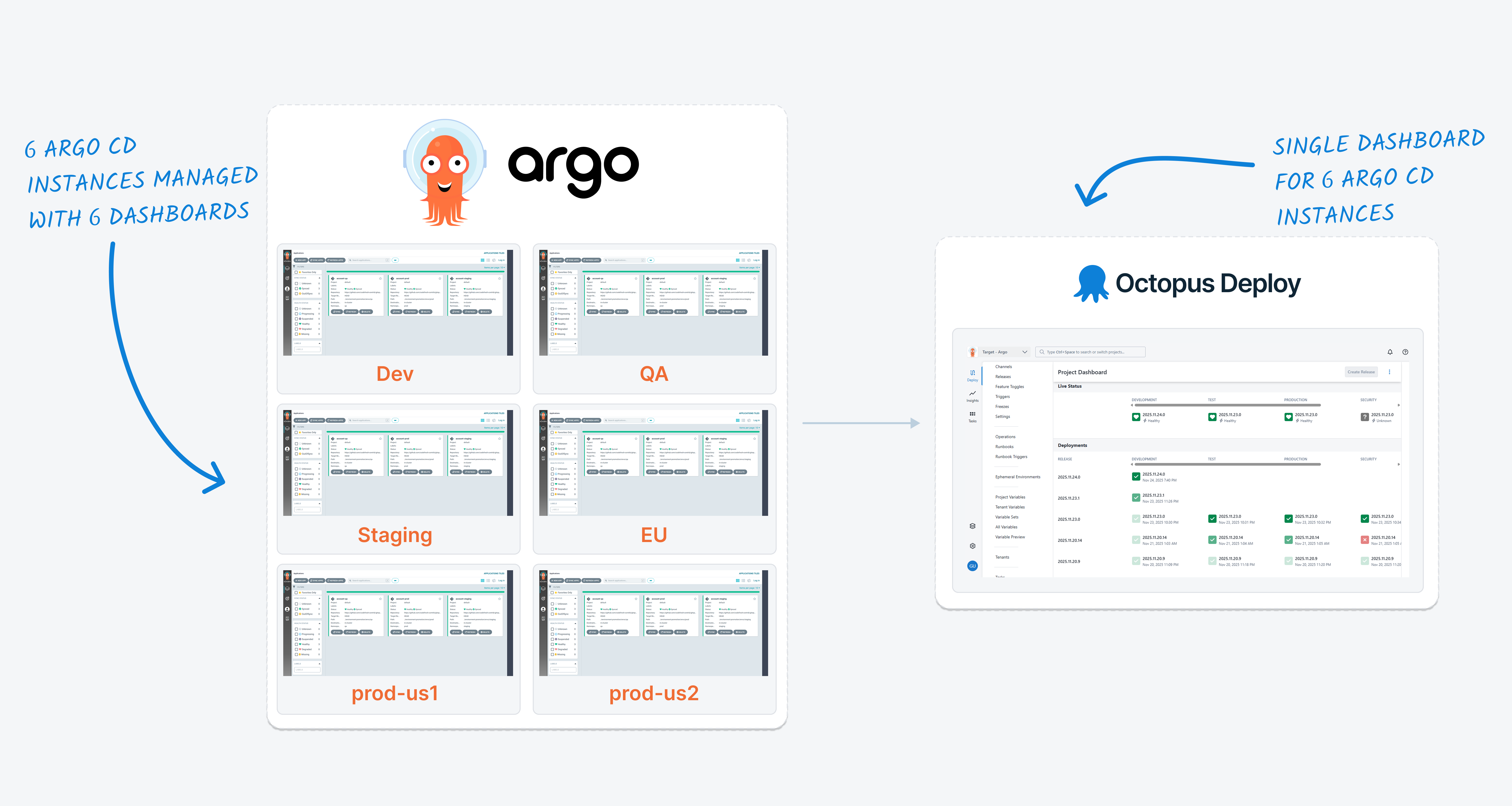
The Octopus Deploy environment dashboard is a single pane of glass that can
- Aggregate applications from different Argo CD instances
- Show which environments are implemented by the different clusters
- Document deployment history on an environment level instead of individual clusters
- Help developers promote applications to different environments in a safe way
- Give an overview of the live status of applications and their logs
Blocking developers from understanding what is deployed where is a crucial problem during incidents. If developers cannot quickly determine which version is deployed in an environment and which version to rollback to, the incident will cause downtime for end users, leading to loss of business and customer dissatisfaction.
Conclusion
By adopting Octopus Deploy for your GitOps process, you can scale Argo CD across a large organization with many clusters/applications/developers. Argo CD still performs the last step of the deployment using its powerful synchronization engine, while Octopus handles all the enterprise requirements that the modern software lifecycle includes, such as approvals, auditing, and compliance.
With Octopus, all developer and operator teams have a single way to deploy to production without any custom scripts or glue code. Octopus standardizes your GitOps workflows by eliminating ad hoc solutions for manifest management that require constant maintenance and are often fragile and complex to update.
At the same time, developers get the full picture of how an application is promoted between different environments and can quickly understand where each application is deployed and what it needs to progress to the next environment. This results in less downtime, especially during incidents when understanding which applications are affecting which environments becomes time-critical.
If you want to know how Octopus can scale your Argo CD installation contact us or browse the documentation.
Happy deployments!
Tags: