
Runbooks provide a way to automate ad-hoc and maintenance tasks, and webhooks allow you to trigger these runbooks from external systems. In this post, you’ll create a sample project that demonstrates how to set up runbook webhook triggers.
Prerequisites
- An Octopus Cloud account. If you don’t have one, you can sign up for a free trial.
- The Octopus AI Assistant Chrome extension. You can install it from the Chrome Web Store.
The Octopus AI Assistant will work with an on-premises Octopus instance, but it requires more configuration. The cloud-hosted version of Octopus doesn’t need extra configuration. This means the cloud-hosted version is the easiest way to get started.
Creating the project
Paste the following prompt into the Octopus AI Assistant and run it:
Create a Script project called "23. Script App with Runbook Webhooks", and then:
* Add a runbook called "Runbook Webhook Trigger" with a script step that echoes "Runbook triggered by webhook".
* Create a webhook trigger for the runbook, using a webhook secret.
The project 23. Script App with Runbook Webhooks will be created, along with a runbook called Runbook Webhook Trigger that contains a script step to echo the message “Runbook triggered by webhook”. A webhook trigger will also be set up for the runbook, using a webhook secret.
For security reasons, the AI Assistant does not accept secrets as inputs, and the webhook secret is generated automatically. You must replace the secret with your own value:
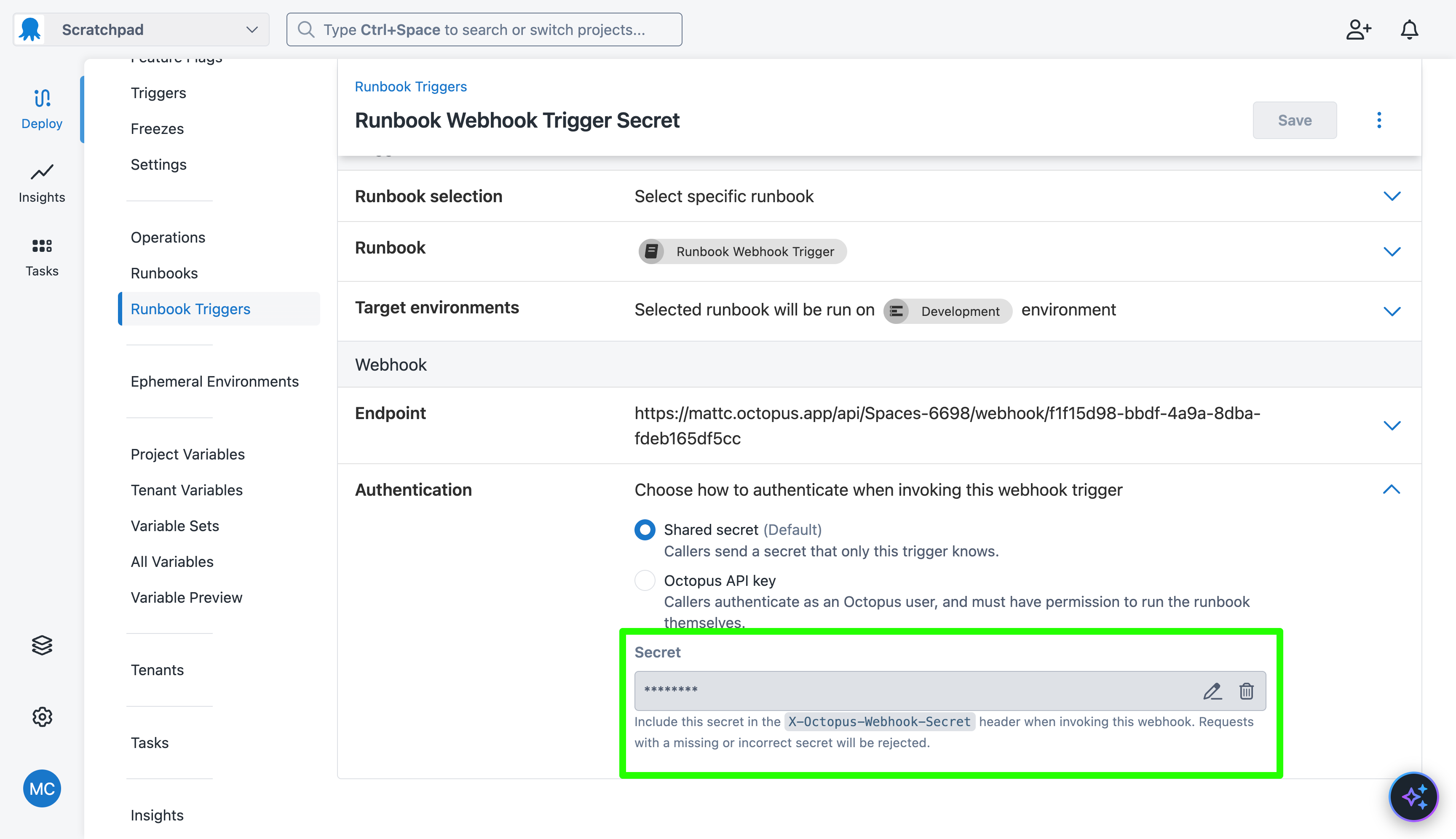
Even if you try to define a secret in the prompt, the AI Assistant will ignore it and generate a new random secret that is immediately forgotten and not displayed anywhere. You must replace the secret with your own value.
Webhooks can also use an Octopus API key for authentication.
Your webhook has a unique URL that you can use to trigger the runbook. This is displayed in the Endpoint section of the webhook trigger.
Use the following curl command to execute the runbook:
curl -X POST -H "X-Octopus-Webhook-Secret: <webhook-secret>" https://<your-octopus-url>/api/Spaces-<space-id>/webhook/<webhook-id>What just happened?
You created a sample project with:
- A runbook called
Runbook Webhook Triggerthat contains a script step to echo a message to the logs. - A webhook trigger for the runbook, using a webhook secret.