
Argo CD Rollouts provides advanced deployment capabilities for Kubernetes, including blue-green, canary, canary analysis, experimentation, and progressive delivery. In this post, you’ll create a sample project that demonstrates how to deploy Argo CD Rollouts using Octopus.
Prerequisites
- An Octopus Cloud account. If you don’t have one, you can sign up for a free trial.
- The Octopus AI Assistant Chrome extension. You can install it from the Chrome Web Store.
The Octopus AI Assistant will work with an on-premises Octopus instance, but it requires more configuration. The cloud-hosted version of Octopus doesn’t need extra configuration. This means the cloud-hosted version is the easiest way to get started.
Creating the project
Paste the following prompt into the Octopus AI Assistant and run it:
Create an Argo CD Rollout project called "24. Argo CD Rollouts"

---

Create a token account called "Mock Token".

---

Create a feed named "Docker Hub" that points to "https://index.docker.io" using anonymous authentication.

---

Create a Kubernetes target called "Rollouts" with the tag "Kubernetes", the URL "https://mockk8s.octopusdemos.com", using the health check container image "octopusdeploy/worker-tools:6.5.0-ubuntu.22.04" from the "Docker Hub" feed, using the token account "Mock Token", and the "Hosted Ubuntu" worker pool. Link the target to the "Development", "Prod 10", "Prod 50", and "Prod 100" environments.
The project 24. Argo CD Rollouts will be created with a Kubernetes target pointing to a mock Kubernetes cluster and a Git Connection providing the credentials for the mock Git server.
The project references a lifecycle called Progressive, which has the following phases (with each phase having a single environment of the same name):
DevelopmentProd 10Prod 50Prod 100
The Argo CD Rollout manifest, sourced from the mock Git repo, will be deployed to the mock Kubernetes cluster to simulate a canary deployment with production traffic for the new revision, starting at 10%, increasing to 50%, and then finally 100% of the traffic.
Deploying an Argo CD Rollout manifest to multiple environments requires some planning:
- The non-production environment,
Development, deploys a new revision of the manifest (either to a non-production namespace likedevelopmentor to a non-production cluster) and has 100% of the traffic going to the new revision with no advanced deployment patterns. This allows teams to test their changes without waiting for all traffic to cut over. - The first production environment,
Prod 10, representing 10% of traffic, also deploys a new revision of the manifest (to a production namespace likeprodor to a production cluster) and directs 10% of the traffic to the new revision. - Subsequent production environment deployments,
Prod 50andProd 100, then promote the new revision to 50% and then finally 100% of the traffic by callingkubectl argo rollouts promote rollouts-demo.
These patterns are modelled in the Argo CD Rollout manifest below, which uses Octopus template syntax to define unique canary rules for the Development environment and the production environments. Also note that the template.spec.containers[0].image property is set to the Octopus project variable #{Project.Image}. The #{Project.Image} variable resolves a second variable #{Octopus.Action.Package[rollouts-demo].Image}, which in turn references the image selected for the release:
apiVersion: argoproj.io/v1alpha1
kind: Rollout
metadata:
  name: rollouts-demo
spec:
  replicas: 5
  strategy:
    canary:
      steps:
        #{if Octopus.Environment.Name == "Development"}
        # Development environment deploys 100% of the traffic to the new version immediately
        - setWeight: 100
        #{/if}
        #{unless Octopus.Environment.Name == "Development"}
        # In non-development environments, we will deploy 10% of the traffic to the new version,
        # then pause for manual approval, then deploy 50% of the traffic to the new version,
        # then pause for manual approval, and finally deploy 100% of the traffic to the new version.
        - setWeight: 10
        - pause: {}
        - setWeight: 50
        - pause: {}
        #{/unless}
  revisionHistoryLimit: 2
  selector:
    matchLabels:
      app: rollouts-demo
  template:
    metadata:
      labels:
        app: rollouts-demo
    spec:
      containers:
        - name: rollouts-demo
          image: "#{Project.Image}"
          ports:
            - name: http
              containerPort: 8080
              protocol: TCP
          resources:
            requests:
              memory: 32Mi
              cpu: 5m
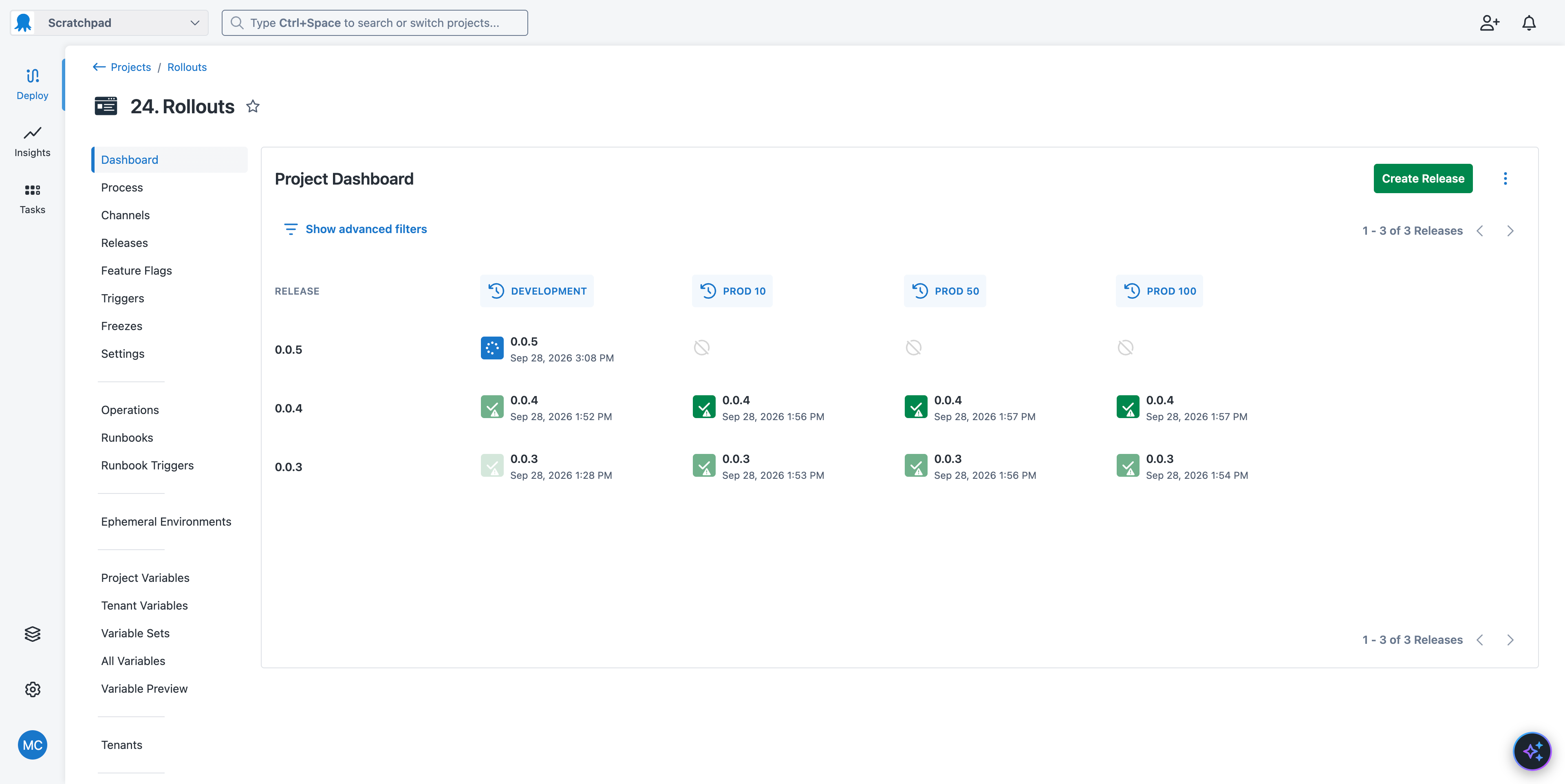
The end result is that new releases reference new image tags, creating new revisions of the rollout manifest. Traffic is then gradually shifted to the new application revision in production, using deployments to the environments Prod 10, Prod 50, and Prod 100 to control each stage of the rollout.
The dashboard visualizes the rollout progress, allowing teams to quickly see the state of the environments:
What just happened?
You created a sample project with:
- Steps that deploy an Argo CD Rollout manifest to a mock Kubernetes cluster using the
Deploy a Kubernetes Manifeststep type. - Steps that promote the Argo CD Rollout to 50% and 100% of the traffic in production using the
Run a kubectl scriptstep type. - A manifest that uses Octopus template syntax to define unique canary rules for the development and production environments.
Next steps
To productionize the sample project, you can:
- Add integration or end-to-end tests after the manifest has been deployed or the traffic has been increased.
- Abort a rollout if integration tests fail by calling
kubectl argo rollouts abort rollouts-demoin aRun a kubectl scriptstep set to run if the previous step fails.