
In July we launched Octopus Feature Flags in Public Preview. Since then, teams have been using them to turn features on and off without redeploying, to roll changes out to a subset of tenants or users, and to keep unfinished work safely hidden on their main branch.
In this post, we’ll share what’s coming next. There are three headlines:
- A redesigned experience for feature flags, featuring rules-based targeting configuration.
- Automated rollouts, so you define the rollout once, and Octopus takes it to 100%.
- General availability. We are moving Feature Flags to General Availability in Cloud soon (removing the Preview labels), and making them available to Octopus Server (self-hosted) customers from release 2027.0
Let’s take a look.
Rules-based configuration
Today, you configure a flag by filling in a form for each environment: which tenants to include, which to exclude, a rollout percentage, a minimum version, and so on. This form started simple, but as we’ve added capabilities it’s become difficult to understand how the fields interact. The relationship between these fields is also fixed, and if your scenario doesn’t fit, you’re stuck.
We’re replacing the form with rules.
Each environment has zero or more rules, and each rule has one or more conditions. A rule matches when all of its conditions are satisfied. The flag is enabled when any rule matches. That’s the whole model. The conditions are the targeting options you already know, but now you can compose them however you like:
- Tenant is or is not one of a list of tenants.
- Tenant has or does not have a tenant tag.
- Context attribute is or is not one of a list of values. This is how you target users by anything your application passes in the OpenFeature evaluation context, like email, region, or license type.
- Version is at least a given release version. Because Octopus knows what’s deployed where, the rule only matches once that version has reached the environment.
- Percentage of tenants, for a progressive tenant rollout.
- Percentage based on targeting key, for a progressive rollout across your users.
Want to release to all of your beta tagged tenants, plus 10% of everyone else, except one customer who’s asked to be excluded? Here’s how that looks:
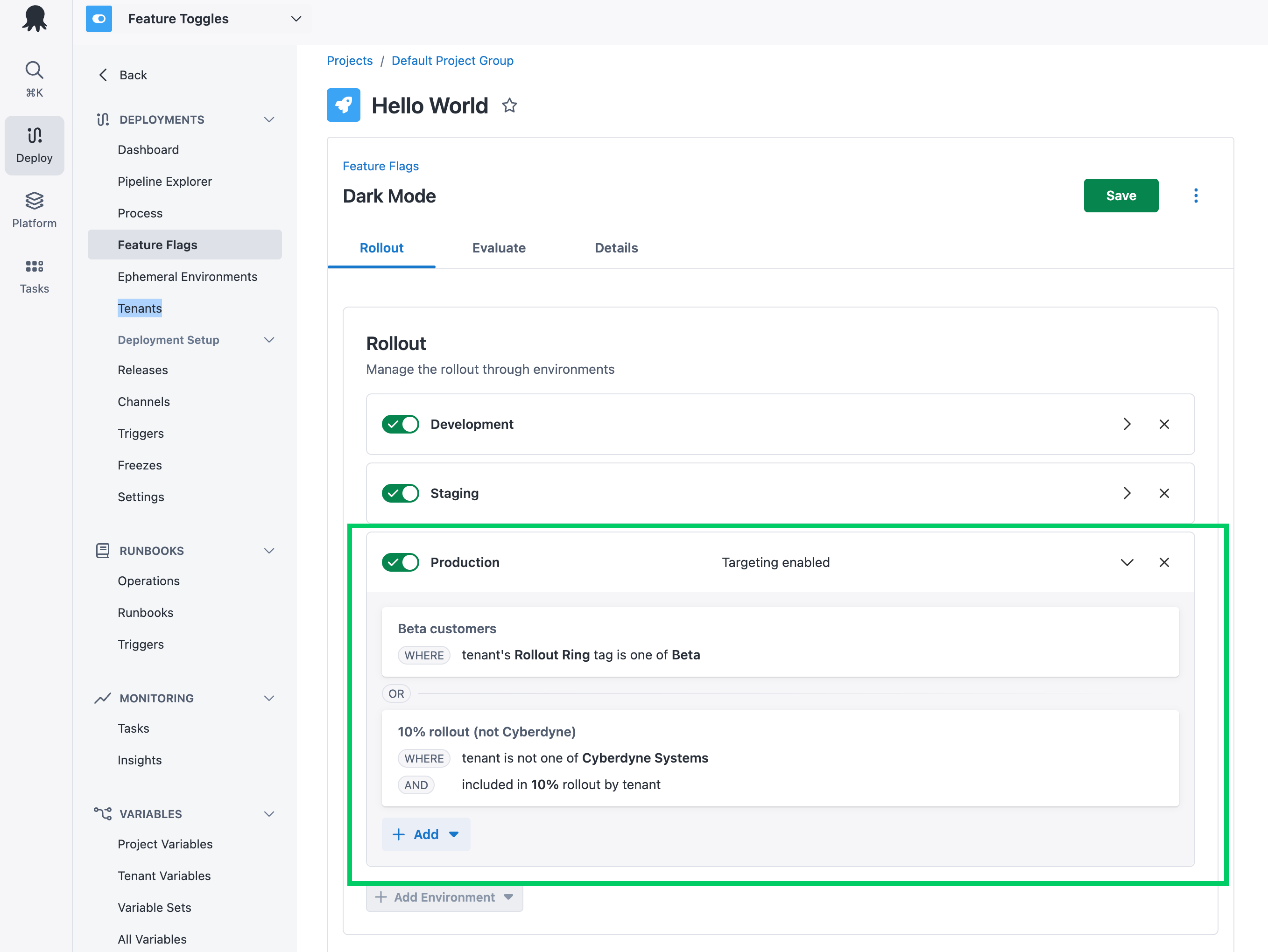
Rules are simpler to explain and more powerful than the previous form-based approach. They’re also the foundation for automated rollouts.
Rules come with a redesigned feature flag page. The Rollout, Evaluate, and Details tabs now sit together on a single page, and when you expand an environment, the rule builder is right there.
What this means for existing flags
Projects with existing flags will display an option to upgrade all of their flags.
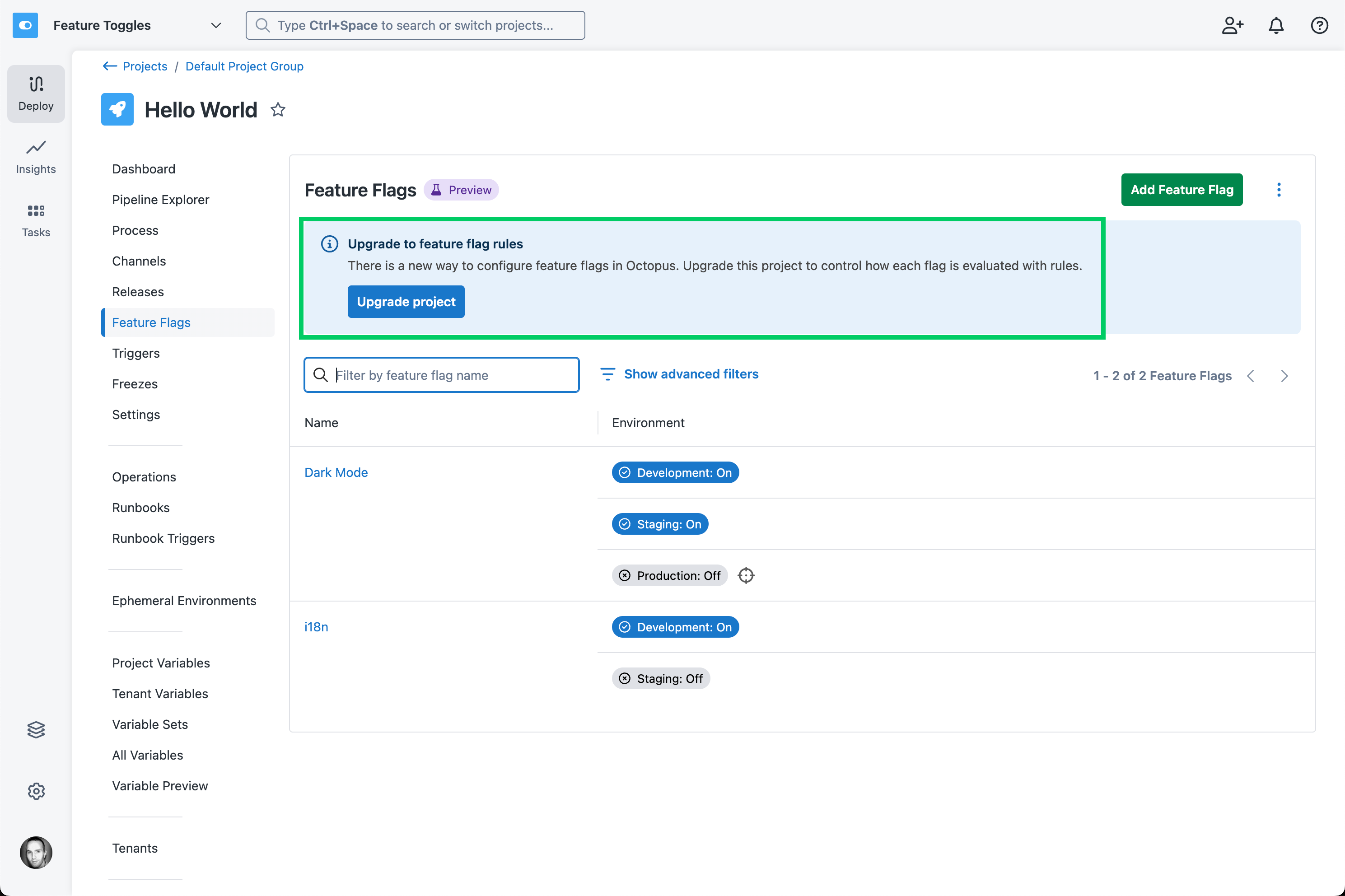
Everything you can express with the current form can also be expressed as rules, so the upgrade won’t change how your flags behave.
You will need to ensure your client SDKs are on a compatible version before upgrading your existing flags, as shown below.
The new SDK versions are backward-compatible, so you can upgrade at any time. There’s no need to wait.
Automated rollouts
Progressive rollouts are the reason many teams adopt feature flags. Release to your staff first. Then to a handful of friendly customers. Then to 10%, then 50%, then everyone. Or whatever your version of this is.
Octopus Feature Flags have always supported this, but there was a catch: you were the automation. Someone had to decide when a change was ready to move to the next group, and remember to come back on Thursday to widen the rollout by updating the flag configuration. The rollout plan lived in someone’s head or on a wiki page, so every team shipped a little differently, and every rollout depended on who was driving it.
With automated rollouts, the plan lives with the flag.
Phases
A rollout is a sequence of phases. Each phase groups one or more rules, and enabling a phase publishes its rules. If you’ve used lifecycles in Octopus, this should feel familiar: lifecycle phases are ordered groups of environments, while rollout phases are ordered groups of rules.
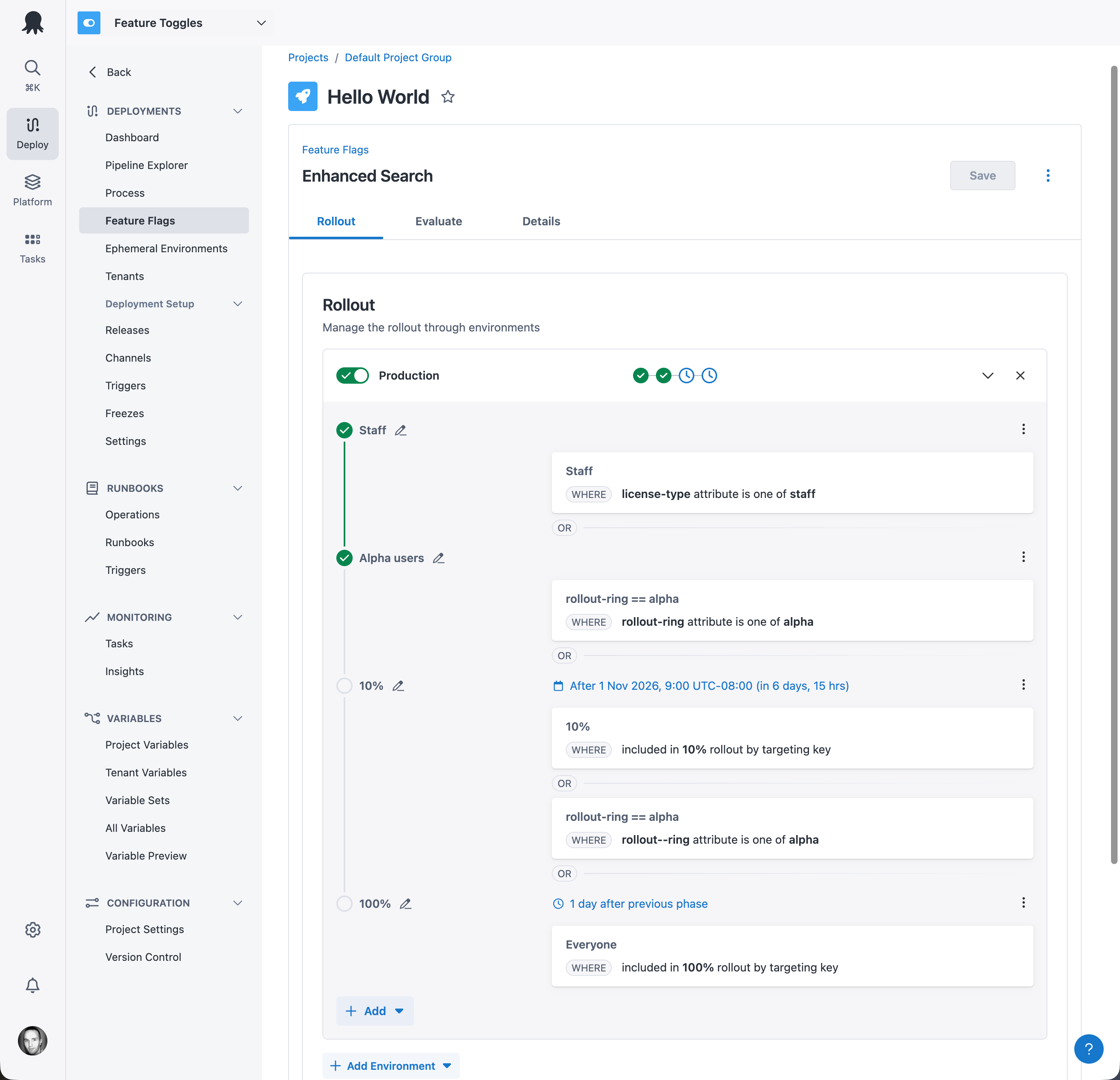
An example rollout might look like this:
- Staff: A rule matching users with a context attribute of
license-typeequal tostaff. - Alpha users: A rule matching users with a context attribute of
rollout-ringequal toalpha. - 10%: 10% of all users, plus all alpha users from the previous phases.
- Everyone: All users.
Triggers
Phases can be enabled manually, or automatically using triggers. A trigger enables a phase either at a specific date and time, or a set time after the previous phase was enabled. You can mix manual and automated phases in a single rollout, so you might enable the first phases by hand and let Octopus handle the rest. In the example above, Staff and Alpha users were enabled manually. The 10% phase is scheduled for 1 November, and everyone gets the feature one day after that.
Once a rollout is underway, Octopus completes it without any further intervention. And you stay in control the whole way. Turn the flag off instantly if something goes wrong, or hold the rollout where it is by removing the trigger from the next phase.
See where every flag is
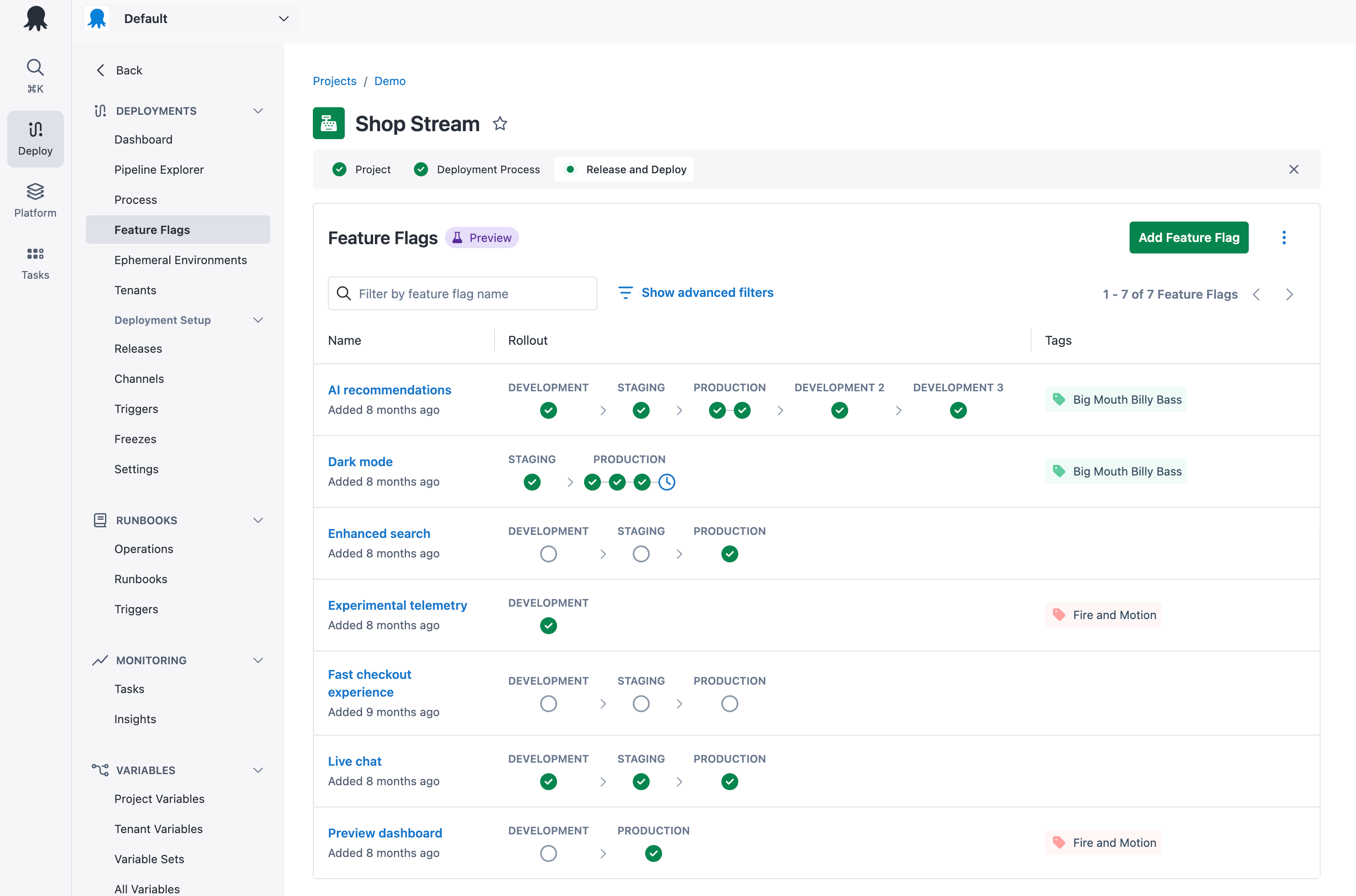
The rebuilt list page shows each flag’s rollout at a glance: which phase is active, what’s scheduled next, and how far the feature is on its journey to full release. No more opening each flag to work out where things are up to.
General availability, including Octopus Server (self-hosted)
Feature Flags are leaving Public Preview and going GA.
For Octopus Cloud customers, Feature Flags are now available in every instance, and we are removing the Preview label. And for the many of you who’ve asked when Feature Flags will come to self-hosted Octopus Server: they’ll be available in Octopus 2027.0.
Rules-based configuration and automated rollouts are rolling out to Octopus Cloud customers right now (we’re rolling them out with Octopus Feature Flags, of course!).
If you’ve been waiting for Octopus Feature Flags to mature before adopting them, now is a great time to start. Feature Flags are available in all license tiers, including the Free tier. They’re built on OpenFeature, so it’s easy to try them alongside your current in-house or commercial feature flag tool. And because switching OpenFeature providers is trivial, there’s no lock-in.
Get started with Octopus Feature Flags today.
Happy deployments!
Tags: