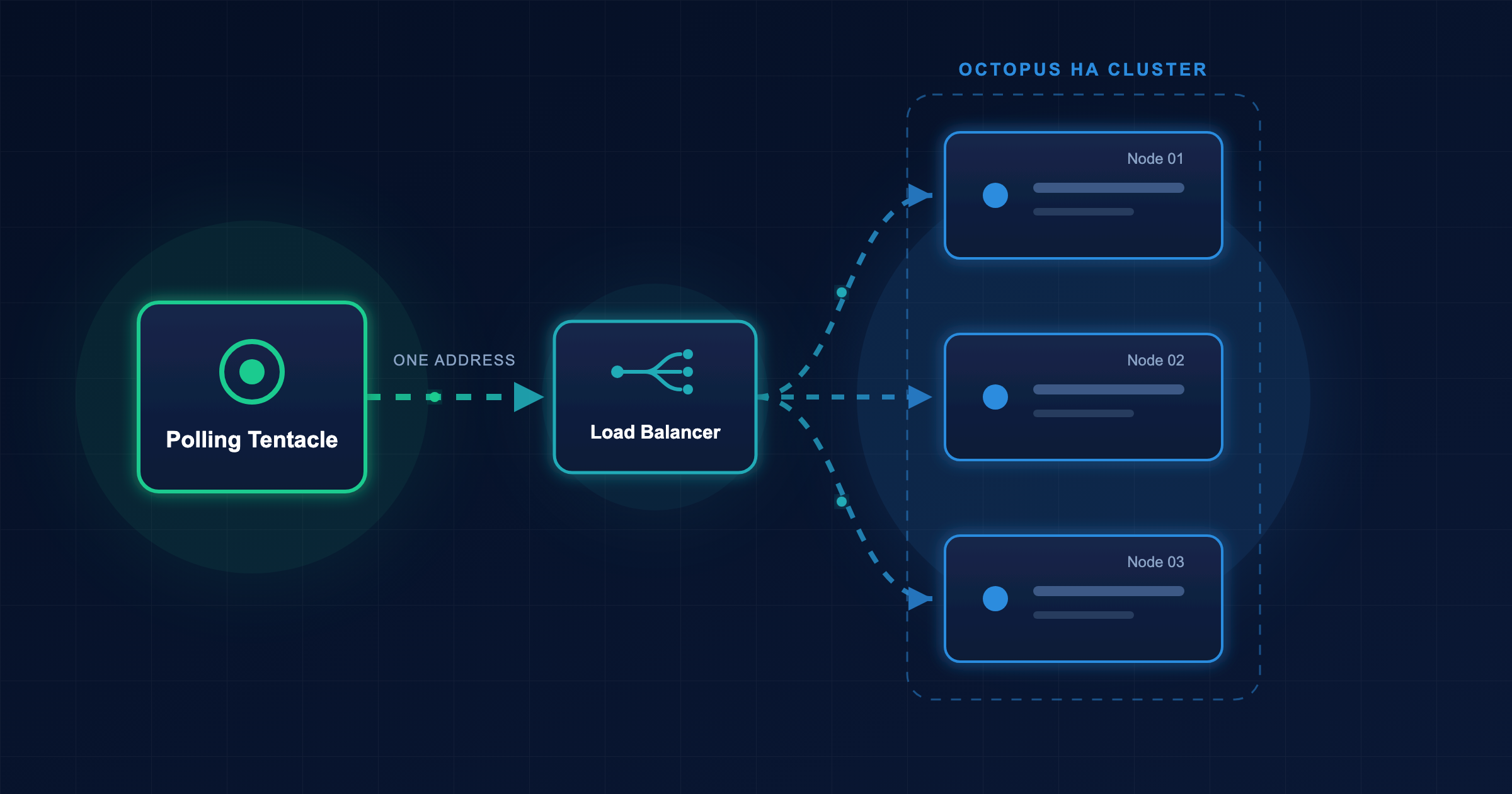

Polling Tentacles no longer need to poll every Octopus Server node in a self-hosted High Availability (HA) cluster. In the next GA release of 2026.4, Polling Tentacles can poll a single address instead.
Polling Tentacles connect out to Octopus Server, so you don’t need to open inbound firewall ports to reach them like you do for Listening Tentacles. That keeps your architecture simpler and more secure. However, if you run Octopus Server across multiple nodes and use Polling Tentacles, every Tentacle has to know about every node. Add a node, and you need to update every Tentacle. Remove a node, and you need to update them all again. With hundreds or thousands of Tentacles, that’s a lot of work just to resize your cluster.
Multi-node support for Polling Tentacles removes that restriction.
Why every Tentacle had to poll every node
A Polling Tentacle connects to Octopus Server and asks, “Do you have any work for me?”
In an HA cluster, any node can pick up a task. When a node runs a deployment that needs a Polling Tentacle, that node holds the work for that Tentacle. The Tentacle must poll that specific node to collect the work.
If the Tentacle is polling a different node, it never sees the work, and the deployment times out.
That’s why the guidance for Polling Tentacles with HA has previously been to configure each Tentacle to poll every HA node.
This would also prevent the use of a load balancer with Polling Tentacles. The load balancer could send the Tentacle to any node, which might not be the one holding its work.
What changed in Octopus Server 2026.4.6909
With multi-node support for Polling Tentacles, the nodes share a single queue of pending requests. The queue lives in Redis, a shared in-memory data store.
When a node needs a Polling Tentacle to perform an action, it puts the request in Redis. When the Tentacle polls a node for work, that node collects the Tentacle’s next request from Redis. The Tentacle’s response goes back through Redis to the node that originally queued the work.
Thus, it no longer matters which node a Tentacle connects to. Each Tentacle only needs to poll one address, and that address can be a load balancer that spreads Tentacles across all the nodes.
This feature has been in use in Octopus Cloud for some time. We’re now making it available for self-hosted customers.
A few details are worth knowing:
- Octopus encrypts messages with your Master Key before storing them in Redis.
- To keep Redis memory usage low, Octopus writes larger files, such as packages, to the cluster shared directory so every node can read them.
- A Tentacle’s Connectivity page now shows communication logs from every active node, not just the node your browser is connected to.
- This change doesn’t affect Listening Tentacles, which Octopus Server connects to directly.
What you need
To use multi-node support for Polling Tentacles, you need:
- Octopus Server 2026.4.6909 or later installed on every node in the HA cluster
- A Redis instance that every node can reach, set up as a short-lived queue rather than a database
- A cluster shared directory that every node can read and write
- A TCP load balancer (optional) in front of the Polling Tentacle port, so your Tentacles only need one address
To get early access before 2026.4 ships, contact support.
Getting started
You enable multi-node support for Polling Tentacles by giving each node the same Redis connection string. You can do this from the command line, with an environment variable in the Linux container, or with the Octopus Deploy Helm chart. The Helm chart can also run Redis and create the load balancer for you.
Once multi-node support for Polling Tentacles is turned on, you can configure Polling Tentacles to connect to one node, all nodes, or anything in between. You don’t have to reconfigure Tentacles straight away, and you can point your Tentacles at a load balancer at your own pace.
The docs for multi-node support for Polling Tentacles walk you through each step.
Conclusion
Now you can add or remove nodes in your HA cluster without reconfiguring every Tentacle.
If you’re thinking about moving to HA in the first place, read how one customer migrated to High Availability one safe step at a time.
Happy deployments!