

Migrating application secrets to the GitOps paradigm is one of the hottest topics for teams adopting Argo CD. Until recently, the Argo CD documentation for secrets management was just a list of secret-related solutions without any clear guidance on which to pick.
With the release of Argo CD v3.x the project has finally taken a clear stance on secret management. Today, the documentation page clearly recommends external secret controllers over manifest generation plugins. At the time of writing, the following solutions are recommended:
We’ve already covered the first two solutions in our previous guides. Today, we’ll complete the trilogy by showing how you can secure your Argo CD secrets with the Secret Store CSI driver.
Easy Mode - Argo CD provides a practical example of Argo CD deployments you can apply to your own Octopus instance:
- Install the Chrome extension
- Run the prompt
Create an Argo CD Manifest Update project called "16. Argo CD Manifest Update" with the slug "argo-cd-octopub-manifest" using a Git Connection called "Mock" with a random username and the allowed repository "https://mockgit.octopusdemos.com/*"
Using an external secret solution
Before we dive into the secret store driver, it’s important to understand the concepts behind GitOps Secrets. Even though in theory there are several different secret solutions, in reality most of them fall under two categories:
- Secret solutions that are implemented by external controllers without any coupling to Argo CD
- Secret solutions that are tied to Argo CD and the manifest generation process
The first category is what the new Argo CD documentation recommends. This is the case where two different tools handle secret management and application deployments with completely different lifecycles.
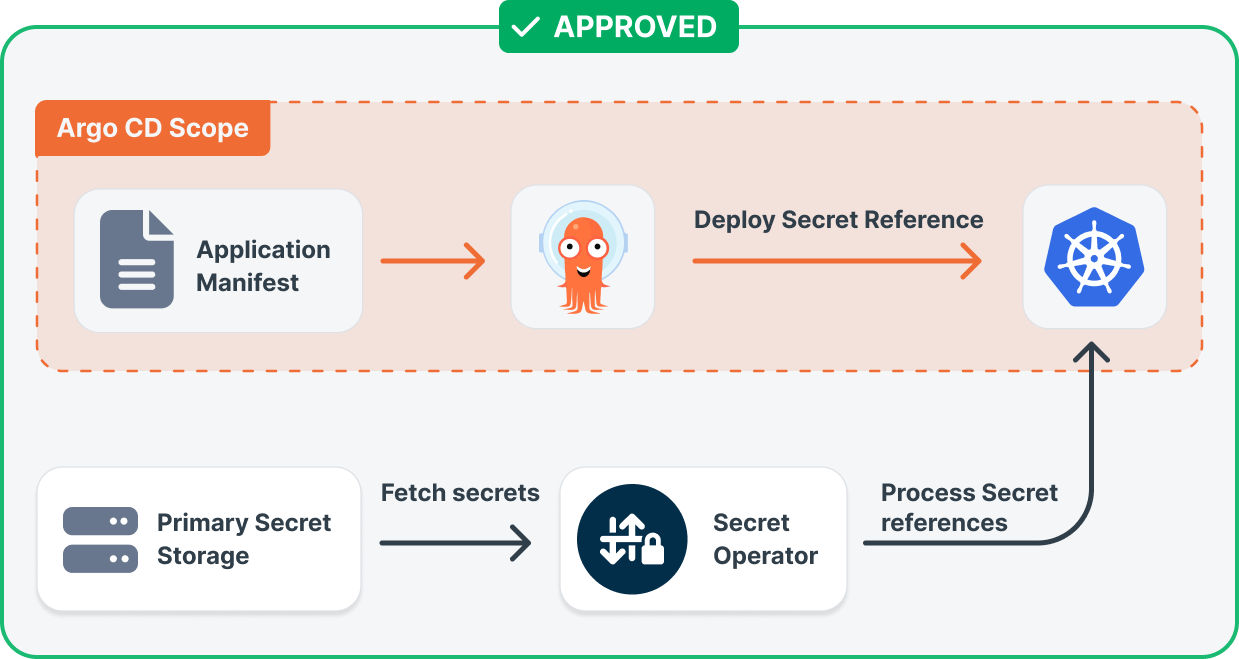
In this setup, Argo CD doesn’t even know what the real secret values are. It deploys the application with several secret references/pointers. An external secret operator is then responsible for converting secret references into real secrets. Each tool does what it does best and more importantly, any secret rotation process doesn’t need application re-deployments or sync operations in Argo CD.
On the other hand, we have secret solutions that are tied to Argo CD, either in the form of plugins or any other tools that modify manifests in place when a sync operation takes place. These are not recommended by the Argo CD team.
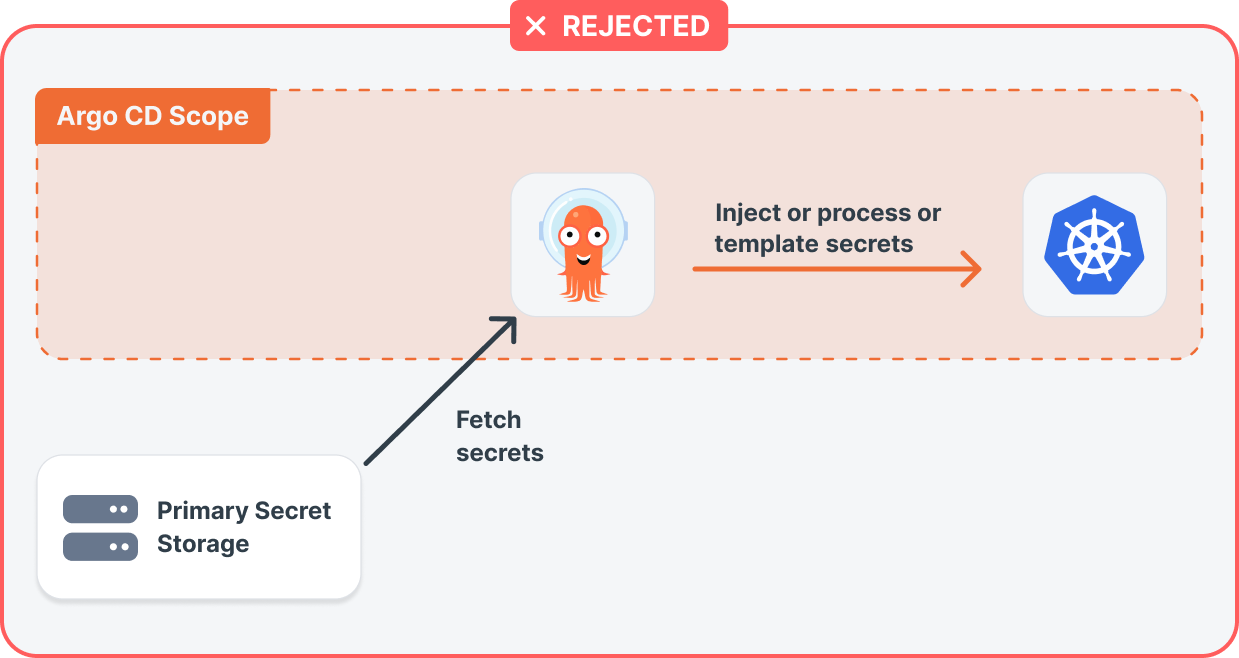
Having a secret solution tightly coupled with Argo CD forces Argo CD into the realm of secret management. Not only does it make Argo CD aware of the actual secret values, but any kind of rotation needs to pass through Argo CD and its synchronization process.
The secret store CSI driver is a solution that follows the first approach and thus enjoys the implicit approval from the Argo CD team.
Avoiding Kubernetes secrets by mounting files directly on pods
If you have read our previous guide or you already know how the external secret operator works, you might wonder what’s the advantage of using the Secret Store CSI driver. At first glance, both approaches work in a similar way
- Both solutions are decoupled from the Argo CD sync process
- Both fetch secrets from an external secret source and bring the secrets into the Kubernetes cluster
- Both use a secret pointer/reference CRD
- Both support mounting secrets as files on the workload pods
- Both can automatically refresh the files when a secret changes
The biggest difference between them is that the CSI driver does not use Kubernetes secrets.
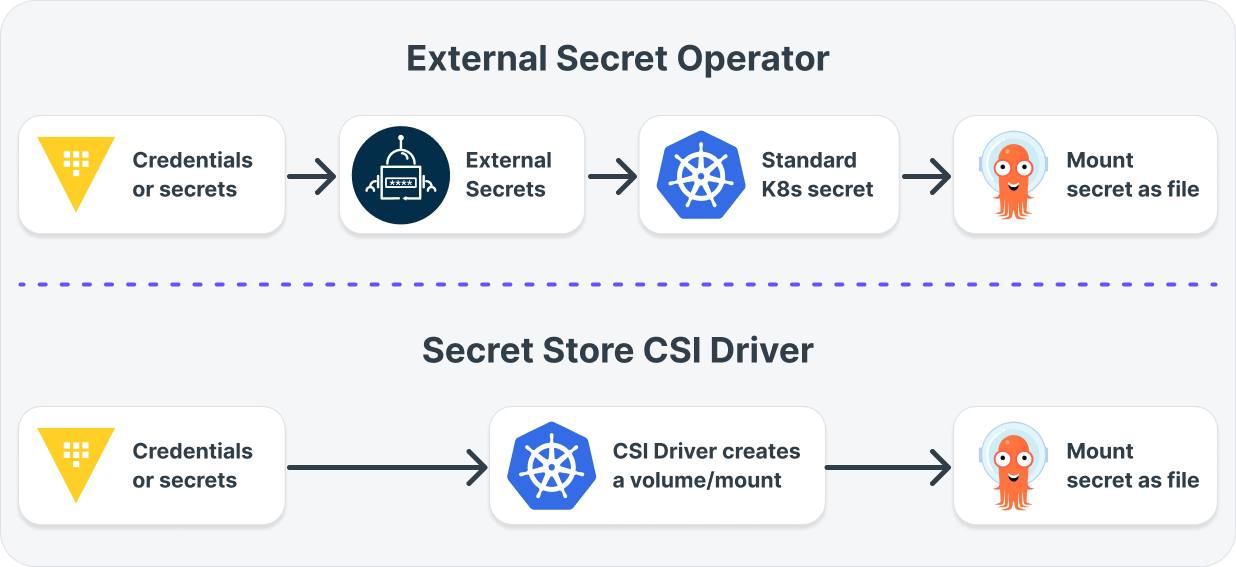
The External Secret Operator always uses Kubernetes secrets, which are then mounted as files using the standard Kubernetes volume mechanism. The CSI driver completely bypasses this step and mounts the secrets directly as files without any Kubernetes secrets on the cluster.
Whether this feature is important to you depends on your security policy. Several companies have different security constraints and requirements that affect how their workloads run in a Kubernetes cluster. If part of the security policy is to never have Kubernetes secrets anywhere, then the CSI driver is a better option for you.
The end result in both cases is the same, the secrets reach your Argo CD application as files and are automatically rotated if the secret provider changes them. In all cases, we assume that your application is loading its secrets from files and not environment variables.
So if you already have a working solution with the External Secret Operator and your security team is happy with it, there’s no real technical reason to adopt the CSI driver.
The example secret application
You can find the source code and Kubernetes manifests for our application in the argocd-csi-secret-store-example repository on GitHub.
It’s a very simple application that reads a database connection credential from /secrets. There’s no real database of course. The application just prints its own secrets so that you can see the flow of information from the secret store to the Kubernetes pods
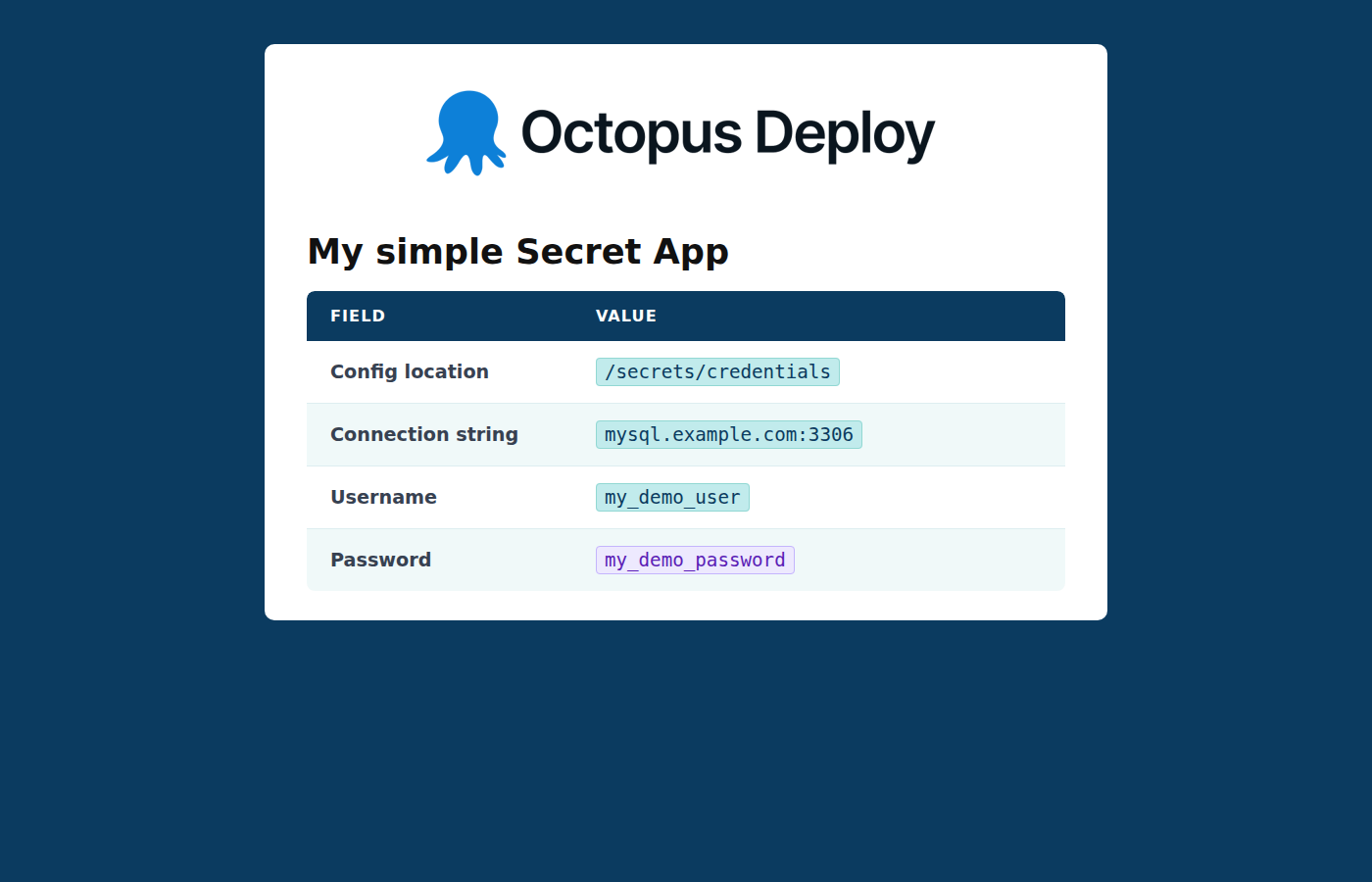
Even though this is a demo application, it has several important characteristics that help with secret management.
- It loads secret information from files and not environment variables.
- It shows where it loads secrets from. This makes debugging very easy.
- It automatically reloads secrets if they change. We’ll see this later in the secret rotation scenario.
Installing HashiCorp Vault and the CSI secret store driver in your Kubernetes cluster
Let’s start by deploying our “infrastructure” applications first. You can install Vault using the public Helm chart.
argocd app create vault \
--project default \
--repo https://helm.releases.hashicorp.com \
--helm-chart vault \
--revision 0.28.0 \
--sync-policy auto \
--sync-option CreateNamespace=true \
--parameter server.dev.enabled=true \
--parameter injector.enabled=false \
--parameter csi.enabled=true \
--dest-namespace vault \
--dest-server https://kubernetes.default.svc
Just for this demo we install Vault with server.dev.enabled so that we don’t deal with sealing/unsealing. The default admin token is “root” and we’ll use it later to log in to the web UI. We also pass csi.enabled=true for CSI integration.
In a production environment, Vault should be handled by your security team and have proper credentials. We create applications using the Argo CD CLI for simplicity here. In a production setup, all applications should be stored in Git. See anti-pattern 2 in our comprehensive Argo CD guide.
The next step is to create the credentials that the application is using. In this contrived example, it’s database credentials for an imaginary MySQL instance.
You can do this from the vault CLI or from the Web interface:
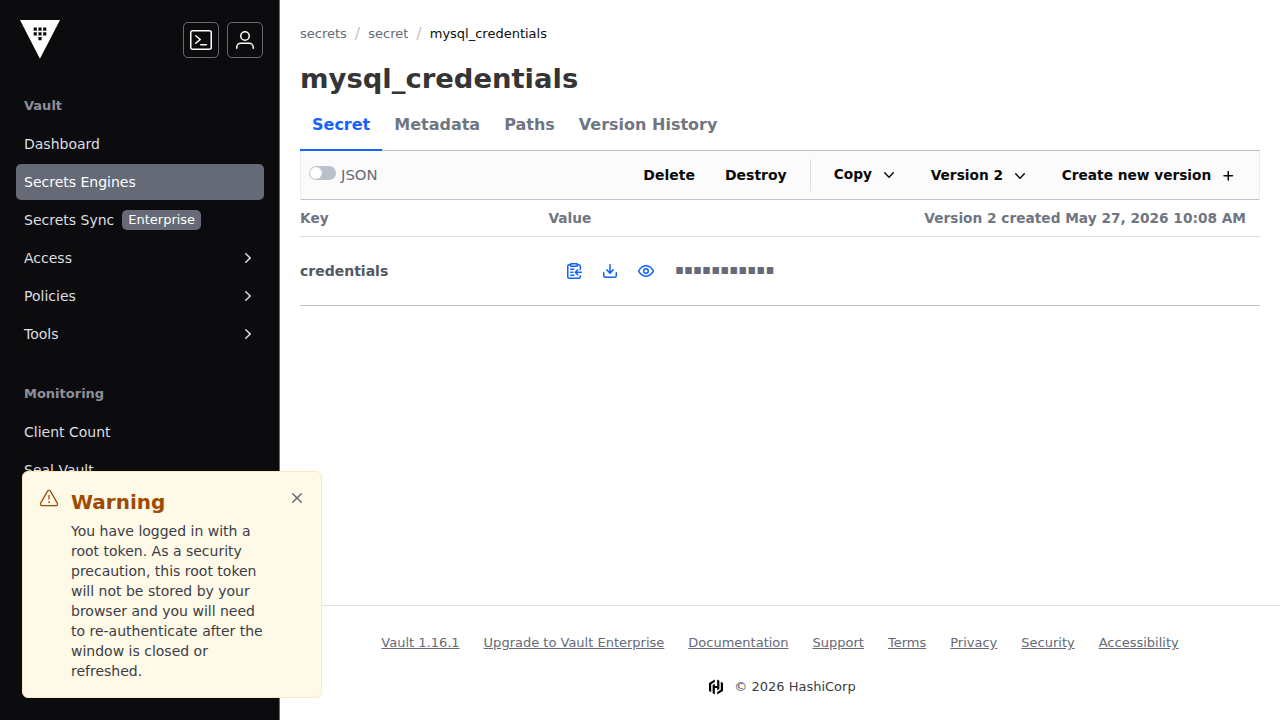
This concludes the “demo” installation for HashiCorp Vault. As a reminder, Vault is just one of the many providers supported by the CSI driver.
Fetching external secrets from HashiCorp Vault
With the vault installation ready, we can now install the CSI driver. This step depends on how you create your Kubernetes cluster and on any Infrastructure-as-Code tool you already use.
See also the official installation instructions.
The last piece of the puzzle is to actually set up the integration between the CSI driver and vault. This happens via a dedicated SecretProviderClass. See the example in our application repository.
You can easily deploy it like any other Argo CD application:
argocd app create vault-secret-store \
--project default \
--repo https://github.com/kostis-codefresh/argocd-csi-secret-store-example.git \
--path "./manifests/vault-integration" \
--sync-policy auto \
--dest-namespace default \
--dest-server https://kubernetes.default.svc
Notice that, like the external secret operator example, Vault is set up to trust the Kubernetes cluster it is running on. There’s no other token or secret stored anywhere (either in Git or the application itself)
Everything is ready now regarding secret management. Vault is running, and the CSI driver connects to it to fetch secrets.
Passing secrets as normal files without Argo CD involvement
Finally, let’s deploy our application. It’s very similar to the one we used in the External Secrets Operator post. It’s a very simple Web application that prints a “secret”. Again, you can do this with Argo CD and verify that everything is synced and healthy:
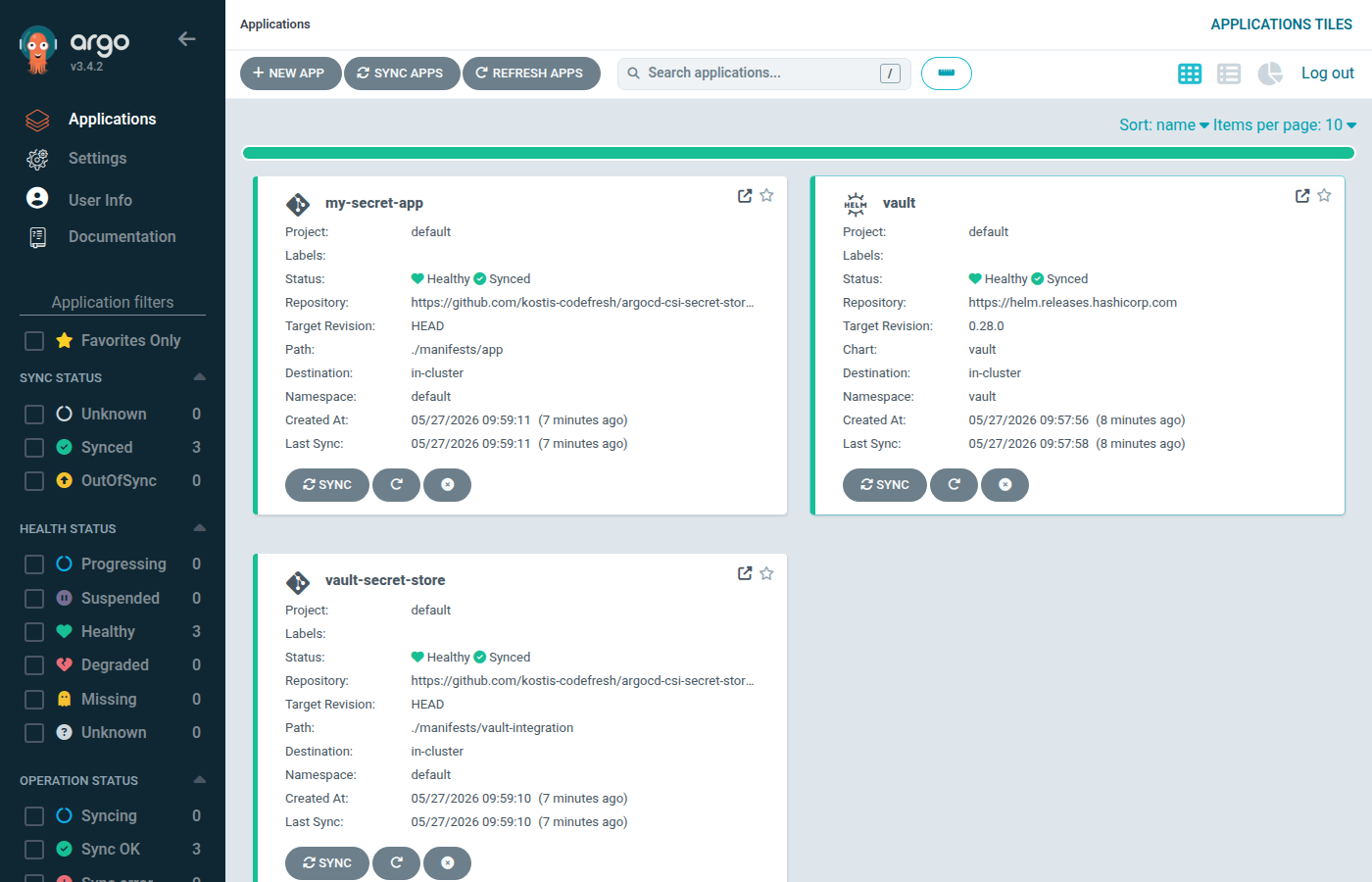
Now if you visit the Web UI of the application (using port forwarding or any other networking method), you’ll see the full result. An application reading secrets from Vault without any hardcoded token anywhere.
This is how the whole process works:
- Vault is running inside Kubernetes and also has a trust relationship with the same cluster.
- The CSI driver is also active on the same cluster and can read secrets from Vault.
- The secrets are mounted directly as files under /secrets.
- The application is just reading files without any knowledge of how/where these secrets are stored.
The main advantage of this setup is security and simplicity:
- There are no Kubernetes secrets in the cluster
- There are no application tokens that are used for vault access
- The source code of the application just reads files at /secrets
- The communication between the vault and the CSI driver is transparent to the application
We’ve now explained the initial deployment of the application. But what happens when a secret needs to be rotated?
Refreshing secrets without restarts and any Argo CD sync operations
The Secret Store CSI driver has a similar capability to the external Secret Operator for automatically refreshing secrets without application restarts. This means that you can change a secret value, and if the application is correctly wired it can auto-reload the secret on its own.
We can test this scenario easily by changing the secret values in Vault (using the CLI or the Web interface).
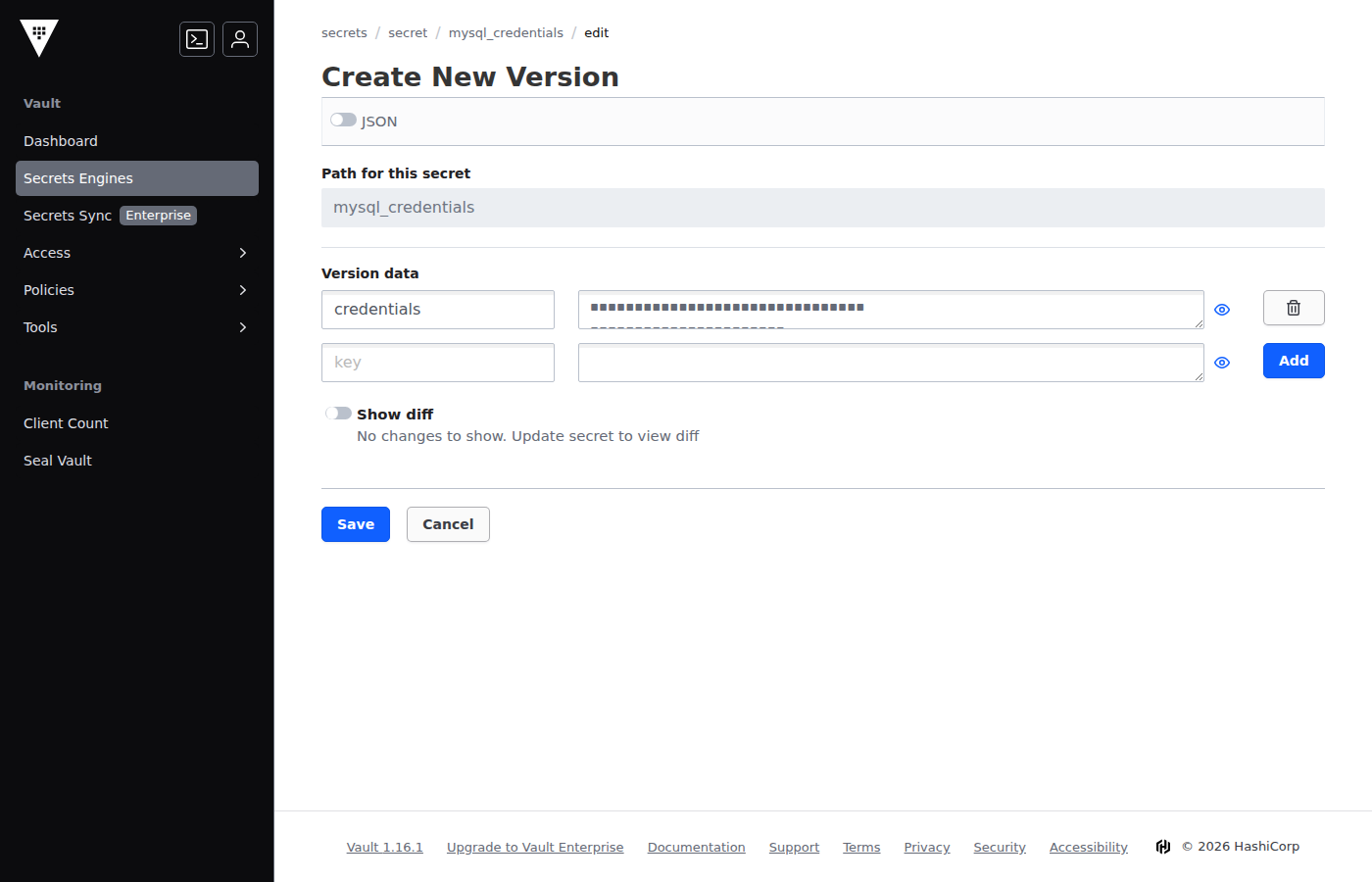
After the secret changes in the vault, the Secret store driver detects it (the refresh period is configurable) and can automatically update the secret’s file contents in the mounted folder.
For the application, everything is transparent. The source code just sees a file change on the filesystem. Our example application is already configured correctly to automatically reload secrets on the fly.
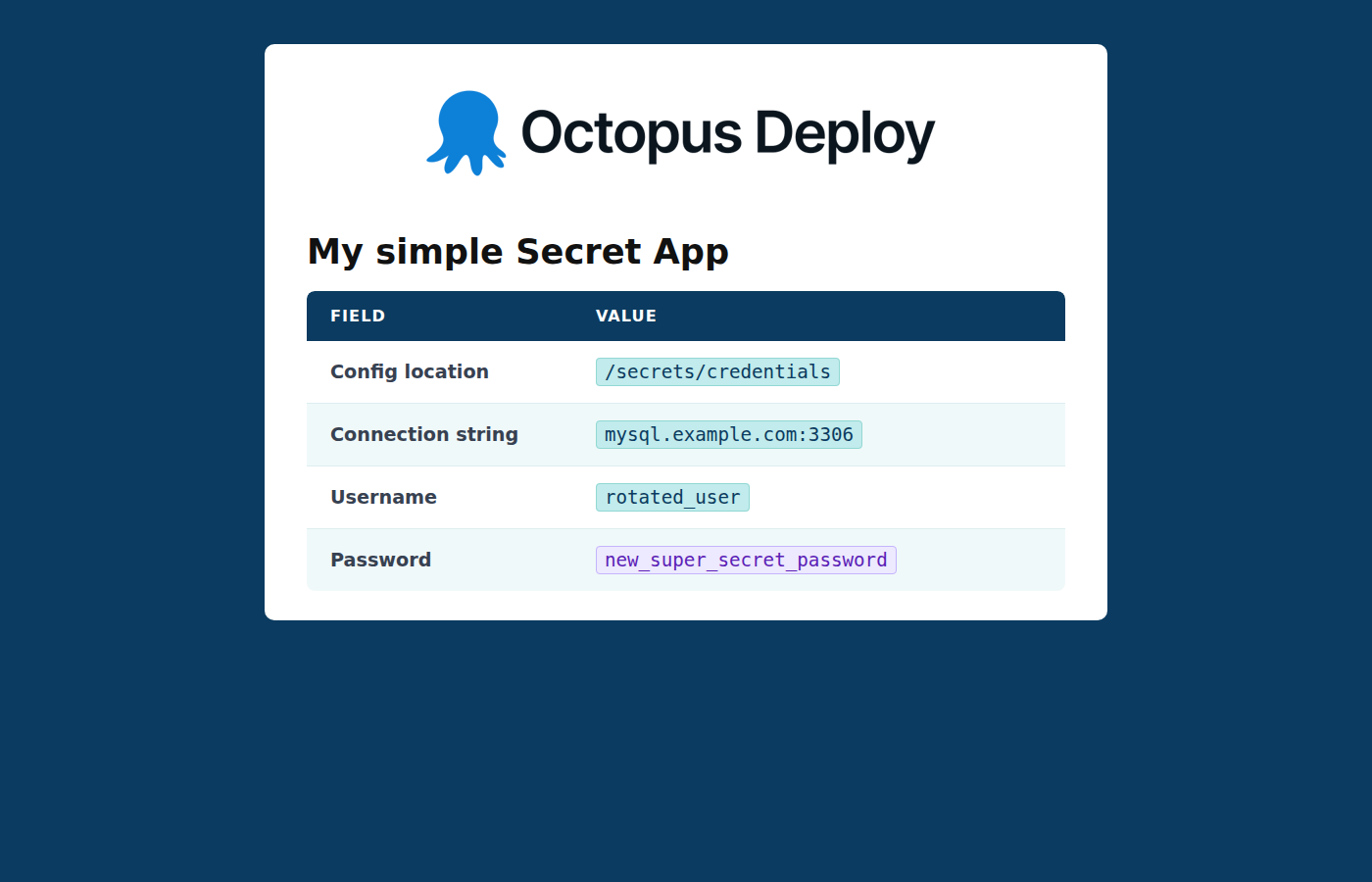
Secret rotation works with zero effort and without any involvement from Argo CD. No sync operation is required, or killing pods manually. One of the biggest challenges in a big organization when it comes to secret rotation is not only understanding which applications use a specific secret, but also how exactly to make the applications “see” a secret change.
With the CSI Secret store driver, secret rotation is straightforward. There’s no need to hunt down individual applications for restarts or missing an application that was never part of the rotation process.
If your application can’t refresh secrets on its own, you can use any external controllers such as Reloader to achieve the same result. The CSI Secret store driver can be configured to use Kubernetes Secrets as a configuration option. Secret rotation can then follow the traditional process where you must restart applications in order for the new secret to take effect.
Conclusion
In this guide, we’ve explained how to use the CSI Secret driver for secret management of Argo CD applications. We’ve seen how you can rotate secret values without any sync operations or application restarts.
We’ve now covered the full trilogy of how to handle secret management with Argo CD applications. The updated Argo CD documentation now has a clear recommendation, and there’s a comprehensive guide for each one of them
- Secret Store CSI driver (this post)
- External Secret operator (previous post)
- Sealed Secrets controller (previous post)
If you need help in your Argo CD onboarding process or just need advice on how to improve your Argo CD promotion workflows, check out our Enterprise Argo support offering.
Happy deployments!
Tags: