In vanilla Argo CD, “promoting to production” is really just editing a YAML file in a different folder and hoping you got it right. You bump an image tag in a production overlay, commit, and trust that what you just wrote matches what you verified in Development.
This is great until an auditor asks, “Who promoted this, and when?” or an incident traces back to a tag nobody meant to change.
Argo CD is excellent at keeping a cluster in sync with Git, but it has no concept of a release, i.e, no single, frozen artifact that moves from one environment to the next under policy.
In this guide, you will connect Argo CD to Octopus Deploy and turn promotion into a governed release, using the same immutable snapshot to move from Development to Production, gated by approval.
The Audit Stream and connection reuse the setup from our EKS connection walkthrough, so this article stays focused on promotion.
Easy Mode - Argo CD provides a practical example of Argo CD deployments you can apply to your own Octopus instance:
- Install the Chrome extension
- Run the prompt
Create an Argo CD Manifest Update project called "16. Argo CD Manifest Update" with the slug "argo-cd-octopub-manifest" using a Git Connection called "Mock" with a random username and the allowed repository "https://mockgit.octopusdemos.com/*"
Why “promotion” is hard in vanilla Argo CD
Argo CD treats each Application as an independent unit. The dev install of your app and the production install are two separate Applications with no codified relationship between them. Nothing in Argo CD knows that “web in production” should receive exactly what “web in dev” was verified with.
Similarly, depending on your organization or team, promoting to an environment could mean a separate namespace or an entirely new cluster, both of which Octopus Deploy can handle.
That fragmented trail is slow and painful to reassemble at exactly the moments you need it most. Like when an auditor asks who promoted what and when, or when you are mid-incident trying to work out what changed.
Whereas, what you want is a single, frozen release that moves through environments under governance: verified once in Development, promoted unchanged to Production, with the who and when captured automatically.
That leaves two do-it-yourself options for promotion, and both are ad-hoc:
- Hand-edit the image tag in each environment’s overlay folder, commit, and let Argo sync. This is fast, but there is no record of intent, no gate, and nothing stopping a typo from shipping a different tag to Production than the one you tested.
- Script a pull request per environment. This is more controlled, but now your promotion logic lives in CI YAML and shell, reinvented per team, drifting as the estate grows.
Whereas, what you want is a single, frozen release that moves through environments under governance: verified once in Development, promoted unchanged to Production, with the who and when captured automatically.
Prerequisites
This walkthrough builds on the cluster and Octopus connection from the EKS connection post. You do not need EKS specifically, but you do need these pieces in place before the promotion steps make sense:
- An Octopus Deploy instance with the Argo CD integration (Octopus Cloud or self-hosted). This is where the project, lifecycle, and release live.
- A Kubernetes cluster you can install into. A local kind cluster is enough. Because the Octopus gateway dials outbound, no ingress or public address is required.
- Argo CD running in that cluster, connected to Octopus through the gateway. If you followed the EKS connection post, reuse that same cluster and its gateway connection. If you are starting fresh, the next section installs Argo CD and registers the gateway from scratch.
kubectl,helm, and theargocdCLI installed locally.- A Git repository for your manifests with Kustomize overlays per environment (the demo uses a public GitHub repo), plus a Git credential in Octopus that can push to it.
The architecture setup
For this demo, we’re aiming for a single Kubernetes cluster with two namespaces that serve as environments, dev and production, each with its own Argo CD Application.
Octopus owns the release and promotion process, and Git remains the source of truth, while Argo CD applies manifests to the cluster.
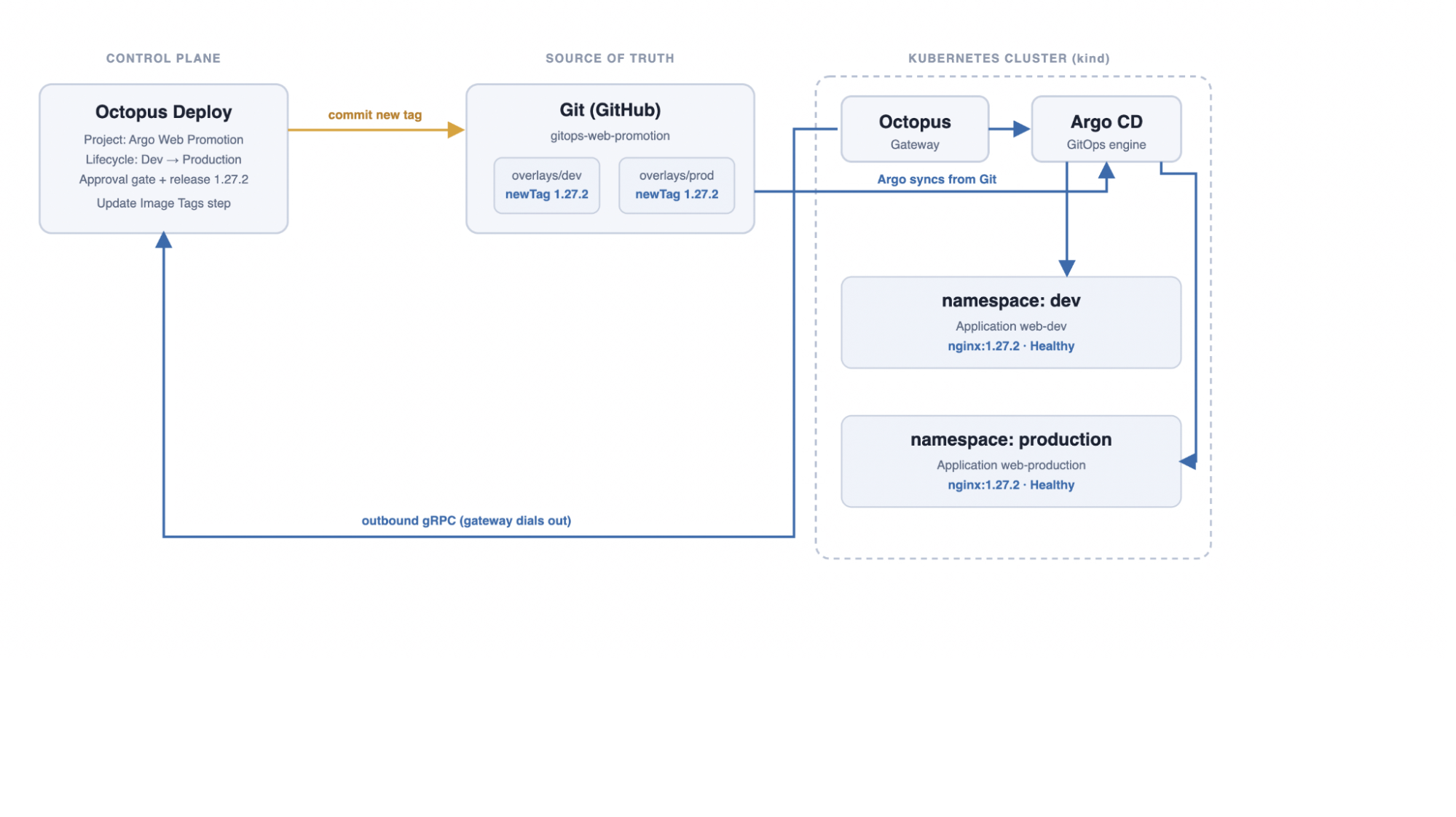
The Octopus gateway is a small component you install in the cluster with Helm; it dials outbound to Octopus over gRPC, so nothing in your cluster needs a public address. That means this entire demo can run on a local kind cluster with no ingress.
For an in-depth look at the cluster and gateway connection, see the EKS connection post; here, we install Argo CD, register the gateway, and proceed to promotion.
Install Argo CD with a dedicated octopus account so the gateway has its own scoped identity rather than piggybacking on admin:
helm install argocd argo-cd \
 --repo https://argoproj.github.io/argo-helm \
  --create-namespace --namespace argocd --wait --timeout 10m \
 --values - << 'EOF'
configs:
  cm:
    accounts.octopus: apiKey
  rbac:
    policy.default: "role:readonly"
    policy.csv: |
      g, admin, role:admin
      p, octopus, applications, get, *, allow
      p, octopus, applications, sync, *, allow
      p, octopus, clusters, get, *, allow
      p, octopus, logs, get, */*, allow
EOF
With Argo CD running, register the instance in Octopus (Infrastructure, then Argo CD Instances, then Add Argo CD Instance), paste an auth token for the octopus account, and Octopus generates a Helm command for the gateway.
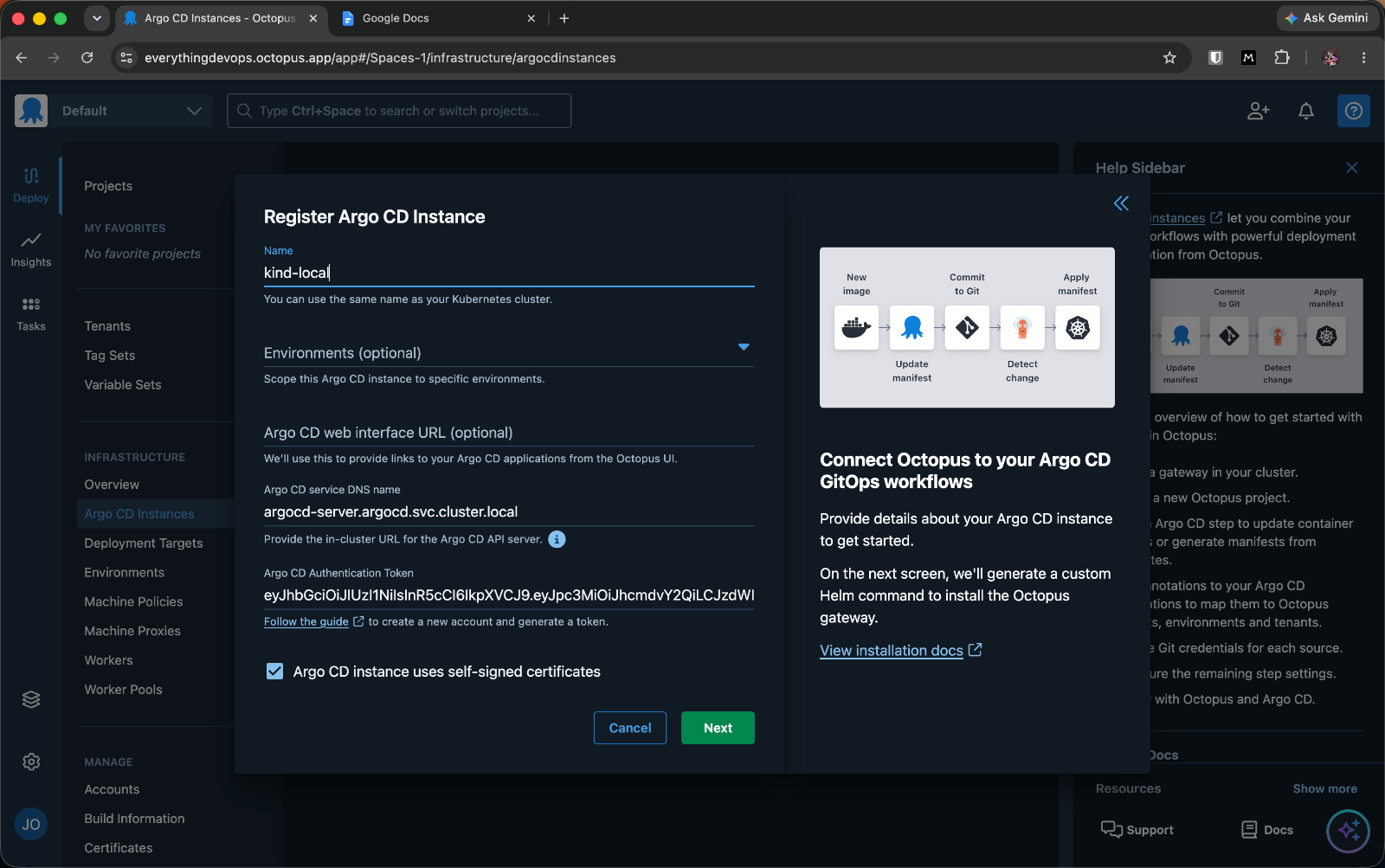
Run the generated Helm command against your cluster, and Octopus confirms the connection: the gateway registers, connects to Octopus, and connects to Argo CD.
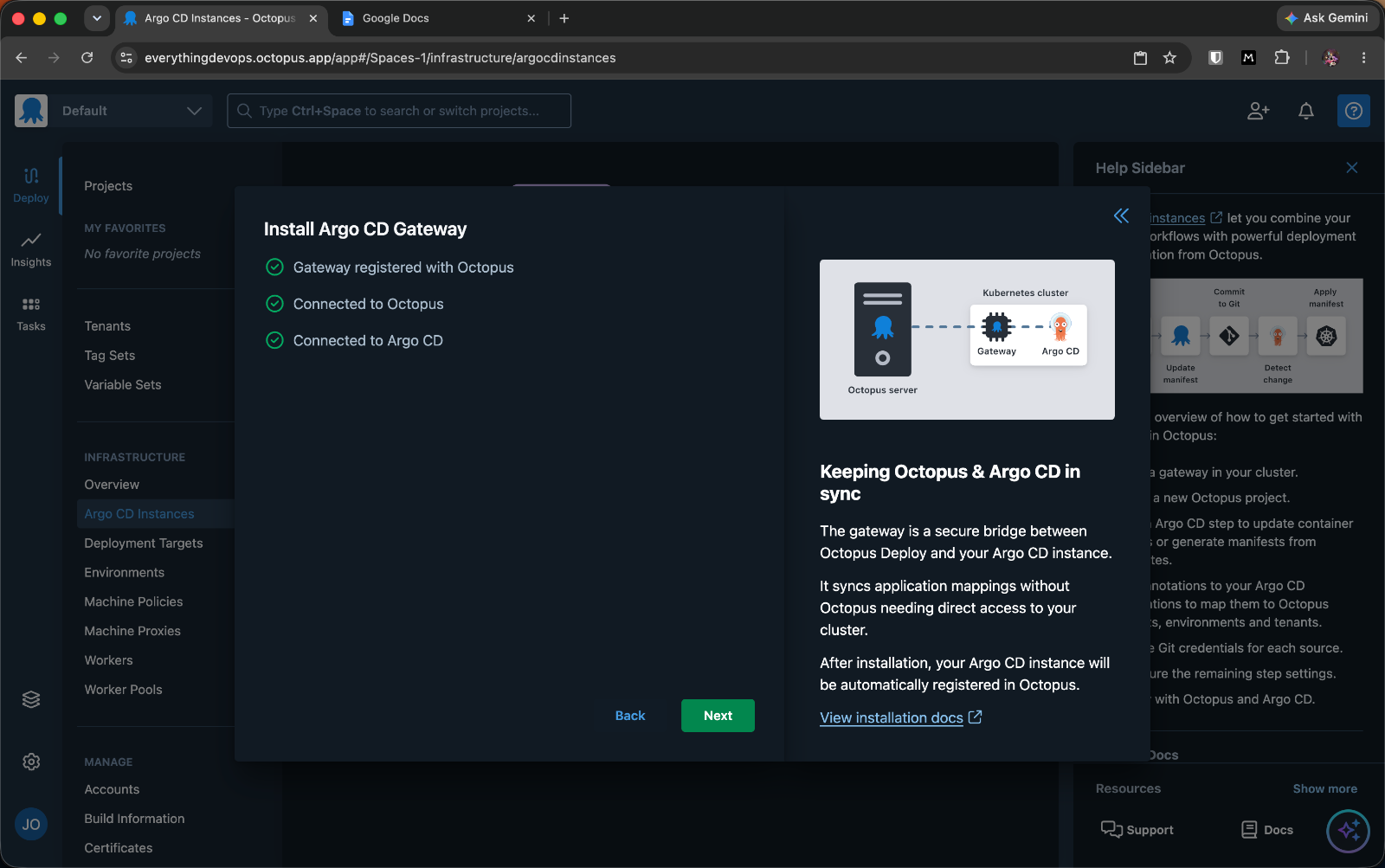
The gateway bridges Octopus and Argo CD over an outbound connection. No inbound firewall rules required.
Map the Applications with annotations
Octopus needs to know which Argo CD Applications belong to which project and environment. You declare that with two annotations on each Application manifest. No per-application configuration is needed in Octopus; the annotations handle the mapping.
apiVersion: argoproj.io/v1alpha1
kind: Application
metadata:
  name: web-dev
  namespace: argocd
  annotations:
    argo.octopus.com/project: argo-web-promotion
    argo.octopus.com/environment: development
spec:
  project: default
  source:
    repoURL: https://github.com/your-org/gitops-web-promotion
    targetRevision: main
    path: overlays/dev
  destination:
    server: https://kubernetes.default.svc
    namespace: dev
  syncPolicy:
    automated: { prune: true, selfHeal: true }
    syncOptions: [ CreateNamespace=true ]
The argo.octopus.com/project annotation ties the Application to the Octopus project, and argo.octopus.com/environment ties it to an Octopus environment. The production Application is identical except name: web-production, argo.octopus.com/environment: production, path: overlays/production, and namespace: production.
When Octopus deploys argo-web-promotion to Development, it now knows web-dev is the Application to update; when it deploys to Production, it updates web-production.
Both overlays are simple Kustomize folders that set the image tag. This is the field Octopus will rewrite:
# overlays/dev/kustomization.yaml
apiVersion: kustomize.config.k8s.io/v1beta1
kind: Kustomization
namespace: dev
resources:
 - ../../base
images:
 - name: nginx
    newTag: "1.27.0"
Building the Octopus project with a Dev to Production lifecycle
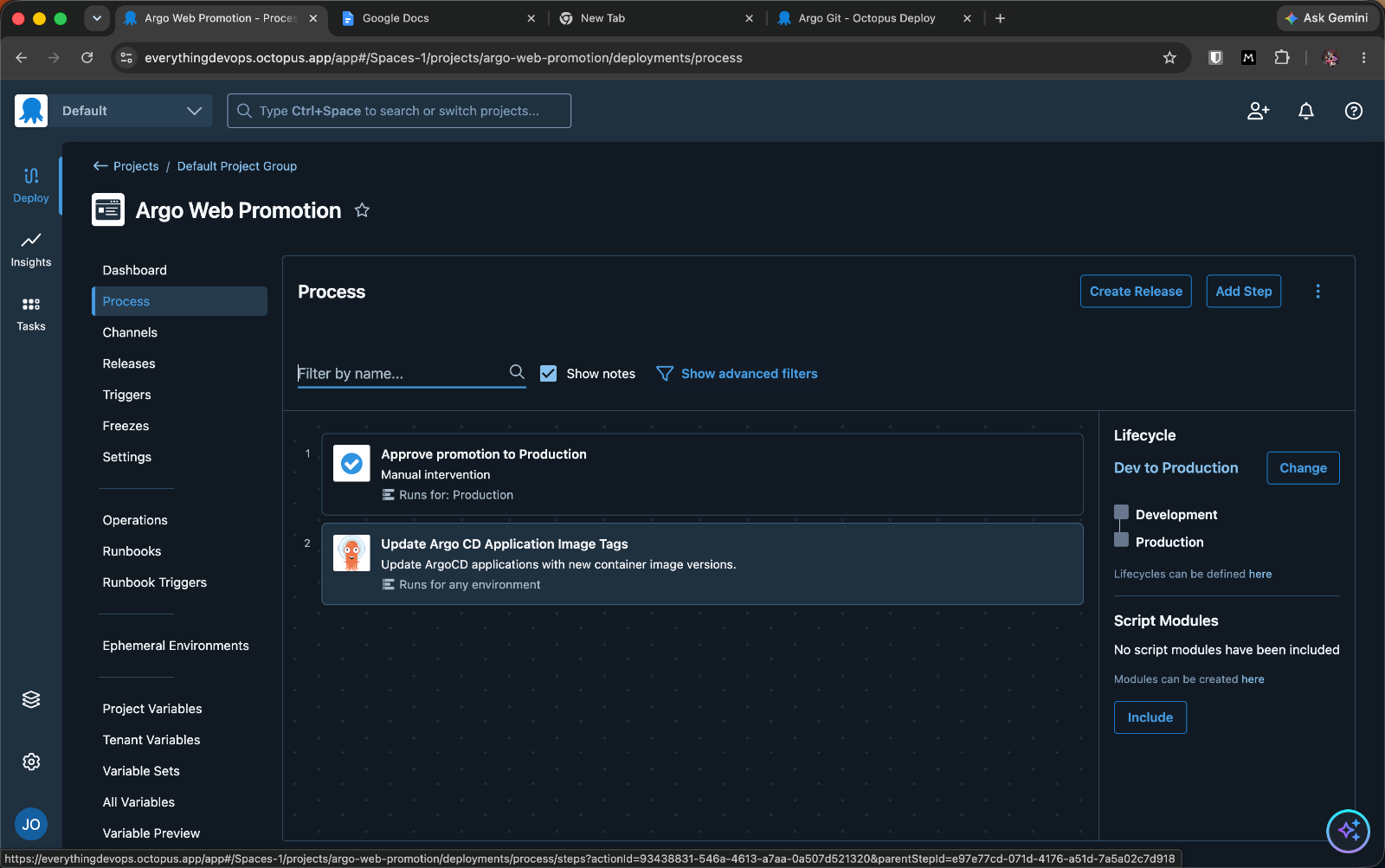
Create an Octopus project and give it a lifecycle with two phases, Development and Production. The lifecycle is what makes promotion ordered, which simply means a release must pass through Development before it can reach Production.
Then add the built-in Update Argo CD Application Image Tags step to the deployment process. For each Application matched by annotation, this step retrieves the Git location from the Application, updates the image tag in the manifests, commits the change, and triggers Argo CD to sync. Add a container image reference (the nginx image, from a Docker Hub feed) so the release knows which image to update and what version to pin.
To make the governance visible, add one more step before it: a Manual intervention step scoped to the Production environment only. That is your approval gate. It runs when promoting to Production and is skipped for Development, so it stays fast while Production stays governed.
Create a release and deploy to Development
Create a release in Octopus and select the image version to promote, for example nginx:1.27.2 (a bump from the 1.27.0 currently in the overlays). This release is a frozen snapshot of the process, variables, and package versions. Once created, it is immutable: the version that goes to Production later is the exact version you are about to verify in Development, not whatever happens to sit at Git HEAD.
Deploy the release to Development. Octopus commits the new tag to the dev overlay, and Argo CD syncs the dev namespace:
Credential 'gitops-web-promotion' will be used to access the repository
Committing directly to branch for changes in this environment
Cloning repository https://github.com/your-org/gitops-web-promotion
Within seconds, the dev Application is synced and Healthy on the new tag, while Production is untouched:
$ kubectl get deploy web -n dev -o jsonpath='{..image}'
nginx:1.27.2
$ kubectl get deploy web -n production -o jsonpath='{..image}'
nginx:1.27.0
That contrast is the whole point: the release moved dev to 1.27.2, and Production still runs 1.27.0 because nothing has promoted it there yet.
Promote the same release to Production
Now promote the same release to Production. Because the process has a Production-scoped approval step, the deployment pauses and waits for a human before it touches anything.
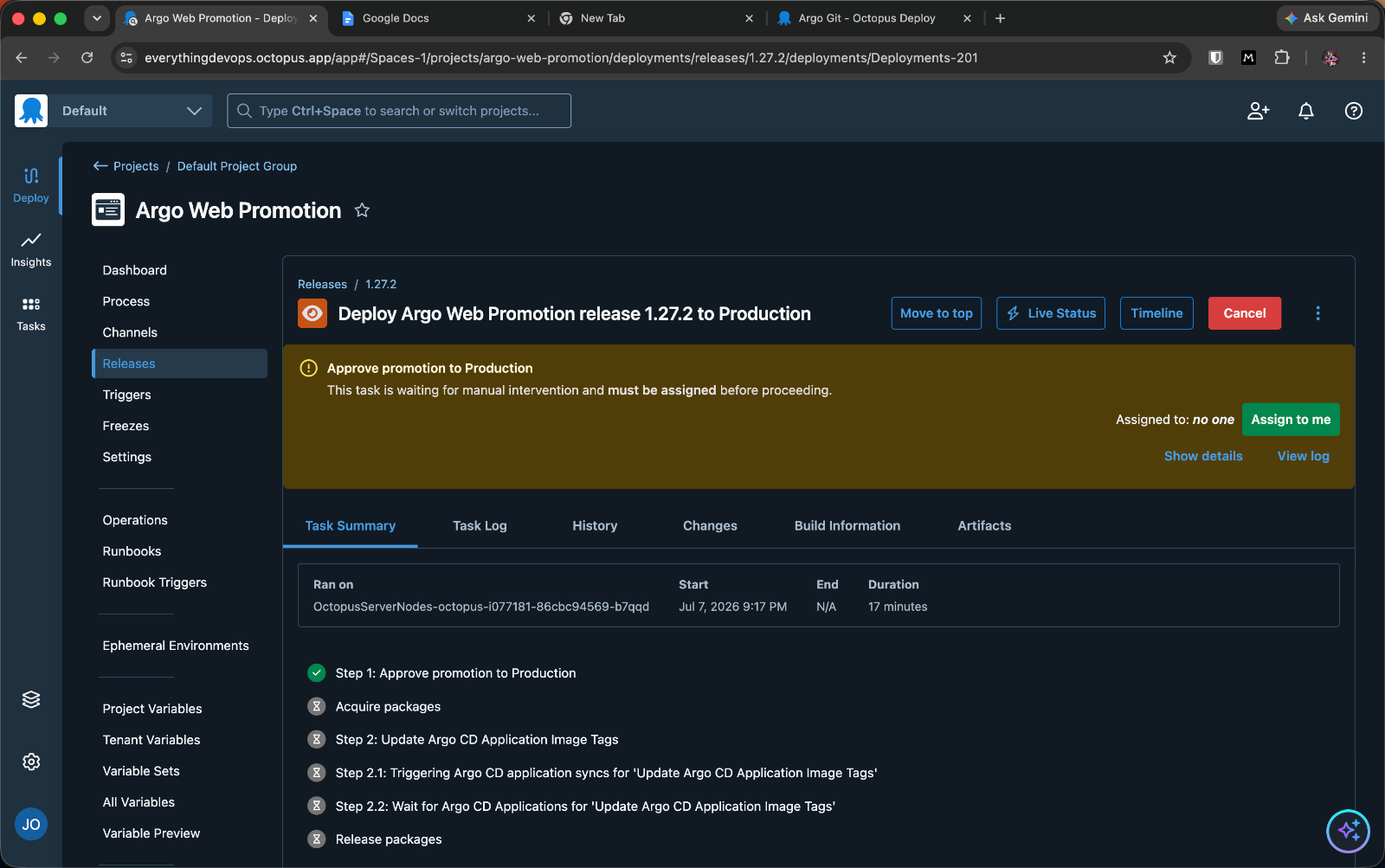
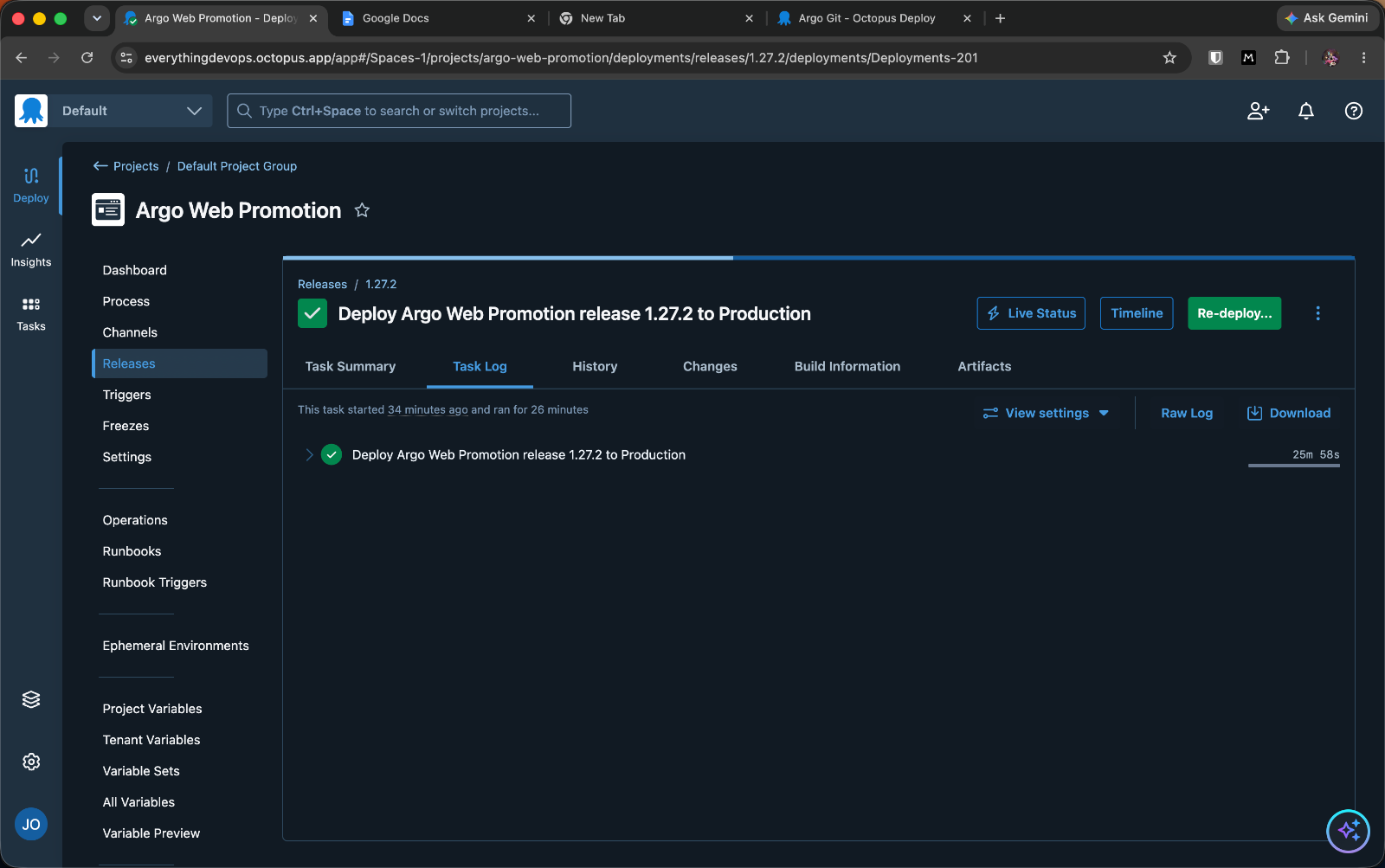
Production promotion stops at the approval gate; the image update and sync below it are queued, not run.
Approve it, and the same flow runs against the production overlay: Octopus commits the tag to overlays/production, and Argo CD syncs the production namespace. Production now gets exactly what was verified in dev, not a freshly hand-edited value.
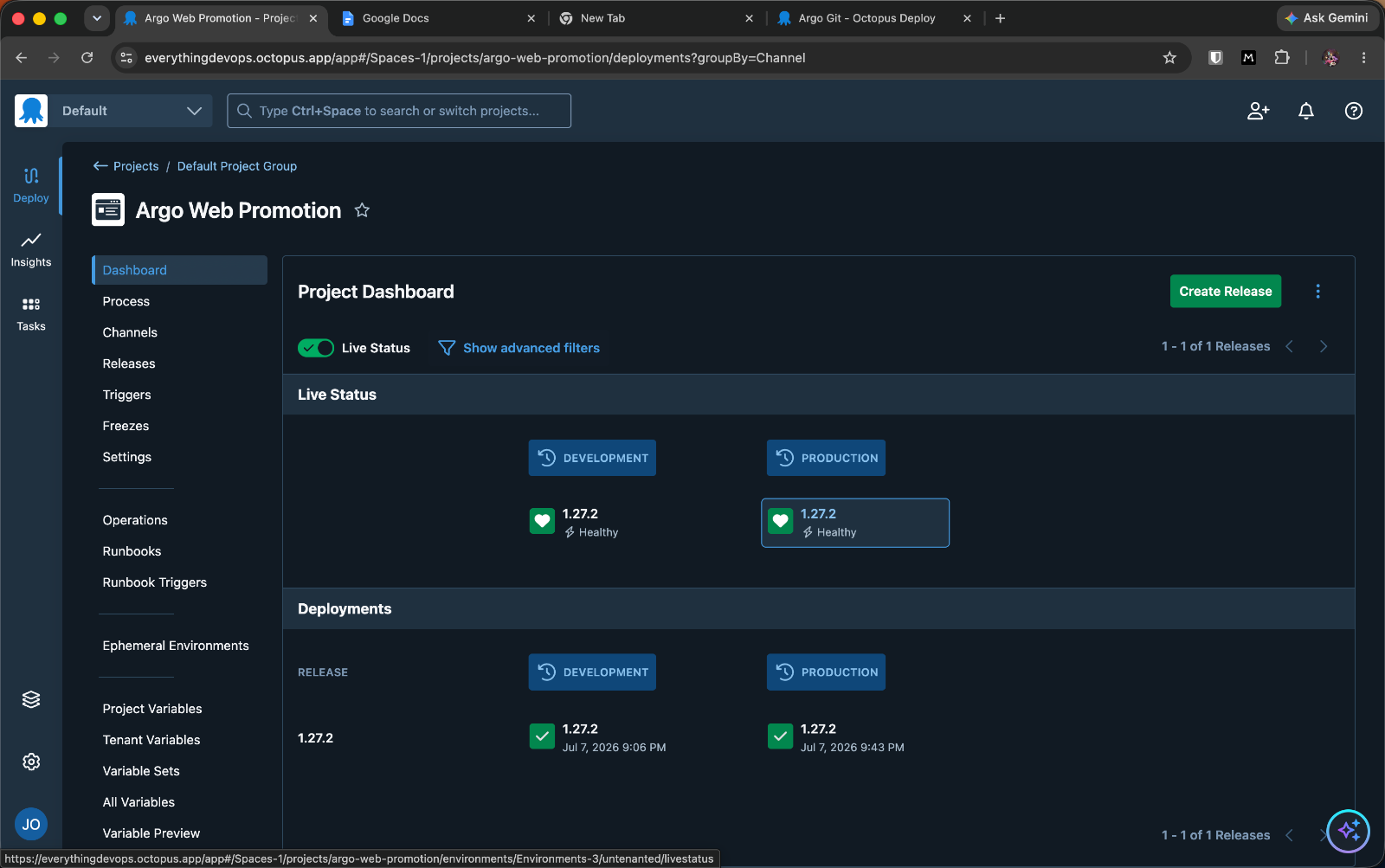
The project dashboard shows the end state at a glance: one release, both environments, both healthy, with the live status pulled from Argo CD.
The governance you got for free
Taking a step back, there are a few things this approach has saved you from:
-
An immutable release snapshot. Release
1.27.2pinned the exact image version. Production could only ever receive what dev verified. -
A Git commit per environment. Each promotion is a commit in your history, attributable and reversible:
07d62d8  Octopus Deploy promoted image 1.27.2   (production overlay)
28e2ace  Octopus Deploy promoted image 1.27.2   (dev overlay)
dfdadc8 Initial GitOps repo-
An approval record. Production promotion required a named human to take responsibility and proceed, captured in the deployment history.
-
One view of what is running where. The project dashboard shows every environment and the release it holds, with live health from Argo CD, and you can click into any deployment to see who promoted it and when. That single pane matters more as you scale because your Argo CD Applications might be spread across many instances in different clusters, regions, or accounts, and Octopus gives you one place to see and govern all of them instead of tab-hopping between Argo CD UIs.
None of this is captured by default in the hand-edited-overlay approach. Because the Octopus release is a standard, predictable object, the same governance and policy apply no matter what sits underneath
This ties into the core Platform Hub idea: a single deployment shape and consistent governance across every stack you run.
Going from overlay edits to audited releases
Promotion should not be a YAML edit you hope you got right. With Argo CD connected to Octopus, it becomes a release you can govern.
Argo CD keeps doing what it does best: reconciling Git with your cluster, while Octopus adds a release model and an audit trail to that flow.
The bigger idea here is Platform Hub, which offers you one place to see what is running where, and the same governance and audit across every environment, cluster, and Argo CD instance you run, not just the one in this walkthrough.
If you promote Argo CD deployments by hand today, that is the gap it closes. See how Platform Hub brings your GitOps deployments under one governed roof, read Manage releases and rollbacks with Argo CD for the release mechanics, and start for free!
Tags: