Deployment strategies for Kubernetes
Deployment strategies
Deployment strategies describe how new versions of an application get deployed. Different applications have different requirements. You'll want to roll out an API server differently to a batch processor, as they process data differently. The deployment strategy you use also impacts its availability and how easy it is to roll back in the case of failure.
One key factor in whether your application can have disparate versions running simultaneously is whether you can update it without downtime. The compatibility between database schema versions is important, as the old application must work with the newer schema. If you can't run disparate versions, you must recreate all application Pods to update your application, leading to downtime. You can do this by using a Deployment object to control your Pods with the Strategy set to Recreate.
You have more options if you can run disparate versions of your application. Most of the time, you want to consider a type of rolling deployment. The main concept of a rolling deployment is to gradually bring up new versions of your application while bringing down the old ones simultaneously. This is the default strategy for the Kubernetes Deployment object and allows for seamless transitions to new versions of your application.
If you have more complex needs, Kubernetes has options for them. Many deployment strategies are available, but the primary options are canary and blue/green deployments. Canary deployments allow for mid-deployment quality checks and an early warning of degradation. Blue/green deployments aim to minimize the time multiple versions coexist and let you test and warm up the environment before promotion.
Many tools are available on Kubernetes to help you complete canary and blue/green deployments. These tools can run inside Kubernetes to manage the progressive delivery of your code. They often include ways to communicate with service mesh software, which lets you control traffic more granularly.
The 2 most well-known tools are Flagger and Argo Rollouts. These tools plug directly into Kubernetes, so they work with whichever CD tool you use. Sometimes, your CD tool may even have in-built support for progressive delivery features.
Note: ArgoCD and Argo Rollouts, while both part of the Argo project, are different tools, and are not packaged together. But they can run in tandem.
Canary deployments
Canary deployments get their name from the canaries taken into mines, giving an early warning of dangers to the people accompanying them. Similar to this concept, new versions of canary deployments start small, often with only 5-10% of traffic directed to them. This slowly scales up over time, pausing or rolling back if problems arise.
An example workflow:
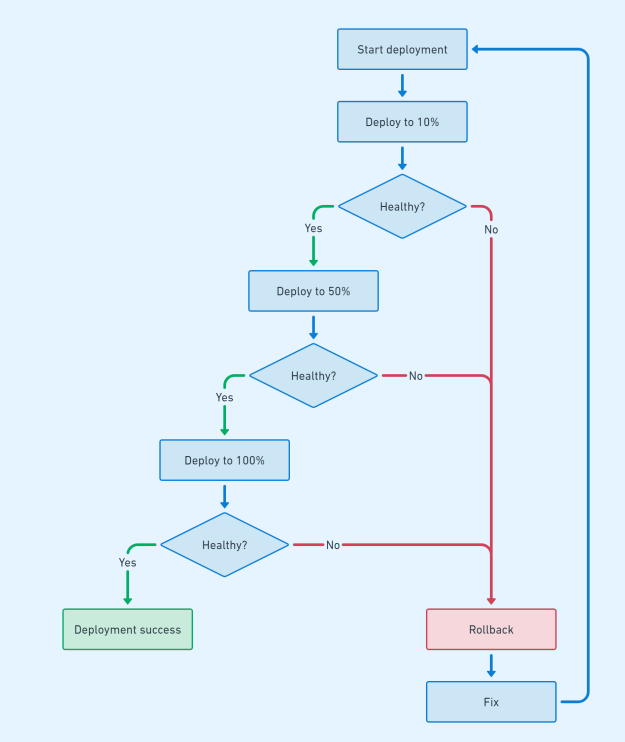
There are many ways to check that the new version is healthy when doing a canary deployment. Some applications with minimal observability depend on user reports after deployment, so simply pause deployments for a period of time before resuming. Other applications automatically check for problems by seeing how much traffic receives 200 status codes compared to 4xx or 5xx, indicating a successful deployment. Manual verification is often completed during the initial stage for larger deployments.
Blue/green deployments
While canary deployments aim to give you early warnings for failures, blue/green deployments aim to give you the facilities to run acceptance and performance tests on the new version before customers use it. This is usually done by bringing up the new application, which is now called the "green" environment. The old version is called the "blue" environment. You can then run automated tests on the green environment. After you deem the green environment stable, you swap the traffic between the blue and green environments, and the blue environment goes idle. Eventually, you can remove what used to be the blue environment, with the new green environment becoming the blue environment ready for the next deployment.
This is an example workflow:
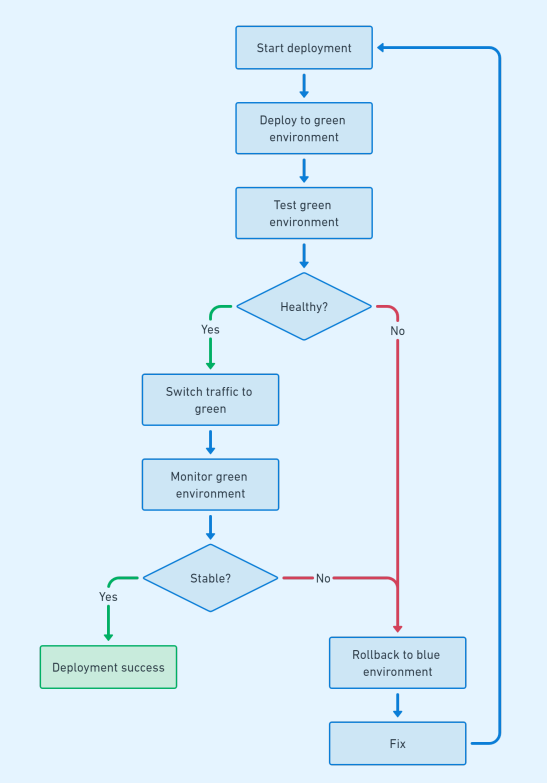
Blue/green deployments are an excellent choice when the experience differs between versions, and you want customers to have a consistent experience. They're often used in backend services, where data consistency is more important than in frontend services.