
Terraform is the most popular solution for implementing Infrastructure As Code (IaC). The Terraform provider registry contains a very large collection of providers/integrations for all the major cloud providers and at the same time offers a wealth of integration for databases, networking components, Continuous Integration platforms etc.
Argo CD is the leading solution for GitOps deployments on Kubernetes. In the last CNCF survey we found out that 60% of respondents use Argo CD in production.
Although several guides currently exist that explain how to use each tool individually, there is limited information on how they can be combined. A lot of existing Terraform users adopt Argo CD and wonder:
- What is the best way to pass variables from Terraform to Helm charts deployed with Terraform?
- How to get secrets in Kubernetes applications that are generated/retrieved from Terraform?
- When should the Terraform Helm and Kubernetes providers come into play if Argo CD already supports Kubernetes deployments on its own?
- For which Kubernetes resources should Terraform be responsible and for which Argo CD?
- What is the proper boundary between the two tools so that operators can use them to the maximum benefit?
In this guide, we will answer all these questions and actually show you four different approaches for how Terraform and Argo CD can work together. Note that everything we say about Terraform also applies to OpenTofu.
Easy Mode - Argo CD provides a practical example of Argo CD deployments you can apply to your own Octopus instance:
- Install the Chrome extension
- Run the prompt
Create an Argo CD Manifest Update project called "16. Argo CD Manifest Update" with the slug "argo-cd-octopub-manifest" using a Git Connection called "Mock" with a random username and the allowed repository "https://mockgit.octopusdemos.com/*"
Using Argo CD for all Kubernetes resources
Let’s get the basics out of the way. Argo CD is great for managing resources in a GitOps way but in its vanilla version it only handles resources that are described in Kubernetes manifests. This means that if you want to manage a resource that has no Kubernetes representation, then Terraform should handle it.
The Terraform registry contains a wealth of providers for existing infrastructure, so it makes sense to use the ones your cloud provider recommends. Typical examples are:
- Virtual machines
- Storage primitives
- Networking constraints and routes
- DNS records
Therefore, a very natural evolution is to use Terraform first to create the underlying infrastructure for your application, then also create the Kubernetes cluster and install Argo CD. Finally, let Argo CD take over for all existing resources that are managed by the cluster (e.g. Deployments and services).
This is also our suggestion for an easy starting point:
- Everything that is deployed/managed on Kubernetes is controlled by Argo CD
- Everything that is outside the cluster is controlled by Terraform
Each tool is completely oblivious to what the other one is doing.
Some teams however, try to go beyond this basic approach by exploring other alternatives. These typically fall under two approaches:
- Managing external clusters with Argo CD using ClusterAPI Kubernetes resources
- Abusing the Terraform Helm and Kubernetes providers to bring Kubernetes resources under Terraform management.
While these alternative approaches can work, they can also present several challenges as teams grow their Kubernetes use. The most obvious issue is how to share secrets and other confidential information between the two tools.
The elephant in the room - sharing values between Argo CD and Terraform
Creating infrastructure with Terraform and deploying Kubernetes applications with Argo CD sounds great in theory and can work easily in small teams and simple applications. For most production workloads and Enterprise installations, every administrator will soon face the challenge of making the two tools communicate with each other and, more specifically, pass information between them.
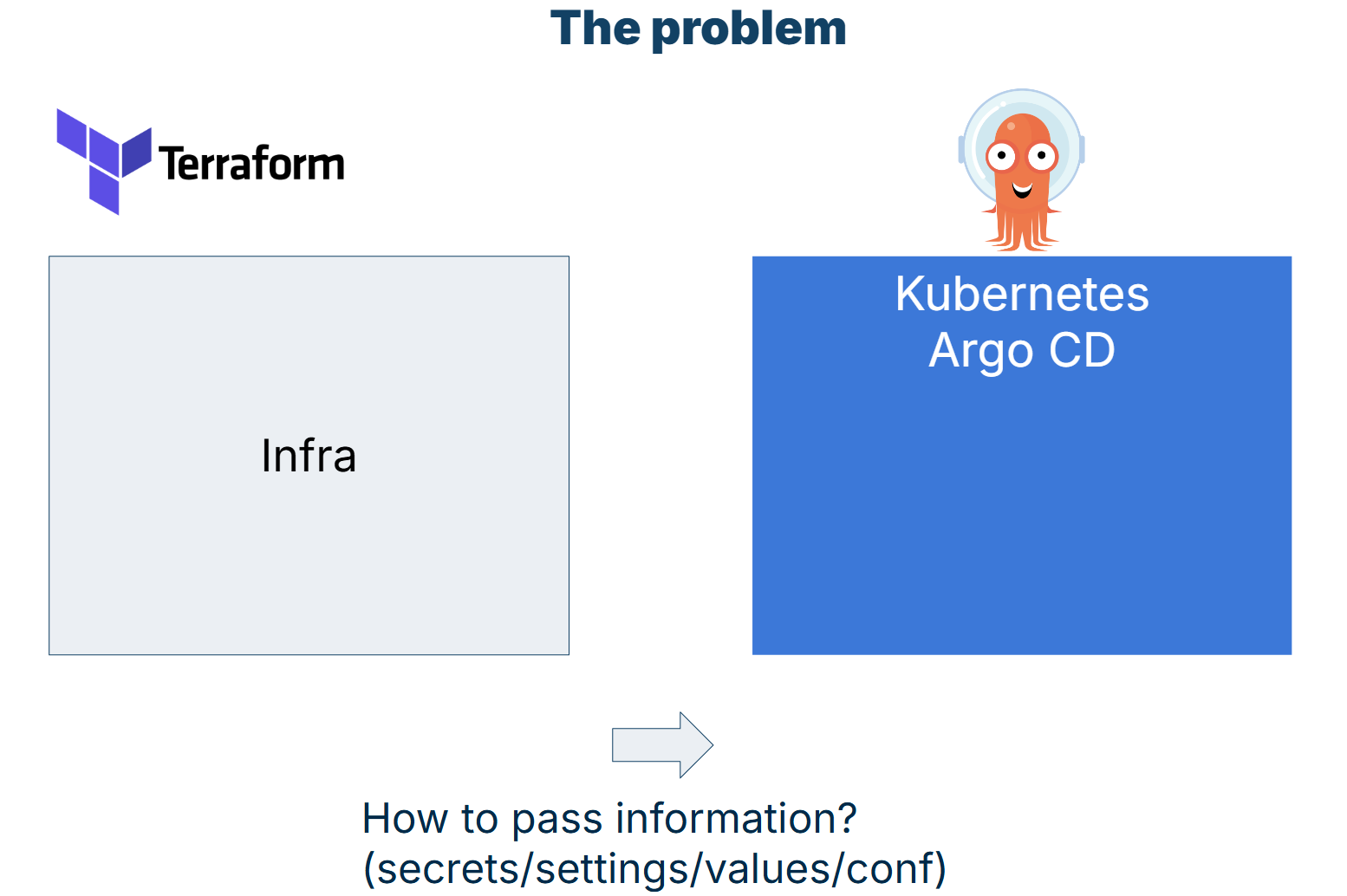
Some typical examples are:
- You want to create a database with Terraform and pass its name and credentials to an application managed by Argo CD
- You create IAM roles, service accounts, or other unique identifiers with Terraform that will also be used at the Kubernetes level
- Cluster endpoints and certificates that are created with Terraform, but will be added as external clusters to Argo CD
- You create network settings and infrastructure with Terraform that will be used later for Ingress resources at the Argo CD level
There are several more use cases, and they vary depending on your Argo CD use. More specifically, if you use Argo CD for off-the-shelf applications or applications that your developers create (or both) then you will need to find a way to share information between the two tools.
Now, obviously, you could just duplicate this information and have it in two places (Terraform files and Kubernetes manifests). But this approach is not viable in the long run, and the more you adopt Argo CD, the more challenging it will be to remember that you have two sources of truth for your settings. This also opens the door for human errors and misunderstandings of where settings are actually stored.
So, is there a better way to make the two tools work together?
Let’s look at 4 alternative approaches that might be suitable for your organization.
Approach 1 - Share nothing and use DNS
One of the easiest ways to solve a problem is to avoid it completely. Instead of trying to solve the problem of sharing configuration between Argo CD and Terraform, spend some time first to understand if you need to share anything at all.
A typical example is an application that uses a database created by Terraform. Many teams want to achieve the following scenario.
- Create a database with Terraform
- Wait for it to be healthy
- Create an endpoint/proxy/network service for the DB port
- Pass the DB host/port settings to the application via Argo CD.
Another similar scenario is when you have microservices and you want to pass information to a specific application about its own dependencies. For example, notify the frontend application what is the URL that houses the backend.
It turns out that for these kinds of applications you can simply use DNS, which can handle exactly this type of problem.
The whole point of using DNS is to have a stable name that identifies a resource, even as the underlying network/IP address can change. You gain the same benefits by having your applications pre-configured with permanent DNS names instead of waiting for ad-hoc hostnames from Terraform.
- The application always searches for a DB at a well-known hostname (e.g.
db.prod.acme.com). This is stored in Kubernetes manifests - Terraform is still used to create a database
- Terraform also creates the correct DNS records that bind the newly created instance to the well-known hostname
- The application starts up and connects to the database without any other knowledge
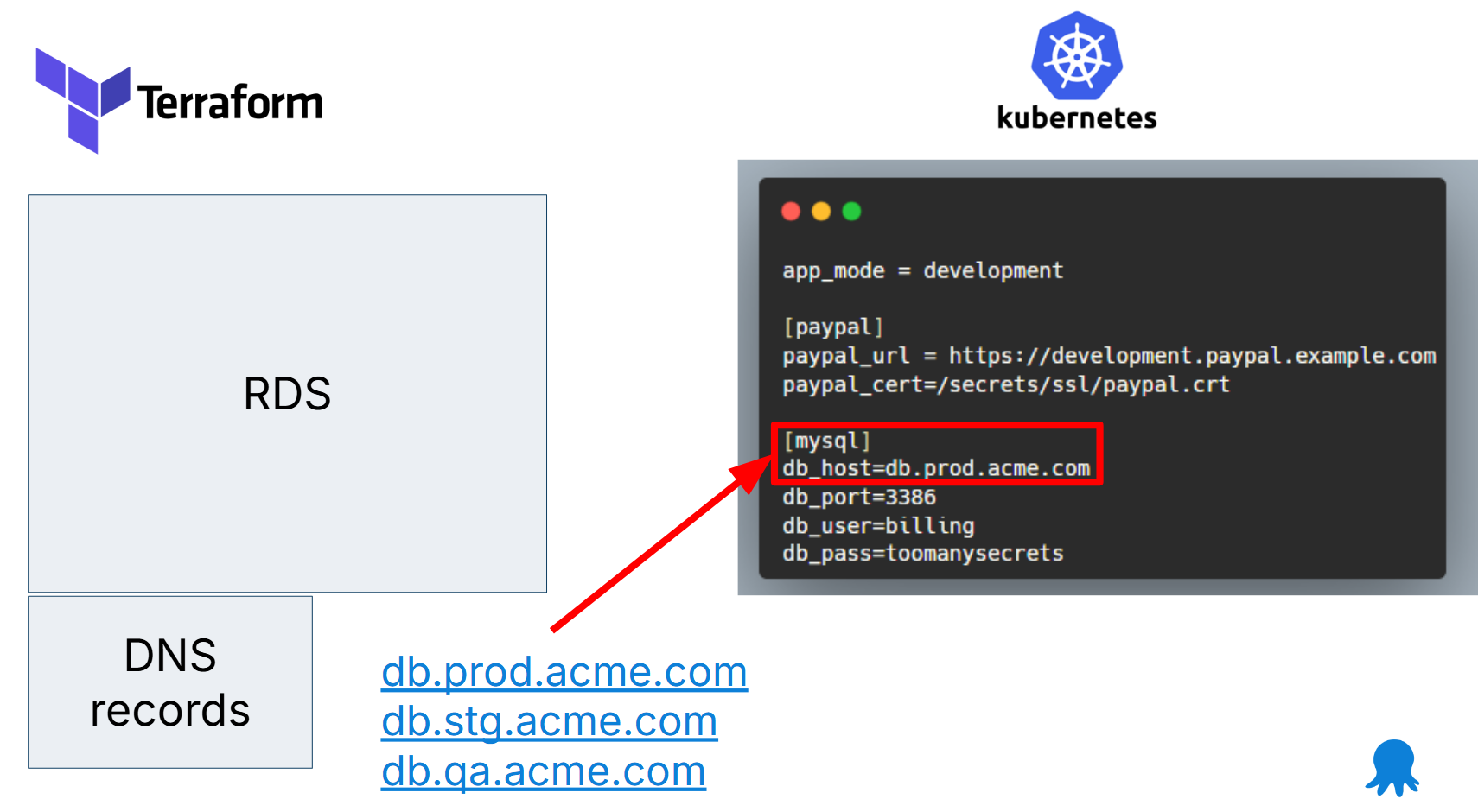
This pattern means that Argo CD applications don’t need any hostnames from Terraform. You can take this approach even further by making resource dependencies as generic as possible. Several times, we see applications that have hardcoded configuration that says
- The db is at
db.prodin Production - The db is at
db.stgin Staging - The db is at
db.qain QA
You can simplify this by just saying that the DB is at mydb or some other generic name. Follow the same approach for all other application dependencies.
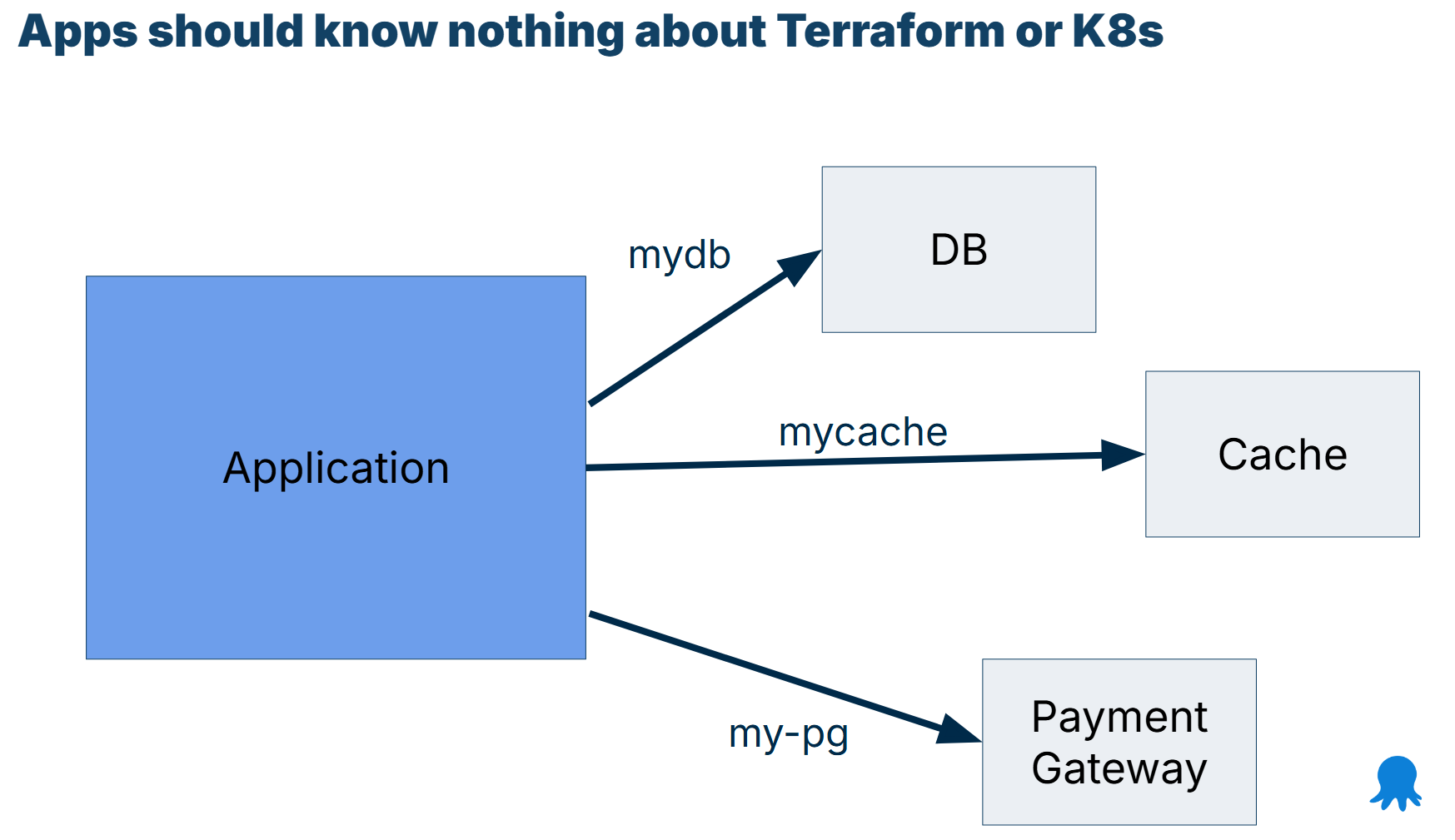
The application starts up and tries to connect to “mydb” for a database resource.
The DNS name can resolve to different resource types depending on the environment the application runs in. Here are some examples:
mydb-> Database running in the Same cluster using a DB operatormydb-> ExternalName to another K8s clustermydb-> RDS instance with global Route53 recordmydb-> /etc/hosts for legacy dbmydb-> External Name -> Route53 record -> active/passive DB in other regions
A related approach is to also try to minimize external dependencies in general. Several times we see teams that have such complex configuration platforms that the application itself needs to fetch its own configuration. And again Terraform needs to explain to Argo CD where to fetch configuration from. This is very cumbersome and we advise against this approach.
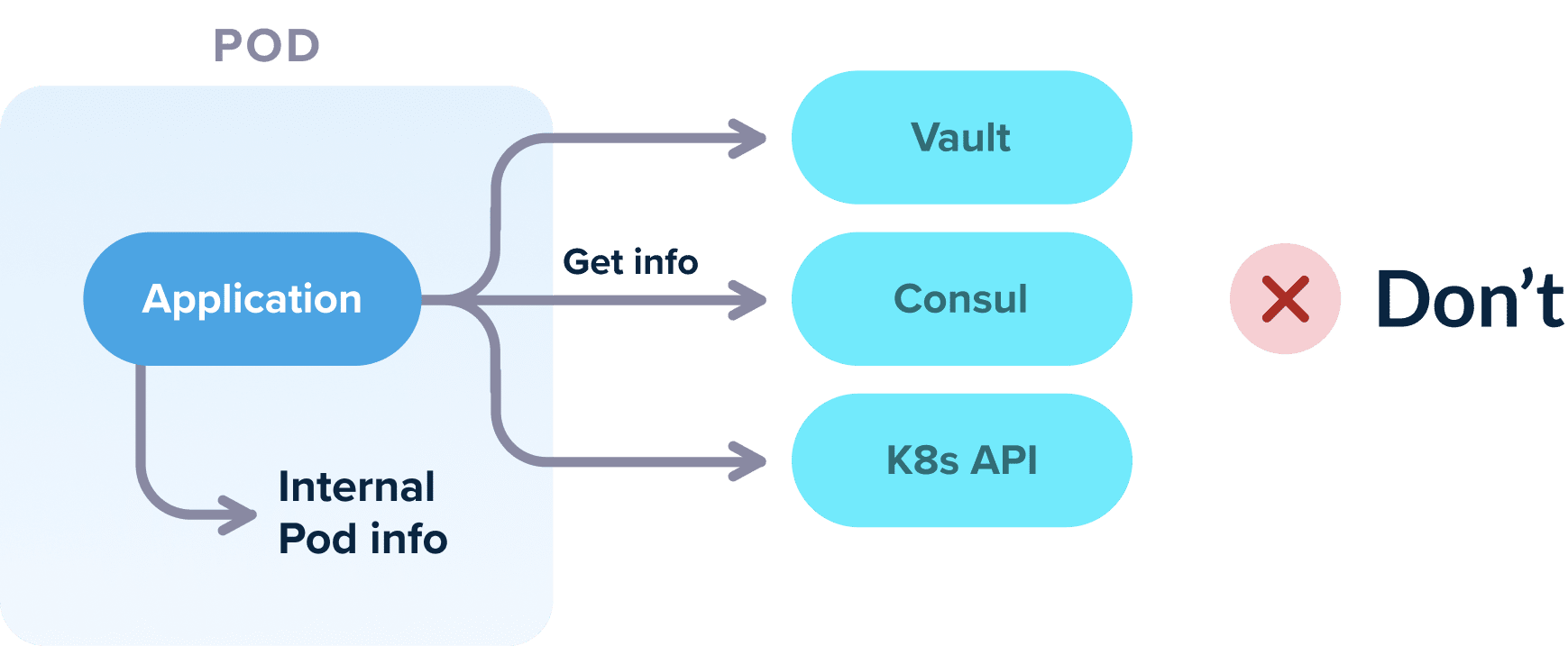
Our recommendation is to have Terraform create/fetch all configuration and then just pass it to the application as normal files (or environment variables).
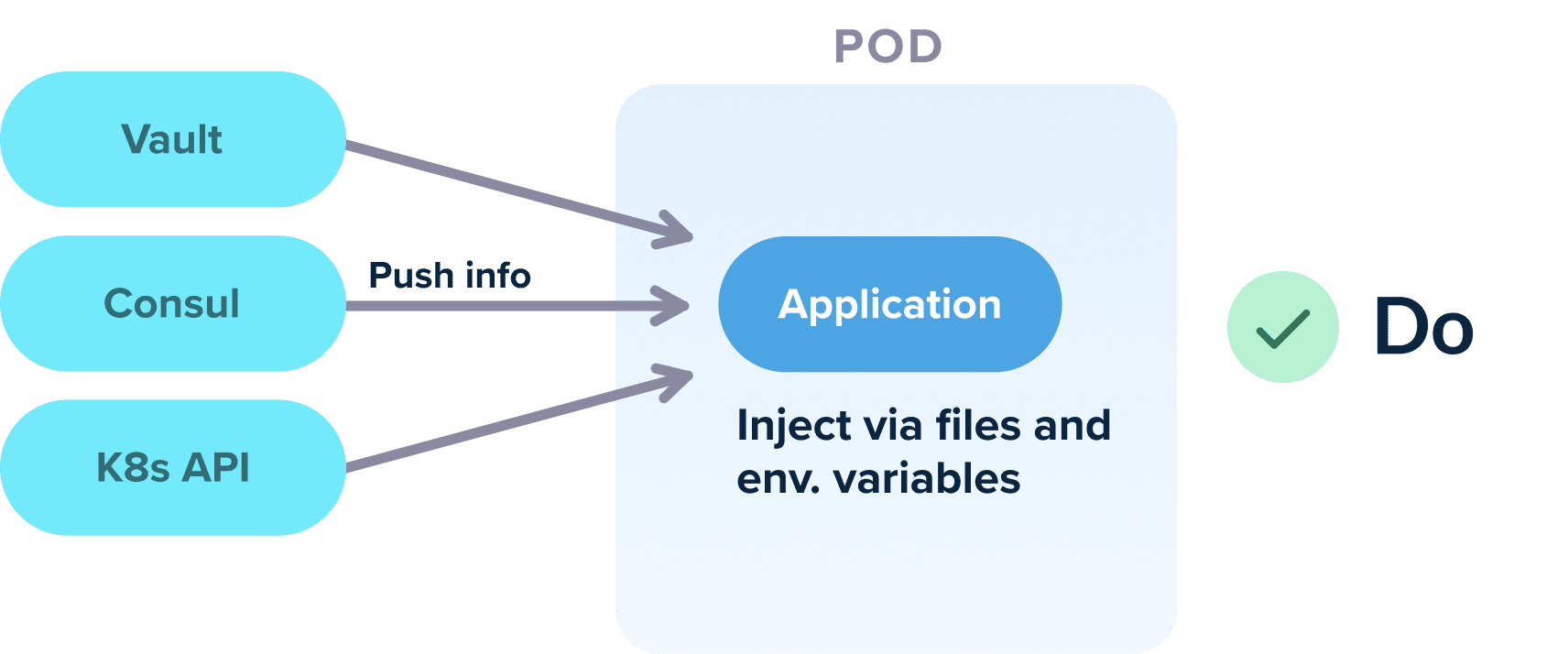
Again, there is a well-known convention for these files (or variables). For example, you can say that all applications start and look at /etc/config for their settings.
The end result is that you have minimized the amount of information you need to pass from Terraform to Argo CD and in some ideal cases, completely eliminated it.
Using DNS pros/cons
Using DNS and well-known file conventions is a very easy way to make your applications self-contained, both for Argo CD but also for local development.
Advantages:
- Very simple to implement, no other tool needed
- Works great for developers and local debugging
- Use DNS the way it was meant to
Disadvantages:
- Works for your own applications, but not always for off-the-shelf applications that you don’t control
- Developers may need to make source code changes for applications that don’t follow conventions
- Works only for hostnames and other networking components
- Does not cover secrets (such as passwords and credentials)
- You need to make sure that both Terraform and your apps follow the conventions
We recommend you try this approach first, at the very least to minimize the amount of configuration you need to pass from Terraform to Argo CD.
Approach 2 - Commit files to Git with Terraform
If you have adopted Argo CD because you want to go all-in with GitOps you might be wondering if we can use a solution that actually follows GitOps correctly. And the answer is we can.
Argo CD will continuously sync changes it finds in Git, without concern for how those changes were committed. This means that we can use Terraform to commit files to Git, which will be picked up by Argo CD.
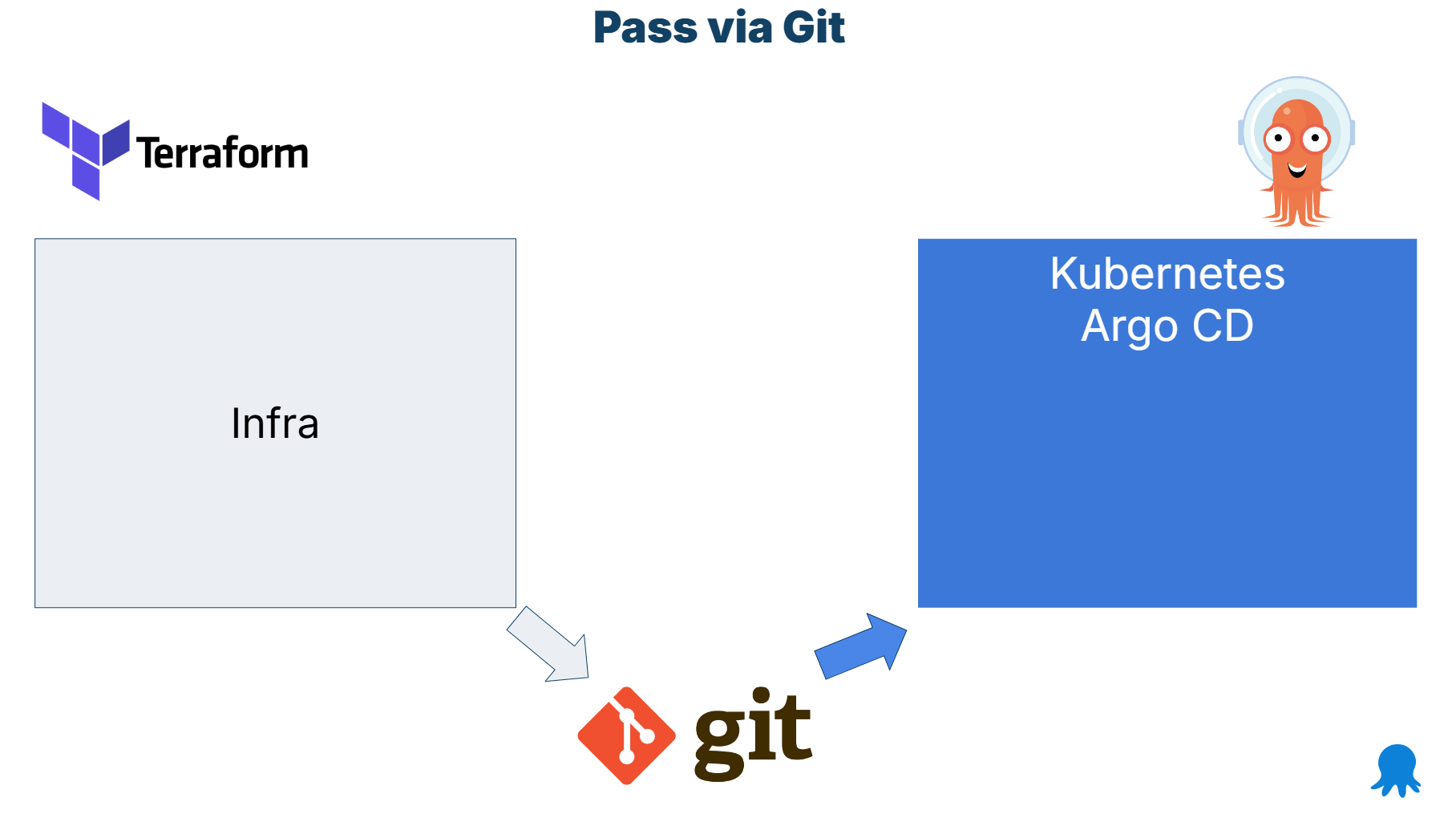
This is a very clean approach as each tool is fully isolated from the other and there is no direct communication between them. Terraform doesn’t know anything about Argo CD and vice versa. All communication happens via Git.
The key capability of Terraform is that it can commit files on its own via the GitHub or GitLab providers. There are also several generic Git providers for any kind of Git repository.
The handoff works like this
- Terraform runs first. It creates the infrastructure required for your application. It can also install Argo CD into the cluster (but no other Kubernetes resource)
- Output variables are put in Kubernetes manifests or Argo CD application sets (or even plain applications) Terraform supports templating files on its own as a built-in capability
- The final result is committed to Git by Terraform like any other manifest
- Argo CD notices Git changes and syncs the files without visibility into how they were created
The pattern can cover many use cases (but not secrets). Here is an example with a service account:
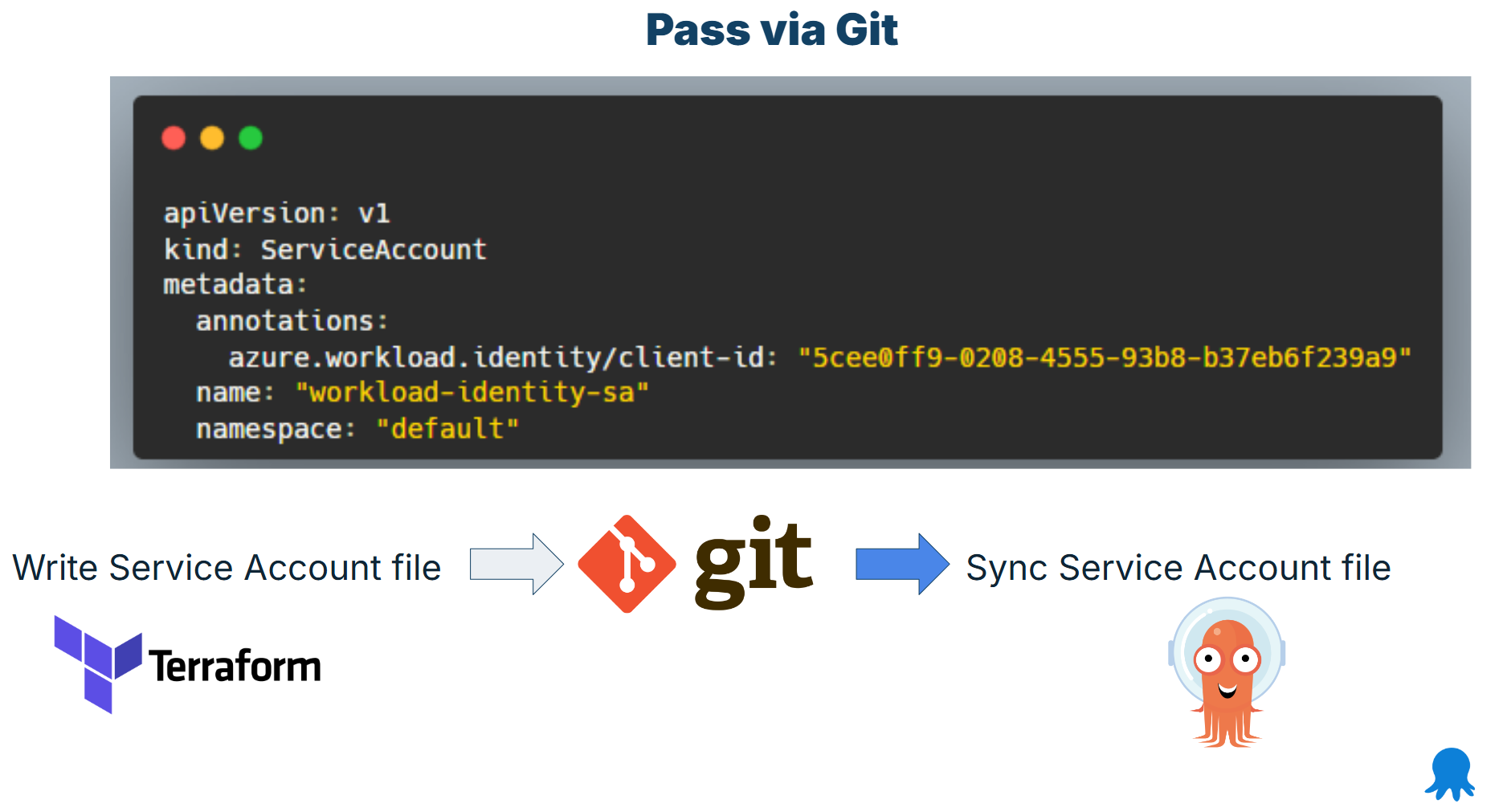
The workload ID information comes from Terraform but must be used in Argo CD. Terraform commits the file to Git and Argo CD syncs it to the cluster like any other manifest.
You can follow the same approach by committing to Git any other file that Argo CD understands, including Argo CD applications and/or application sets.
Using Git Commits pros/cons
If you want to follow GitOps, this is the purest approach. It allows you to keep the two tools completely isolated while still seeing everything that happened in Git history.
Advantages:
- Simple to implement. Only Git is needed, which is already a requirement of using Argo CD
- Very good isolation between the two tools. Each tool doesn’t even know that the other one exists
- Single source of truth for all values
- Very flexible as you can pass any kind of information. Every file that can be templated can be processed by Terraform
- Automatic auditing via the Git history and “blame” mechanism
- Works well with information that is required before an application is deployed
- Can potentially pass secret references (but not the secrets themselves)
Disadvantages:
- Will not work for secrets of any kind. You must never save raw secrets in Git storage
- More moving parts. Git is now a critical component of deployments
- Terraform must have Git write access
- You need some guardrails. More specifically, it should be clear to everyone that Git files are read-only, and any manual changes will be overwritten by Terraform during the next run. When possible, we recommend separating generated files from user-edited files
- Possible performance issues and bottlenecks if too many commits are happening (Git conflicts, rate limits, clone timeouts etc)
Approach 3 - Inject Kubernetes resources directly on the cluster
A common problem with the previous two approaches is that they cannot handle secrets. If you only need to pass non-confidential information from Terraform to Argo CD, they will work great for your use cases.
There are however, some cases where you want to pass a secret to Argo CD. This can be a database credential, a security token, a private certificate or anything else that must be created with Terraform but consumed by Kubernetes applications.
A common choice here is to use the Kubernetes and Helm providers of Terraform and have those files injected directly into the cluster without passing from Git first.
Note that this practice should be used only as a last resort, as it introduces several challenges and completely bypasses the GitOps lifecycle managed by Argo CD.
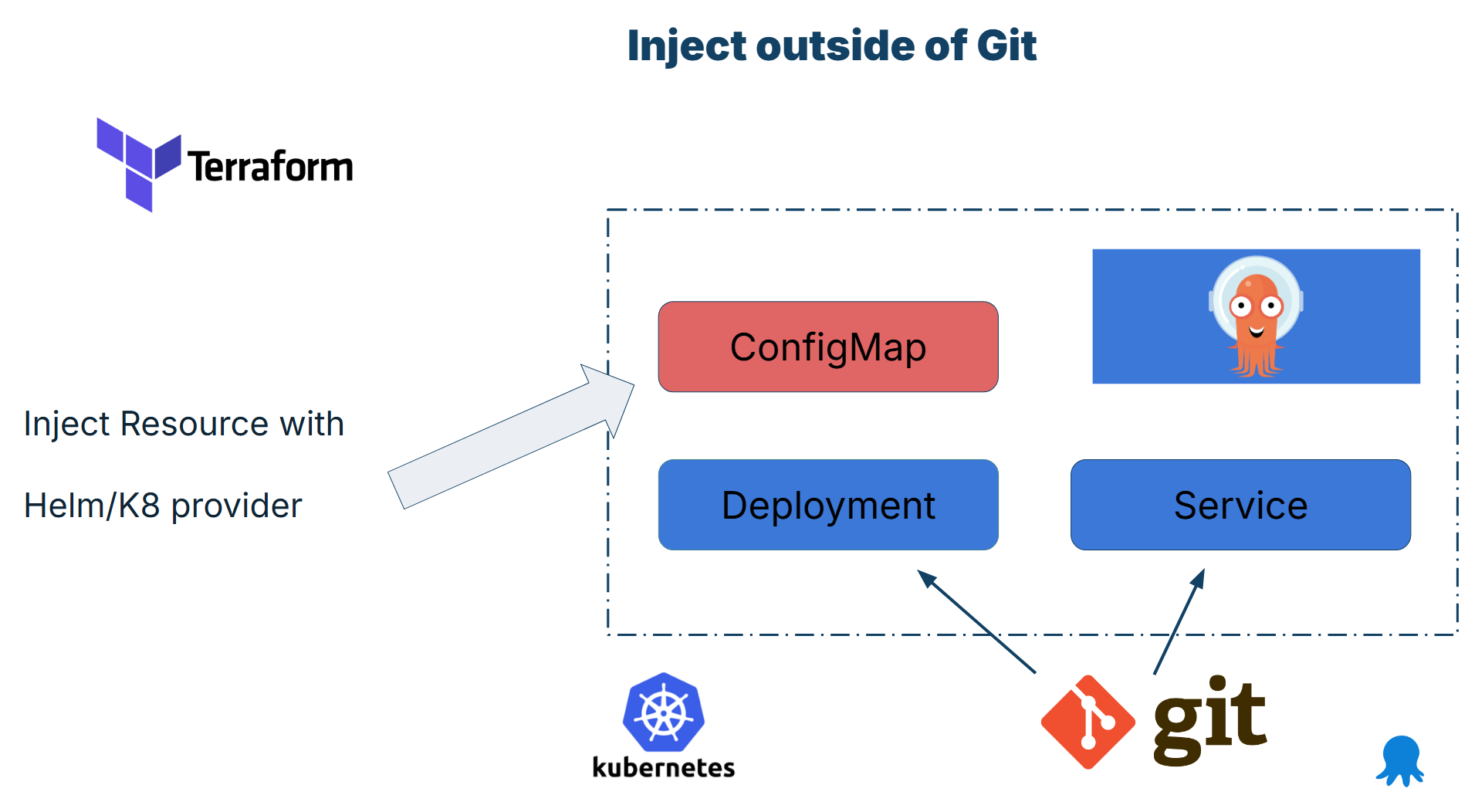
Essentially, you have two sources of truth. First, there are the files of the application that are managed by Argo CD and are stored in Git. What Argo CD syncs is not a complete application though. Some files are also managed by Terraform. Only when resources are created by both tools then the application is up and running.
A typical example would be an application with an important secret known only to Terraform. The whole process goes like this
- Terraform runs first. It uses the Kubernetes (or Helm) provider to directly deploy a secret manifest to the Kubernetes cluster. The file does nothing on its own
- Argo CD runs second. It deploys to the cluster the other parts of the application (deployment, HPA, network, roles etc).
- The application also requires a secret and this is already in place by Terraform. Argo CD is oblivious to this extra file.
- The application starts up and all files work as a single instance.
- The two tools have their own lifecycle. When the secret is updated only Terraform knows about it. When the other Kubernetes manifests are updated then Argo CD is taking actions where Terraform has no visibility
We see many teams jumping straight to this approach without first examining other alternatives. We recommend you explore the other 3 approaches first and only inject resources into the cluster when there is no other solution.
Creating resources directly pros/cons
Using the Helm and Kubernetes providers might sound good in theory. In practice, Terraform was never meant to be a Kubernetes deployment solution and the lifecycle primitives offered by Terraform will never match the reconciliation capabilities of Argo CD.
Use this method sparingly and only for secret/confidential information that you cannot bring into the cluster in any other way.
Advantages:
- Unlike the other solutions, it can pass secrets from Terraform to Argo CD
- Very flexible – any kind of Kubernetes resource can be processed and deployed
Disadvantages:
- Two separate sources of truth
- Two separate tool lifecycles
- Completely bypasses all the guarantees and capabilities of GitOps
- Argo CD files are just a fraction of an application instead of full application
- Makes local debugging for developers very difficult.
- Terraform CLI needs to have direct access the Kubernetes cluster (even production)
- No auditing. Configuration drift is again possible.
Approach 4 - Use the GitOps bridge project
The last approach that we are going to see is GitOps bridge. GitOps bridge is a pattern that helps you bring information from Terraform to Argo CD in a more controlled way.
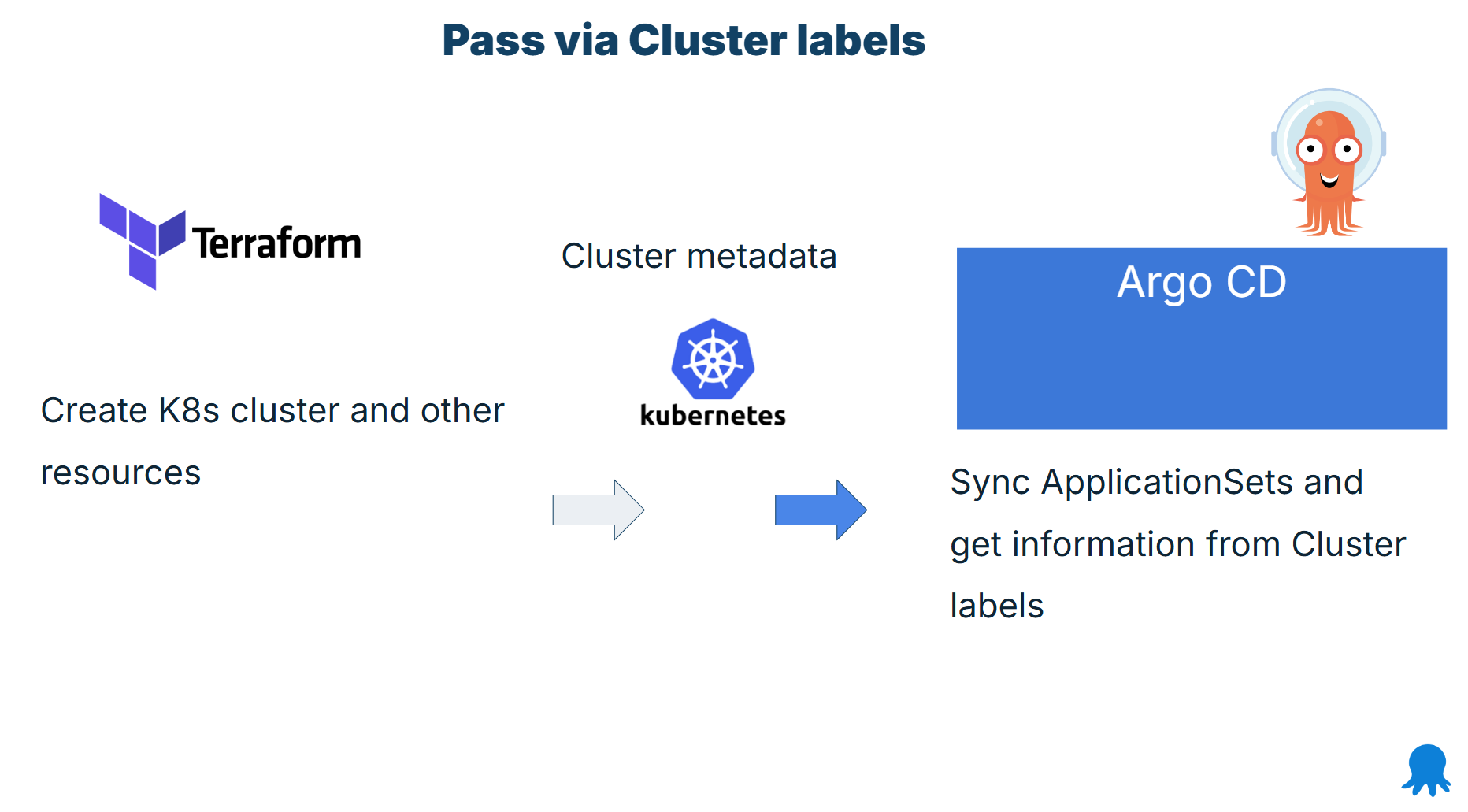
The pattern works in the following way:
- You create your Kubernetes clusters with Terraform
- You add those clusters to your Argo CD instance (or install Argo CD on them)
- You put custom metadata and other information as cluster labels
- You then use Application Sets to retrieve the labels and pass all the necessary information to Argo CD
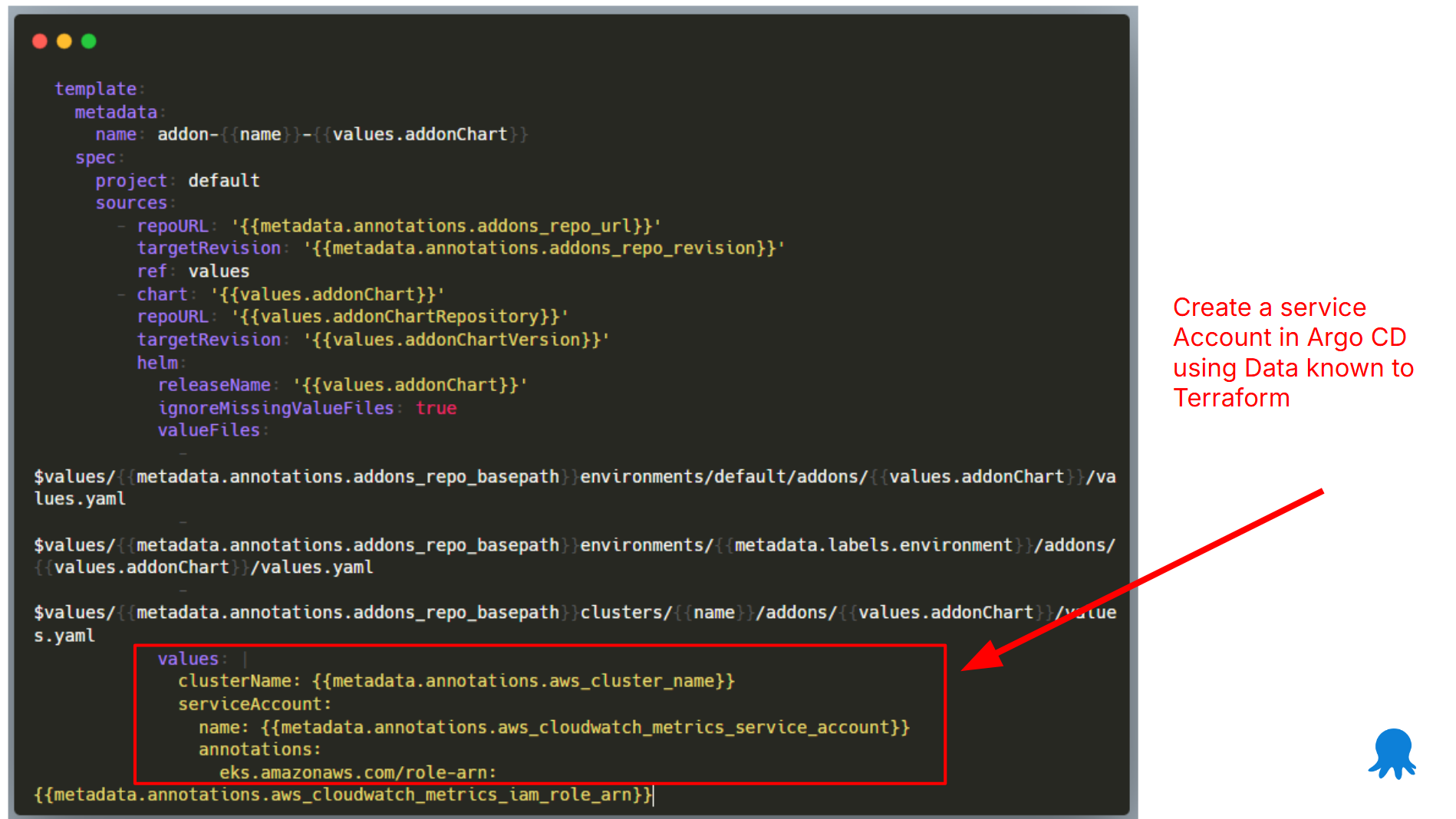
In the example above, we want to create and manage a Service Account resource with Argo CD. The service account object needs information that is only known to Terraform.
Terraform has already stored this information as cluster metadata. Then, in any application set this metadata can be passed to any part of the Argo CD application including Helm/Kustomize values or other settings.
You can find more examples in the GitHub repository.
GitOps Bridge pros/cons
The GitOps bridge is trying to get the best of both worlds from the previous 2 solutions. It allows you to pass any information to your Argo CD applications without actually having to create new Git repositories.
Advantages:
- Well-structured approach based on application sets, which is a good practice to use anyway
- Many examples already available for AWS
- Can potentially pass secret references (but not the secrets themselves)
Disadvantages:
- Requires the usage of application sets that not all organizations are using
- No extra components required
- Not fully GitOps – half the configuration exists only in Argo CD
- Mostly used with Helm overrides that make the configuration confusing to non-Argo CD experts
- Makes local testing for developers more complicated
- Cannot pass secrets directly, but can pass secret references, or where to find secrets
Bonus alternative - Crossplane
If you look at the 4 solutions we suggest for making Argo CD and Terraform work together, you will soon realize that no solution is perfect. Each one has pros and cons. It is up to you to understand the tradeoffs involved.
You might be wondering whether there is an alternative that offers better integration between infrastructure management and GitOps-style application deployment. And the answer is yes!
Crossplane is a Kubernetes controller that offers Resource management for external infrastructure components. You can define your cloud resources (VMs, LBs, storage, DBs) in Crossplane as native Kubernetes objects.
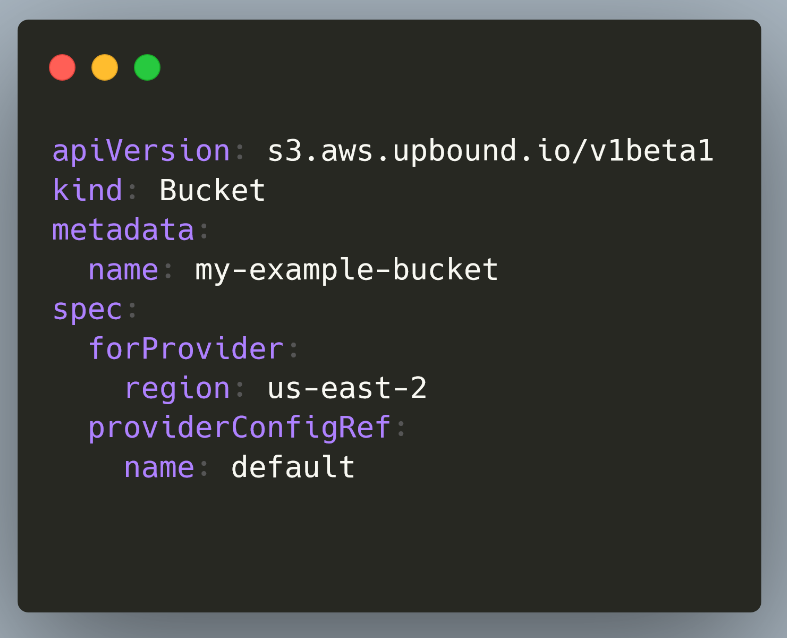
Then you can simply manage those manifests with Argo CD like any other Kubernetes resource. Essentially, Crossplane is a GitOps style Terraform. You can create any kind of infrastructure (like Terraform) and still get all the benefits of GitOps like automatic reconciliation and easy auditing (like Argo CD) in a single package.
Of course, this means that you no longer need Terraform, and you must migrate all your resources to Crossplane manifests. This is a non-trivial process, and we don’t actually recommend you do it. It is much easier to try Crossplane on greenfield projects and still keep your Terraform investment in existing projects.
We strongly recommend that you evaluate Crossplane and understand the benefits.
- You solve configuration drift once and for all at the infrastructure level, something that is not possible with just the Terraform CLI
- There is nothing to share anymore – everything can happen inside Crossplane. You can create a cluster with Crossplane and immediately deploy Argo CD on it or any other kind of application. You can create a database and pass credentials to an Argo CD application that needs them all within Crossplane
Note that Crossplane recently released V2 with a better vision on how to manage both infrastructure and applications in the same platform.
Comparison of all solutions
You should now understand all the different ways of making Argo CD and Terraform work together.
Here is a summary of all the solutions.
| Solution | Effort/Complexity | Follows GitOps | Pros | Cons |
|---|---|---|---|---|
| Use DNS | Low | No | Very simple to use | Covers limited scenarios |
| Use Git Provider | High | Yes | Pure GitOps, tool isolation | Does not work with raw secrets |
| Inject Resources | Medium | No | Can cover all scenarios | Complex, hacky, breaks GitOps and Argo CD |
| GitOps bridge | Medium | Depends | Existing templates available | Requires Application Sets |
| Use Crossplane | Very High | Yes | Single tool for everything | Migration needed |
We recommend that you first create a catalogue of all the configuration data that must be shared between the 2 platforms. Then understand:
- What settings can be modelled with well-known DNS entries
- What information is secret, and what is non-confidential
- How to employ Application Sets and cluster labels for large-scale installations.
- Which applications need secrets directly, versus applications that can work with secret references
Happy deployments!
Tags: