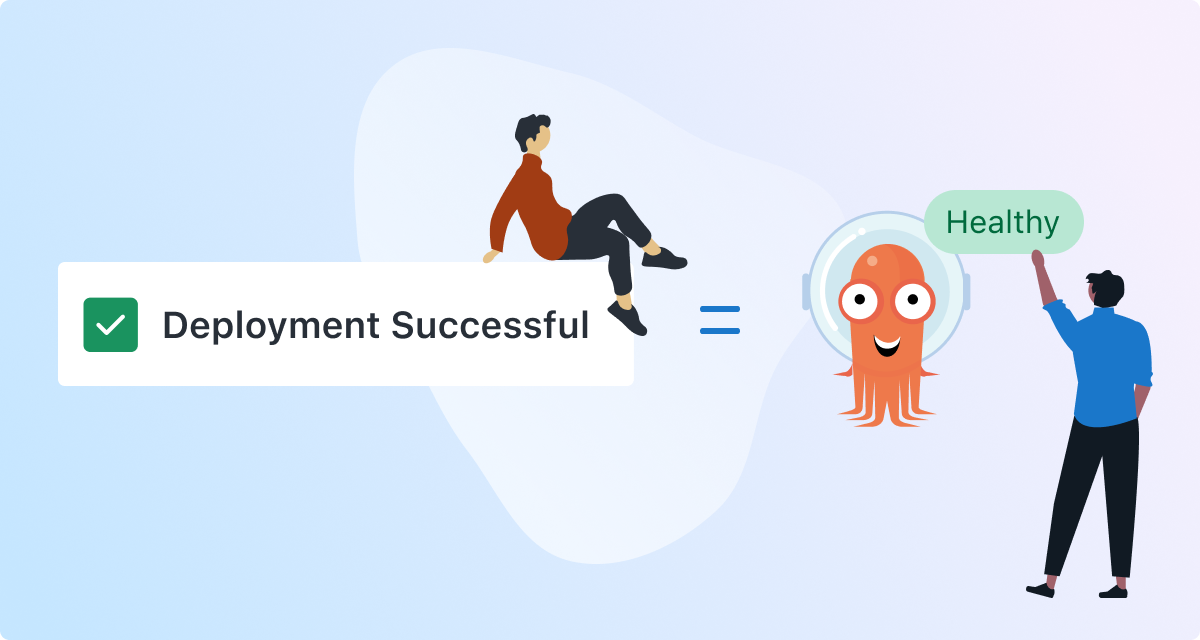

Since Argo CD in Octopus was released in Early Access in 2025, we’ve been incrementally adding new features to make the integration even more useful. This blog post is a deep dive into the new step verification feature that lets you wait for the updated Argo CD applications to be healthy before the step in Octopus completes.
Step verification
Previously, Octopus would consider a step complete once changes were pushed to Git.
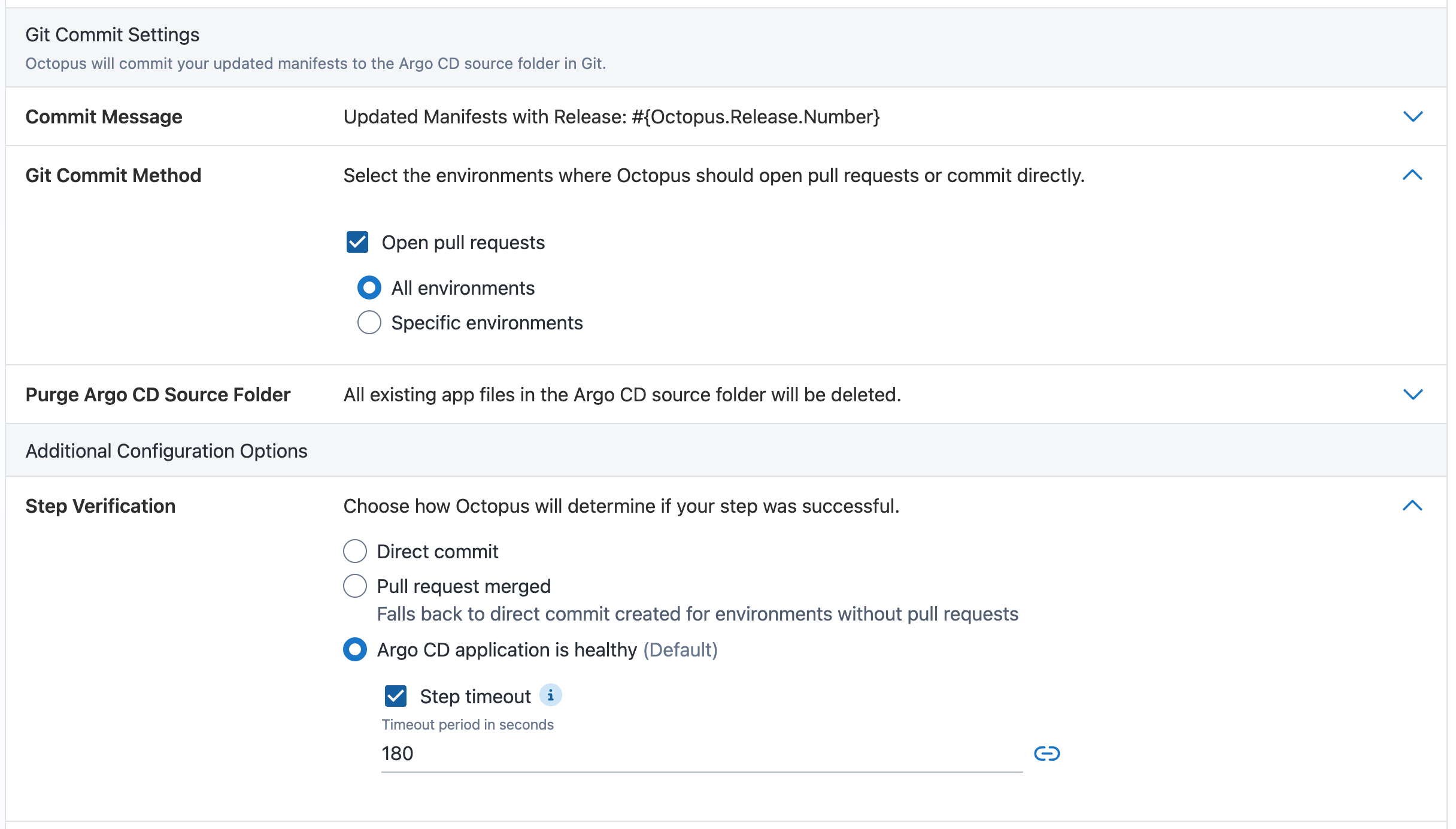
There are some new options in the step editor now that allow you to customize the behavior. The options are listed under step Verification:
- Direct commit: Progress to the next step once changes are pushed to Git (this is the existing behavior)
- Pull request merged: Progress to the next step once pull requests are merged, or fail the step if pull requests are closed or abandoned. This option results in a no-op if changes are committed directly without a pull request (see Git commit method)
- Argo CD application is healthy: Progress to the next step once all the Argo CD applications have synced the new changes and the applications are in a healthy state. Choosing this setting means your Octopus dashboard will accurately reflect the version and status of your applications deployed to the cluster
The task is paused while Octopus waits for pull requests to be merged or for Argo CD applications to be healthy. This means the task does not count towards your instance task cap.
Trigger sync
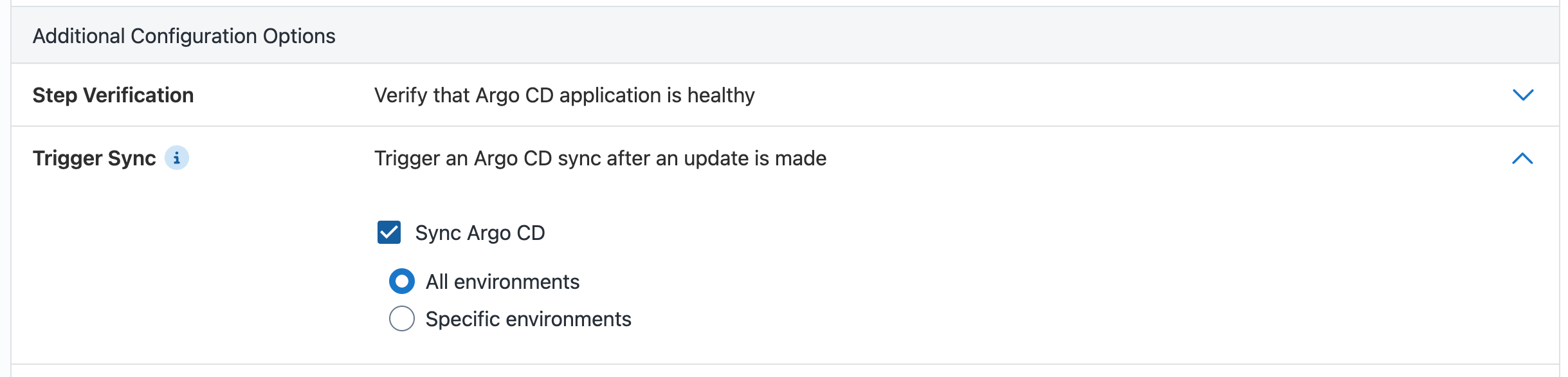
Turning on this option will trigger Argo CD to explicitly sync applications with the changes committed to Git by this same step.
If the application has auto-sync turned off, then triggering sync ensures Argo CD will look at the latest changes in Git when verifying application health.
If the application has auto-sync turned on, then triggering sync speeds up the deployment because Octopus does not have to wait for the next Argo CD refresh loop.
When is the application synced and healthy?
When verifying that the application is healthy after a change, we first need to check whether it references the changes we just made. Unfortunately, we can’t rely on Argo CD’s sync status alone, since Argo CD doesn’t know what Octopus’s intended changes are.
Let’s go through a few scenarios:
Scenario 1: All synced
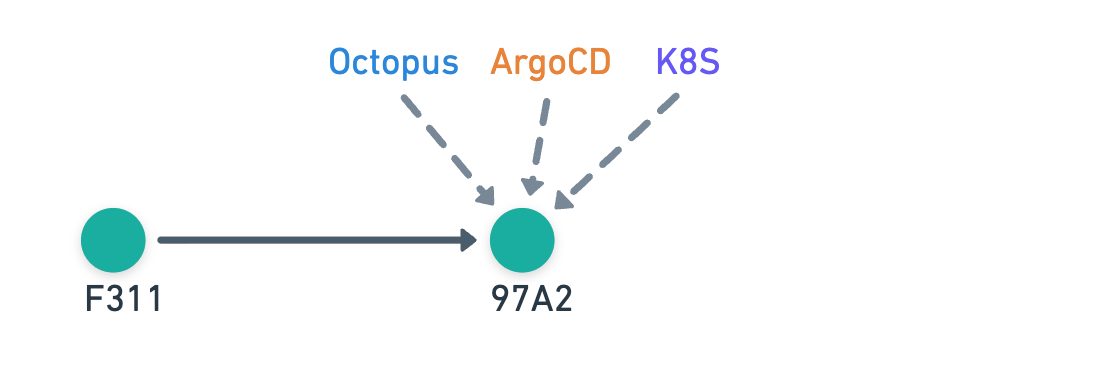
- Octopus commits
97A2 - Argo CD refreshes to
97A2and syncs the changes to the cluster
Sync status:
- Argo CD: In sync
- Octopus: In sync
This is the simplest scenario where all parties are looking at the same commit, so everyone is In sync.
Scenario 2: Out of sync
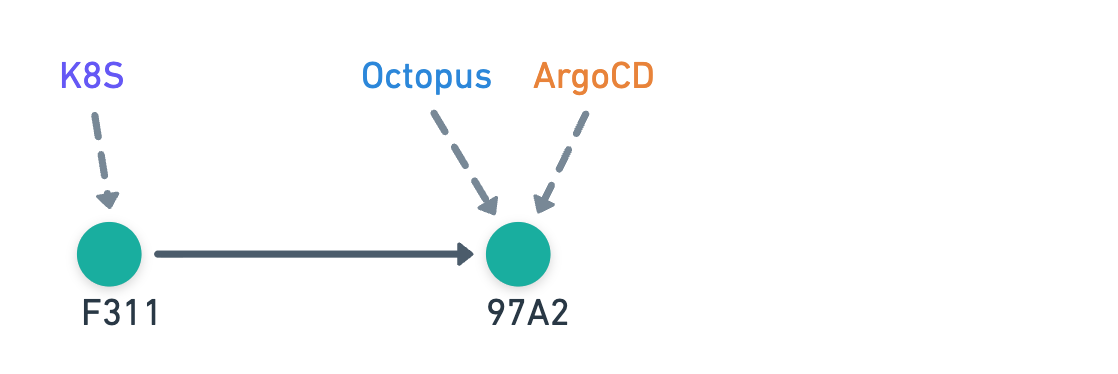
- Octopus commits
97A2 - Argo CD refreshes to
97A2but has yet to sync the changes to the cluster
Sync status:
- Argo CD: Out of sync
- Octopus: Out of sync
Even though Octopus and Argo CD are looking at the same commit, the changes have not yet been applied to the cluster, so Octopus still shows Out of sync.
Scenario 3: Octopus is ahead of Argo CD
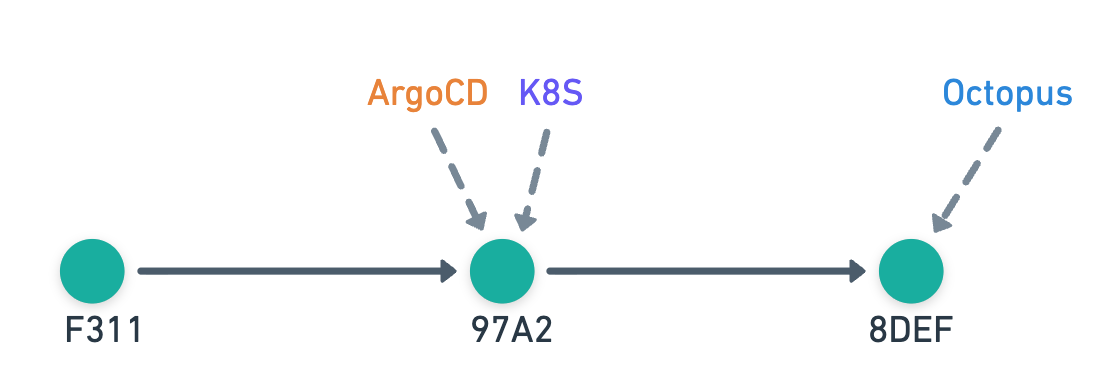
- Octopus commits
8DEF - Argo CD has yet to refresh, so it still considers
97A2to be the latest
Sync status:
- Argo CD: In sync
- Octopus: Git drift
In this scenario, Octopus has made a change that Argo CD doesn’t see yet. Here we introduce a concept called Git drift - this means even though everything looks up to date from Argo CD’s perspective, the changes made by Octopus aren’t in the cluster.
Scenario 4: External change overwrites Octopus-generated changes
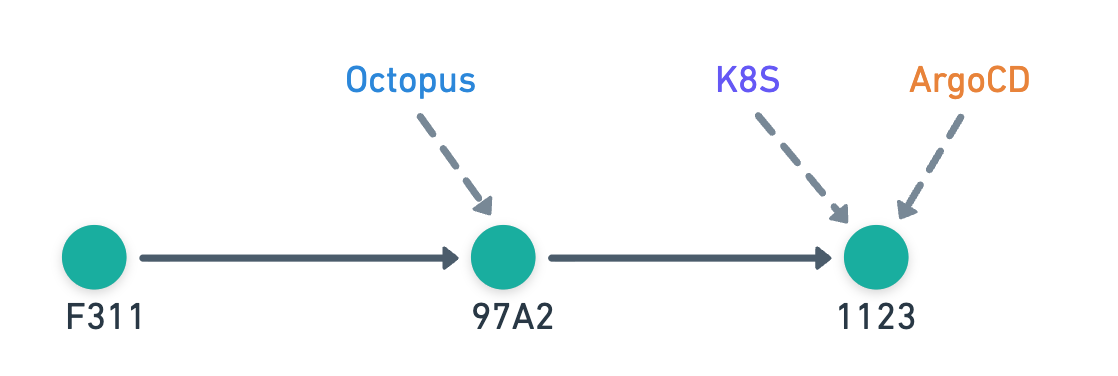
- Octopus commits
97A2 - Another process commits
1123with contents overwriting Octopus-generated changes - Argo CD refreshes to
1123and syncs the changes to the cluster
Sync status:
- Argo CD: In sync
- Octopus: Git drift
This scenario also results in Git drift because a later commit overwrites Octopus’s changes - an example would be the user updating image tags that Octopus updated.
Scenario 5: External change is unrelated to Octopus-generated changes
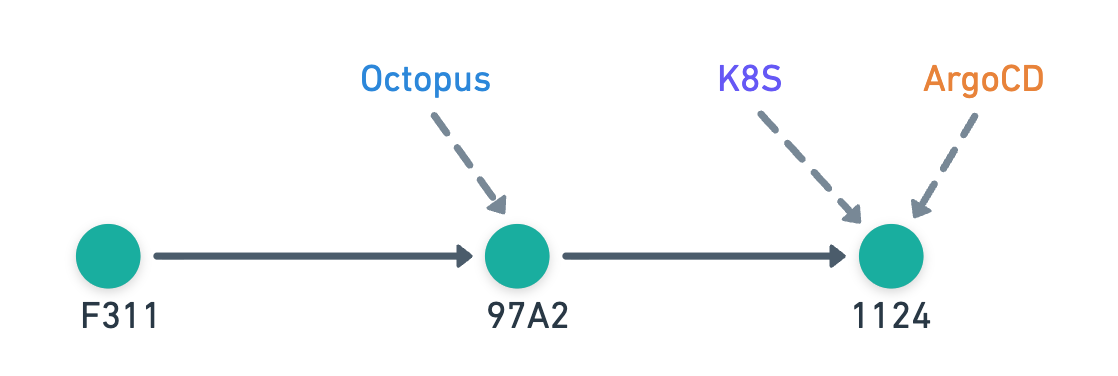
- Octopus commits
97A2 - Another process commits
1124with contents unrelated to Octopus-generated changes - Argo CD refreshes to
1124and syncs the changes to the cluster
Sync status:
- Argo CD: In sync
- Octopus: In sync
This scenario is similar to the previous one, but here the later commit only contains unrelated changes - an example would be the user updating the replica count after Octopus updates the image tags. Since Octopus-generated changes made are still in the cluster, it displays In sync.
How does Octopus know what changes are intended?
Since Octopus pushed the changes to the Git repository, it can keep track of the intended changes.
The two Argo CD steps have different functionality, so the way they record the intended changes is different.
Update Argo CD Application Image Tags
This step updates the image tags in the manifests. To track changes, Octopus records JSON patches for the files it updates.
When detecting whether these changes have been overwritten later on:
- Octopus checks out the Git repository files for the commit that Argo CD is looking at
- Octopus re-applies the JSON patches to the files it previously updated
- If the files have any changes, then it means Octopus’s changes have been overwritten
Note that JSON patches have limitations, so if the manifest has been significantly restructured, you might see an unexpected Git drift status. Simply redeploy to remove this false positive.
Update Argo CD Application Manifests
This step generates the manifests that go into the application’s repository. To track changes, Octopus records the file hashes it generates.
When detecting whether these changes have been overwritten later on:
- Octopus checks out the Git repository files for the commit that Argo CD is looking at
- Octopus checks if the file contents have changed by comparing the hashes of the files it generated
- If the files have any changes, then it means Octopus’s changes have been overwritten
Does Octopus inspect the Git tree?
While planning this feature, we initially went down the route of inspecting the Git tree to figure out whether Argo CD was including the latest changes deployed by Octopus. We soon realised that we would need to inspect file contents anyway because a later commit could easily overwrite Octopus’s changes.
Other than some small optimizations to skip file comparisons when the commit SHA matches between Octopus and Argo CD, Octopus only looks at the file contents in Git; it doesn’t care whether the commit is in the Git history.
How to try it out
The step verification functionality is currently available to all customers starting with 2026.1. Pull request merged verification is available from 2026.2 (rolling out in Octopus Cloud).
There’s nothing extra required to enable the feature. Simply open the Argo CD Instances section under Infrastructure, and connect one of your Argo CD instances to Octopus. From there, you can start modelling deployments that combine GitOps and Continuous Delivery out of the box.
Conclusion
Argo CD is a powerful GitOps tool for Kubernetes, but it wasn’t built to manage the full software delivery lifecycle. Octopus complements Argo CD by adding environment promotions, orchestration across diverse workloads, fine-grained RBAC, and centralized visibility across clusters.
With Argo CD integration, Octopus lets teams combine the strengths of GitOps and Continuous Delivery without building custom automations. You get the reliability of Git-driven deployments and the safety, governance, and flexibility of a full CD platform—all in one place.
Learn more on our use-case page.
Happy deployments!
Tags: