Rate limiting controls how quickly a system processes incoming requests. It is useful to guard against misbehaving scripts, integrations, or bad actors.
Octopus Server has a built-in rate limiter for HTTP requests. Users with the ConfigureServer permission (usually associated with the System Manager role) can configure it.
Configuration
Rate limiting is configured using policies, managed in the Configuration ➜ Settings ➜ Rate Limiting screen in the Octopus Web Portal.

There are four built-in policies:
Unauthenticated Requests
This policy applies to any HTTP requests not associated with an authenticated user. The rate limit applies per IP address.
Authenticated Requests
This policy applies to any HTTP requests associated with an authenticated user. The rate limit applies per user.
Authenticated AI Agent Requests
This policy applies to any HTTP requests associated with an authenticated user which authenticate using an agent API key. The rate limit applies per user, counted separately from non-AI requests.
Webhook Trigger Requests
HTTP requests made to the webhook runbook trigger endpoint have a builtin rate limit policy which is always enabled. It is not shown in the configuration interface and cannot be changed or disabled.
Configuring the Rate limiter
You can use the configuration screen to enable or disable the rate limiting policies, and alter their configured values.
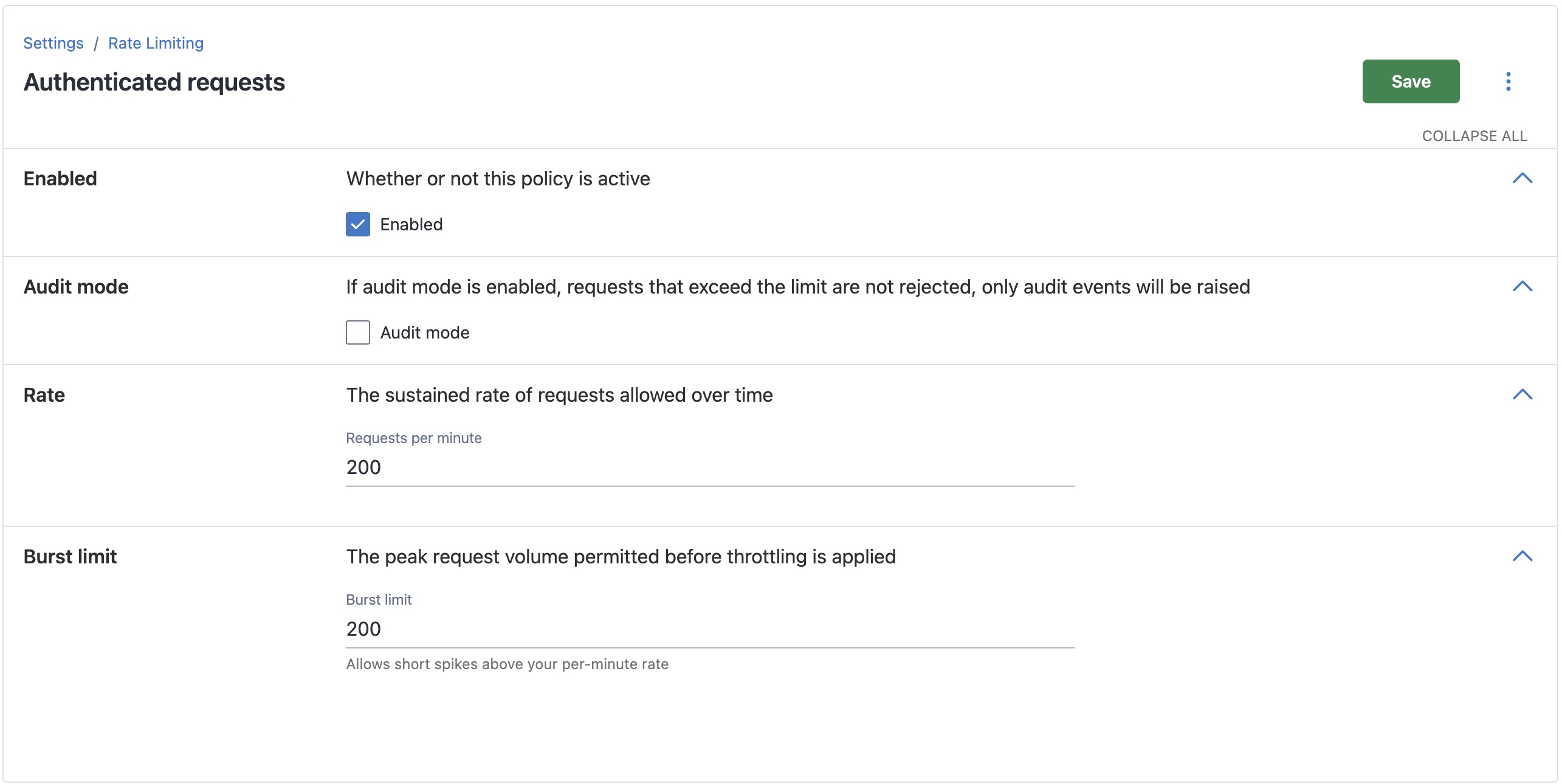
Each policy has the following settings you can modify:
- Enabled: This controls whether the policy is applied to incoming HTTP requests. If a policy is disabled then matching requests will not be limited.
- Audit mode: If enabled, this causes the Server not to reject traffic, but simply generate audit events where requests would have been limited. See “Audit Events” below.
- Rate: The sustained rate of incoming HTTP requests that the limiter will allow. See Understanding the Rate Limiter.
- Burst limit: The number of requests that must be consumed before the rate limiter activates and starts rejecting them. See Understanding the Rate Limiter.
The Webhook Trigger Requests policy is an exception; its settings cannot be modified.
Rate limiting policies can also be configured using the Octopus.Server command line’s rate-limiting-policy command.
Rate limiting policies can also be configured using the API.
Default Enabled State
For Octopus Cloud instances created after August 2026, and self-hosted installations of Octopus Server created with version 2026.3 or newer, all rate limiting policies are enabled by default.
For Cloud instances created before August 2026, or self-hosted installations created with 2026.2 or earlier versions, the rate limiting feature is a new addition when upgrading to 2026.3 or the latest Octopus Cloud version. When these instances upgrade, the Unauthenticated and Authenticated (non-AI) policies will stay disabled to avoid breaking pre-existing workflows. The Authenticated AI policy will be enabled.
Maintaining Service in Octopus Cloud
Octopus reserves the right to alter your cloud instance configuration to enable or adjust rate limiting, in line with our acceptable usage policy. We do this only if our internal monitoring shows that an instance is overloaded and rate limiting may help us restore service.
Understanding the Rate Limiter
Octopus Server uses the Token Bucket algorithm.
It has two configurable parameters - Burst Limit, and Rate.
The Burst Limit value specifies how many requests can be made (per user or per IP) before the rate limiter starts rejecting requests.
The Rate value specifies the steady state, in requests per minute, at which requests are allowed to continue, when the burst capacity is consumed.
By analogy: Imagine the rate limiter as a physical bucket of coins.
- Each user has their own bucket.
- Whenever a user makes an HTTP request to the Octopus Server, a coin is removed from the bucket.
- If the bucket is empty and a coin cannot be removed, the request is rejected.
- Burst Limit specifies how many coins the bucket starts with, and how many it can hold before it is full and no more can be added.
- Rate specifies how quickly new coins are added to refill the bucket.
Detail
- All requests are considered equal; they each deduct one token from the bucket regardless of what the request does.
- The bucket refills continuously. If you specified a rate of 120 requests per minute, then it would behave as though one token is added every half-second.
- Requests made by the Octopus web portal are considered the same as requests made via scripts and integrations.
- If you are concerned that a script or integration might consume a user’s rate limit quota and prevent them from accessing the web portal, create a separate service account for that script or integration.
- The Octopus web portal makes some requests to diagnostic endpoints for logging and telemetry. These do not count towards a user’s rate limit.
- The Octopus web portal makes some requests to load static content such as JavaScript and Image files. These do not count towards a user’s rate limit.
Enforcement
When the rate limiter rejects a request, the client will receive an HTTP 429 Too Many Requests error response. The request will not be processed by the server, and any action the request is intended to perform will not occur.
Retry-After response header
An HTTP 429 error response may include a Retry-After header, with a value specifying the number of seconds to wait before trying again.
The Retry-After header is a suggestion; a client is not guaranteed to succeed if it waits that long and tries again, and it may succeed even if it doesn’t wait for the specified period.
Advisory response headers
When the rate limiter is enabled, Octopus Server adds two additional headers Octopus-RateLimit-Policy and Octopus-RateLimit to all requests that are subject to rate-limiting, whether they succeed or fail.
Clients can use these headers to throttle their requests before hitting the rate limit, avoiding errors from the server and delays associated with retries.
Example:
Octopus-RateLimit-Policy: l=200;rpm=600
Octopus-RateLimit: r=7;t=18l=200tells the client that the policy’s Burst limit is 200rpm=600tells the client that the policy’s Requests per minute is 600r=7tells the client that there are 7 tokens remaining in its buckett-18tells the client that the bucket will fully refill in 18 seconds (assuming no other requests occur)
The Octopus Web Portal uses these headers automatically.
The Octopus C# Client gains support for these headers in Release 22.10.2889, however support is disabled by default. To have the client adapt to these headers, set UseRateLimitHeaders property to true on the OctopusClientOptions object you supply when creating the client.
draft-ietf-httpapi-ratelimit-headers-11 proposes the RateLimit-Policy and RateLimit headers.
The Octopus implementation is heavily inspired by this RFC, however we chose not to adopt the standard as it is still unstable. In future if the RFC becomes accepted and stable it is likely that we will adopt it.
Defining our own Octopus- headers allows us to transition gracefully way and maintain support for customers on timeframes within our control.
Audit Events
When a request is rejected, an Audit Event will be generated. At most one Audit Event will be generated every 15 minutes, per user, per server node.
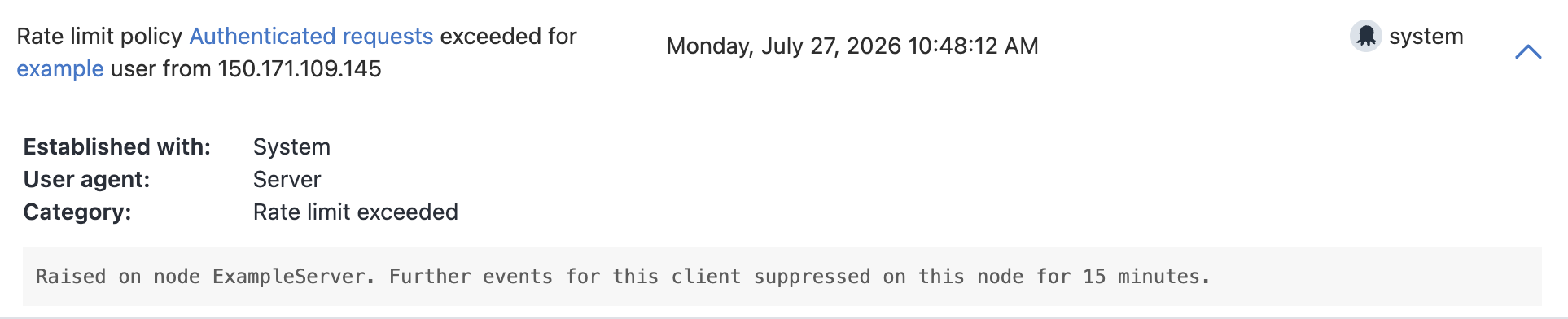
Audit Mode
Audit mode can help you tune rate limiting configuration for your specific Octopus Server instance, without disrupting existing workloads.
If a policy has the Audit Mode setting enabled, the rate limiting policy remains active and records HTTP requests, however:
- When a client reaches the limit, their requests are not rejected; they act as though the policy is not enabled.
- An audit event indicating that the rate limit was exceeded is still generated.
- The audit event interval is decreased. If a client continues to exceed the rate limit, an audit event is generated every 5 minutes, rather than every 15.
Advisory response headers are sent in audit mode. Clients which use them will slow down before they hit the rate limit, even though it is not technically enforced.
High Availability
When Octopus Server is configured for High Availability, and multiple nodes are serving HTTP requests, the rate limiting state is not shared across nodes. Each counts requests per user independently.
For example, given three server nodes, and a load-balancer which evenly distributes requests across nodes, a rate limiting configuration of 200 requests per minute would result in as many as 600 requests per minute being accepted.
Version Notes
HTTP Rate Limiting functionality was added in Octopus 2026.3.