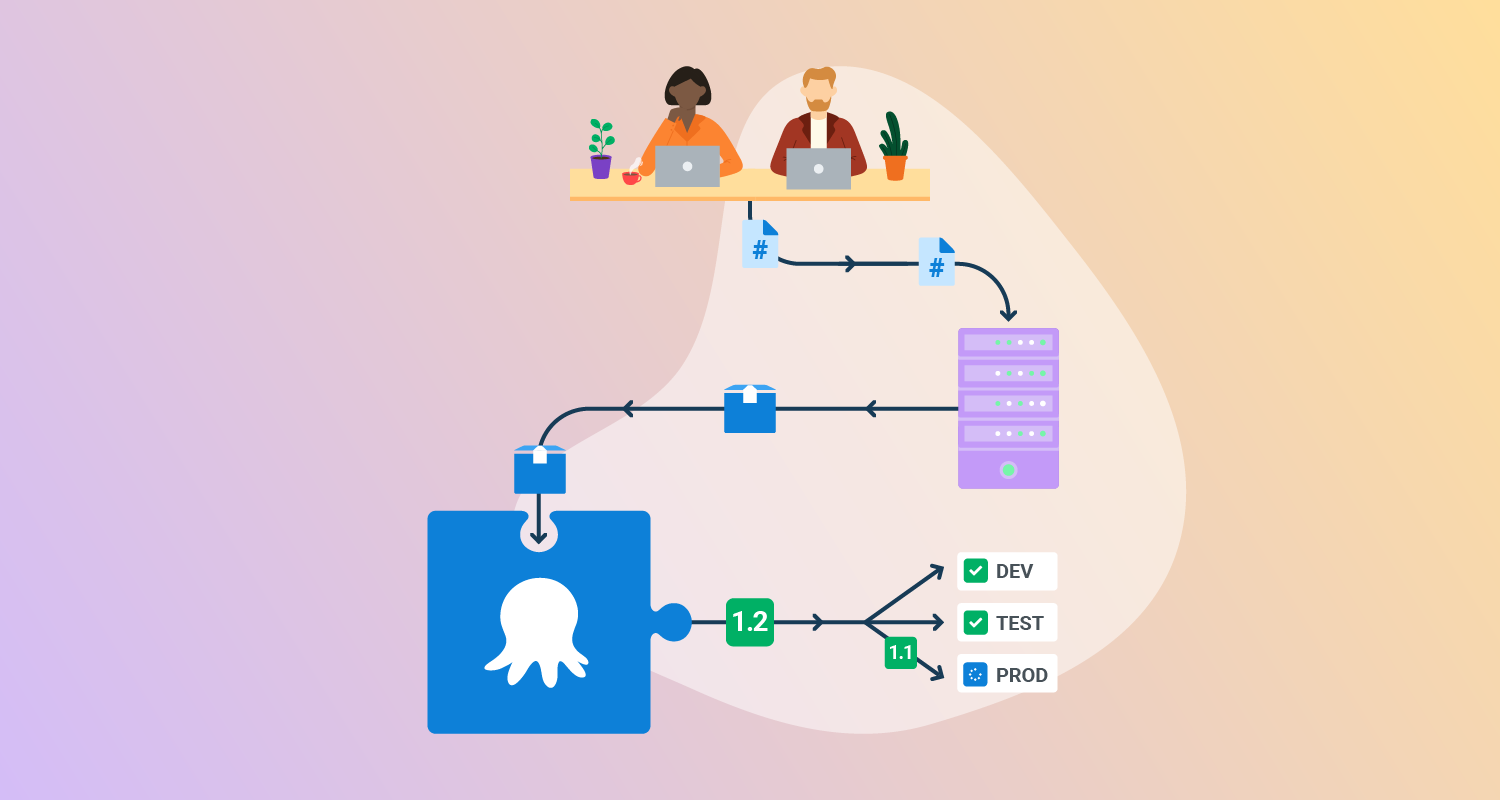
What is cloud deployment automation?
Cloud deployment automation refers to the use of software tools and processes to automate the provisioning, configuration, and management of cloud resources and applications. This automation simplifies the deployment process, improves efficiency, reduces errors, and enables faster software releases.
Cloud automation tools are often used in conjunction with DevOps practices to achieve Continuous Integration and Continuous Delivery (CI/CD) pipelines. These automated processes typically integrate with cloud provider APIs, version control repositories, and orchestration and monitoring tools.
By defining deployment steps as code or templates, teams can reliably reproduce environments or roll out updates across different environments with consistency.
Key aspects of cloud deployment automation include:
- Automated provisioning: Automatically creating and configuring cloud resources like virtual machines, storage, and networks based on predefined templates or scripts.
- Configuration management: Ensuring consistent and repeatable configurations across different environments using tools like Ansible, Chef, or Puppet.
- Deployment pipelines: Automating the steps involved in releasing new software versions, from code commit to production deployment, using CI/CD tools.
- Infrastructure as Code (IaC): Managing infrastructure through code, enabling version control, automated testing, and faster deployments.
- Self-service provisioning: Allowing developers and other users to provision resources on demand through automated workflows, reducing manual intervention.
- Monitoring and alerting: Automatically monitoring the performance of deployed applications and triggering alerts for issues or anomalies.
Benefits of cloud deployment automation
Cloud deployment automation offers advantages that enhance the efficiency and effectiveness of cloud operations. By streamlining processes, it helps organizations achieve key objectives:
- Faster deployments: Automated workflows enable rapid, consistent deployment of resources and applications, reducing time spent on manual tasks.
- Reduced errors: Automation minimizes human error by removing manual intervention and ensuring processes are executed as intended.
- Improved efficiency: Automation optimizes resource allocation and deployment, reducing wasted time and effort while enhancing productivity.
- Increased agility: Teams can quickly respond to changes and roll out updates without delays.
- Reduced costs: By eliminating manual processes, automation reduces labor costs and resource wastage.
- Better collaboration: Standardized, automated processes improve communication and collaboration across teams, as everyone works with the same frameworks and tools.
Core components of cloud deployment automation
1. Automated provisioning
Automated provisioning uses scripts or orchestration tools to create and manage cloud infrastructure without manual intervention. This includes launching virtual machines, configuring networks, setting up storage, and assigning permissions. By defining these steps in code or declarative templates, teams ensure infrastructure is provisioned consistently and reproducibly.
Provisioning automation integrates with cloud provider APIs, enabling rapid and scalable deployment of resources across different environments (development, testing, production) as required. It supports scaling operations, disaster recovery setups, and quick environment cloning, all while maintaining compliance with organizational policies and standards.
2. Configuration management
Configuration management automates the setup and ongoing management of software configurations across cloud resources. Configuration management tools, such as Ansible, Chef, or Puppet, enforce desired states for operating systems, middleware, and application layers. This eliminates configuration drift and ensures every instance meets defined requirements.
By treating configurations as code, teams can track changes, audit incidents, and quickly roll back misconfigurations. Configuration management also enables repeatable and secure deployments, especially when managing large fleets of instances or containerized workloads in the cloud.
3. Deployment pipelines
A deployment pipeline is an orchestrated sequence of steps for building, testing, and deploying code to cloud environments. Pipelines automate each stage—from source code retrieval and integration to automated tests, artifact creation, and final deployment. Pipeline tools such as Jenkins, GitLab CI/CD, or GitHub Actions enable repeatable, traceable, and fast deployments.
Automated pipelines incorporate checks, approvals, and rollbacks as part of their workflows, ensuring only validated code reaches production. This systematic approach reduces manual errors, shortens feedback loops, and allows incremental releases, supporting Continuous Delivery and DevOps practices.
4. Infrastructure as Code (IaC)
Infrastructure as Code defines and manages cloud infrastructure using code files, typically written in languages such as YAML, JSON, or HashiCorp Configuration Language (HCL). Tools like Terraform, AWS CloudFormation, or Azure Resource Manager allow teams to codify the desired state of networks, storage, and compute resources. IaC brings versioning, peer review, and automated testing to infrastructure management.
By storing infrastructure definitions in a code repository, organizations gain traceability and the ability to roll back or replicate builds. This approach ensures environments can be reproduced reliably and consistently, across teams or cloud providers.
5. Self-service provisioning
Self-service provisioning empowers end users, such as developers or QA engineers, to request and deploy cloud resources without needing administrator intervention. User portals or APIs abstract away underlying complexity, enforcing policies and limits automatically as resources are provisioned.
This model accelerates delivery while reducing the operational load on infrastructure teams. Self-service tools can integrate with organizational billing, identity management, and approval workflows to ensure governance, accountability, and compliance are maintained across dynamic environments.
6. Monitoring and alerting
Monitoring and alerting are critical for observing the health, performance, and availability of both cloud infrastructure and deployed applications. Automated monitoring tools collect metrics, logs, and event data in real time, providing actionable insights into system behavior. Predefined or custom alerts notify teams of anomalies, threshold breaches, or failures.
Effective monitoring enables quick incident response, root cause analysis, and retrospective analysis for process improvement. Automation here includes self-healing actions, such as automatic scaling or restart of failed services, further enhancing system resiliency and reducing mean time to recovery (MTTR).

Tony Kelly is a DevOps marketing leader who drives innovation and awareness of the latest trends in Continuous Delivery.
Cloud deployment automation challenges
Complexity in large-scale deployments
As organizations scale their cloud operations, the number and diversity of resources to manage increase dramatically. Orchestrating deployments across multiple regions, accounts, or cloud providers introduces substantial complexity. Dependencies, networking, security, and compliance requirements further compound these difficulties, making it challenging to maintain a uniform deployment process.
Without careful planning and robust automation, large-scale deployments are vulnerable to configuration drift, inconsistent environments, and misaligned updates. Tool sprawl, lack of visibility, and insufficient integration between tools can impede troubleshooting and increase the risk of outages or compliance violations. Addressing this complexity requires standardized processes and robust orchestration platforms.
Deployment consistency
Achieving consistent deployments across varying environments—from development sandboxes to production clusters—is a significant challenge. Differences in environment configurations, access rights, or resource types often result in unpredictable behavior or failed rollouts. Manual overrides or ad hoc changes compound inconsistencies, making root cause analysis difficult.
Automation can enforce baselines, but teams must also invest in version control, template standardization, and rigorous testing to ensure every deployment results in identical infrastructure and configurations. Regular audits and automated configuration tools help maintain this consistency as environments evolve.
Dependency management
Managing dependencies—whether system libraries, middleware, or external services—becomes increasingly complex in cloud environments where applications are distributed and interconnected. A failure to track or version dependencies properly can lead to broken deployments, incompatibilities, or cascading failures.
Automation tools should include robust dependency management strategies, pinning versions, and performing compatibility checks as part of deployment pipelines. Containerization and artifact repositories can further isolate dependencies, enabling more predictable and controlled rollouts. However, ongoing vigilance and clear documentation remain essential to prevent issues stemming from unmanaged dependencies.
Best practices for successful cloud deployment automation
Organizations can improve their automated cloud deployments with these practices.
1. Use modular templates and blueprints
Modular templates and blueprints allow teams to define reusable components and configurations, which can be combined into complete infrastructure setups. This modular approach improves flexibility by enabling teams to customize individual pieces of infrastructure, such as networking, storage, or compute resources, without starting from scratch each time.
Tools like Terraform, AWS CloudFormation, and Azure Resource Manager support the use of modular templates to manage cloud resources efficiently.
By breaking down configurations into smaller, manageable units, teams can maintain consistency, ease updates, and promote better collaboration across different groups within the organization. Additionally, modular templates can be version-controlled and shared across teams, improving governance and traceability in the deployment process.
2. Adopt a shift-left security approach
Shifting security left means incorporating security practices early in the development and deployment lifecycle. In cloud deployment automation, this involves integrating security testing, vulnerability scans, and compliance checks into the automated pipeline from the outset. By doing so, teams can identify and resolve security issues before they make it to production.
Automating security scans, access controls, and configuration audits ensures that infrastructure and applications remain secure as they evolve. This proactive approach minimizes the need for costly security remediation later in the process.
3. Establish clear rollback procedures
Rollback procedures are essential to mitigating the risks of failed deployments. These procedures involve automated steps to revert infrastructure and applications to a known good state if something goes wrong during a deployment. Clear rollback strategies should be part of the deployment pipeline, integrated with version control, and thoroughly tested.
Automating rollback procedures ensures that recovery is fast, consistent, and reliable. By using tools like CI/CD pipelines, containerization, and infrastructure-as-code templates, teams can define rollback scripts that quickly restore previous configurations or application versions, minimizing downtime and reducing operational disruption.
4. Automate testing of deployments
Automated testing plays a crucial role in validating the success of cloud deployments. By incorporating automated tests within deployment pipelines, teams can quickly verify that infrastructure changes or new applications work as expected in the target environment. These tests can include unit tests, integration tests, performance tests, and security checks.
Automated tests provide consistent and repeatable validation, helping catch issues early in the process. This approach increases deployment confidence and reduces the risk of errors reaching production.
5. Implement incremental and blue/green deployments
Incremental and blue/green deployments are deployment strategies designed to minimize risk by gradually introducing changes and enabling easy rollback. In incremental deployments, updates are deployed in smaller chunks, allowing for better control over the release process and easier troubleshooting if issues arise.
Blue/green deployments involve running two identical environments—one with the current version and one with the new version—allowing for quick switching between them in case of failure.
6. Monitor and optimize deployments
Monitoring deployments ensures that infrastructure and applications perform as expected after automation processes complete. Teams should integrate monitoring tools such as Prometheus, Datadog, or AWS CloudWatch into deployment pipelines to track key metrics like CPU usage, response times, error rates, and resource consumption.
Automated alerts can notify engineers of anomalies or failures during and after deployment, enabling rapid intervention to prevent downtime. Optimization focuses on refining deployment workflows and resource usage. Teams can analyze historical deployment data to identify bottlenecks, optimize resource allocation, and eliminate redundant steps.
Techniques such as auto-scaling, cost monitoring, and garbage collection of unused resources help keep cloud environments efficient and cost-effective. Regular post-deployment reviews ensure that lessons learned feed back into automation scripts for continuous improvement.
Related content: Read our guide to deployment automation tools (coming soon)
Help us continuously improve
Please let us know if you have any feedback about this page.