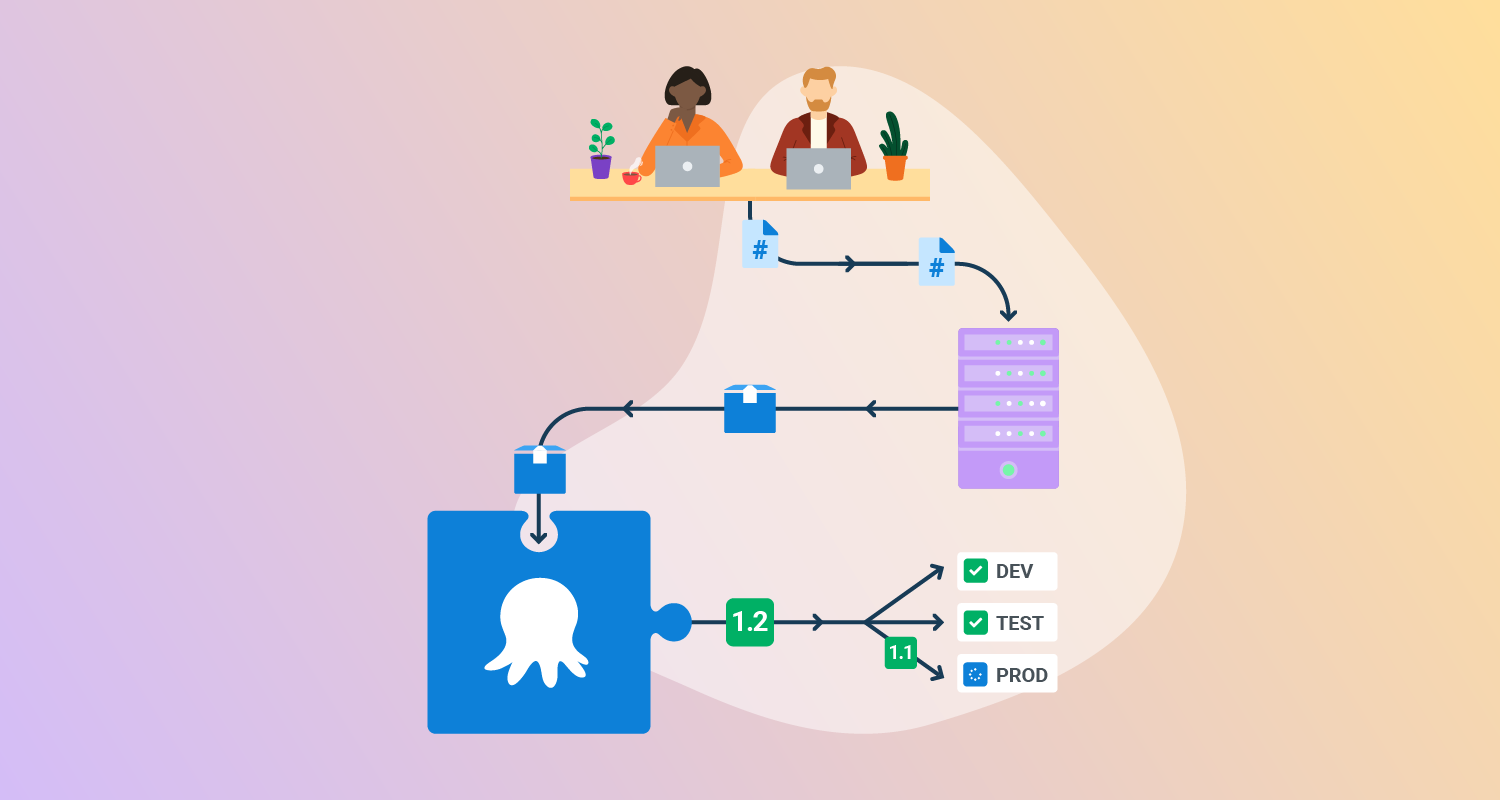
What is deployment automation?
Deployment automation is the process of using software tools to automatically move code changes from one environment to another, like from development to testing, staging, and production. It eliminates manual, error-prone deployments, leading to faster, more reliable, and consistent releases. This practice is crucial for DevOps and Continuous Delivery (CD) methodologies.
By automating deployment steps like copying files, configuring servers, and running database migrations, organizations achieve consistent, repeatable results across environments. These automated processes can include building application artifacts, testing code, managing dependencies, and provisioning infrastructure.
Key aspects of deployment automation include:
- Automated processes: Automates the steps involved in deploying applications, including packaging, configuration, and deployment itself.
- Reduced manual intervention: Minimizes the need for human interaction during deployments, reducing the risk of errors and improving efficiency.
- Faster release cycles: Enables faster and more frequent software releases, allowing for quicker delivery of new features and updates.
- Improved consistency: Ensures consistent deployments across different environments, leading to more reliable and predictable results.
- Key component of DevOps: A core practice in DevOps, complementing Continuous Integration (CI) and contributing to the overall CI/CD pipeline.
Key benefits of software deployment automation
The benefits of deployment automation are significant, improving both the speed and quality of software delivery. By automating repetitive tasks, organizations can reduce the manual workload and ensure more reliable deployments. Here are some of the key advantages:
- Increased speed and frequency: Automation allows for faster deployments, enabling more frequent updates and quicker delivery of new features or fixes.
- Reduced risk and errors: By eliminating manual steps, automation reduces the chances of human error, resulting in more reliable deployments with fewer issues.
- Improved efficiency: Automated processes reduce the time spent on manual tasks, freeing up resources for other critical areas.
- Enhanced collaboration: With standardized and automated deployment workflows, teams can collaborate more effectively, as everyone follows the same process for releases.
- Better feedback loops: Deployment automation helps speed up the feedback cycle, allowing teams to identify and fix issues earlier.
- Consistency across environments: Automation ensures that deployments are executed consistently across different environments, from development to production.
- Scalability: As your application grows, automated deployments allow for the scalability needed to handle more complex systems and larger user bases.
- Cost savings: By reducing manual intervention, automation can lower operational costs and reduce downtime.
Key aspects of deployment automation
Automated processes
Automated deployment processes handle every task involved in moving code from development to production without manual steps. This includes compiling code, running automated tests, packaging application artifacts, and deploying them to target environments. Automation scripts or tools manage these tasks in a repeatable and predictable manner.
By scripting deployment workflows and using configuration files, teams can enforce consistency in how applications are built and deployed. This reduces variability and ensures that deployments are performed the same way every time, regardless of who initiates them.
Reduced manual intervention
Reducing manual intervention minimizes the risks associated with human error during deployment. Manual steps like editing configuration files, copying binaries, or restarting services are prone to mistakes that can cause outages or failed releases.
With deployment automation, these steps are defined once and executed reliably through scripts or orchestration tools. This not only improves accuracy but also speeds up the deployment process by removing the need for manual oversight.
Faster release cycles
Automation accelerates the release process by eliminating delays caused by manual workflows and approvals. Code can move through the deployment pipeline as soon as it passes tests, enabling Continuous Delivery of updates and new features.
This speed helps teams respond quickly to customer feedback, security issues, or changing market demands. It also supports agile development practices by making it feasible to deploy small, frequent changes instead of large, infrequent releases.
Improved consistency
Automated deployments ensure that the same deployment steps are followed in every environment, from development to production. This consistency reduces the chances of bugs or failures caused by environment-specific differences or manual misconfigurations.
Tools like configuration management systems and infrastructure as code help enforce this consistency by applying the same configurations across all environments. As a result, teams can trust that code behaves the same way in production as it did in testing.
Key component of DevOps
Deployment automation is a foundational practice in DevOps, supporting the goal of Continuous Delivery through faster, more reliable releases. It bridges the gap between development and operations by standardizing and automating how code is delivered.
By integrating deployment automation into the CI/CD pipeline, teams can deliver value to users more frequently and with higher confidence. This not only improves software quality but also fosters a culture of collaboration and shared responsibility across teams.

Tony Kelly is a DevOps marketing leader who drives innovation and awareness of the latest trends in Continuous Delivery.
Automated deployment process: What is involved?
Executing an automated deployment involves setting up a series of processes and tools to ensure the delivery of applications. Below are the key steps involved in executing deployment automation effectively:
- Set up version control: Ensure that all source code and configuration files are stored in a version control system (e.g., Git). This enables tracking of changes and simplifies collaboration.
- Define the deployment pipeline: Build a pipeline that outlines the steps required for deployment. The pipeline typically includes stages like build, test, and deploy. Automation tools (e.g., Jenkins, GitLab CI) can help create this pipeline.
- Automate build and test processes: Use Continuous Integration (CI) tools to automatically build and test your application whenever changes are pushed to the version control system. This ensures that issues are detected early, and only code that passes all tests proceeds to deployment.
- Provision infrastructure: Automate the provisioning of infrastructure using tools like Terraform or AWS CloudFormation. This allows for consistent, repeatable environments across all stages, from development to production.
- Automate deployment: Once your application is built and tested, automate the deployment to target environments. This can be done using tools like Kubernetes, Docker, or AWS CodeDeploy. The deployment script should handle tasks such as server configuration, database migrations, and environment-specific settings.
- Monitor and rollback: After deploying, continuously monitor the application for performance and errors using monitoring tools like Prometheus or New Relic. If issues arise, have automated rollback procedures in place to revert to a previous stable version.
- Set up notifications: Integrate notification systems (e.g., Slack, email) to alert team members about the deployment status.
This is just a quick overview of the steps involved in full deployment automation. You can learn more about some of these steps in our detailed guides about:
- Software deployment pipeline
- Software deployment testing (coming soon)
- Deployment checklist (coming soon)
- Cloud deployment
- Kubernetes deployment
Key use cases for deployment automation
Here are some of the main scenarios in which organizations use deployment automation:
- Microservices deployment automation: Microservices deployment automation focuses on automating the deployment of microservices-based applications, which consist of independently deployable services. Each service in a microservices architecture may be deployed to different environments, often with varying resource needs and dependencies.
- Cloud deployment automation: Cloud deployment automation refers to using automation tools and processes to deploy applications and infrastructure in cloud environments such as AWS, Azure, or Google Cloud. It uses infrastructure as code (IaC) principles to define and provision infrastructure resources.
- Kubernetes deployment automation: Kubernetes deployment automation focuses on streamlining the process of deploying containerized applications to a Kubernetes cluster. Kubernetes is a container orchestration tool, and automating the deployment process ensures consistency, scalability, and minimal downtime.
- Docker deployment automation: Docker deployment automation involves automating the process of deploying Docker containers, which encapsulate applications and their dependencies. By automating Docker deployments, organizations can ensure that containerized applications are deployed consistently and reliably across various environments.
- Serverless deployment automation: Serverless deployment automation refers to automating the deployment of serverless applications, where the infrastructure management is abstracted away. With serverless computing platforms such as AWS Lambda, Azure Functions, or Google Cloud Functions, developers can focus on writing and deploying code without worrying about managing servers or scaling infrastructure.
Notable tools for deployment automation
1. Octopus Deploy
Octopus Deploy helps software teams deploy freely – when and where they need, in a routine way. With Octopus, you can orchestrate deployments from modern containers and microservices to trusted legacy applications. We support deployments in data centers, multiple cloud environments, and hybrid IT infrastructure.
Features of Octopus Deploy:
- Deployment and runbooks automation: Automates complex deployments and operations runbooks with hundreds of ready-made step templates, so you can avoid rolling your own scripts.
- All your deployments in one place: See all of your deployments in one place, including Kubernetes, cloud, data-center, and on-premises targets.
- Intuitive UI plus GitOps: Use the intuitive user interface to configure and run deployments, and store the deployment process as code in declarative version-controlled files.
- Configuration management: Easily handle complex configuration management and variable substitution to make sure every environment and instance has the correct configuration.
- Scalable, repeatable, reliable deployments: Removes the stress from deployments with robust automation options.

2. GitLab CI/CD
GitLab CI/CD is a platform designed to automate the software delivery process, enabling teams to build, test, and deploy code with greater speed and reliability. It integrates various stages of the software development lifecycle, from source code management to deployment, offering an all-in-one solution for Continuous Integration and Continuous Delivery. GitLab supports features like security testing, vulnerability scanning, and compliance checks, ensuring that applications are secure before deployment.
Key features include:
- Progressive delivery: Control the deployment process with features like canary deployments to gradually release code changes to a smaller user base before full rollout.
- Continuous Deployment: Deploy code to multiple environments, including virtual machines, Kubernetes clusters, or function-as-a-service (FaaS) platforms across various cloud vendors.
- Automated security integration: Automatically integrate security testing and compliance checks at each stage.
- CI/CD pipeline templates: Use pre-configured or custom pipeline templates to automate building, testing, and deploying applications.
- Merge trains and parent-child pipelines: Simplify and improve pipeline performance by breaking complex pipelines into smaller, manageable units.

3. Azure DevOps
Azure DevOps is a suite of development tools that supports automation of the software delivery lifecycle. It includes services for managing code repositories, pipelines, testing, and artifact storage. Deployment automation with Azure DevOps is achieved through its Pipelines service, which enables teams to define, automate, and monitor multi-stage CI/CD workflows.
Key features include:
- Multi-stage pipelines: Define separate stages for build, test, and deploy in YAML-based pipelines.
- Environment-specific deployments: Configure environment-specific settings, approvals, and checks.
- Integration with Azure and third-party tools: Easily connect with cloud services, containers, and external tools.
- Secrets management: Securely manage sensitive values using Azure Key Vault integration.
- Built-in testing and artifact management: Integrate unit testing, code coverage, and artifact storage in the deployment workflow.

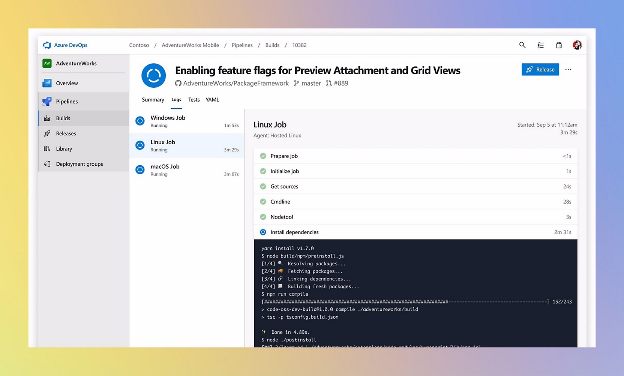
Source: Microsoft
4. GitHub Actions
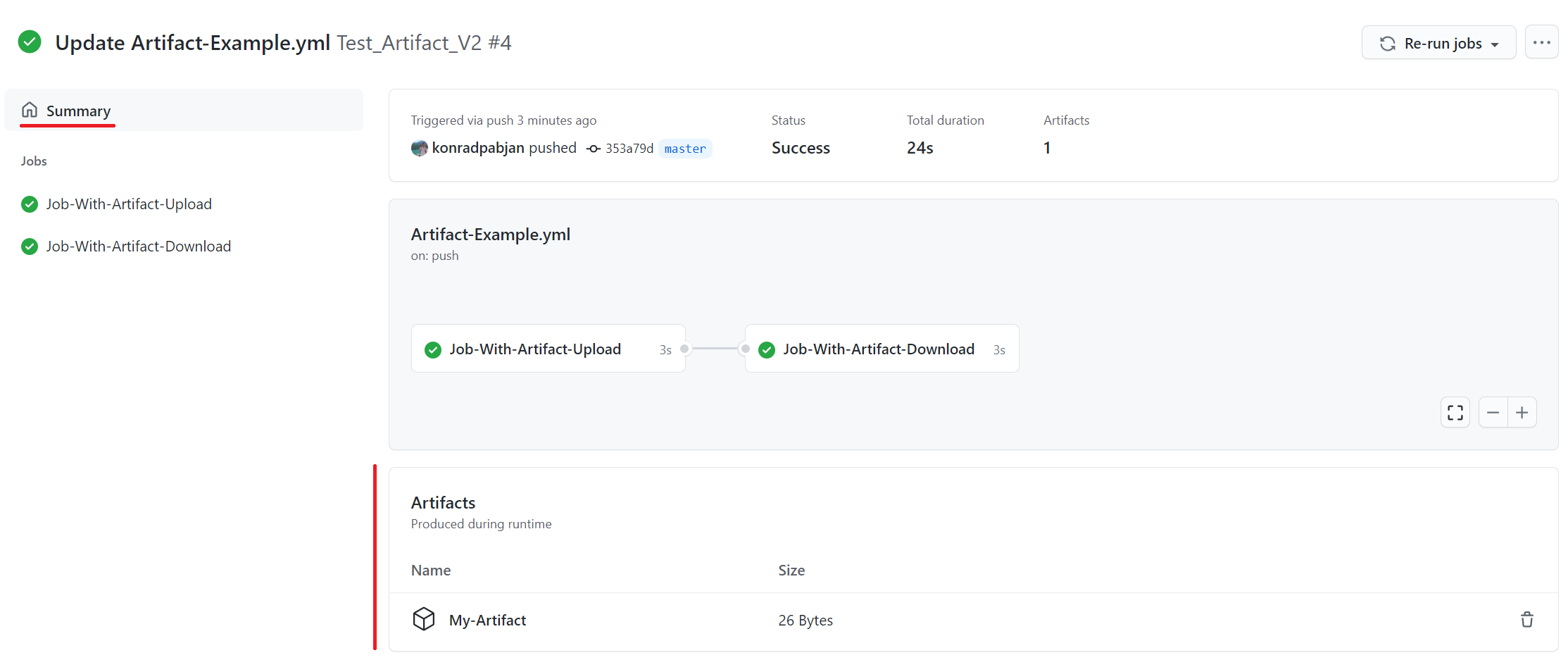
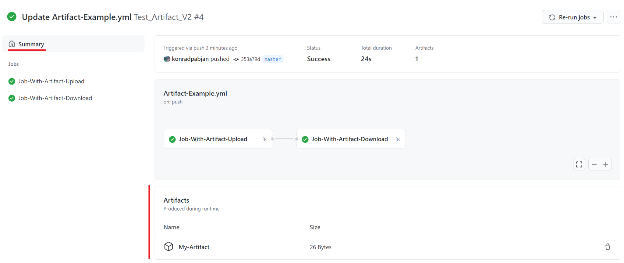
GitHub Actions is an automation platform built into GitHub that allows teams to define workflows for building, testing, and deploying applications directly from their repositories. It supports event-driven automation, enabling deployment pipelines to be triggered by events such as code pushes or pull requests.
Key features include:
- Workflow automation: Use YAML configuration files to define CI/CD workflows.
- Matrix builds and parallel jobs: Run multiple jobs concurrently across different configurations.
- Container and VM support: Run workflows in Docker containers or GitHub-hosted runners.
- Marketplace of pre-built actions: Use community-contributed actions to simplify deployments.
- Secret management: Securely store credentials and tokens for deployment environments.

Source: GitHub
5. Harness
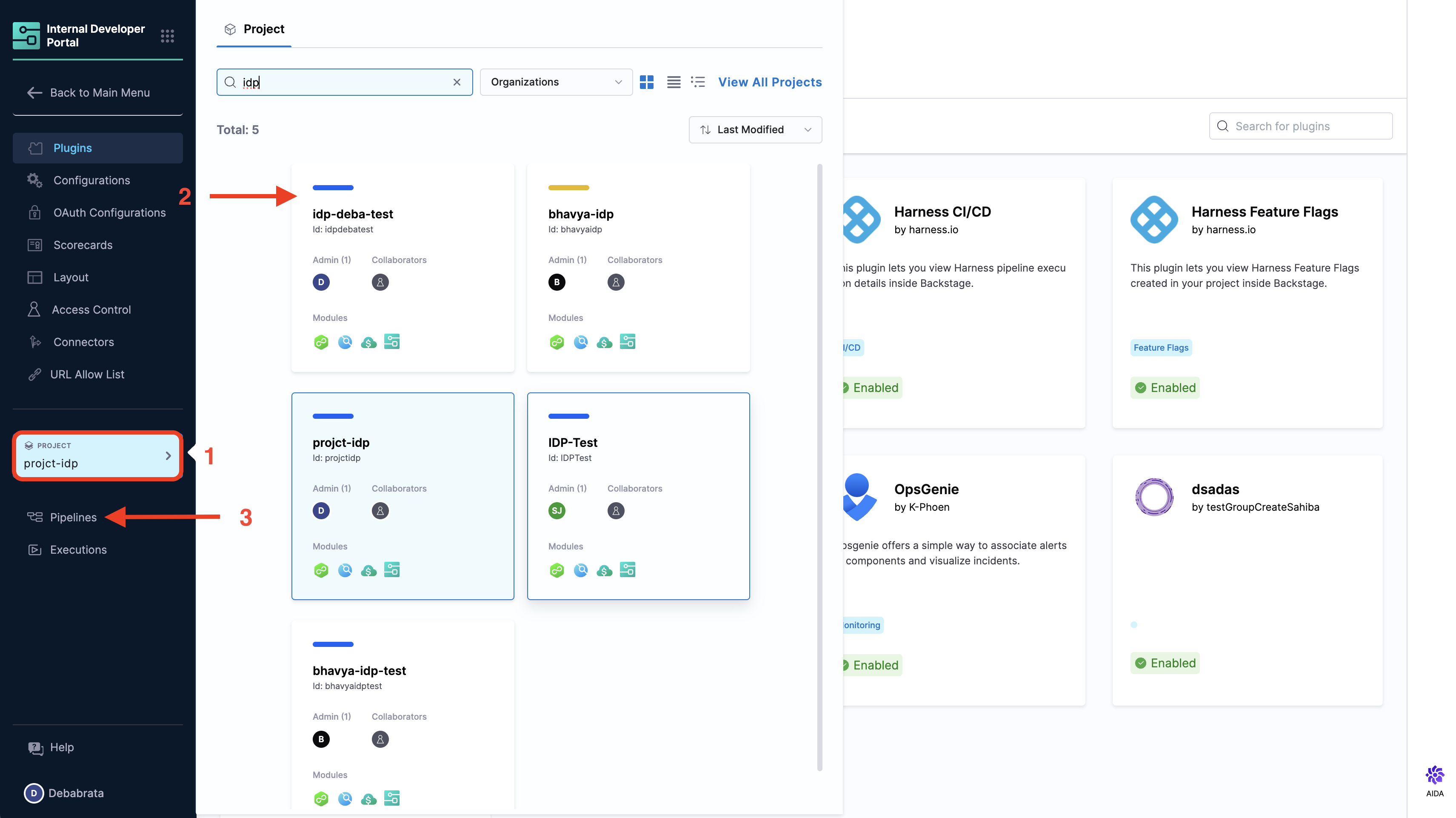
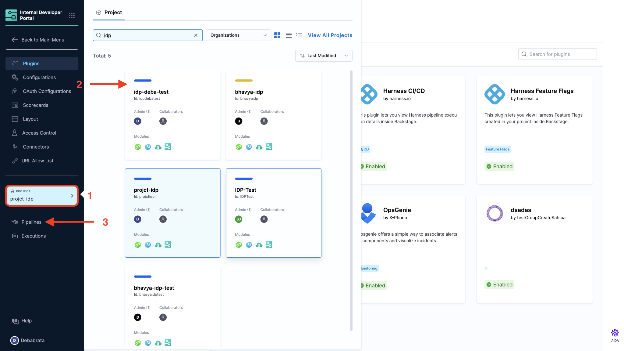
Harness is a Continuous Delivery platform that focuses on simplifying and automating deployments across various environments. It uses machine learning to verify deployments, automate rollbacks, and manage release strategies with minimal manual intervention.
Key features include:
- Smart deployment verification: Analyze metrics and logs to determine the success of deployments.
- Rollback automation: Automatically roll back failed deployments using previous stable versions.
- Canary and blue/green deployments: Support progressive delivery strategies with minimal risk.
- Audit trails and governance: Maintain records of deployment activity for compliance.
- Multi-cloud and Kubernetes support: Deploy across cloud platforms and container orchestration systems.

Source: Harness
Learn more in our detailed guide to deployment automation tools (coming soon)
Best practices for deployment automation
Organizations should consider the following practices when automating their deployment processes.
1. Version everything in source control
Version control should not only encompass application code but also configuration files, scripts, environment settings, and infrastructure definitions. By placing everything into a version control system like Git, you ensure that every element involved in the deployment process is tracked and maintained in a centralized, auditable repository. This approach allows for easy collaboration among team members, reduces the risk of inconsistent configurations, and ensures that deployments are fully reproducible.
Storing deployment scripts and infrastructure-as-code (IaC) files in version control makes it possible to quickly roll back to a previous state if a deployment fails or issues arise. Additionally, version control encourages team discipline, as every change is documented with a detailed commit history.
2. Monitor and log deployments
Effective monitoring and logging systems are essential for detecting and addressing issues in real-time, especially when automation is in place. Tools like Prometheus or Datadog can monitor the health of applications, system resources, and infrastructure in production environments.
Having a logging strategy—using platforms such as ELK Stack (Elasticsearch, Logstash, and Kibana) or Splunk—ensures that all deployment activities are recorded and can be analyzed if something goes wrong. Logs should capture details about the deployment process, such as which versions were deployed, whether all steps succeeded or failed, and any changes made to configuration files.
Monitoring provides insight into critical application metrics such as response times, error rates, and resource use. Additionally, an alerting system should be integrated into your monitoring to immediately notify the team about deployment failures, performance degradation, or other significant issues.
3. Automate environment provisioning
Automating environment provisioning is a core part of deployment automation, ensuring that new environments are created quickly and consistently across different stages of the development lifecycle (e.g., development, staging, production). This eliminates the manual setup errors that are common when environments are configured by hand.
Infrastructure-as-code (IaC) tools like Terraform, AWS CloudFormation, or Ansible allow teams to define entire infrastructure stacks as code, including network configurations, security groups, servers, databases, and other services required to run applications.
These scripts can be versioned, tested, and shared, making it easy to recreate environments from scratch whenever necessary, such as for scaling, recovery, or replication. Furthermore, with automated provisioning, teams can quickly set up isolated testing environments that mimic production, ensuring that new code is thoroughly tested before it reaches live systems.
4. Implement robust testing at every stage
To ensure that only stable and secure code is deployed, integrate rigorous testing at every stage of the deployment pipeline. Automated tests should run on every commit or change in the codebase. Unit tests focus on individual components, while integration tests check how different parts of the system interact, and end-to-end tests validate the entire workflow.
This testing process should be tightly integrated into your Continuous Integration (CI) tools, ensuring that code is thoroughly vetted before it reaches production. Additionally, use performance testing to identify potential bottlenecks or scalability issues early on.
Automating testing also reduces the reliance on manual quality assurance processes, speeding up the feedback loop and minimizing the chances of deploying broken code. Furthermore, practices like canary deployments, where only a small subset of users experience the new version, and blue/green deployments, where traffic is gradually switched between environments, help test changes in production with minimal risk to end users.
5. Implement Infrastructure as Code (IaC)
Infrastructure as Code (IaC) ensures that all infrastructure resources—such as servers, networks, databases, and storage—are described and provisioned through code rather than manual configuration. This approach enables teams to automate infrastructure provisioning and manage it in a consistent, repeatable, and version-controlled manner.
By adopting IaC tools like Terraform, AWS CloudFormation, or Ansible, teams can define infrastructure in configuration files, which can then be executed automatically to create or modify environments. IaC speeds up deployment and reduces the risk of human error, as every change is tracked and versioned in source control.
IaC ensures that environments are consistent, regardless of whether they are created in development, staging, or production. It also allows for the use of automated testing for infrastructure, validating that the provisioned environments are correctly configured. This makes scaling applications and rolling out infrastructure updates much faster and safer.
Conclusion
Deployment automation is essential for modern software delivery, enabling teams to release changes quickly, safely, and consistently. By automating the entire deployment lifecycle—from building and testing to provisioning and release—organizations can reduce errors, accelerate feedback loops, and better support scalable, high-performing systems.
Help us continuously improve
Please let us know if you have any feedback about this page.