What are mainframe automation tools?
Mainframe automation tools use software robots to interact with legacy systems for tasks like data entry, extraction, and application testing, simplifying processes by reducing costs and errors. Key tools and platforms include IBM Z System Automation, BMC AMI DevX, Mainframe Application Tuner (MAT), and Rocket Enterprise Suite, which provide capabilities for terminal emulation, API-driven testing, and DevOps workflows.
How mainframe automation tools work:
- Robotic Process Automation (RPA): Many tools use RPA to emulate human interaction with mainframe applications, automating repetitive tasks by interacting with terminal emulators (like 3270/5250 screens).
- Code-based vs. codeless: Some tools require coding, while others offer codeless automation using natural language or visual interfaces.
- Terminal emulation: Tools interact with mainframe “green screens” by supporting various terminal emulators and screen mapping techniques (e.g., CICS/BMS).
- API integration: Some platforms enable modern applications to interface with mainframes using REST APIs, allowing data to flow between the systems.
This is part of a series of articles about mainframe modernization.
How mainframe automation tools work
Robotic Process Automation (RPA)
Robotic Process Automation for mainframes mimics user actions by performing screen-based interactions through terminal emulation. RPA scripts can replicate manual keystrokes, menu selections, and data entry, allowing automation of tasks that would otherwise require direct human intervention. This is effective for environments where legacy mainframe applications lack modern integration points or where direct programmatic access is limited. RPA solutions often come with visual workflow designers, making it easier to automate even without advanced programming knowledge.
While RPA offers quick wins for process automation, it can introduce fragility if user interfaces change or if there is a dependency on screen layouts. However, it remains a popular approach for quickly automating repetitive data processing, report generation, or mass updates. When combined with other automation methods, such as scripting and API integration, RPA can help close gaps between manual and fully automated processes in mainframe operations, thus enhancing efficiency with minimal system changes.
Code-based vs. codeless
Code-based automation tools require users to write scripts or programs, typically in languages such as REXX or JCL, to define automated operations. This approach offers flexibility and granular control over mainframe processes, enabling deep customization. However, it also demands skilled staff familiar with mainframe environments and scripting languages, which may not always be available. Code-based automation is well-suited to complex or highly specialized tasks that cannot be addressed through templates or standard functions.
In contrast, codeless automation uses graphical interfaces, wizards, or drag-and-drop workflow builders to configure tasks without traditional coding. These tools are designed for ease of use and accessibility, broadening participation to business users or IT staff with limited scripting knowledge. Codeless platforms can accelerate deployment, reduce the learning curve, and promote standardization across teams. However, they may lack the depth of customization that code-based solutions provide.
Terminal emulation
Terminal emulation automation involves software tools that simulate physical terminals, enabling automated interactions with mainframe applications just as a human operator would. These tools map keystrokes, screen navigation, and data entry into scripted steps, capturing the logic of manual workflows. Terminal emulation remains critical in environments where core business applications present only a “green screen” interface, with no modern APIs or services for direct integration.
Automated terminal emulation lowers the friction of connecting legacy mainframe programs with other enterprise systems or digital workflows. While effective, this method can be sensitive to changes in screen layouts or menu structures, requiring ongoing maintenance as applications evolve. Despite this maintenance overhead, terminal emulation provides an essential bridge for automation where modernization of the application layer is not feasible or scheduled. It enables organizations to add efficiency and reliability to longstanding processes without rewriting or refactoring legacy code.
API integration
API integration transforms mainframe automation by enabling direct, structured communication between mainframes and modern systems. Many automation tools now expose or consume RESTful or SOAP APIs, providing a standardized way to exchange data and trigger actions. This method enables real-time integration with cloud services, web applications, and mobile front-ends, significantly broadening the reach and utility of core mainframe data and processes.
Automating through APIs allows for more resilient, maintainable solutions compared to screen-scraping or RPA, as APIs are designed for programmatic access and typically offer better version management and documentation. Organizations can orchestrate end-to-end workflows across hybrid IT environments, combining mainframe reliability with the agility of distributed platforms. API-driven automation is now a cornerstone in digital transformation initiatives, paving the way for mainframes to participate fully in enterprise-scale DevOps and data integration strategies.
Core capabilities of mainframe automation tools
Here are some of the key features offered by mainframe automation tools.
Job scheduling and monitoring
Job scheduling is a core function that automates the execution of batch jobs, applications, and routine tasks on mainframes. Automation tools allow administrators to define triggers, dependencies, and execution windows, ensuring jobs run at optimal times and avoiding resource contention. Monitoring tools track job status and performance, raising alerts on failures or delays. This integrated approach helps organizations ensure timely completion of business operations without requiring constant operator oversight.
Sophisticated job monitoring systems also provide historical analytics, trend analysis, and forecasting. These insights enable IT teams to optimize schedules, preempt recurring issues, and improve resource use. The benefits include faster turnaround, reduced errors due to missed or duplicated runs, and a consistent framework for handling exceptions. Advanced job schedulers integrate with enterprise calendars and external systems, providing end-to-end orchestration for both legacy and modern workloads.
Data movement and transformation
Automating data movement is essential for efficient integration between mainframe and external systems. Mainframe automation tools can automate extract, transform, and load (ETL) processes, transferring data seamlessly between diverse databases, file formats, or remote applications. These tools manage large volumes of batch transactions as well as real-time updates, ensuring data consistency across platforms. Automation reduces manual intervention, speeding up data delivery and processing for business intelligence, reporting, or regulatory needs.
Transformation capabilities handle format conversions, data cleansing, and enrichment during transfer. Automation platforms handle complex rules and mappings that would be error-prone or time-consuming if done manually. Monitoring and auditing are standard, providing traceability for compliance. With robust data movement and transformation automation, organizations can ensure reliable, scalable, and secure integration between mainframe assets and digital ecosystems, supporting analytics and modernization efforts.
Security and compliance management
Security and compliance remain top priorities in mainframe environments due to the volume of sensitive data processed. Automation tools enforce security policies by automating user access controls, privileged account management, and the tracking of configuration changes. Automation ensures that security patches and rules are applied consistently across systems, reducing the risk of manual errors or delayed updates. Audit trails and detailed logs are generated automatically, enabling incident response and regulatory compliance.
Compliance features enable organizations to meet standards such as GDPR, SOX, or HIPAA by embedding policy enforcement directly into workflow execution. Automated reporting and alerting help organizations detect and respond to suspicious activities promptly. By minimizing human intervention and centralizing oversight, automation tools reduce exposure to security breaches and make it easier to demonstrate compliance to auditors and regulators.
System administration and resource optimization
Mainframe automation tools simplify system administration by automating routine maintenance tasks, configuration changes, and resource provisioning. These tools ensure consistent application of configurations by using templates and standardized procedures. Automated monitoring and alerting free administrators from manual checks, enabling faster detection and resolution of performance issues or system faults.
Resource optimization capabilities analyze system usage (CPU, memory, storage) and dynamically adjust allocations to match workload demands. This proactive management limits resource wastage, improves response times, and prevents bottlenecks. Automation also enables incident recovery, such as automated failover or restart actions, reducing mean time to repair (MTTR). Overall, automation ensures stable, efficient mainframe operations and supports business continuity goals.
Integration with DevOps and CI/CD
Modern mainframe automation tools integrate with DevOps pipelines and Continuous Integration/Continuous Deployment (CI/CD) workflows. These integrations enable mainframe teams to participate fully in agile development cycles, supporting automated build, test, and deployment processes. By connecting mainframes to version control, artifact management, and orchestrated releases, organizations accelerate delivery timelines while maintaining mainframe stability and security.
This alignment with DevOps methodologies helps eliminate silos between development and operations, enabling automated feedback, rollback, and monitoring. Automation tools also support Infrastructure as Code, automated provisioning, and policy enforcement, making the mainframe an active participant in enterprise-wide DevOps transformation. As a result, organizations can deploy updates more frequently, reduce risk, and achieve faster time-to-market for mainframe-powered services.

Tony Kelly is a DevOps marketing leader who drives innovation and awareness of the latest trends in Continuous Delivery.
Notable mainframe automation tools
1. IBM Z System Automation
IBM Z System Automation is a policy-driven automation tool to ensure high availability and performance across IBM Z environments. Built on IBM NetView, it offers centralized control for managing both hardware and software resources in mainframe systems. The solution supports automation at the application, system, and sysplex level, minimizing manual administration and accelerating recovery during outages.
Key features of IBM Z System Automation:
- High availability: Enables policy-based, self-healing automation for applications and IBM Z systems, including Parallel Sysplex environments.
- Disaster recovery: Integrates with IBM GDPS for managing remote copy storage and ensuring fast, automated recovery from failures.
- ChatOps integration: Connects with Slack, Microsoft Teams, or Mattermost to simplify collaboration and incident resolution via IBM Z ChatOps.
- Goal-driven automation: Uses performance objectives to guide automation decisions, optimizing system health and minimizing costs.
- Enterprise-wide automation: Automates tasks across multiple sysplexes and non-z/OS systems from a single console.
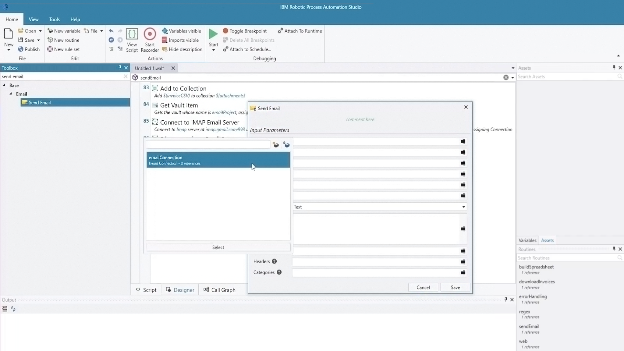
Source: IBM
2. BMC AMI DevX
BMC AMI DevX is a development platform to modernize the mainframe software delivery lifecycle. It brings collaborative, automated development practices to the mainframe, improving productivity, code quality, and team morale. With integrated support for modern IDEs like Eclipse and VS Code, developers can work in familiar environments while managing the entire pipeline without switching tools.
Key features of BMC AMI DevX:
- Modern IDE integration: Supports Eclipse and VS Code, allowing developers to work in familiar environments with integrated tools like File-AID, Code Pipeline, and Abend-AID.
- Automated CI/CD pipelines: Simplifies build, test, and deployment processes through BMC AMI DevX Code Pipeline for faster and more reliable releases.
- Code understanding: Uses BMC AMI Assistant and Code Insights to explain complex COBOL, JCL, PL/I, and Assembler code and visualize dependencies.
- Automated testing suite: Provides unit, functional, integration, and regression testing through BMC AMI DevX Total Test and Performance Test.
- Application diagnostics: Delivers root cause analysis and debugging support via BMC AMI DevX Abend-AID for quick incident resolution.

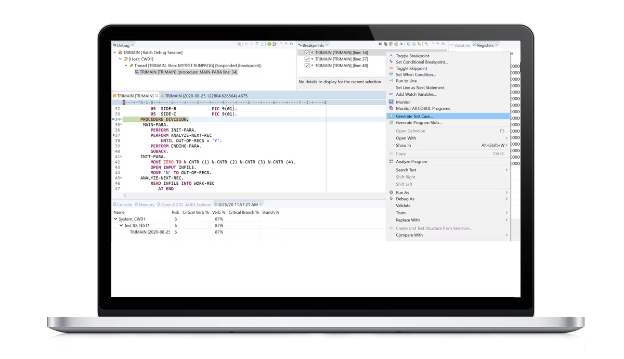
Source: BMC
3. Mainframe Application Tuner
Mainframe Application Tuner (MAT), a key component of the WatchTower Platform for mainframe AIOps, delivers a solution for optimizing z/OS application performance. It equips DevOps and performance teams with tools to identify, analyze, and resolve performance inefficiencies from early development and testing through to production. MAT provides actionable insights into CPU usage, response times, and batch performance.
Key features of Mainframe Application Tuner:
- Lifecycle performance monitoring: Identifies performance issues in applications across development, testing, and production stages.
- Root cause analysis: Delivers detailed diagnostics to uncover the source of performance degradation, improving mean time to resolution.
- Batch performance detection: Detects batch inefficiencies during testing to prevent costly performance issues in production.
- Command-line integration: Supports CLI-based performance analysis to fit seamlessly into DevOps and CI/CD workflows.
- Zowe plugin support: Uses Zowe-conformant plugins to automate performance monitoring and integrate with modern toolchains.

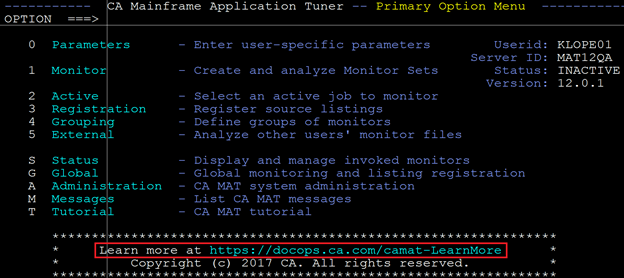
Source: Broadcom
4. Rocket Enterprise Suite
Rocket Enterprise Suite is a mainframe application modernization platform that enables enterprises to replatform legacy applications instead of rewriting them. By preserving existing business logic, organizations can modernize faster and more safely, reducing risk, cost, and time to value. The suite supports cloud migration, hybrid cloud adoption, and ongoing modernization using modern development practices, DevOps pipelines, and API integration.
Key features of Rocket Enterprise Suite:
- Replatforming without rewriting: Modernizes COBOL-based applications while preserving core business logic, reducing risk and accelerating transformation.
- Cloud-ready architecture: Enables seamless deployment to cloud or hybrid environments, supporting modernization without lock-in.
- DevOps integration: Supports modern CI/CD pipelines and tooling to simplify development, testing, and deployment.
- Cross-platform portability: Develop applications once and deploy across multiple platforms, including mainframe, distributed, and cloud.
- Rapid development cycles: Speeds up change implementation using modern development environments and tools.

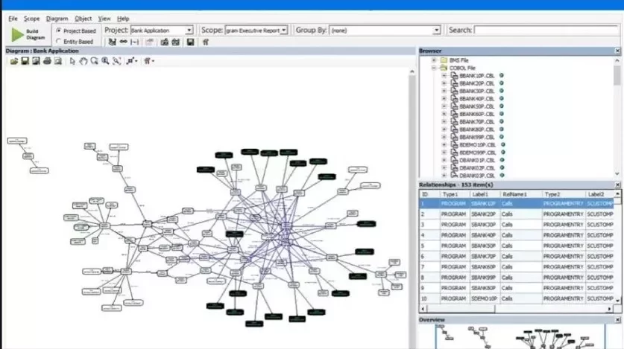
Source: Rocket
5. OpenLegacy
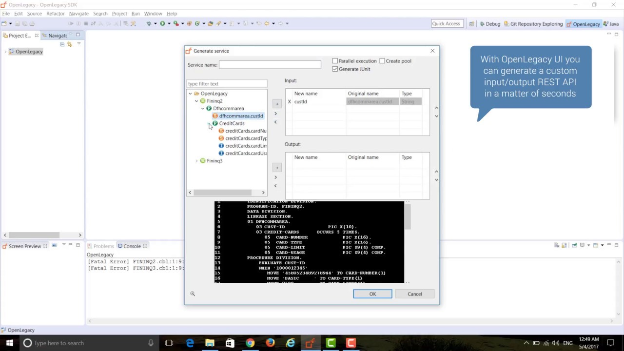
OpenLegacy is an AI-driven modernization platform that transforms legacy systems into cloud-ready, API-enabled services without rewriting code or disrupting operations. Designed for phased, low-risk transformation, it connects to mainframes and IBM i systems, analyzes interdependencies, and auto-generates standardized APIs for seamless deployment to any cloud or hybrid environment.
Key features of OpenLegacy:
- AI-assisted analysis: Connects securely to legacy systems and uses AI to map dependencies and identify safe decoupling points.
- Phased modernization planning: Generates a step-by-step roadmap to modernize with zero disruption using built-in safety checks.
- Automatic API generation: Creates well-documented, standardized APIs from legacy code without requiring rewrites or middleware.
- Cloud-agnostic deployment: Deploys APIs to any cloud, hybrid, or on-prem environment, supporting full architectural flexibility.
- Continuous operation: Maintains coexistence between old and new systems, ensuring uninterrupted service during transformation.

Source: OpenLegacy
6. Swimm
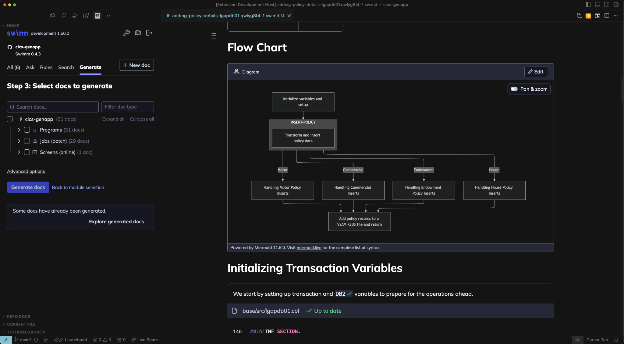
Swimm is a code intelligence and documentation platform to help teams modernize and maintain legacy mainframe code. By automatically generating accurate documentation, code diagrams, and business logic insights, Swimm helps remove the barriers caused by poorly documented COBOL and other legacy systems. It helps developers quickly understand complex flows, dependencies, and intent behind the code.
Key features of Swimm:
- Automated documentation: Instantly generates comprehensive, readable documentation for legacy codebases, filling in missing context.
- Impact analysis: Enables developers to assess the effect of changes before implementation, reducing the risk of unintended side effects.
- Business logic discovery: Surfaces embedded business rules so analysts and engineers can access critical logic without expert interpretation.
- Code and system diagrams: Produces visual representations of system structure and program dependencies to aid understanding at all levels.
- Static code analysis: Uses deterministic parsing rather than black-box AI to extract logical structures, ensuring reliable, explainable results.

Source: Swimm
Help us continuously improve
Please let us know if you have any feedback about this page.