What is CI/CD on AWS?
CI/CD (Continuous Integration/Continuous Delivery) on AWS refers to using DevOps practices to to automate the software development release lifecycle within the Amazon Web Services (AWS) ecosystem. This is often done with AWS native tools, but can also be done with third party CI/CD tools that support AWS.
CI involves frequently integrating code changes into a shared repository, where automated builds and tests run to detect issues early. CD extends this automation, enabling ready code to be deployed automatically to production or staging environments with minimal manual intervention.
AWS provides a suite of managed services for CI/CD workflows. These services handle the integration, build, test, and deployment stages in a scalable and reliable way. Using this tooling, teams can set up pipelines that trigger on code changes, execute unit and integration tests, and deploy artifacts to different AWS environments such as EC2, Lambda, or ECS.
Key AWS services for CI/CD include:
- AWS CodePipeline: Orchestrates and automates the entire software release process, from source code to deployment.
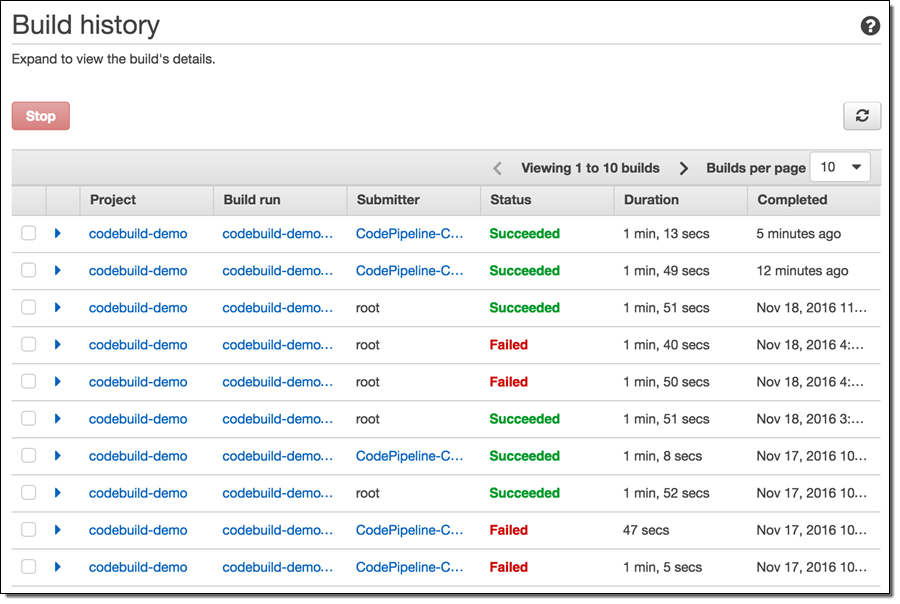
- AWS CodeBuild: A fully managed service that compiles source code, runs tests, and produces deployable software packages without requiring users to manage build servers.
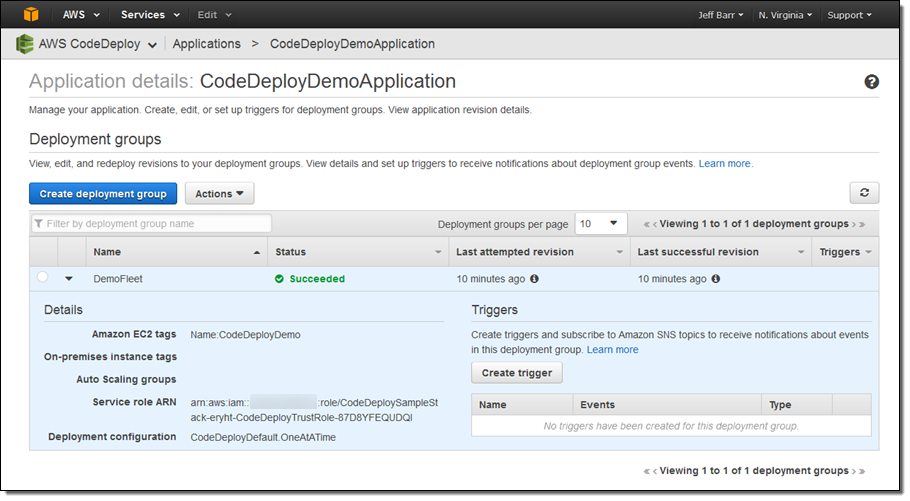
- AWS CodeDeploy: Automates application deployments to various compute services, including Amazon EC2, AWS Fargate, AWS Lambda, and on-premises servers.
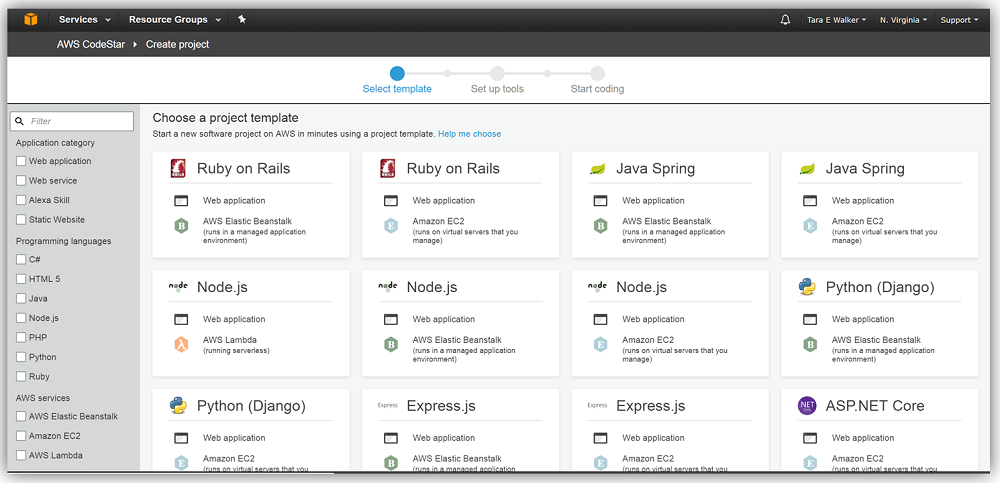
- AWS CodeStar: Provides a unified UI for managing AWS software development projects, including integrating with CodePipeline.
Note: AWS CodeCommit, a managed source control service for hosting private Git repositories, was effectively deprecated by AWS. It was closed for access by new AWS customers and will not have new feature developments. However AWS says it will continue to invest in support and security updates.
Benefits of CI/CD on AWS
CI/CD on AWS offers a cloud-native way to automate and optimize software delivery. It allows teams to eliminate manual steps, catch issues early, and deploy updates faster and more reliably.
Here are the key benefits of implementing CI/CD on AWS:
- Scalability: AWS services automatically scale to handle large volumes of builds, tests, and deployments without requiring manual resource management.
- Faster release cycles: Automated pipelines reduce time between code commit and deployment, enabling faster delivery of new features and fixes.
- Improved code quality: Continuous Integration ensures that each code change is tested early, helping catch bugs before they reach production.
- Reduced manual intervention: Automation minimizes human error and reduces the time developers spend on repetitive tasks like deployments and testing.
- Security and compliance: Fine-grained IAM controls, encrypted artifact storage, and audit logging help maintain secure and compliant development workflows.
- Cost efficiency: Pay-as-you-go pricing and managed infrastructure reduce the need for maintaining CI/CD servers, lowering operational costs.
Key AWS services for CI/CD
1. AWS CodePipeline
AWS CodePipeline is a fully managed service that automates the build, test, and deploy stages of the release process. CodePipeline allows users to define the steps of the software delivery pipeline as stages, connecting source repositories, test environments, and deployment targets. Pipelines can be easily triggered by code commits or manually, and can include approval gates for quality control.
By integrating with other AWS services and third-party tools, CodePipeline supports sophisticated workflows. Each stage can use AWS Lambda functions, custom scripts, or native integrations with CodeBuild, CodeDeploy, and other services. This flexibility helps users tailor pipelines to meet project-specific requirements while benefiting from AWS-managed scalability and reliability.

Source: Amazon
2. AWS CodeBuild
AWS CodeBuild is a fully managed build service that compiles source code, runs tests, and produces deployable artifacts. CodeBuild scales automatically to meet the build volume, eliminating the need to provision or manage build servers. Its pay-as-you-go model ensures cost-effectiveness, charging only for the compute resources consumed during builds.
With support for multiple languages and custom build environments, CodeBuild addresses diverse project needs. It integrates seamlessly with CodePipeline and can process build specs defined in YAML, enabling reproducible processes. Detailed logs, environment variables, and container support provide transparency and flexibility, making it easy to diagnose failures and maintain build consistency.

Source: Amazon
3. AWS CodeDeploy
AWS CodeDeploy automates code deployments to various AWS compute services including EC2, Lambda, and on-premises servers. It manages the complexities of updating applications, such as orchestrating rolling updates, handling traffic routing, and enabling quick rollbacks in case of failure.
CodeDeploy supports different deployment strategies like blue/green or canary deployments, reducing downtime and minimizing risk associated with new releases. Its tight integration with CodePipeline and event notifications allows for a tightly controlled, monitored deployment process. CodeDeploy’s logging and dashboard features give teams operational visibility, aiding rapid diagnosis and recovery from potential issues.

Source: Amazon
4. AWS CodeStar
AWS CodeStar provides a unified user interface for managing software development activities across the AWS CI/CD toolchain. With CodeStar, teams can quickly set up application projects with preconfigured repositories, pipelines, and deployment targets tailored for popular frameworks and languages.
CodeStar simplifies access control and team collaboration by integrating with AWS Identity and Access Management (IAM). Its dashboards display pipeline activity, deployment status, and cloud resource health in one place, helping teams monitor and manage project progress efficiently. The service lowers the entry barrier for adopting CI/CD on AWS, making it easier for teams to follow best practices from day one.

Source: Amazon

Tony Kelly is a DevOps marketing leader who drives innovation and awareness of the latest trends in Continuous Delivery.
Example of a CI/CD pipeline on AWS
A typical CI/CD pipeline on AWS automates the path from source code to deployment, using a series of stages that verify, build, and release software. This pipeline is managed by AWS CodePipeline, which integrates with services like CodeCommit, CodeBuild, and CodeDeploy to handle each step.

Source: AWS
The process begins when a developer pushes code to a repository in AWS CodeCommit or a third-party source like GitHub. This triggers the pipeline’s Source stage, which pulls the latest code into the system. The Build stage uses AWS CodeBuild to compile the code, run tests, and generate deployable artifacts. If the build is successful, the pipeline proceeds to the Test stage, where integration, functional, or performance tests validate the application’s behavior.
Next, in the Staging stage, artifacts are deployed to a staging environment for further validation, which may include canary or blue/green deployments using AWS CodeDeploy. This step can also involve manual approval actions before moving forward. Finally, the Production stage handles the deployment of the tested and approved application into the live environment.
Each stage in the pipeline acts as a checkpoint. If any stage fails—due to code errors, test failures, or deployment issues—the pipeline halts, and results are sent back to the team for review. This ensures only stable, verified code reaches production.

Source: AWS
The entire pipeline can be defined as code using AWS CloudFormation or AWS CDK, allowing teams to version and reuse their pipeline configurations. Continuous updates to applications—such as changes to container images in Amazon ECR—can automatically trigger redeployments, keeping systems current without manual intervention.
By structuring pipelines this way, AWS enables scalable, reliable, and repeatable delivery of applications, reducing risk and speeding up software release cycles.
Best practices for CI/CD on AWS
Organizations should consider the following practices to ensure the best use of AWS for Continuous Integration/Continuous Delivery.
1. Maintain a single repository
Consolidating application code in a single repository simplifies management and improves traceability. Teams can use clear branching strategies such as Git Flow or trunk-based development to organize feature work, bug fixes, and releases within a centralized CodeCommit repository. This approach reduces confusion caused by fragmented codebases and makes automated builds and deployments more predictable.
A single repository also improves auditability and security. All code changes are tracked, permissions are managed in one place, and integration with AWS access controls enforces consistent policies. This simplifies onboarding of new team members and allows automated CI/CD tools to operate more efficiently without juggling multiple disconnected code sources.
2. Automate infrastructure with AWS CloudFormation
Automating infrastructure provisioning using AWS CloudFormation ensures environments are reproducible and consistent. By defining resources as code, teams can version, review, and audit all infrastructure changes alongside application code in their repository. This minimizes configuration drift and accelerates onboarding for new projects or team members.
Integrating CloudFormation with the CI/CD pipeline allows for infrastructure updates to be tested and released in tandem with application changes. This reduces manual intervention during deployments and helps avoid misconfigurations that often lead to downtime or inconsistencies. Automated rollback features further improve resilience, letting teams recover quickly from failed stack updates.
3. Prioritize small, frequent changes
Shipping small, incremental code changes is preferable to delivering large, infrequent updates. Smaller changes are easier to test, review, and roll back if something goes wrong. CI/CD pipelines on AWS excel when orchestrating rapid, low-risk deployments, allowing development teams to deploy multiple times per day with minimal disruption.
Frequent integration and delivery mean issues are detected and resolved quicker. This feedback loop supports faster innovation and aligns teams closely with end-user needs. AWS services enable automation for Continuous Integration, Testing, and Deployment, enabling organizations to keep releases small, safe, and closely aligned to business priorities.
4. Test in production-like environments
Running automated tests in environments that closely resemble production helps catch issues before they affect users. AWS lets teams provision test environments with similar configurations to production, using tools like CloudFormation to replicate networks, databases, and application stacks. This reduces gaps between testing and live deployment, exposing infrastructure or integration issues early.
Automated testing should include unit, integration, and end-to-end checks, running as part of the CI/CD pipeline before each release. By using AWS resources to mirror production, teams can validate application behavior, performance, and security under conditions that match what customers will experience, significantly reducing the likelihood of critical failures after deployment.
5. Embrace GitOps and multi-cloud flexibility
GitOps introduces the practice of managing infrastructure and application deployment configurations via Git repositories, bringing version control, auditability, and automation to environments. On AWS, teams can set up pipelines that detect changes in configuration repositories and trigger automated updates to infrastructure or application deployments, ensuring consistency across environments.
Building pipelines that are cloud-agnostic or designed for multi-cloud environments increases resilience and portability. Using infrastructure-as-code and containerization, teams can avoid vendor lock-in and simplify disaster recovery. By embracing GitOps workflows on AWS, organizations combine the strengths of automated cloud-native tooling with transparent, traceable change management processes that adapt well to evolving technology stacks.
CI/CD on AWS with Octopus
CI/CD on AWS with Octopus Deploy creates a powerful deployment pipeline that combines AWS’s robust cloud infrastructure with Octopus Deploy’s sophisticated release orchestration capabilities. Teams can seamlessly integrate their AWS services—including EC2 instances, ECS containers, Lambda functions, and CloudFormation stacks—with Octopus Deploy’s intuitive deployment automation platform. This combination enables organizations to implement consistent, repeatable deployments across development, staging, and production environments while maintaining full visibility into release progress and deployment history.
Help us continuously improve
Please let us know if you have any feedback about this page.