What is CI/CD deployment?
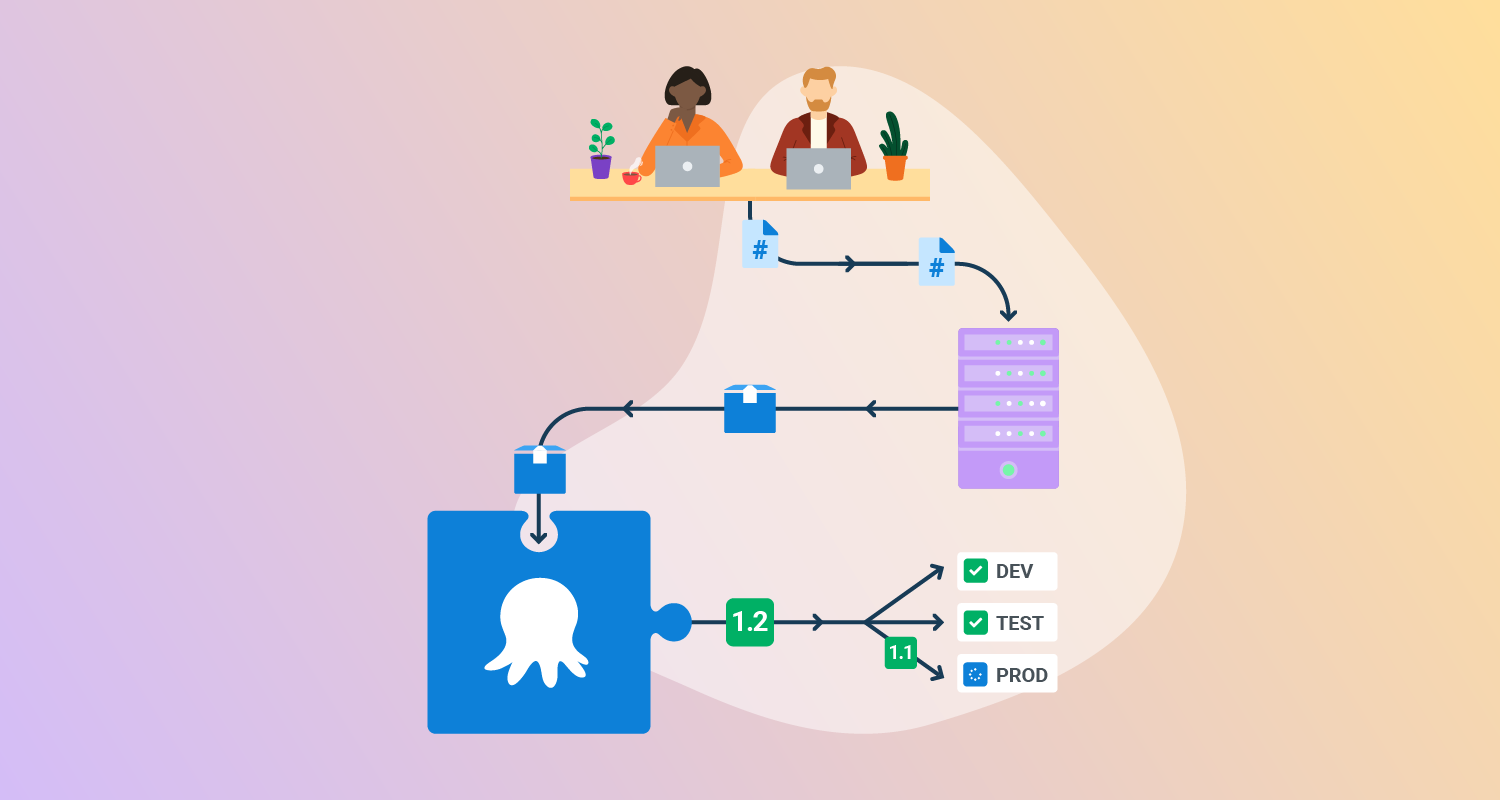
CI/CD deployment refers to the application of Continuous Integration and Continuous Delivery or Continuous Deployment practices in software deployment:
- Continuous Integration is the practice of frequently merging code changes into a central repository where automated builds and tests are run.
- Continuous Delivery extends this by ensuring that the integrated codebase can be automatically released to production at any time.
- Continuous Deployment goes further by automatically pushing every change that passes automated tests directly to production.
When applied to deployment, these practices can make deployments more efficient, standardized, and automated, increasing release frequency and quality.
CI/CD deployment uses predefined pipelines that push code updates through phases of building, testing, and deployment, with minimal human intervention. This allows teams to identify bugs earlier, minimize integration issues, and reduce the likelihood of configuration drift across environments.
Top CI/CD deployment strategies
1. Recreate
The recreate deployment strategy involves shutting down the current version of an application before starting the new version. All instances of the running application are terminated, and the new application version is deployed from a clean state. This method is the simplest to implement, making it suitable for early-stage projects, simple setups, or non-mission-critical systems where temporary downtime is acceptable.
However, the primary drawback of the recreate approach is downtime. Because the application is entirely stopped and restarted, end users will experience a service interruption during deployment. This makes it inappropriate for customer-facing or critical systems that require constant availability. Recreate can also lead to cascading failures in microservices architectures, as dependent services may not handle the unavailability of peers gracefully.
When to use: Use recreate deployments when downtime is acceptable and simplicity is more important than availability. This works well in internal tools, proof-of-concept projects, or small-scale systems where reliability is not business-critical and traffic is low.
2. Rolling updates
Rolling updates address the downtime problem by incrementally replacing application instances with the new version. Instead of shutting down all instances, the deployment updates a fraction of them at a time while the rest continue to serve traffic. As each new instance comes online and proves healthy, the remaining old instances are retired. This minimizes service disruption and ensures users experience a continuous service even during the release.
Rolling updates work well for stateless services and are widely supported by orchestration platforms like Kubernetes. However, this approach requires careful attention to backward compatibility, as both old and new versions will coexist during the update. Managing database migrations and state synchronization is also more complex, since partial rollouts can expose inconsistencies.
When to use: Rolling updates are suitable for stateless services and workloads that can tolerate gradual version mixing. They are best for web applications or APIs where maintaining availability is important but a full parallel environment (blue/green) would be too costly.
3. Blue/green deployment
Blue/green deployment reduces risk by maintaining two production environments—one is the current live version (“Blue”), and the other is the staging version for the new release (“Green”). The new version is deployed to the Green environment, where it undergoes final tests. Once validated, traffic is switched from Blue to Green, usually by updating a load balancer or DNS record.
The Blue environment then serves as an immediate rollback target in case issues are detected with the new release. This strategy minimizes downtime and allows safe testing of the new release using production-like data and environment conditions. However, maintaining parallel environments doubles infrastructure costs and operational complexity. Blue/green is useful for critical applications that demand rapid rollback, but it can be cost-prohibitive for smaller projects.
When to use: Blue/green deployments are appropriate for mission-critical services where downtime must be avoided and rollback speed is a priority. They fit regulated industries, financial systems, or eCommerce platforms where a failed release could cause significant losses.
4. Canary deployment
Canary deployment delivers new application versions to a small, isolated segment of users before rolling out to the entire user base. By releasing features incrementally to “canary” users, teams can observe real-world performance and catch issues before they affect everyone. If problems arise, the deployment can be halted or rolled back with minimal impact. This strategy is named after the historical use of canaries in coal mines as early warning systems.
Canary deployment is effective for reducing risk in complex or large-scale systems. It allows teams to test compatibility, performance, and user response under real traffic. However, implementing canary releases introduces routing complexity, requiring smart load balancers or feature flag infrastructure to target user segments reliably.
When to use: Canary deployments are suitable for large-scale user-facing applications where feature risk is high and early feedback is valuable. They are best used when you want to test real-world impact gradually, such as rolling out a new search algorithm or payment flow to a subset of users.
5. Shadow deployment
Shadow deployment involves releasing a new application version alongside the active one, but only mirroring live traffic to the shadow version for testing—without any customer impact. The shadow instance receives production traffic in real-time, yet its output does not affect the actual user experience or system state. This approach enables teams to observe how the new release behaves under authentic workloads without risking service stability.
Shadow deployments are valuable for performance benchmarking, compatibility assessment, or experimenting with architectural changes. Operations teams can spot performance regressions, functional discrepancies, or scalability issues before a formal rollout. However, maintaining shadow environments adds infrastructure overhead and requires additional monitoring to compare outputs effectively.
When to use: Shadow deployments are best suited for validating performance, scalability, or major architecture changes under real traffic. They are useful in high-risk scenarios, such as introducing a new database engine or rewriting a core service, where production-like stress testing is essential.
6. Feature toggles (feature flags)
Feature toggles, or feature flags, separate deployment from feature release by allowing teams to switch application features on or off at runtime via configuration. This enables the deployment of code containing incomplete or risky features without exposing them to end users. Teams can perform A/B testing, gradually rollout features, or switch off faulty features remotely with minimal risk and without requiring another deployment.
Feature flags provide flexibility and fine-grained control over application behavior in production. However, excessive or poorly managed flags can complicate codebases, introduce technical debt, and hinder maintainability. Teams should establish procedures for lifecycle management of flags, removing obsolete toggles and documenting their purpose.
When to use: Feature toggles should be used when you need flexibility in controlling feature rollout after deployment. They are effective for staged rollouts, A/B testing, and rapid mitigation of faulty features without requiring a redeploy.

Tony Kelly is a DevOps marketing leader who drives innovation and awareness of the latest trends in Continuous Delivery.
Common CI/CD deployment challenges
CI/CD deployment is highly beneficial, but is not trivial to achieve, especially in complex development environments.
Rollback and failure handling
Effective rollback and failure handling mechanisms are essential for mitigating risk in CI/CD deployments. If a deployment introduces critical defects, teams need reliable ways to revert to a stable version quickly. Automated rollback scripts, environment snapshots, and strategies like blue-green or versioned artifacts enable fast restoration.
Rollbacks should be tested regularly in pre-production environments to ensure they work seamlessly under real conditions. A lack of proper rollback procedures can turn minor deployment failures into widespread outages, eroding user trust and increasing recovery time.
Environment inconsistency
One of the most common pitfalls in CI/CD is environment inconsistency—differences between development, testing, staging, and production environments. Such discrepancies often lead to the infamous “it works on my machine” problem, where code passes tests in one environment but fails in another due to mismatched configurations, dependencies, or data.
Automation tools and infrastructure-as-code solutions like Terraform or Kubernetes can help standardize environment provisioning and configuration. Persistent inconsistency hampers debugging, slows releases, and increases the likelihood of late-stage failures.
Version and dependency management
Managing versions and dependencies is a complex challenge in automated deployments, particularly for projects with multiple services and frequent updates. Inconsistent or untracked versions can lead to breakages, failed updates, or incompatibility between components.
Solutions involve strict enforcement of semantic versioning, artifact version tagging, dependency pinning in package files, and using artifact repositories for reproducible builds. Neglecting proper management can cause issues ranging from subtle bugs to catastrophic failures in production. CI/CD pipelines should include automated verification steps to check dependency versions and detect known vulnerabilities before deployment proceeds.
Multi-pipeline complexity
As organizations scale, CI/CD ecosystems often evolve into a complex web of interconnected pipelines serving multiple applications or microservices. Complex pipelines can become difficult to manage, maintain, and debug—delays and failures in one stage may cascade elsewhere.
Pipeline sprawl often results from decentralized ownership, inconsistent coding standards, and ad hoc integrating of new technologies or tools. To manage this complexity, teams must prioritize modular design, shared templates, and consistent pipeline definitions.
How to make your deployment strategy work: Best practices for effective CI/CD deployment
To overcome the above challenges, organizations should consider the following practices when deploying CI/CD pipelines.
1. Governance, audit, and feedback loop for production deployments
Strong governance over production deployments ensures that only authorized, tested, and understood changes reach end users. Audit trails should document who triggered each release, the changes deployed, and outcomes of all automated or manual checks. Automated approval gates, change management workflows, and role-based access controls are crucial to preserving accountability and compliance, particularly in regulated industries.
A well-defined feedback loop connects operations data and user experience metrics back to development teams. Real-time monitoring, application performance indicators, and incident tracking enable continuous improvement by making it clear which deployments succeeded and which changes caused regressions.
2. Use immutable hosts or containers for each deployment
Immutable infrastructure is the principle of provisioning new servers or containers for each deployment rather than updating existing ones in place. This ensures every deployment starts from a clean, predictable state, eliminating configuration drift, hidden dependencies, or manual changes that can diverge from version control. Tools like Docker, Kubernetes, and cloud-native VM provisioning foster consistent, reproducible deployments.
By always deploying to fresh infrastructure, teams can confidently automate scaling, rollback, and upgrades without the risk of legacy issues affecting new versions. Immutability improves security by making unauthorized changes easier to detect and revert, and it simplifies troubleshooting, as inconsistencies are rare. While it may increase resource usage, the operational advantages far outweigh the costs for most modern applications.
3. Use smoke and integration tests
Integrating smoke and integration tests into the deployment phase is crucial for early detection of breakages that unit tests cannot catch. Smoke tests perform basic checks to confirm that applications have started correctly and that critical-path functionality is working. Integration tests go further by validating that new code works seamlessly with external systems, databases, or APIs in an environment that closely mimics production.
Automating these tests as gating steps immediately before or after deployment helps catch issues before users are affected, reducing mean time to recovery and the likelihood of rollbacks. Teams should design tests to be fast, reliable, and representative of typical user behavior. Implementing strong test coverage in deployment workflows ensures that systems remain resilient throughout fast-paced release cycles.
4. Observability and health gating in production rollouts
Observability provides deep insight into system performance, error rates, and user experience as new releases hit production. Health gating uses automated checks—covering metrics like latency, error rates, or business KPIs—to determine if a deployment should proceed, pause, or rollback. Integrating observability with deployment pipelines ensures that unhealthy releases are intercepted before impacting a large user base.
Teams should invest in comprehensive telemetry tooling, including log aggregation, distributed tracing, and real-time alerting. Automated health gates should be calibrated to the sensitivity and operational requirements of each service.
5. Idempotent deployment logic
Idempotency in deployment logic ensures that running deployment scripts multiple times produces the same result, without creating side effects or breaking environments. Idempotent processes are resilient to interruptions, network failures, and repeated triggers, allowing teams to safely re-run deployments as needed without risking partial or inconsistent states.
Ensuring idempotency typically involves explicit state checks, clean application of changes, and the avoidance of assumptions about previous system state. Infrastructure-as-code tools, declarative configuration, and rigorous automation help maintain idempotency even as systems scale.
Help us continuously improve
Please let us know if you have any feedback about this page.