Why deploy PHP on Linux?
PHP and Linux are commonly used together to create a powerful and stable environment for web development. Linux, as an open-source operating system, provides a robust and flexible foundation, while PHP, a popular server-side scripting language, enables the creation of dynamic web content and applications.
Key benefits of PHP on Linux include:
- Most Linux distributions come with PHP packages readily available, making installation and configuration straightforward.
- The LAMP stack (Linux, Apache, MySQL, and PHP) is a common and well-supported setup for hosting dynamic websites.
- PHP runs efficiently on Linux thanks to better integration with web servers like Apache and Nginx, and support for process managers such as PHP-FPM.
- Linux provides command-line tools, package managers, and cron jobs, which can be used to automate tasks and manage PHP applications more effectively.
- System-level tools and configuration files in Linux are easily scriptable, which complements PHP’s server-side scripting capabilities.
- Linux file permissions and user management help enforce better security practices when deploying PHP applications.
This is part of a series of articles about software deployment
Understanding the LAMP stack and its pros and cons
The LAMP stack is a software bundle used to host dynamic websites and web applications. It includes four open-source components:
- Linux: The base operating system providing stability, security, and resource control. Linux is highly customizable and widely adopted in server environments.
- Apache: The web server that handles HTTP requests and delivers web content. Apache supports modules for performance, security, and PHP integration, making it highly adaptable.
- MySQL: The relational database used to store and query structured data. MySQL is known for its performance, ease of use, and strong compatibility with PHP.
- PHP: The server-side scripting language used to process business logic, access databases, and generate dynamic HTML content. PHP integrates directly with Apache and MySQL, streamlining development.
The LAMP stack has played a crucial role in the evolution of modern web development. It became the default platform for millions of developers building websites, content management systems (like WordPress, Joomla), and web applications in the early 2000s. Its success is largely due to its simplicity, modular architecture, and zero licensing costs, which made professional-grade hosting accessible to individuals and small businesses.
Key advantages of the LAMP stack include:
- Maturity and stability: Each component is well-documented and battle-tested in production environments.
- Cost efficiency: Fully open-source, with no licensing fees.
- Customization: Components can be configured, tuned, or replaced independently.
- Community support: Vast ecosystem of guides, tools, forums, and updates.
- Ease of deployment: Pre-integrated packages and task-based installers (like Tasksel) streamline setup.
However, despite its long-standing popularity, the LAMP stack has received criticism in recent years:
- Performance: Traditional Apache setups can be slower under high concurrency compared to event-driven servers like Nginx.
- Monolithic nature: LAMP applications are typically monolithic services, which are less compatible with microservices or containerized environments.
- Database inflexibility: The default LAMP stack assumes MySQL, which may not be optimal for all use cases.
In light of these limitations, many developers and organizations are adopting alternative stacks better suited to their specific needs:
- LEMP (Linux, Nginx, MySQL/MariaDB, PHP): Swaps Apache for Nginx, which offers better performance with lower memory usage and improved handling of concurrent connections.
- MEAN/MERN (MongoDB, Express, Angular/React, Node.js): Uses JavaScript end-to-end and is optimized for single-page and real-time applications. Suitable for modern, API-driven development.
- JAMstack (JavaScript, APIs, Markup): Emphasizes pre-rendered static content and decoupled APIs, improving performance and scalability, often deployed via CDNs.
Tutorial: installing PHP on Linux
Prerequisites
Before installing PHP, ensure you’re comfortable using the terminal and understand basic operations in Unix-like systems. You should also update your package index to make sure you’re working with the latest available software. On most distributions, this can be done with:
sudo apt-get update && sudo apt-get upgradeYou’ll need administrative privileges (using sudo) to install PHP and related packages.
Installing PHP on Ubuntu
On Ubuntu, installing PHP is simple. First, update your packages:
sudo apt-get update && sudo apt-get upgradeThen install PHP:
sudo apt-get install phpTo check the installed PHP version:
php -vIf you need a specific version like PHP 7.4, add the Ondřej Surý PPA and update your sources:
sudo apt install software-properties-common
sudo add-apt-repository ppa:ondrej/php
sudo apt-get update
sudo apt install php7.4
Alternatively, Ubuntu users can install a full LAMP stack using Tasksel. First, install Tasksel:
sudo apt install taskselThen run:
sudo tasksel install lamp-serverThis installs Linux, Apache, MySQL, and PHP in one step.
Installing PHP on CentOS
CentOS uses yum instead of apt. To update packages and enable additional repositories, run:
sudo yum install epel-release && sudo yum updateTo install PHP:
sudo yum install phpVerify the installation with:
php -vThis approach works for CentOS 7 and similar RHEL-based systems.
Installing PHP on Debian
Debian supports both apt-get and aptitude for package management. Begin by updating your system:
sudo apt-get update && sudo apt-get upgradeTo install PHP using apt-get:
sudo apt-get install phpAlternatively, use aptitude:
sudo aptitude install phpIf PHP doesn’t parse or extensions aren’t loading, double-check your server configuration and make sure .ini files for extensions are being loaded correctly.
Installing PHP on Alpine Linux
Alpine Linux is often used in containerized environments due to its small footprint. To install PHP:
First, update the system:
sudo apk updateThen install PHP by specifying the version:
sudo apk add php81(Replace 81 with the desired version.)
To verify the installation:
php -vIf the version number appears, the installation was successful.

Tony Kelly is a DevOps marketing leader who drives innovation and awareness of the latest trends in Continuous Delivery.
Using PHP on Linux: 3 common operations
PHP can be used on Linux both from the command line and through web servers such as Apache and Nginx.
1. Running PHP scripts from the command line
To test PHP without a web server, create a .php file and run it directly. For example, save the following code as test.php:
<?php
$message = "Hello, PHP on Linux!";
echo $message;
?>
Execute it with:
php test.php
If the script outputs the message, PHP is working correctly. This method is useful for quick tests, automation scripts, or maintenance tasks.
2. Using PHP with Apache
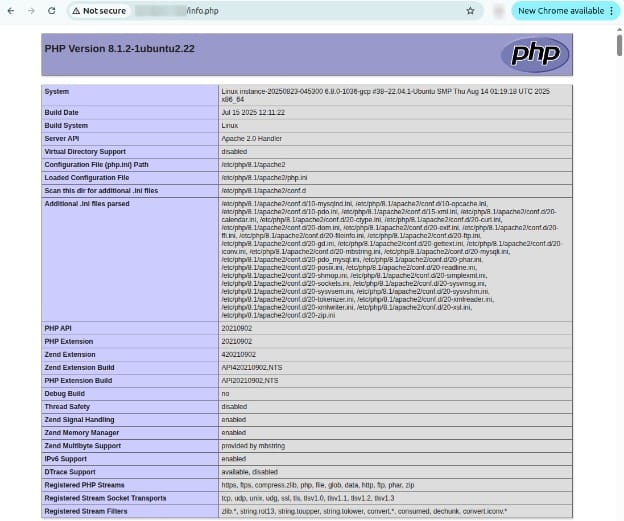
On Ubuntu, if the libapache2-mod-php package is installed, Apache will process PHP automatically. Place a file such as info.php in /var/www/html:
<?php
phpinfo();
?>
Accessing http://your_server_ip/info.php in a browser should display detailed PHP configuration information.
3. Using PHP with Nginx
Nginx requires PHP-FPM (FastCGI Process Manager) to handle PHP requests. After installing it with:
sudo apt install php-fpmYou need to edit the Nginx server block to forward .php files to PHP-FPM. The configuration typically includes a section like:
location ~ \.php$ {
fastcgi_pass unix:/run/php/php7.4-fpm.sock;
fastcgi_index index.php;
fastcgi_param SCRIPT_FILENAME $document_root$fastcgi_script_name;
include fastcgi_params;
}
Reload Nginx to apply changes:
sudo systemctl reload nginx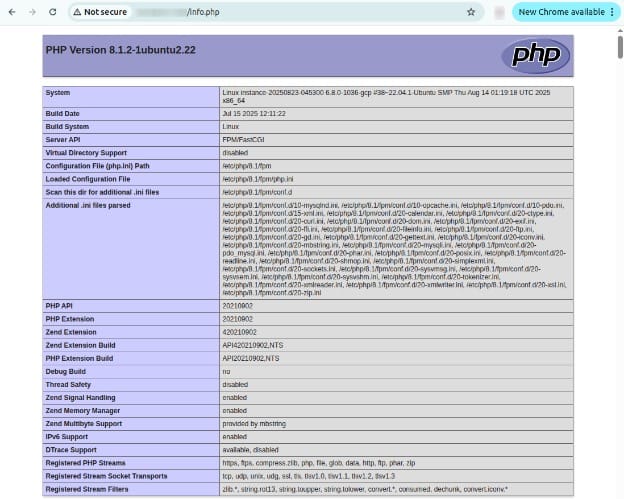
This setup allows PHP files placed in /var/www/html to be executed through the Nginx web server.
Best practices for running PHP on Linux
Here are some useful practices to consider when using PHP with Linux.
1. Keep PHP versions updated
Each new major PHP release addresses known vulnerabilities, optimizes memory usage, and often brings speed improvements. Most security patches are only issued for supported versions, so running outdated PHP can expose your applications to compromise, data leaks, or unexpected runtime behavior. Linux distributions release updated PHP packages soon after upstream releases, making regular updates straightforward for administrators.
Schedule regular checks for updates using your package manager (apt, yum, apk), and subscribe to security mailing lists relevant to your stack. Before applying major updates, verify compatibility with your applications and extensions in a staging environment. Automated tools like unattended-upgrades (Ubuntu) or dnf-automatic (CentOS) can simplify patching but should be used with caution, especially on production systems.
2. Use PHP-FPM with proper configuration
PHP-FPM outperforms traditional CGI and mod_php handlers in concurrent web environments. Its process pool enables better resource allocation and security isolation for multi-tenant servers. To maximize benefits, you must fine-tune configuration settings in the www.conf file, including the number of child processes, memory limits, and timeout values. Proper tuning prevents resource exhaustion during traffic spikes and keeps response times predictable.
Ensure that PHP-FPM runs as an unprivileged user, and set separate pools for different sites if you host multiple applications. For security, switch off potentially dangerous functions and limit file access where possible. Major web servers like Nginx and Apache have support for PHP-FPM, allowing you to enable socket-based or TCP communication depending on your architecture and performance requirements.
3. Apply the principle of least privilege for PHP services
Limit the access that PHP and its associated processes have to the operating system and file system. Configure PHP-FPM pools to run as dedicated, unprivileged users without shell access, restricting their file and process-level permissions. This containment ensures that if a vulnerability is exploited in one part of your stack, the potential damage or escalation is minimized. Review file and directory permissions for all PHP applications.
Only necessary files or folders should be writable by PHP processes, particularly directories holding user uploads or temporary data. Switch off the execution of scripts in upload directories, and never run web servers or PHP as the root user. Regularly audit access logs and permissions to identify potential exposures early.
4. Enable OPcache for performance
OPcache is a PHP extension that improves performance by storing precompiled script bytecode in memory. When enabled, it significantly reduces execution times by eliminating the compile step on subsequent requests. OPcache is bundled with mainstream PHP distributions and typically only requires enabling and configuring in php.ini or an equivalent conf.d file.
Fine-tune OPcache settings such as memory consumption, number of cached scripts, and revalidation frequency according to your workload. Monitoring OPcache statistics lets you spot cache saturation or fragmentation, which can negatively impact performance. For high-traffic environments, OPcache alone can yield substantial throughput improvements and reduce server load.
5. Monitor PHP logs and metrics
Proactive log and metric monitoring are necessary for maintaining PHP applications on Linux. Log files like php-fpm.log, error.log, and web server access/error logs track runtime issues, security incidents, and performance bottlenecks. Tools such as journalctl, logrotate, or centralized logging platforms simplify the process of scanning and alerting on unusual activity or repeating errors.
Beyond logs, monitor metrics like request throughput, memory usage, pool use (for FPM), and error rates. Utilities such as Prometheus or Grafana allow for real-time graphing and alerting on PHP service health. Consistently reviewing this telemetry ensures your PHP stack remains stable, detects regressions early, and helps plan for scaling or further optimization as application usage evolves.
Help us continuously improve
Please let us know if you have any feedback about this page.