What is GitHub Actions matrix?
The GitHub Actions matrix allows developers to automate testing and deployment processes across various configurations, within the GitHub Actions CI/CD platform. It provides a structured way to define multiple parallel job executions in a single GitHub Actions workflow, by specifying different environments or combinations. This approach ensures code testing, reducing unexpected failures in production.GitHub Actions matrix operates through a declarative syntax, enabling management of variable combinations—such as different operating systems, Node.js versions, or Python environments. This enables simultaneous execution of tasks across predefined scenarios. It promotes more efficient Continuous Integration processes, enabling rapid feedback on platform compatibilities without manual intervention to modify workflow scripts.
Here is a simple example of a matrix that tests three application versions across three types of platforms, running nine jobs in a single workflow:
jobs:
  example_matrix:
    strategy:
      matrix:
        platform: [desktop, mobile, iot]
        app-version: [1.3, 1.5, 1.8]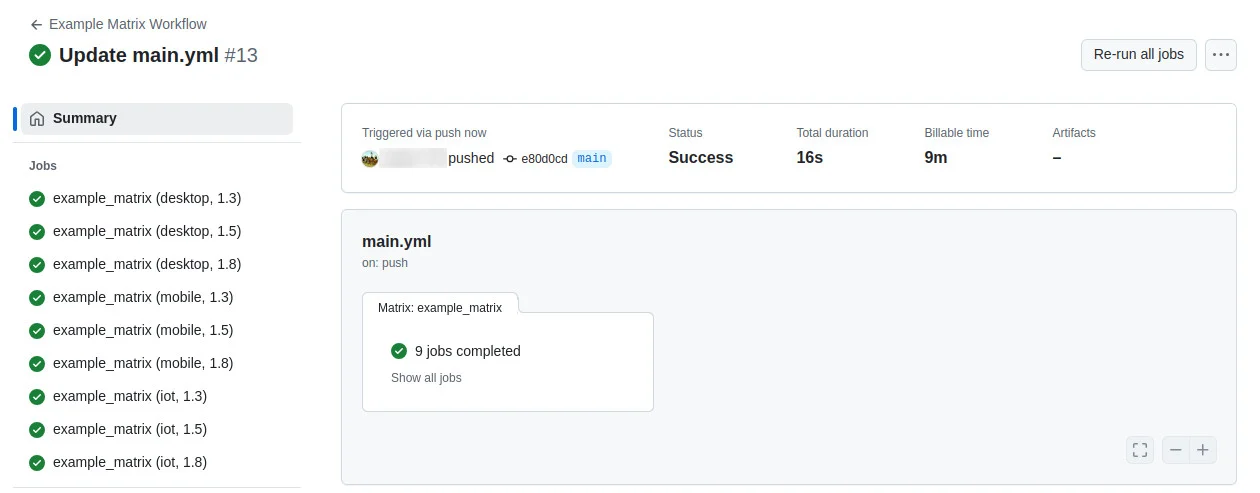
Benefits of using matrix strategies
The main benefit of using matrix strategies in GitHub Actions is increased coverage in testing code under various conditions. This is achieved by automating multiple configurations and environments within a single workflow, ensuring that code remains functional across different scenarios. The tests identify compatibility issues early in the development cycle, reducing the likelihood of bugs in production environments.
Matrix strategies also improve Continuous Integration practices by executing numerous job combinations simultaneously. This parallel execution reduces runtime, allowing developers to receive test feedback more swiftly. Additionally, by setting matrix parameters, teams can easily expand their testing suite to incorporate new environments as they develop.

Kostis Kapelonis is a Principal Developer Advocate at Octopus Deploy. He lives and breathes automation, good testing practices and stress-free deployments with GitOps. He is also a member of the Argo team focusing mainly on Argo Rollouts and Argo CD.
Quick tutorial: Using GitHub Actions Matrix
Here’s an overview of how to use and configure a matrix in GitHub Actions. These instructions are adapted from the GitHub Actions documentation.
Basic matrix strategy
The jobs.<job_id>.strategy.matrix section is where the matrix is configured, using variables with lists of possible values. Each combination of these variables will create a separate job.
Here’s a simple example that defines two variables: version with values [13, 15, 17] and os with values [ubuntu-latest, windows-latest].
jobs:
  matrix_example:
strategy:
  matrix:
    version: [13, 15, 17]
    os: [ubuntu-latest, windows-latest]
runs-on: $
steps:
  - name: Setup Node.js
    uses: actions/setup-node@v4
    with:
      node-version: $
  - run: node --version
This configuration will run six jobs, covering each combination of version and os. In each job, matrix.version and matrix.os will reflect the current values, making it easy to adjust the setup or steps for each environment.
Expanding or adding matrix configurations
In some cases, you may need specific job configurations that aren’t covered by the main matrix. The include keyword allows you to add additional key-value pairs to specific matrix combinations or introduce entirely new configurations.
Consider the following example, where we add an npm version to a combination of os and node:
jobs:
  matrix_example:
strategy:
  matrix:
    os: [ubuntu-latest, windows-latest]
    node: [13, 17]
    include:
      - os: windows-latest
        node: 17
        npm: 7
runs-on: $
steps:
  - uses: actions/setup-node@v4
    with:
      node-version: $
  - if: $
    run: npm install -g npm@$
  - run: npm --version
This configuration creates four jobs, one for each combination of os and node, but only the job for windows-latest with Node.js 13 will have npm set to 6.
Excluding matrix configurations
If you want to avoid running specific combinations, use the exclude keyword. This is useful for skipping unnecessary configurations or known incompatible setups. For example, here’s how to exclude selected combinations:
strategy:
  matrix:
os: [macos-latest, windows-latest]
version: [16, 17, 18]
environment: [staging, production]
exclude:
  - os: macos-latest
    version: 16
    environment: production
  - os: windows-latest
    version: 18
In this setup, the matrix initially creates jobs for all combinations of os, version, and environment. However, two configurations are excluded: macos-latest with version 16 in production, and windows-latest with version 18, effectively reducing the total number of jobs run.
Using an output to define two matrices
In GitHub Actions, outputs from one job can be used to define matrices for multiple jobs. This is useful when you need to dynamically generate values for a matrix based on previous job results. In this example, we define colors in an initial job, use them to create artifacts in a second job, and then access these artifacts in a third job.
name: Shared Matrix Example
on:
  push:
  workflow_dispatch:

jobs:
  define-matrix:
    runs-on: ubuntu-latest
    outputs:
      colors: ${{ steps.colors.outputs.colors }}
    steps:
      - name: Define Colors
        id: colors
        run: |
          echo 'colors=["yellow", "orange", "brown"]' >> "$GITHUB_OUTPUT"

  produce-artifacts:
    runs-on: ubuntu-latest
    needs: define-matrix
    strategy:
      matrix:
        color: ${{ fromJson(needs.define-matrix.outputs.colors) }}
    steps:
      - name: Define Color
        env:
          color: ${{ matrix.color }}
        run: echo "$color" > color
      - name: Produce Artifact
        uses: actions/upload-artifact@v4
        with:
          name: ${{ matrix.color }}
          path: color

  consume-artifacts:
    runs-on: ubuntu-latest
    needs:
      - define-matrix
      - produce-artifacts
    strategy:
      matrix:
        color: ${{ fromJson(needs.define-matrix.outputs.colors) }}
    steps:
      - name: Retrieve Artifact
        uses: actions/download-artifact@v4
        with:
          name: ${{ matrix.color }}
      - name: Report Color
        run: cat color
In this setup:
- Define colors: The define-matrix job outputs an array of colors.
- Produce artifacts: The produce-artifacts job uses each color from the matrix to create an artifact named after the color.
- Consume artifacts: Finally, consume-artifacts downloads and reads each color artifact, providing flexibility for each color to be processed independently.
Handling failures
GitHub Actions offers controls to handle matrix failures using fail-fast and continue-on-error:
- fail-fast: If set to true, all in-progress and queued jobs are canceled if any job in the matrix fails. This is enabled by default, allowing quick termination of jobs upon failure to save time and resources.
- continue-on-error: This applies to individual jobs. When set to true, other jobs in the matrix continue to run even if the job fails, making it useful for experimental tests where errors can be ignored.
Here’s an example where fail-fast is enabled, and continue-on-error is set based on the experimental property in the matrix:
jobs:
  test:
runs-on: ubuntu-latest
continue-on-error: $
strategy:
  fail-fast: true
  matrix:
    version: [9, 10, 11]
    experimental: [false]
    include:
      - version: 12
        experimental: true
In this workflow:
- Jobs with experimental: [false] will halt other jobs if they fail.
- Jobs with experimental: true will allow other jobs to continue even if they fail, offering flexibility in handling optional or test-only failures.
Best practices for using matrix strategies
Developers should consider the following practices when working with matrix strategies in GitHub Actions.
Optimize the number of combinations
Optimizing the number of combinations in matrix strategies is crucial for balancing thorough testing with resource and time efficiency. To achieve this, developers should prioritize configurations representing the most critical environments or those most likely to yield valuable results. This targeted approach minimizes redundant executions.
Prioritization might involve analyzing historical data to identify frequently failing environments or leveraging statistical techniques to focus on configurations with the highest impact on application performance. By methodically reducing excessive combinations, developers can maintain coverage while avoiding unnecessary resource consumption.
Keep workflows efficient
To keep workflows efficient when using matrix strategies, developers must simplify both job configurations and execution flow. This involves reducing task complexity, reusing common actions, and eliminating superfluous steps. Additionally, leveraging caching strategies to minimize redundant work, such as dependency installation, reduces execution time.
An efficient workflow ensures each job is only as complex as necessary, focusing on critical testing and build criteria. Developers should regularly review and refactor their configurations to remove or optimize sections that cause bottlenecks. This accelerates pipeline throughput and improves maintainability, making workflows easier to adapt to evolving project requirements.
Secure the Workflow with Proper Permissions
Securing GitHub Actions workflows involves setting proper permissions to minimize the risk of unauthorized access or malicious activities within the CI/CD pipeline. By configuring the permissions keyword in workflows, developers can explicitly define the least privilege principles required for each job execution, making sure only necessary scopes are granted.
Additionally, it’s recommended to use token permissions judiciously and avoid hardcoding sensitive information in workflow files. Using GitHub secrets for sensitive data management further increases security by ensuring credentials are stored and accessed securely.
Use Self-Hosted Runners Wisely
Self-hosted runners in GitHub Actions offer increased control over environments and resources for job execution. However, they also introduce considerations for network access, maintenance, and security. Developers should ensure these runners are properly maintained, with regular updates and access controls, to mitigate risks associated with running jobs outside GitHub’s hosted infrastructure.
Choosing self-hosted runners can improve performance, especially for jobs requiring hardware or software not available on GitHub-hosted runners. However, it’s crucial to balance the benefits against operational overheads. By wisely deploying self-hosted runners—prioritizing critical workflows—developers can extend their CI/CD capabilities effectively.
Document matrix configurations
Documenting matrix configurations in GitHub Actions involves maintaining clear, updated records of workflow YAML structures, variable definitions, and key decisions. This ensures that anyone working on the project can understand the purpose and logic behind different testing strategies, aiding in troubleshooting, maintenance, and future development.
Effective documentation includes descriptive comments within YAML files and separate documentation resources outlining the context and reasoning for matrix setups. Such documentation supports team collaboration and onboarding, ensuring that workflow details are transparent and modifications are made in an informed manner.
Help us continuously improve
Please let us know if you have any feedback about this page.