What is ServiceNow DevOps and how does it support Docker?
ServiceNow DevOps is a framework within the ServiceNow platform that connects software development tools and practices with IT operations and governance. It enables organizations to automate and manage their DevOps toolchains by integrating CI/CD pipelines, source control systems, testing tools, and deployment processes into a unified system.
ServiceNow DevOps integrates with Docker to simplify DevOps workflows, offering capabilities to automate processes, track activities, and connect development and operations teams. ServiceNow provides a Docker spoke in Integration Hub to automate Docker-related actions within ServiceNow workflows. This integration helps manage Docker containers, build pipelines, and enable communication between development and operations teams.
Key aspects of using ServiceNow DevOps and Docker include:
- Integration Hub Docker Spoke: This spoke provides pre-built actions to interact with Docker, enabling automation of tasks like creating, starting, and stopping containers.
- DevOps Change Velocity: ServiceNow DevOps Change Velocity connects the DevOps toolchain with ServiceNow, allowing for automated change creation and approval based on data from tools like Git and Docker.
- Docker-in-Docker (DinD): This technique allows running Docker containers inside other Docker containers, which is useful for creating isolated environments for testing and CI/CD pipelines.
- Tracking and visibility: ServiceNow DevOps provides a centralized view of DevOps processes, including those involving Docker, helping teams track progress and identify bottlenecks.
- Reduced friction: By integrating Docker and other DevOps tools with ServiceNow, teams can reduce manual effort, improve collaboration, and accelerate software delivery.
Example use cases include:
- Automated container deployment: Use the Docker spoke to automate the deployment of application containers to different environments (e.g., development, testing, production).
- Real-time monitoring: Monitor Docker container health and performance within ServiceNow using the Docker spoke and custom dashboards.
- Change management integration: Use DevOps Change Velocity to create and manage change requests in ServiceNow based on Docker container events.
- Simplified testing: Use DinD to create isolated environments for testing Dockerized applications, ensuring consistent results.
Key features of ServiceNow for DevOps and Docker integration
Integration Hub Docker Spoke
The Docker spoke extends ServiceNow Integration Hub with a set of prebuilt actions that manage Docker environments directly from workflows. It supports a wide range of container operations such as creating, starting, stopping, inspecting, and removing containers. Beyond containers, it includes actions for images, volumes, networks, and services, making it possible to orchestrate the full lifecycle of Docker resources without leaving ServiceNow.
The spoke also supports Docker Swarm operations, allowing workflows to initialize swarms, add nodes, and manage cluster states. This helps organizations connect high-level change processes in ServiceNow with low-level container orchestration tasks, reducing the gap between IT governance and infrastructure automation.
Connections are managed through aliases, which centralize credential and endpoint configuration. This avoids repetitive setup across workflows and ensures that when environments change, only the alias needs to be updated rather than every automation step.
DevOps Change Velocity
ServiceNow DevOps Change Velocity uses data from integrated tools, including Docker, to automate the creation and approval of change requests. Instead of requiring developers to manually submit and justify changes, pipeline activity, such as container builds, deployments, and test results, can serve as evidence for automated risk assessments.
These automated workflows reduce delays in the release process by allowing low-risk changes to be auto-approved, while still enforcing IT governance requirements for higher-risk updates. Evidence collected from Docker, Git, or Jenkins ensures that every change is backed by verifiable technical data.
By bridging pipelines and ServiceNow Change Management, Change Velocity ensures Continuous Delivery remains compliant with enterprise controls. This integration helps teams accelerate deployments without bypassing regulatory or organizational standards.
Docker-in-Docker (DinD)
Docker-in-Docker (DinD) is a technique that allows Docker to run inside a containerized environment. This is useful for creating temporary, isolated environments that can be spun up during build or test stages of a CI/CD pipeline. ServiceNow DevOps supports this approach by connecting DinD workflows with governance and approval processes.
With DinD, teams can test Dockerized applications in a controlled environment without affecting the host system. Each inner container runs independently, allowing repeatable testing scenarios that closely mirror production.
This capability enables automated ServiceNow workflows to create, use, and tear down DinD instances as part of Continuous Integration pipelines. It ensures consistent results across environments and supports rapid validation of containerized applications before production deployment.
Tracking and visibility
ServiceNow DevOps centralizes delivery metrics and pipeline data across tools and teams. It creates a unified data model by correlating commit history, build and test results, deployment activities, change records, and incident reports. This allows for deep traceability from a production issue back to the original code change and developer.
The system uses integration connectors and APIs to ingest data from tools such as GitHub, Bitbucket, Jenkins, Spinnaker, and Kubernetes. This information is visualized in dashboards showing release status, change frequency, deployment success rates, and mean time to recover (MTTR). ServiceNow’s reporting and analytics tools can also generate audit logs and compliance reports.
These capabilities provide stakeholders, including DevOps engineers, SREs, release managers, and auditors, with real-time insight into the state of software delivery. Teams can spot bottlenecks, understand trends, and proactively address issues.
Reduced friction
Traditional enterprise environments often suffer from fragmented toolchains and manual handoffs between developers, operations, and compliance teams. ServiceNow DevOps addresses this by automating the flow of information and approvals, reducing the need for context switching or redundant documentation.
For example, when a developer commits code, ServiceNow can automatically create or update a change request, attach pipeline evidence, and route it for approval or auto-approval. If the deployment fails or causes an incident, the incident is automatically linked to the responsible change and release.
The system also standardizes terminology and processes across tools, making collaboration easier. Developers continue using their preferred CI/CD tools, while ServiceNow aggregates the necessary data for operations and compliance.
Use cases and examples of ServiceNow DevOps with Docker
Automated container deployment
ServiceNow DevOps enables automated container deployment by integrating with CI/CD pipelines and container orchestration tools like Kubernetes or Docker Swarm. When a new build is completed and passes quality checks, a ServiceNow workflow can trigger the deployment of the associated Docker image to the target environment.
For example, upon successful merge to a main branch, Jenkins can build a Docker image and push it to a registry. ServiceNow DevOps then initiates a deployment request, verifies compliance conditions, and either auto-approves the change or routes it for review. Once approved, it deploys the container to a Kubernetes namespace using preconfigured parameters.
Real-time monitoring
By integrating with monitoring and observability platforms like Prometheus, Datadog, or New Relic, ServiceNow DevOps provides real-time insights into the performance and health of deployed applications. This includes alerting, metric collection, and incident correlation tied to specific changes or deployments.
When an issue arises—such as a performance regression after a deployment—ServiceNow can automatically create an incident and link it to the responsible change request and release item. This traceability helps teams respond faster and investigate root causes. If a new deployment triggers error spikes or SLA violations, ServiceNow can block further changes to affected components until the issue is resolved.
Change management integration
ServiceNow DevOps integrates natively with the ServiceNow Change Management module to align agile development with ITIL-compliant governance. It automates the creation, risk assessment, and approval of change requests based on evidence collected from CI/CD systems. It also enables change advisory boards (CABs) to make decisions based on real data.
For example, when a deployment pipeline completes successfully and all policy gates are passed, a change request is automatically generated with test results, code diffs, and deployment logs attached. ServiceNow evaluates the risk level using DevOps change velocity rules and determines whether manual approval is needed.
Simplified testing
ServiceNow DevOps simplifies testing by incorporating automated test execution and result tracking into its workflows. It integrates with testing tools such as Selenium, JUnit, and Postman, allowing test results to be linked directly to development tasks, change requests, and deployment steps.
Tests can be triggered automatically as part of a build pipeline, and the results are captured by ServiceNow for compliance checks and reporting. If a test fails, ServiceNow can prevent the associated change from progressing to production or notify the responsible developer.
Tutorial: Getting started with ServiceNow Docker Spoke
Follow these steps to set up and use the ServiceNow Docker Spoke. This tutorial covers prerequisites, activation, and connection configuration.
1. Request subscription and activate the spoke
Request a ServiceNow Integration Hub subscription, which is required for the Docker Spoke.
From the ServiceNow Store, activate the Docker Spoke in your instance. Ensure you have the admin role, which is required to perform the setup.
2. Verify dependencies and supported versions
Confirm that the required plugins are installed:
- ServiceNow IntegrationHub Action Step – REST
- ServiceNow IntegrationHub Runtime
Check that your Docker environment is supported. The spoke works with Docker Community Edition version 18.09.0.
If you need Swarm support or other advanced functionality, verify that your Docker setup meets those requirements.
3. Navigate to connection setup
In ServiceNow, go to: All > Process Automation > Workflow Studio. Click the Integrations tab.
Under Connections, enable Outbound connections.
Locate the Docker connection alias and click View Details.
4. Configure the connection
To configure the default connection shipped with the Docker Spoke, click View Details. If you want to add more than one Docker environment, click Add Connection to create a child alias record.
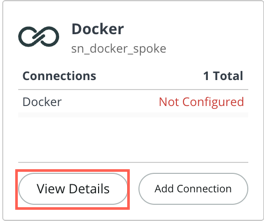
If setting up for the first time, click Configure. For existing connections, click Edit.

5. Enter connection details
Fill in the connection form with the required fields:
- Connection Name – A unique name (e.g., Docker connection).
- Connection URL – The host server’s IP address and port, such as
https://<ip>:<port>orhttps://<domain>.com. - Repository Name – The Docker repository name.
- User Name – Your Docker account username.
- Email – Email tied to the Docker account.
- Repository Type – Type of Docker repository.
- Password – Password for your Docker account.
- Server Address – IP address of the host server where Docker is installed.
6. Finalize the configuration
Click Configure Connection to save.
The Docker Spoke is now ready to use for automating container, image, network, volume, and swarm operations directly from ServiceNow workflows.
Limitations of ServiceNow DevOps
While ServiceNow DevOps offers integrations and automation for development workflows, there are several limitations that may affect its adoption and usability, particularly for smaller teams or less mature DevOps environments. These limitations were reported by users on the G2 platform:
- High cost: The pricing of ServiceNow DevOps is often seen as expensive, especially for small to mid-sized organizations. Licensing and implementation costs can be prohibitive for teams with fewer than 100 employees or limited budgets.
- Steep learning curve: Due to its broad feature set and configuration options, ServiceNow DevOps can be complex to learn and set up. Teams may require significant training and onboarding time to use it effectively.
- Performance issues: Users have reported slow performance, especially when dealing with a high volume of incidents or during peak usage. This can impact responsiveness and efficiency in fast-paced environments.
- Complex setup and configuration: Initial environment setup is time-consuming and often more difficult compared to other tools. Customizing workflows and automating approvals may require deep platform knowledge.
- Ticketing friction: The change approval process often involves filling out multiple mandatory fields, even when minimal updates are needed. This adds unnecessary effort in automated deployments.
- Inefficient filtering: Filtering tickets using conditional logic can be cumbersome due to limited or overly complex “and/or” filtering options in the interface.
- Manual overhead: Certain processes, such as canceling expired change requests, require manual intervention. Automating these routine tasks is currently limited.
- Support delays: Customer support responsiveness has been a concern, with delays in resolving service tickets affecting productivity and issue resolution timelines.
- Usability concerns: Minor interface issues, like premature comment posting without confirmation, can affect user experience and increase the risk of miscommunication.
- Not ideal for all use cases: The ITIL-centric approach of ServiceNow may introduce unnecessary overhead for teams focused on agility and rapid delivery, potentially spreading resources too thin across compliance, operations, and development tasks.
Help us continuously improve
Please let us know if you have any feedback about this page.