NPM feeds are supported from version Octopus 2026.1.7997.
NPM repositories can be configured as an external feed in Octopus Deploy, allowing you to consume packages from npmjs.com or private NPM registries such as Nexus Repository Manager and JFrog Artifactory.
Adding an external NPM feed
The following steps can be followed to add an external NPM feed.
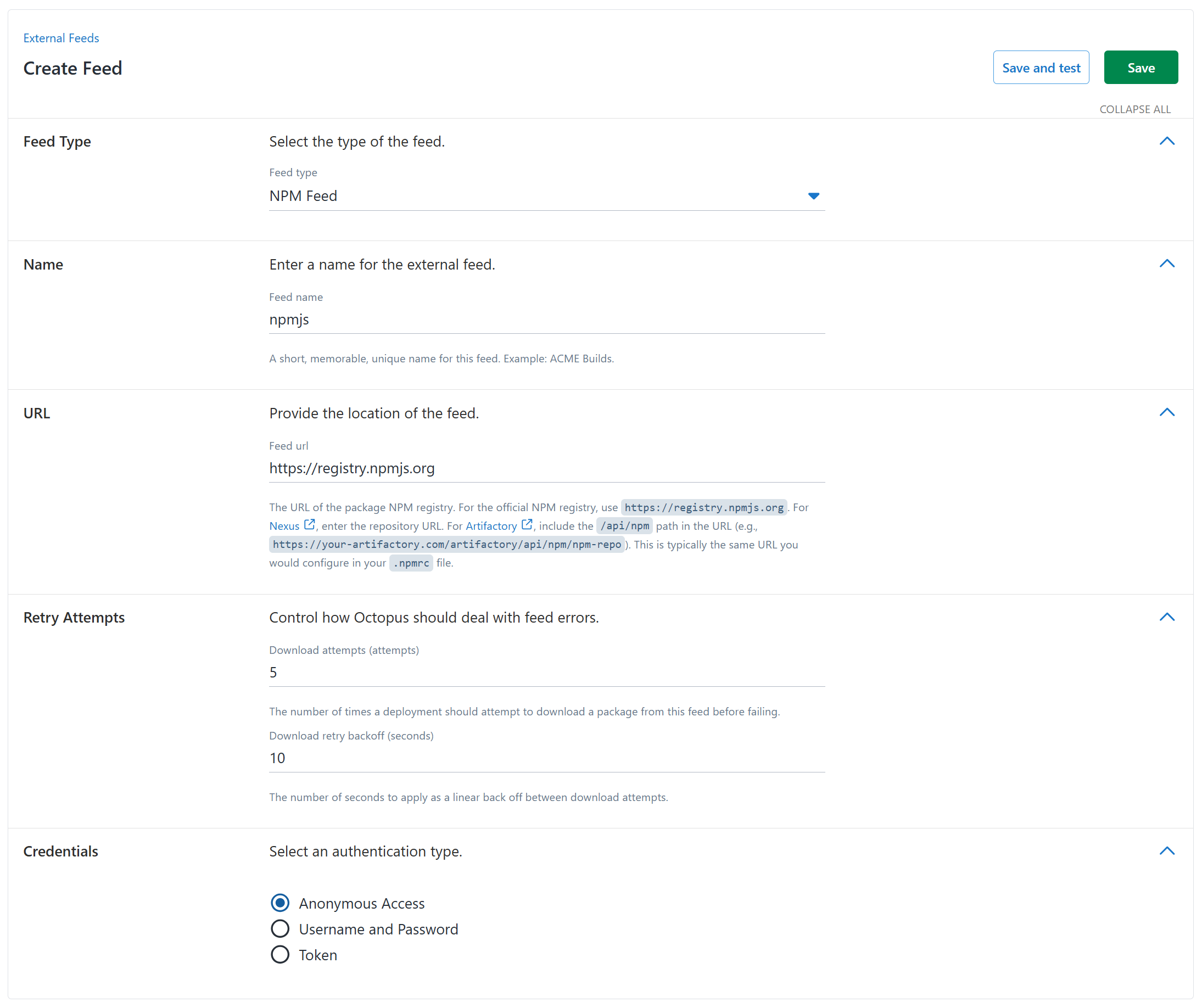
- Navigate to Deploy ➜ Manage ➜ External Feeds and click the ADD FEED button.
- Select NPM Feed from the Feed Type field.
- Enter a descriptive name for the feed in the Feed name field.
- In the Feed URL field, enter the URL of the NPM registry. Common examples include:
- Public NPM registry:
https: / /registry .npmjs .org - Nexus Repository Manager:
https: / /your-nexus-server /repository /npm-hosted / - JFrog Artifactory:
https: / /your-artifactory-server /artifactory /api /npm /npm-repo /
- Public NPM registry:
- If the NPM registry requires authentication, enter the credentials in the Feed login and Feed password fields. For token-based authentication (common with private registries), use the token as the password.
- The Download attempts field defines the number of times that Octopus will attempt to download a package from the NPM registry. Failed attempts will wait for the number of seconds defined in the Download retry backoff field before attempting to download the package again.
- Click Save and test to verify the feed configuration.
Authentication
NPM feeds support several authentication methods:
Public registries
For public registries like npmjs.com, authentication is optional. You can leave the credentials fields blank to access public packages.
Username/Password
Most NPM registries support basic authentication with username and password. Enter these directly into the Feed login and Feed password fields.
Nexus Repository Manager
For Nexus repositories:
- Use your Nexus username in the Feed login field.
- Use your Nexus password in the Feed password field.
- Alternatively, you can use an NPM Bearer Token generated from Nexus.
JFrog Artifactory
For Artifactory repositories:
- Use your Artifactory username in the Feed login field.
- In the Feed password field, you can use either:
- Your Artifactory password
- An Access Token generated from Artifactory
- An API Key (if enabled in your Artifactory instance)
Referencing NPM packages
When referencing an NPM package in Octopus Deploy, use the package name as it appears in the NPM registry. For scoped packages, include the scope in the package name.
Examples:
- Unscoped package:
express - Scoped package:
@octopusdeploy/example-package - Organization scoped:
@myorg/my-package
Versioning with NPM feeds
NPM packages use semantic versioning (SemVer). Octopus Deploy supports the standard SemVer format: MAJOR.
Pre-release versions are also supported, following the SemVer specification with identifiers such as:
1.0 .0-alpha 1.0 .0-beta .1 1.0 .0-rc .2
Testing an NPM feed
After adding an NPM feed, you can verify it’s working correctly:
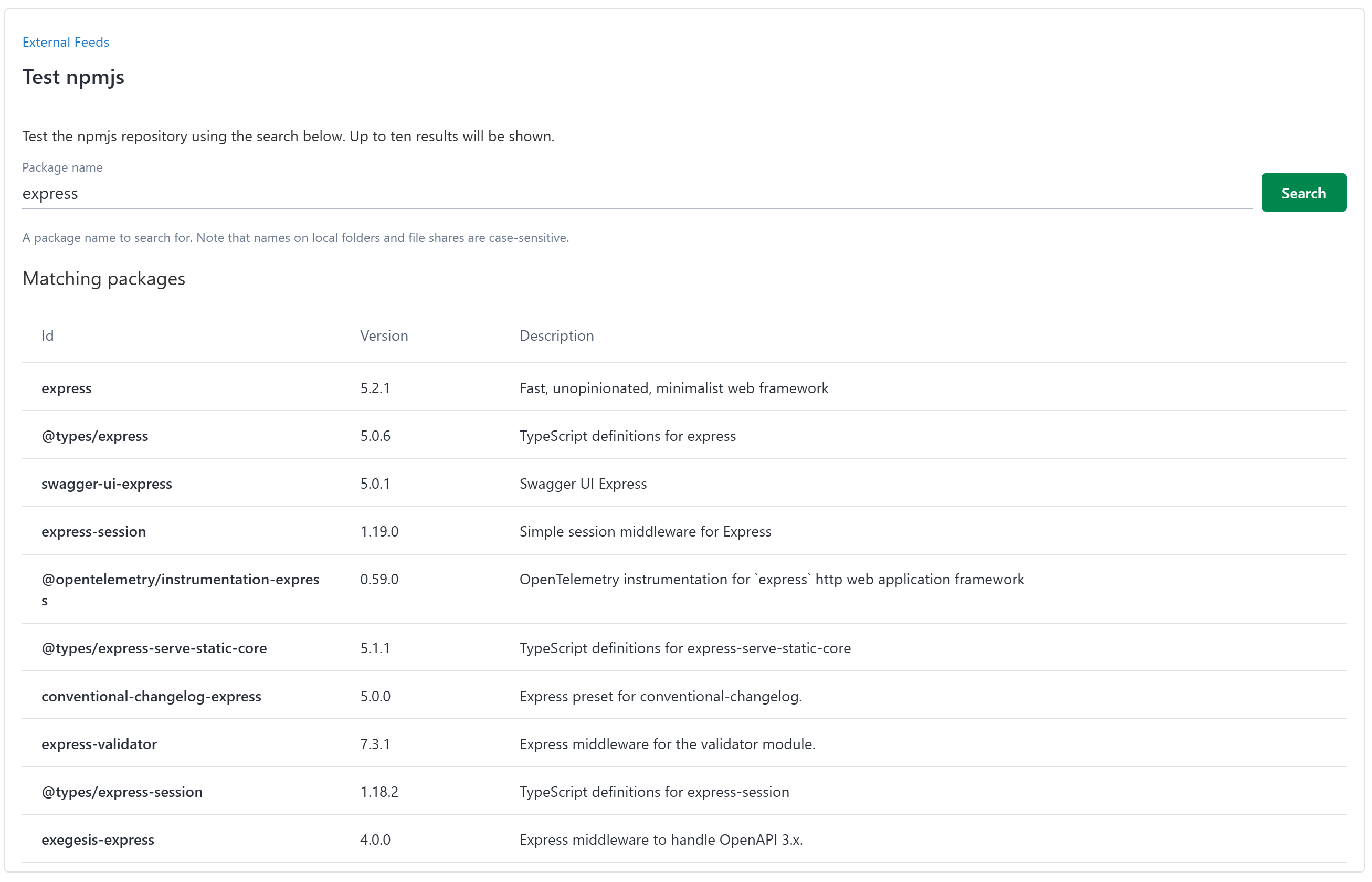
- Click the TEST button on the feed configuration page.
- Search for a known package in your NPM registry.
- Verify that packages are displayed and version information is correct.
Troubleshooting NPM feeds
Connection issues
If you cannot connect to your NPM registry:
- Verify the feed URL is correct and accessible from the Octopus Server.
- Check that authentication credentials are valid.
- Ensure any required network access (firewall rules, proxy settings) is configured.
- For Nexus or Artifactory, verify the repository is online and the repository path is correct.
Authentication failures
If authentication is failing:
- Confirm your credentials haven’t expired.
- For Artifactory, ensure your API key or access token has the necessary permissions.
- For Nexus, verify that NPM realm is properly configured if using token authentication.
- Test authentication using the NPM CLI with the same credentials:
npm login --registry=https://your-registry-url
npm view package-namePackage not found
If a package cannot be found:
- Verify the package name is spelled correctly, including any scope.
- Confirm the package exists in the registry and isn’t private (if you’re using anonymous access).
- For scoped packages, ensure you’re using the full package name including the
@scopeprefix./
Performance considerations
For large NPM registries or when dealing with many packages:
- Consider using a caching proxy or mirror closer to your Octopus Server.
- Adjust the Download attempts and Download retry backoff settings if you experience timeouts.
- Monitor network bandwidth if packages are large or frequently downloaded.